Texas Hunt & Fish
- 110.00
- 2.9
- Installs
- 100.00K
- Price
- Free

Screenshots
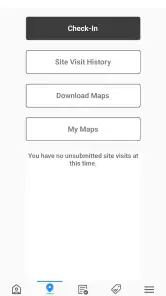
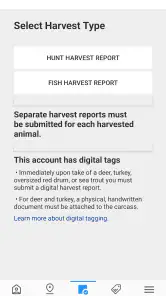
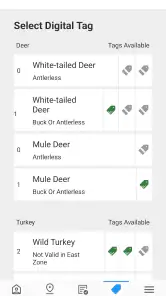
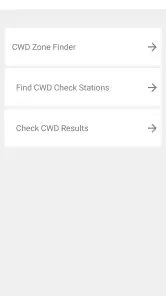
Analysis by Reviewed
When I think of a hunting companion on a phone, I do not expect Texas Hunt & Fish to replace careful preparation, local knowledge, or the equipment I take outdoors. Its value is narrower and more practical: it gives hunters in Texas a way to report harvested game in real time instead of treating that task as something to postpone until the end of the day. That sounds simple, but a reporting tool is only useful when it works at the exact moment I need it, often outdoors, under time pressure, and with less reliable connectivity than I have at home.
That focus makes this free sports app from the Texas Parks and Wildlife Department more specialized than a general hunting log. I see it as an official reporting utility first and a companion app second. It is available for everyone, runs on devices using Android 8.0 or later, and has reached over 100 thousand installs. The current release is version 4.1.2. Those details make it accessible to many Android users, although an older phone may still create a very different experience from a newer one.
Where the real friction appears in the field
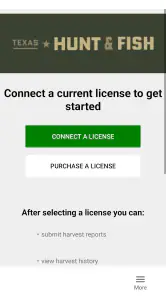
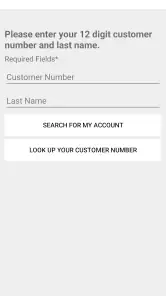
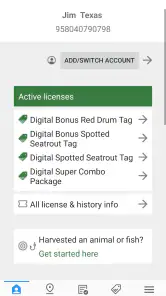
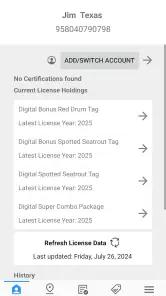
The first place I would expect a new user to get stuck is before the hunt even begins: finding the app, installing it, and assuming that installation alone means the phone is ready for a report. In practice, I would treat setup as part of the hunt plan. A reporting app is not something I want to understand while standing outdoors with cold hands, limited light, and other people waiting. I would open it at home, look through its available screens, and make sure I understand the path from launch to submission.
Another common point of friction is the difference between a phone being switched on and a phone being ready for a dependable outdoor task. Battery level, mobile service, device storage, system updates, and the condition of the phone all matter. Texas Hunt & Fish may be the screen I am using, but the phone is still responsible for keeping the app open, communicating with the service, and displaying confirmation. If any of those parts fail, the problem can feel like an app failure even when the cause is elsewhere.
I would also avoid interpreting a brief pause as proof that a report failed. In a rural area, a request may take longer than it would in town. Repeatedly tapping a submission control can make the situation more confusing, especially if the first request is still processing. My safer habit would be to wait, look for a clear result, and record the relevant details separately before trying again. A small note in a pocket notebook can be useful here, not as a replacement for the app, but as a way to avoid guessing later.
The app’s average rating is 2.9 from around 212 ratings, with roughly 110 written reviews. I would read that as a warning to prepare rather than as a final judgment. A low average can reflect frustrating moments, older devices, connectivity problems, or expectations that go beyond the app’s narrow purpose. It does tell me that I should not arrive at a hunt assuming the digital part will be effortless.
Why the reporting moment deserves preparation
A harvest report is different from casually opening a weather app or checking a map. The information may matter immediately, and the user may be distracted by the surroundings. I would prepare by charging the phone, clearing unnecessary background activity, and opening Texas Hunt & Fish once before leaving. I would also make sure I know how to return to the app if the screen locks. These are ordinary checks, but they remove the kind of avoidable uncertainty that is most annoying outdoors.
More From Our News Desk

Clash of Clans Is Won Between the Battles

Android Auto Makes the Case for Quieter Car Software

MobiOffice: Transforming Mobile Productivity with Seamless Integration

EA SPORTS FC™ Mobile Soccer: Redefining Mobile Sports Gaming

How Microsoft OneDrive Became a Mobile Productivity Giant

How Google Translate Breaks Language Barriers Effortlessly
I would not rely on a screenshot, text message, or a handwritten record as the official action when the app is intended for real-time reporting. Those backups are useful for remembering what happened during a technical problem, but they do not perform the same job. The important distinction is between preserving my own notes and successfully completing the report through the intended channel.
Setup checks that make a field report less stressful
My first setup check would be compatibility. Texas Hunt & Fish requires Android 8.0 or later, so I would confirm the phone’s Android version before planning to use an older spare device. Compatibility is not the same as a good field experience: a phone can meet the minimum requirement and still have a weak battery, slow performance, or limited free space. If I were choosing between two devices, I would favor the one that remains responsive and has dependable mobile service, not merely the one that can install the app.
Next, I would install the app while connected to a stable network and open it before the trip. This gives me a chance to notice any update request or startup issue without having to solve it in a vehicle or outdoors. I would not make assumptions about a feature based on a quick glance at the store summary. Instead, I would follow the actual screens presented by the installed version and learn the wording used for the report process.
Location is another area where I would be careful. A phone can show a location problem because its own positioning is weak, because the surroundings obstruct the signal, or because the device settings are not ready. I would check the phone’s location settings before leaving and avoid treating an inaccurate map position as proof that the reporting service itself is broken. If a screen asks for information I do not understand, I would stop and verify it rather than entering a guess simply to move forward.
Connectivity deserves its own plan. I would check whether the hunting area normally has mobile coverage, but I would not assume that a signal shown near home will remain available in the field. A practical routine is to open the app before leaving service, review the reporting path, and then avoid closing it repeatedly during the critical moment. I would still expect that a real-time report may require communication with the service, so I would arrange to reach a usable signal if the report cannot complete where I am.
Battery preparation is more important than it sounds. Bright screens, location services, weak-signal searching, and cold weather can all reduce the time a phone remains useful. I would start with a full charge, carry a suitable power bank when appropriate, and keep the phone protected from conditions that can make the battery drop quickly. This is not a special Texas Hunt & Fish feature; it is a practical limit of using any phone outdoors.
A simple pre-trip routine
- Install the current version on a compatible Android phone and open it at home.
- Walk through the report screens without submitting a false or test report.
- Check the phone’s battery, system version, location settings, and available storage.
- Think about where a usable signal may be available if the field location is weak.
- Carry a private written note for temporary record-keeping, without treating it as the completed report.
I like this routine because it separates learning from reporting. The app is not the place to experiment with unfamiliar fields after a harvest. By the time I need it, I should be confirming information, not discovering how the interface works.
Recovering a workflow when something goes wrong
If the app does not open correctly, I would begin with the least disruptive checks. I would confirm that the phone is not overloaded with other tasks, close unrelated apps, and try again. If the device itself is behaving slowly, restarting it can be more useful than repeatedly tapping the same control. I would also check whether the app is current through the normal app store process, since version 4.1.2 is the release I would expect to see on a maintained installation.
If the report screen loads but the submission does not finish, I would avoid immediately creating a duplicate. First I would look for an on-screen confirmation, a changed status, or another indication that the request was accepted. If the result remains unclear, I would write down the time and the information I entered, then move to a better signal location if that is safe and practical. The goal is to recover carefully, not to produce multiple uncertain attempts.
When the connection is the likely problem, moving a short distance may help more than changing every setting on the phone. A clear outdoor position can sometimes be more useful than a sheltered spot, although safety and local conditions come first. I would not climb, drive while distracted, or leave a group simply to chase a signal. The reporting task should fit into a safe plan, not override it.
There is also a difference between an app crash and a failed service request. If the app closes, I would restart it and check whether the report appears to have been recorded before entering anything again. If the app stays open but the request spins or returns an error, I would suspect connectivity or service availability before assuming that my phone installation is damaged. That distinction helps prevent unnecessary uninstallation, which can create a new setup problem at the worst time.
I would be especially cautious about clearing app data or reinstalling while away from home. Those actions may remove local state or force me through setup again, and they do not solve a weak signal. They are troubleshooting steps for a calm moment, not my first response in the field. If I had to choose between preserving notes and experimenting with a reinstall, I would preserve the notes and deal with the installation later.
Using the app alongside a backup record
A backup record is useful when it supports accuracy. I would note the time, the basic details I entered, and what happened on screen. I would not use it to invent missing information or to claim that a report went through when I never saw confirmation. This approach is particularly helpful if I need to explain a failed attempt to the appropriate authority later, because it gives me a clear account instead of a vague memory.
I would also keep the backup private and simple. A photograph or message shared casually can expose more information than necessary, while a short written record is enough to preserve the sequence of events. The app remains the main reporting route; the note is only a safety net for my own recollection during recovery.
When the app is not the cause
It is easy to blame the visible app for every problem because it is the part of the process I can see. In reality, the cause may be the phone’s operating system, a damaged screen, aggressive battery management, poor coverage, or a temporary service interruption. If other apps also struggle to connect, I would investigate the phone or network first. If only Texas Hunt & Fish has trouble, I would still check the basics before deciding that the installation is at fault.
Older hardware deserves honest consideration. The minimum Android requirement is 8.0, but meeting that threshold does not guarantee comfortable use. A phone with a weak battery or very limited memory may close apps in the background or take longer to respond. For a serious trip, I would rather use a modest but reliable current phone than an old device kept only as an emergency spare.
Permissions can create confusion as well. If the phone asks for access related to a function I need, I would read the prompt and make a deliberate choice instead of automatically rejecting everything. At the same time, I would not grant access blindly. The practical rule is to allow what is necessary for the workflow I understand and revisit the phone’s settings if a screen cannot proceed.
Connectivity is perhaps the biggest outside factor. Real-time reporting depends on more than the app being installed. A location with weak or absent service can turn a straightforward action into a delayed one. This is where Texas Hunt & Fish differs from an offline hunting journal: a notebook can store information without a network, but it cannot perform the same immediate digital report. If offline use is the main requirement, I would choose a tool designed around offline notes and separately follow the required reporting process when communication is available.
The same comparison applies to general hunting apps. A mapping app may be better for navigation, a weather app for conditions, and a broad hunting log for long-term personal records. Texas Hunt & Fish makes more sense when the priority is the Texas harvest-reporting task itself. I would not install it expecting a complete outdoor dashboard, and I would not judge it unfairly for lacking the broader features of an all-purpose hunting platform.
Who should use it, and who should look elsewhere
I think the app is a sensible choice for a Texas hunter who wants the official reporting action close at hand and is willing to prepare the phone before heading out. It is also a reasonable fit for someone who prefers a direct, focused utility instead of maintaining a paper process and remembering it later. The fact that it is free removes an important barrier for occasional users who do not want to pay for a larger hunting subscription.
I would be more cautious recommending it to someone with an unsupported device, unreliable mobile service, or no backup plan for a long trip away from coverage. I would also steer a user toward a different primary tool if their main need is route planning, detailed personal journaling, weather tracking, or a broad collection of hunting resources. Those jobs require different strengths, and adding one focused reporting app will not replace them.
The age rating of Everyone is reassuring for general accessibility, but it does not change the need for responsible adult judgment in the field. The app can support a reporting task; it cannot teach safe handling, local rules, ethical decisions, or outdoor awareness. I would treat it as one part of a larger plan rather than as proof that I am prepared for every situation.
My practical verdict after weighing the trade-offs
Texas Hunt & Fish has a clear reason to exist, and I appreciate that it stays tied to a specific Texas hunting responsibility instead of pretending to be everything at once. Its strongest quality is usefulness at a particular moment: after game has been harvested, when a real-time report needs to be made. The free price makes it easy to keep available, and the official developer, Texas Parks and Wildlife Department, gives the app a clear connection to that purpose.
My reservation is not that the concept is wrong; it is that field reliability depends on a chain of conditions. The phone must be compatible and charged, the app must open, the connection must cooperate, and I must understand the workflow before I need it. The modest 2.9 average suggests that some users have found the experience frustrating, so I would not treat installation as the end of preparation.
If I were recommending it to a friend, I would say: install it before the trip, test the screens without submitting anything inaccurate, and make a calm backup plan for weak service. Keep a note of what you entered if a report becomes uncertain, avoid duplicate attempts, and do not perform risky movements just to find a signal. Those habits address the real weaknesses around a field reporting app more effectively than simply tapping harder or reinstalling it.
My bottom line is that this is a focused tool, not a complete hunting companion. For Texas hunters who need its specific reporting purpose, I would keep it on a compatible Android phone and prepare it in advance. For users seeking maps, forecasts, offline journaling, or a broad outdoor toolkit, another app will serve as the main companion, with Texas Hunt & Fish filling only the reporting role. Used with that realistic expectation, it can be practical; used as an all-purpose hunting solution, it is likely to feel limited.
In my experience, that honest framing is what makes the app worthwhile. I would not depend on it blindly, but I also would not dismiss it because it lacks features outside its job. Texas Hunt & Fish is best understood as a prepared, purpose-built reporting step in a larger outdoor routine, and that is enough reason for the right Texas hunter to install it.
Texas Hunt & Fish Frequently Asked Questions
What does the harvested-game reporting feature do?
Texas Hunt & Fish lets hunters in Texas report harvested game in real time, making that reporting task available through the app. This feature may be useful to hunters who want to complete the report while out in the field rather than waiting until later. Before heading out, make sure you understand the applicable reporting requirements and have the app ready to use.
Who develops Texas Hunt & Fish, and who is it intended for?
Texas Hunt & Fish is developed by the Texas Parks and Wildlife Department and is a sports app for people interested in hunting and fishing in Texas. Its real-time harvested-game reporting feature is especially relevant to hunters, while its broader outdoor focus may also appeal to anglers and other wildlife enthusiasts. It is rated for Everyone, though users should still follow age-appropriate safety practices outdoors.
What is Texas Hunt & Fish?
Texas Hunt & Fish is an outdoor recreation app designed for people who hunt, fish, and explore wildlife opportunities in Texas. It brings together useful information such as regulations, license details, season dates, public hunting areas, fishing locations, and related resources. The app is particularly helpful for checking official requirements before planning an outdoor trip.
Do I need an internet connection to use Texas Hunt & Fish?
An internet connection is generally recommended because many features depend on current information, including regulations, maps, license details, and seasonal updates. Some content may remain available after it has been loaded, but users should not assume that every feature works offline. Before traveling to a remote location, open the information you need and verify that it is accessible.
Can Texas Hunt & Fish help me find hunting and fishing locations?
Yes, the app is intended to help users discover relevant hunting and fishing opportunities across Texas. Depending on the feature and current app version, it may provide maps, location details, public-land information, access guidance, or links to additional resources. Always confirm property boundaries, access permissions, local restrictions, and current conditions before entering any area.
Pros
- Detailed maps help locate public hunting and fishing areas.
- Season dates and regulations are useful for planning outdoor trips.
- Species information supports better preparation before heading out.
- Weather and conditions can improve trip timing and safety.
- Helpful for discovering lesser-known outdoor locations in Texas.
Cons
- Some information may require an internet connection in remote areas.
- Regulations can change
- so users should verify details with official sources.
- Map accuracy may vary depending on the location and data updates.
- The app may feel overwhelming for beginners unfamiliar with Texas rules.
- Battery and location services can drain power during extended outdoor use.
- Category
- Sports
- Version
- 4.1.2





