TeamLinkt - Sports Team App
- 80.00
- 4.7
- Installs
- 100.00K
- Price
- Free

Screenshots



Analysis by Reviewed
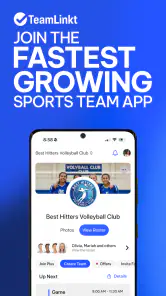
Managing a sports team often becomes harder away from the field. A coach needs to know who is available, players need the latest schedule, parents may need timely updates, and everyone wants one dependable place for conversations. TeamLinkt - Sports Team App is built around that practical problem rather than around training content or live scores. I found it most useful as a shared team workspace where schedules, rosters, availability and chat can stay together.
It is a free sports app from QuickLinkt App, aimed at people organizing teams rather than individual athletes tracking personal performance. Its 4.7 average from around 6.9 thousand ratings suggests that the basic idea works well for many users, while more than 100 thousand installs indicate that it has found a real audience. It is rated for Everyone, so it can suit a wide range of community and youth-team situations, although the way it is used still depends on the team’s own rules and communication habits.
After using it as a team-management tool, my view is fairly clear: this is valuable when a group is tired of scattered messages and missed updates, but it is not automatically the best choice for every club. The app’s strength is organization. Its main challenge is that the whole team has to participate consistently before the shared system becomes better than the familiar alternatives.
How TeamLinkt fits into everyday team organization
A central place for the information people actually need
The appeal is easy to understand. Instead of keeping a roster in one place, a schedule in another and availability replies buried in a chat, TeamLinkt brings those parts of team life into one app. That makes it less like a personal sports tracker and more like a digital noticeboard with communication built in.
I would describe the app as a coordination layer. It does not replace the coach’s judgment, the club’s policies or the actual training session. What it can do is reduce the number of small questions that interrupt those things: When is the next match? Who is available? Has the schedule changed? Where should the team discuss a practical detail?
That distinction matters when comparing it with usual alternatives. A general messaging app may be excellent for quick conversation, but schedules can disappear beneath newer messages. A shared calendar can show dates clearly, yet it may not provide the same team-focused context for availability and roster information. A spreadsheet can be flexible, but it usually requires more manual upkeep and is less comfortable for casual members. TeamLinkt sits between these options by combining the information and the conversation around it.
What the free access means in practical terms
The app itself is free to download and use, which makes it easy for a coach or organizer to test the workflow before asking a whole team to change habits. That is an important advantage for volunteer-led groups and informal teams that cannot justify a large software commitment simply to coordinate weekly activities.
More From Our News Desk

Clash of Clans Is Won Between the Battles

Android Auto Makes the Case for Quieter Car Software

MobiOffice: Transforming Mobile Productivity with Seamless Integration

EA SPORTS FC™ Mobile Soccer: Redefining Mobile Sports Gaming

How Microsoft OneDrive Became a Mobile Productivity Giant

How Google Translate Breaks Language Barriers Effortlessly
There are in-app purchases listed at $1.99 to $4.99 per item. I would therefore avoid treating every possible capability as automatically included in the free experience. The sensible approach is to start with the free setup, see whether the core team routine works, and only then consider whether a paid item solves a specific need. That keeps the decision grounded in actual value rather than in the assumption that paying will fix poor participation.
For a small team, free access may be enough to establish a single routine: check the schedule, update availability and use the team conversation when necessary. For a larger organization, the question becomes less about the download price and more about whether the app’s paid options match the organizer’s needs. The listed purchase range is modest, but value still depends on what the team is trying to manage.
A realistic weekly scenario
Imagine a youth basketball team preparing for a busy weekend. On Monday, the coach posts the upcoming schedule. Players or parents review the dates and indicate availability. By Wednesday, the organizer can see where attendance may be uncertain and adjust plans or contact the relevant people. A short conversation can handle practical details, while the roster remains separate from the stream of messages.
That workflow is more useful than it first appears. The important benefit is not merely having a calendar. It is the ability to connect a date with the people expected to attend and the conversation related to it. When a change happens, the team has a better chance of looking in the same place instead of relying on memory or on whichever chat message someone happens to notice.
My practical tip is to make one channel the team’s source of truth from the beginning. If the organizer continues sending some updates by text, others by email and others through the app, TeamLinkt cannot solve the underlying confusion. The app works best when the team agrees that schedule changes and availability belong there, while urgent last-minute matters can still use a faster method if needed.
Roster and availability are more important than they sound
Many team tools advertise communication, but the less glamorous part of management is knowing who can actually attend. A roster gives the group a stable reference, while availability turns that reference into something useful for planning. In my experience, this is where the app can save more effort than chat alone.
A coach can use availability information before making decisions about lineups, substitutions or whether a session needs adjusting. A player can also avoid repeatedly answering the same question in a group conversation. For parents, especially in youth sports, a clear team space can make it easier to keep track of commitments without scanning a long message history.
There is a trade-off, though. Availability information is only as reliable as the updates people provide. If members forget to change their status, the organizer may get a false sense of certainty. I recommend setting a simple internal deadline, such as asking everyone to update availability before a regular planning point in the week. That is not a special feature of the app; it is the habit that makes the feature worthwhile.
Chat is useful when it stays focused
The built-in chat gives TeamLinkt a natural advantage over a bare calendar. Questions can stay connected to the team rather than being split across unrelated conversations. It is useful for reminders, basic coordination and short discussions that involve the group.
At the same time, chat can recreate the same clutter it is supposed to replace. If every minor comment, joke and announcement is mixed together, important scheduling information may still become difficult to find. My advice is to keep operational messages short and specific. Put the action or change near the start of the message, and avoid using the conversation as a substitute for updating the schedule or availability area.
This is one of the app’s less obvious trade-offs: centralization helps only when information is placed in the right part of the system. A chat message saying that practice moved is less useful than updating the actual schedule and then mentioning the change in chat. The strongest workflow uses conversation to draw attention to structured information, not to duplicate it indefinitely.
What the current release suggests for compatibility
The current version is 2026.32.0, and the listed minimum operating-system requirement is iOS 11 or later. That makes checking device compatibility a sensible first step, particularly for teams with older phones or members who do not update devices frequently. A team app is only effective when the people who need it can access it reliably.
I would also recommend that an organizer test the sign-up and daily routine with one or two members before rolling it out to everyone. This is not because the setup is necessarily difficult, but because team adoption problems are easier to solve with a small trial than after a whole group has already formed parallel habits elsewhere.
Where it saves time and where it does not
The strongest time-saving opportunity is repeated coordination. If the same people are constantly asking about dates, attendance and team notices, one shared system can reduce duplication. It can also make handovers easier when more than one person helps with organization, because the relevant team information is not held entirely in one individual’s private messages.
However, TeamLinkt does not remove the need for an active organizer. Someone still has to keep the schedule current, maintain the roster and encourage members to respond. If a team expects the app to manage itself, disappointment is likely. The app organizes information; it does not create participation.
This is also why I would not recommend it solely for a person who wants individual fitness tracking, workout plans or performance analysis. Its center of gravity is the team. An athlete training alone will probably get more from an app designed around personal goals, while a team struggling with coordination is the audience that can feel the benefit quickly.
Who is likely to get the most value?
TeamLinkt makes the most sense for recreational teams, community clubs, school groups and youth sports where several people share responsibility for attendance and communication. It is particularly suitable when the current system is a mixture of group messages, paper notes and informal reminders.
It should also appeal to volunteer organizers. The free entry point lowers the risk of trying it, and the combination of schedule, roster, availability and chat addresses the repetitive tasks that consume time without improving the sport itself. A small team does not need an elaborate administrative platform to benefit from a clearer routine.
Parents and players can benefit for different reasons. Parents may appreciate a single place to check commitments, while players may prefer updating their own availability rather than replying to repeated messages. Coaches gain the most when they establish clear expectations: where updates go, when availability should be submitted and which messages require a response.
Who should choose something else?
I would skip it if your group already has a simple, well-maintained system that everyone uses consistently. Changing tools has a cost, even when the app is free: people need to install it, learn the routine and remember to check another place. If a shared calendar and an established messaging channel already cover your needs without missed information, TeamLinkt may not add enough value to justify the transition.
I would also look elsewhere if you need highly specialized club administration, detailed financial management, advanced performance analysis or a broad platform for many different sports operations. TeamLinkt’s verified focus is team management, so it should be judged on coordination rather than treated as a complete replacement for every system a large club might use.
Another reason to hesitate is low digital participation. If several members rarely check apps or do not respond to availability requests, the organizer may end up maintaining TeamLinkt while still chasing people through other channels. In that situation, a simpler method with fewer expectations could be more practical, even if it offers fewer features.
Small habits that make the app more effective
My first recommendation is to create a clear weekly rhythm. Ask members to review the schedule at the start of the week, update availability by an agreed point and use chat only for questions or changes. This turns the app from a passive information store into a predictable team routine.
Second, keep the roster clean. Remove outdated entries or correct details when the team changes. A roster that nobody trusts is worse than a basic list because it creates confidence in information that may no longer be accurate.
Third, separate permanent information from temporary discussion. If a detail affects attendance, put it where attendance is managed. If it is a question or reminder, chat is appropriate. This simple distinction prevents the app from becoming another noisy message feed.
Finally, agree on a backup approach for urgent changes. Even with a central team app, a last-minute cancellation may require a direct message or phone call. The best system is not the one that insists on one tool for every situation; it is the one that makes routine coordination clear while leaving room for genuinely urgent communication.
My value judgment
Because the app is free to access, TeamLinkt is easy to recommend as a low-risk trial for a team that currently relies on scattered communication. The potential value comes from bringing several recurring tasks into one place, not from the download itself. The listed in-app purchases mean organizers should evaluate any paid option against a specific problem rather than assuming that spending is necessary.
The rating of 4.7 and its broad user base are encouraging signs, but they should not replace a team-level test. A highly rated coordination app can still be a poor fit for a group that refuses to update availability or already has a smoother process. I would trial it with one upcoming cycle of practices or matches and judge it by concrete questions: Did fewer people ask for the schedule? Were availability replies easier to collect? Did changes reach the right people?
My final verdict is positive, with conditions. TeamLinkt is a sensible free starting point for coaches, organizers and families who need one team-focused place for schedules, rosters, availability and chat. Its best value appears when the group agrees to use it consistently and keeps structured information separate from conversation. I would recommend trying it for a team that is losing time to repeated questions, but I would skip the switch if your existing tools already work or if you need much deeper club administration.
In short, I see it as a practical coordination app rather than a complete sports ecosystem. That is not a weakness when coordination is the real problem. For the right team, the biggest benefit is turning everyday uncertainty into a shared routine; for the wrong team, it is simply another place to check. Used with clear habits, it can earn its place in the weekly workflow without requiring a major financial commitment.
TeamLinkt - Sports Team App Frequently Asked Questions
Is TeamLinkt compatible with my phone?
TeamLinkt is a sports app for managing team activities, and it requires iOS or Android version 11 or later. Before downloading, check your device’s operating system version in its settings to make sure it meets that requirement. Keeping your system current can also help you use the app’s available features and receive updates smoothly.
Who is TeamLinkt designed for?
TeamLinkt is designed for people involved in organized sports, including players, coaches, parents, and team or league organizers. Its shared team tools can help different members keep up with schedules, rosters, availability, and conversations. What you can view or manage depends on your role and the way your organization has set up its teams.
What is TeamLinkt – Sports Team App used for?
TeamLinkt is a sports management app designed to bring players, coaches, parents, and organizers together in one place. After setting up or joining a team, users can view schedules, receive announcements, communicate with other members, check game or practice details, and stay informed about league activities without relying on scattered messages or separate calendar tools.
Can I use TeamLinkt to manage schedules and receive notifications?
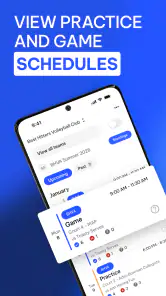
Yes. TeamLinkt can be used to organize practices, games, tournaments, and other team events. Members can generally view upcoming activities, event locations, and relevant updates from the app. Notifications may help users stay aware of schedule changes or new announcements, although the exact information available depends on how the league, club, or team administrator configures the platform.
Does TeamLinkt support communication between coaches, players, and parents?
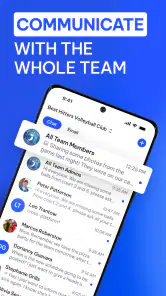
TeamLinkt includes communication features intended to keep sports groups connected. Team administrators and coaches can share announcements, while team members may receive messages and updates related to activities. This can make it easier to discuss attendance, changes, and team information in one location, but access to particular communication tools may vary according to the organization’s settings and the user’s role.
Pros
- Easy team communication through chats
- announcements
- and notifications.
- Simplifies roster management
- player availability
- and attendance tracking.
- Supports schedules
- game details
- locations
- and event reminders in one place.
- Useful tools for collecting fees and organizing team-related payments.
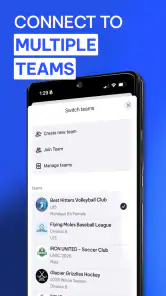
- Works well for clubs managing multiple teams and age groups.
Cons
- Some features may depend on the organizer’s subscription or club setup.
- Notification volume can become high when several teams share the same account.
- New users may need time to understand the many management options.
- Calendar and schedule changes rely on organizers keeping information updated.
- Limited usefulness if your team does not actively use the platform.
- Category
- Sports
- Version
- 2026.32.0





