

Tana: Manga & Comics
- 1.00
- 3.7
- Installs
- 100.00K
- Price
- Free

Screenshots
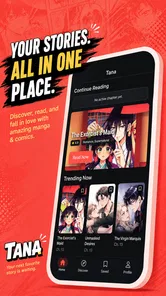

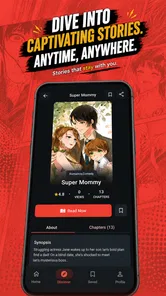
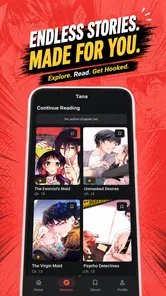

Analysis by Reviewed
I judge a manga reader less by how many things it promises than by whether it makes the small routine of finding a story, reading a few pages, and picking it up again feel easy. Tana: Manga & Comics is a free comics app from VibeDrama Studios, built around reading manga, keeping favorites close, and returning for new chapters. That focused idea suits readers who want a straightforward place for serial reading rather than a sprawling entertainment hub.
For a realistic first test, I’d use a series I already know rather than browse at random. That gives me a familiar title and chapter to judge the basics against, and it avoids confusing a catalog mismatch with a problem in the reading experience. I would also try it during the kind of session I actually have—perhaps a few minutes between errands—because an app can feel very different in a quick visit than during a long catch-up.
My first impression is that Tana’s appeal depends on the habit you bring to it. If you already follow a handful of ongoing series, bookmarking can help keep your reading life organized. If you are looking for an app that replaces every source, offers a deep social layer, or gives you extensive tools to customize how you read, this is a more modest proposition. I would treat it as a dedicated reader to try, not assume it will match the breadth of long-established manga services.
A simple routine for keeping up with manga
I’d make the bookmark list a deliberate starting point rather than a record of everything I’ve ever considered reading: save a series when I’m ready to follow it, then use that list for short sessions and leave exploration for when I have more time. That small distinction can keep returning to a chapter feeling easy instead of turning each visit into another search.
Start with one series and build a repeatable routine
A practical way to begin is to choose a series you are already reading, find it in the app, and save it before adding more. That gives the bookmark feature a clear job: it becomes a short list of stories you intend to return to, rather than a pile of titles you once glanced at. When you open Tana later, you can use that saved starting point instead of trying to remember where you left off across different reading apps or browser tabs.
For an everyday example, imagine you read during a lunch break and again on the way home. In the first session, you finish a chapter and bookmark the series. At the next break, you can check whether a new chapter is available and continue from the title you already care about. This kind of light routine is where Tana’s premise makes sense: it puts following favorites and catching up at the center, rather than asking you to manage a large collection before you can read.
I would keep the list deliberately small at first. A bookmark is most useful when it reflects what you are actively following; saving every interesting title can make it harder to spot the series you meant to resume. If you are sampling a lot of manga, it may help to use a personal rule such as saving only titles you want to revisit. That is not a special app feature, just a simple reading habit that makes the app’s core tool more effective.
More From Our News Desk

 Gmail
GmailGmail in a Busy Inbox: Who Benefits Most?
From first account to crowded workday, Gmail earns its place through dependable search and flexible sorting—but its best fit depends on how much inbox maintenance you can tolerate.

 Prime Video
Switching to Prime Video: What Changes in Your Viewing Routine
Prime Video can make a compelling second home for streaming, but switching means learning a different catalog, rental layer, and route from browsing to playback.

 Universal TV Remote Control
Universal TV Remote Control Works Best as a Reliable Backup
A phone remote earns its place through quick setup and reliable habits. Here is how to get more from Universal TV Remote Control—and where its limits show.

 Weather - By Xiaomi
Weather by Xiaomi Review: Clear at a Glance, Less Clear Up Close
Xiaomi’s weather app makes everyday forecasts quick to scan, but its calm surface can leave useful details and recovery paths harder to find than they should be.

 X
XX Under Pressure: Can It Recover When Posting Goes Wrong?
A resilience-focused review of X, examining setup, mistaken posts, interruptions, weak connections, and the gaps that matter when recovery needs to be dependable.

 Clash of Clans
Clash of Clans Is Won Between the Battles
Its raids are quick; its community is a long-term project of coordination, teaching, rivalry, and shared responsibility—with all the friction that entails.
Latest News



What the app’s focus means in practice
Tana is categorized as a comics app, and its audience is clearly readers rather than people looking for a game or a general media library. Its Teen content rating is a useful signal for families and younger readers, though I would still make choices title by title; an age label on an app does not replace checking whether a particular story suits the person reading it.
The app has a 3.7 average from around 645 ratings, with 100K+ installs. I would take that as a reason to approach it with sensible expectations, not as proof that it will or will not fit your tastes. Reader satisfaction often depends on the catalog and reading habits a person brings. If the series you care about are easy to find and the reading flow suits you, a focused app can be valuable even if it is not everyone’s first choice.
There is only one review in the store, so the visible written feedback is too limited to stand in for a range of reader experiences. For that reason, I would test Tana against your own needs: try locating a current favorite, see whether bookmarking makes it easy to return, and decide whether the way it presents chapters is comfortable for your sessions. A quick personal check is more useful than assuming a rating tells the whole story.
Check the basics before settling in
Before building Tana into a daily routine, I would check the settings and reading controls that are actually available on your device. Display comfort is especially personal: brightness, text or image clarity, and how pages sit on your screen can change whether a short session feels relaxing or tiring. I would not assume that every familiar control from another manga reader is present. Instead, spend a moment exploring the available options and keep only the adjustments that make a noticeable difference.
It is also worth checking how the app behaves when you switch away and return. That small test answers an important practical question: can you comfortably pause a chapter and pick it up again later? Try leaving during a reading session, reopening the app, and navigating back through your saved titles. A repeatable path matters more than a complicated setup, especially if you usually read in short intervals.
Version 1.0.10 is the current version, and Tana supports devices running Android 7.0 or later. If you use an older phone or tablet, confirm that your device meets that baseline before planning to rely on it. On a supported device, I would still judge the experience by your own screen and reading posture; a layout that works well on one handset may not feel equally comfortable on a larger tablet.
Use bookmarks as a lightweight reading system
The most useful way to make bookmarks work is to connect them to a clear action. Save a title when you decide to follow it, then check that list whenever you have time to read. This makes the app a convenient reminder of what you chose, rather than a substitute for a more elaborate collection manager. If you have several series in progress, a quick scan of your saved titles can help you pick something that suits the time you have.
There is a trade-off here. Bookmarks can reduce the effort of remembering favorites, but they do not automatically solve every kind of organization problem. Readers who want custom shelves, detailed progress tracking, notes, or elaborate tagging should check whether Tana provides the exact tools they need before moving their whole routine into it. If those features are essential and unavailable, a reader with a stronger library-management focus will be the better fit.
Build speed from small, repeatable actions
Experienced readers often get more convenience from consistency than from hunting for shortcuts. I would use the same basic sequence each time: open the app, go to a saved series, read, and return to the saved list when finished. Once that path becomes familiar, there is less decision-making between sessions. This is a practical workflow rather than a claim that Tana contains a particular shortcut or gesture.
Another useful pattern is to separate browsing from reading. If you have only a few minutes, go straight to a bookmarked title instead of exploring new series. When you have more time, browse and decide whether a new story is worth following. Keeping those intentions separate helps prevent a quick reading break from turning into a long search, and it keeps bookmarks meaningful.
If you follow ongoing chapters, make checking for updates part of a routine that already exists—for example, when you sit down to read, rather than repeatedly reopening the app throughout the day. Tana is intended to help readers catch new chapters, but a calm check-in is more useful than treating every possible update as urgent. This habit also makes it easier to notice whether the app is serving your actual reading schedule.
Where a focused reader can fall short
The central limitation is that a focused premise does not guarantee a complete manga ecosystem. Your decision will depend on whether the titles you want are available and whether the app’s approach to browsing, reading, and saving suits you. I would test those essentials early, before spending time building a large bookmark list. If your main series are missing or difficult to locate, the convenience of a clean routine will not compensate.
There is also a difference between following favorites and managing a substantial library. Someone who reads casually and wants a few ongoing stories close at hand may find bookmarks sufficient. A collector who wants precise progress records, advanced sorting, extensive customization, or a rich discovery experience may prefer a more mature alternative in the category. I would not choose Tana on the assumption that its simple core will expand into those tools; choose it for the tasks it handles comfortably.
Likewise, readers who need a particular reading mode should check it directly rather than infer it from the app’s purpose. Manga layouts and personal preferences vary, and comfort depends on details such as page presentation and navigation. A short trial with a familiar chapter is a better test than switching your full collection immediately. If the controls feel awkward during that trial, another reader with a better fit for your preferred layout is likely the wiser choice.
Who I would recommend it to
I would suggest Tana to someone who wants a simple home for a small set of manga favorites and values being able to return to them without keeping a separate mental list. It is particularly suitable for readers who enjoy short sessions, already know what they want to follow, and do not need a complicated system to organize everything. The free price makes it easy to consider as a trial alongside whatever reading routine you already have.
I would be more cautious if you rely on a very specific catalog, need advanced library tools, or expect a polished, highly configurable reading setup. In those cases, compare it with the manga readers you already know and test the same title and chapter in each. The better app is the one that makes your real routine easier, not necessarily the one with the broadest feature list.
That comparison is most useful when you keep the test narrow: open the same familiar series in each reader, try to reach the chapter you want, and see how naturally you can pause and resume. A broader service may be preferable if discovery and a large established library matter most to you; a customizable reader may win if controls and collection tools are central to your routine. Tana makes more sense when the saved-title loop is the part you value most.
VibeDrama Studios has kept the stated purpose clear: read manga, save favorites, and keep an eye out for new chapters. That focus is appealing, but it also sets the bar for judging the app. I would want the titles I follow to be easy to reach and the return journey between sessions to feel dependable. If those basics work for you, Tana can earn a place in a lightweight reading routine.
My verdict: useful when your habits stay simple
My recommendation is to try Tana with one or two series you genuinely want to follow, then see whether its bookmark-centered approach fits the way you read. Don’t begin by moving everything over. A small test will tell you whether the app helps you resume a story quickly, whether the available reading controls feel comfortable, and whether its catalog meets your needs.
For readers who want a straightforward manga companion, that is a reasonable proposition. For readers who want a comprehensive library manager or a specific set of advanced controls, I would compare alternatives before committing. The best reason to keep Tana is that it makes returning to your favorites feel easy; if your own trial delivers that, its focused approach is a genuine strength rather than a missing feature.
For me, the deciding question is not whether Tana can replace every manga service I use, but whether it earns a small, dependable role in my reading day. If a saved series takes me back to the right story without extra fuss, I can see the point of keeping it alongside other options. If I find myself repeatedly searching elsewhere for the titles or tools I need, I would keep my routine elsewhere instead.
Tana: Manga & Comics Frequently Asked Questions
What is Tana: Manga & Comics?
Tana: Manga & Comics is a mobile app for reading manga and comics. It is designed to help readers browse available titles, open chapters, and follow stories on a phone or tablet. The exact catalog, reading options, and features can vary by app version and region, so check the current store listing and the app itself to confirm that it offers the genres and titles you want.
Is Tana: Manga & Comics free to use?
The app may be free to download, but that does not necessarily mean every title or feature is free. Some reading apps use advertisements, paid chapters, subscriptions, or other in-app purchases, and access can differ between titles. Before reading, review the app’s store listing for pricing details and check the purchase information shown inside the app. Avoid assuming that a chapter is free until its access terms are clear.
Can I read manga and comics offline with Tana?
Offline reading depends on whether the app provides a download or save-for-later feature and whether a particular title allows it. If offline access matters to you, look for download controls in the app and confirm whether saved chapters remain available without an internet connection. Downloads may require storage space, and access can be limited by licensing, account status, or the app’s policies.
Is Tana: Manga & Comics available for Android and iOS?
Availability can depend on your country, device, and the app’s current release status. Search for the exact title, Tana: Manga & Comics, in Google Play or the Apple App Store and verify the developer name before installing. Check the listed operating-system requirements as well, since older phones and tablets may not support the latest version. If it does not appear in your store, it may not be available in your region.
Is Tana: Manga & Comics suitable for children, and what should I check before downloading?
Suitability depends on the titles included, since manga and comics can cover a wide range of ages and subjects. Review the app’s age rating, content description, privacy information, and any parental-control options before allowing a child to use it. It is also sensible to check whether the app includes purchases, advertisements, or account features, and to supervise browsing when you are unsure about the content.
Pros
- Offers a focused library of manga and comics in one app.
- Browsing by genre makes it easier to find stories that match your interests.
- A convenient option for reading comics on a mobile device.
- Can help readers discover titles beyond their usual favorites.
- Useful for keeping manga and comics close at hand while traveling.
Cons
- The available catalog may vary by region or change over time.
- Some titles or features may require a subscription or in-app purchase.
- Reading on a small screen can make detailed artwork harder to enjoy.
- A stable internet connection may be needed to access some content.
- Readers may prefer other apps if their favorite series are not available.











