

Tackle Football Playmaker X
- 113.00
- 4.5
- Installs
- 100.00K
- Price
- Free

Screenshots
Analysis by Reviewed
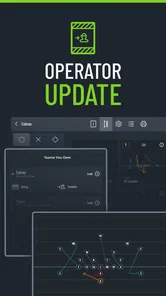
I spent time with Tackle Football Playmaker X as a practical coaching tool rather than treating it like a typical sports app. Its purpose is clear: help tackle-football coaches turn ideas into organized playbooks, prepare material for printing, and create wristband references for players. That focus makes it much more useful for a coach who already thinks in formations, assignments, and game situations than for someone simply looking for football news or training videos.
What I like most is that it addresses the messy part of coaching that happens away from the field. A play may make perfect sense when drawn on a whiteboard, but a season requires a repeatable system: names, diagrams, player responsibilities, printed pages, and quick sideline references. This app brings those jobs into one football-specific workspace. It is free to start, rated Everyone, and available for people using a compatible device running at least iOS 9 or Android equivalent platform support as applicable to the store version. Optional purchases range from $10.99 to $15.99 per item, so the important question is not simply whether it costs anything to install, but whether its specialized workflow saves enough time for your team.
How the current version fits a real coaching workflow
I’d use this section to look at how the current version can fit into a coach’s week, from drafting a small set of calls to checking the materials players will use. I also want to consider how a shared device can support that work without blurring who is responsible for reviewing changes. That practical distinction leads naturally to the question of how a team should set boundaries before building its playbook.
More than a digital drawing board
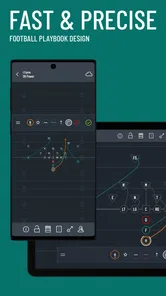
A basic drawing app can let you sketch arrows and circles, but it does not naturally understand why a football coach is making those marks. The value here is the connection between playbook design, physical printing, and wristband preparation. I found that distinction important because football organization is rarely just about making one attractive diagram. Coaches need a collection of plays that can be taught, revised, grouped, and converted into something players can actually use.
For example, imagine a youth or school coach preparing for a Saturday game. During the week, the coach might refine a small package of runs, passes, and adjustments. Instead of keeping one diagram in a notebook, another image in a phone gallery, and wristband notes in a separate document, the app is intended to keep those related tasks close together. That reduces the chance of teaching one version while printing another.
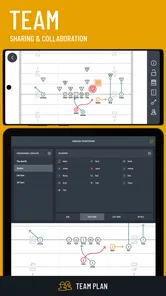
The app is especially relevant when several people share preparation duties. An offensive coordinator may think about the structure of the playbook, while a head coach checks whether the language is understandable and a position coach focuses on assignments. A football-specific design tool gives those conversations a common visual starting point. It does not replace coaching judgment, but it can make the handoff between planning and instruction cleaner.
Where it is strongest for teams
I see the biggest benefit for coaches who use wristbands as an operational tool rather than as decoration. A wristband has limited space, so the challenge is not only deciding which plays belong on it. The coach must also create a naming system that players can recognize quickly and that remains consistent under pressure. Designing the playbook and the wristband together encourages better discipline around terminology.
More From Our News Desk

 Gmail
GmailGmail in a Busy Inbox: Who Benefits Most?
From first account to crowded workday, Gmail earns its place through dependable search and flexible sorting—but its best fit depends on how much inbox maintenance you can tolerate.

 Prime Video
Switching to Prime Video: What Changes in Your Viewing Routine
Prime Video can make a compelling second home for streaming, but switching means learning a different catalog, rental layer, and route from browsing to playback.

 Universal TV Remote Control
Universal TV Remote Control Works Best as a Reliable Backup
A phone remote earns its place through quick setup and reliable habits. Here is how to get more from Universal TV Remote Control—and where its limits show.

 Weather - By Xiaomi
Weather by Xiaomi Review: Clear at a Glance, Less Clear Up Close
Xiaomi’s weather app makes everyday forecasts quick to scan, but its calm surface can leave useful details and recovery paths harder to find than they should be.

 X
XX Under Pressure: Can It Recover When Posting Goes Wrong?
A resilience-focused review of X, examining setup, mistaken posts, interruptions, weak connections, and the gaps that matter when recovery needs to be dependable.

 Clash of Clans
Clash of Clans Is Won Between the Battles
Its raids are quick; its community is a long-term project of coordination, teaching, rivalry, and shared responsibility—with all the friction that entails.
Latest News



One useful habit is to build the naming convention before filling the wristband. If the team uses numbers, colors, words, or combinations, decide what each part means and keep that logic stable. Then check whether a player can identify the call without needing the full diagram. A wristband is not a miniature playbook; it is a rapid reference. The app’s combined focus makes that distinction easier to keep in mind.
Another practical use is preparing different levels of information for different audiences. A coach may want a detailed diagram with blocking notes, while a player-facing reference needs only the call and the essential assignment. I would not assume every team will use exactly the same workflow, but the app’s purpose makes it a better candidate for this kind of separation than a generic presentation or drawing application.
What the developer and release history tell me
True Partners, LLC is the developer behind the app. The current version is 1.9.0, and the product was released on April 20, 2020. Those details matter because this is not a brand-new experiment aimed at a single season. It has had time to become a focused tool for a particular coaching problem, while the version number also suggests a product that has developed beyond its earliest release.
The app has passed the early discovery stage in the store: it has more than 100K installs, an average rating of 4.5 from around 334 ratings, and around 113 written reviews. I treat those figures as encouraging rather than conclusive. A coaching app can work very well for one style of team and feel awkward for another, so the overall score cannot answer questions about your exact playbook habits. Still, the adoption level indicates that the concept has found a real audience beyond a handful of testers.
What appears to have evolved
The clearest evidence of evolution is the move to version 1.9.0 rather than an initial release build. In practical terms, that tells me the app has been maintained through multiple development stages. I would expect a mature workflow to feel more deliberate than a simple diagram pad, particularly around the relationship between designing plays and preparing printed or wristband material.
I would be careful, however, about reading a version number as proof of a specific feature. It does not by itself tell me that the app recently added a particular formation library, export option, collaboration system, or coaching database. What I can reasonably say is that the app’s current identity is established around three connected jobs: creating tackle-football playbook material, getting that material ready for printing, and preparing wristbands. Those are the functions I would evaluate first, rather than expecting it to behave like a broad team-management platform.
This distinction is useful for existing users. If you installed an earlier build, the best way to judge the current release is to revisit the parts of your workflow that caused the most friction: correcting a diagram, organizing a set of plays, producing a clean printed copy, or adapting information for a wristband. Those are the areas where a football-specific update can matter more than a cosmetic change.
How current users can get more from it
If I were setting it up for a team, I would begin with a small, representative package rather than importing or recreating an entire season at once. Choose a few plays that expose different needs: one straightforward call, one play with multiple assignments, and one situation where the wristband wording must be especially compact. This test reveals whether the app fits your coaching language before you invest time building a full library.
I would also create a print-check routine. A diagram that looks readable on a screen may not be equally useful when printed or viewed quickly on a sideline. Check arrow direction, labels, spacing, and whether the most important assignment is visually obvious. Then compare the printed page with the wristband version. This two-step review catches a common coaching mistake: assuming that a detailed teaching diagram can be reduced to a short call without changing how players interpret it.
A third tip is to keep a “teaching” version and a “game” version conceptually separate. The teaching version can explain alignment and responsibilities. The game reference should minimize anything the player does not need during a fast decision. Even if the app stores these materials in a related workflow, the coach still has to decide what belongs in each format. That editorial decision is where much of the real value is created.
Where it may still feel limited
The focused design is also the main limitation. If you want attendance tracking, messaging, schedules, player evaluations, video breakdown, or a full team-management suite, this is not the first app I would choose. Its football-playbook purpose is narrower, and that is a strength only when your immediate problem is play organization and reference material.
I would also avoid assuming that a specialized tool automatically eliminates every manual step. Coaches still need to proofread calls, verify assignments, decide how much information fits on a wristband, and confirm that printed material works in the conditions where it will be used. A digital workflow can reduce duplication, but it cannot notice that a terminology choice will confuse a particular group of players unless the coach reviews it carefully.
The optional purchase model deserves attention as well. Installation is free, but individual in-app items are priced between $10.99 and $15.99. Before committing to a paid item, I would first test the free experience with a small play package and identify the exact point at which the paid option becomes useful. For a coach who only needs a handful of diagrams for an informal team, the purchase may be difficult to justify. For a program that repeatedly prints materials and updates wristbands, the calculation can look very different.
Who should use it, and who should skip it
I would recommend trying it if you are a tackle-football coach who regularly draws plays, revises terminology, prints playbook pages, or communicates calls through wristbands. It is also a sensible option for a coordinator who wants a football-specific process instead of adapting a general design application. The strongest fit is a team that values repeatable preparation and wants the same ideas represented consistently across teaching material and game-day references.
I would be more cautious if you are a player looking for drills, a fan searching for scores, or a coach whose main need is team administration. The app is not aimed at those jobs. I would also consider a general diagramming or document tool if your system is extremely small and you already have a fast method that everyone understands. Switching tools has a cost, and specialization is worthwhile only when it solves a problem you actually experience.
Questions I would answer before installing
Is it free? You can install it without an upfront purchase, but optional items cost between $10.99 and $15.99. I would treat the free installation as a chance to test the workflow, not as a promise that every useful capability will remain free.
Is it suitable for young players? Its content rating is Everyone, which makes it appropriate to consider for youth and school environments from a content-rating perspective. The more important practical question is whether the coach can simplify the play language enough for the age group. A clear wristband system can help, but it should support teaching rather than replace it.
Can it replace a printed playbook? It is designed to help with playbook design and printing, so it can reduce the need to assemble those materials in separate tools. I would still keep a final printed proof and review it with the coaching staff. Printing is only successful when the result is legible, correctly labeled, and aligned with what players have practiced.
Will it work for every football system? I would not make that assumption. The app is built around tackle football playbook work, but teams differ in terminology, formations, age level, and communication style. The small-package test I described earlier is the safest way to see whether your system maps comfortably to the app before building everything inside it.
Is the latest version worth revisiting for existing users? Version 1.9.0 gives existing users a clear current baseline to evaluate. I would compare it against your actual pain points rather than looking only for a headline feature. If your old process produces inconsistent diagrams or makes wristband preparation tedious, a maintained, football-specific workflow may be valuable even without changing how you coach.
My view on the next stage
What I would watch in future development is not simply a longer feature list. The most meaningful progress would be anything that makes the transition from coach-created diagram to player-ready reference more dependable. Better control over organization, clearer review steps, and fewer opportunities for a printed page and wristband call to drift apart would directly improve the app’s core purpose.
I would also watch how well the product serves different levels of football without losing its focus. Youth coaches may need simplicity, while experienced coordinators may need more detailed structure. The challenge is to support both without turning a practical playbook tool into a complicated management system. That balance will matter more to me than adding unrelated team features.
My final recommendation
I came away viewing Tackle Football Playmaker X as a specialized preparation tool, not an all-purpose sports companion. Its best idea is the connection between drawing plays, preparing playbook material, and creating wristband references. That connection can save real effort when a coach is tired of maintaining the same information in several places.
It is not the right choice for every football user, and the optional purchases mean I would test the free installation before spending anything. I would also keep a careful review process for printed pages and game-day calls. But if you coach tackle football and your recurring headache is turning ideas into consistent, usable materials, I think this app is worth trying. The 4.5 average and over 100K installs suggest that many users find the approach useful, while my own recommendation rests on a more practical point: it is aimed at a specific coaching task and gives that task more attention than a generic drawing or document app usually can.
Tackle Football Playmaker X Frequently Asked Questions
Can Tackle Football Playmaker X help me prepare a playbook for printing?
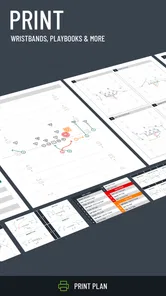
Yes. Tackle Football Playmaker X is designed for football playbook design, with playbook and wristband printing among its stated uses. That makes it relevant for coaches who want to turn designed plays into materials players can consult during preparation or on the field. If printing is central to your workflow, explore the available options in the app before building a complete playbook around it.
Which devices can run Tackle Football Playmaker X?
Tackle Football Playmaker X is available for Android and iOS users whose devices meet the applicable operating-system requirements. Before downloading, check your device’s current software version and make sure there is enough storage for the installation. The app is rated Everyone, so its content rating is suitable for a broad audience, including younger players using it with a coach or family member.
What is Tackle Football Playmaker X?
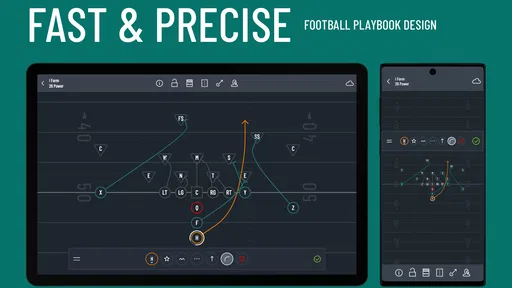
Tackle Football Playmaker X is a football strategy and play-design app focused on helping users create, organize, and review offensive and defensive plays. It is aimed at coaches, players, and serious fans who want a more visual way to plan formations, routes, assignments, and adjustments instead of relying only on a notebook or a basic drawing tool. It is a sports app developed by True Partners, LLC.
Who can benefit most from using Tackle Football Playmaker X?
The app is most useful for youth, amateur, and competitive football coaches, as well as players learning their responsibilities within a system. It can also help coordinators prepare game plans and explain concepts during meetings. Beginners may need some time to understand football terminology and the available design tools, while experienced users will generally get more value from its play-building features.
Can I create and customize my own football plays?
Yes, the main purpose of Tackle Football Playmaker X is to let users build customized football plays. You can typically select formations, place players, draw routes or assignments, and adjust the design to match your playbook. This makes it suitable for creating original concepts or adapting existing plays. The exact depth of customization may depend on the device version and app features available.
Pros
- Clear play diagrams help coaches explain assignments quickly.
- Supports custom formations for different offensive and defensive systems.
- Useful for planning plays before practices or game day.
- Visual layouts make it easier for players to remember routes.
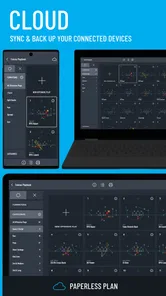
- Can help organize a team’s playbook in one place.
Cons
- Advanced features may require time to learn.
- Small screens can make detailed play editing feel cramped.
- Creating a complete playbook can be time-consuming.
- Some teams may find the interface less useful without shared access.
- Compatibility with older devices may be limited.





