

Flag Football Playmaker X
- 64.00
- 4.4
- Installs
- 50.00K
- Price
- Free

Screenshots
Analysis by Reviewed
When I first opened Flag Football Playmaker X, I approached it as someone who wanted to turn ideas from a flag football practice into something a team could actually use. This is a sports app from True Partners, LLC, focused on designing playbooks and preparing printed playbooks or wristbands. It is free to start, rated for Everyone, and its current version is 1.10.0. My first impression was that it makes the most sense as a planning tool for coaches, assistants, and organized players rather than as a general sports app for casual fans.
The useful question is not simply whether it can draw a play. Most coaches can sketch an arrow on paper. The better question is whether a digital playbook helps me communicate the same idea to different people, in different situations, without creating extra work. In my experience, this app is strongest when I use it as a bridge between planning and game-day communication. It can help me move from a rough concept to a repeatable visual reference, especially when a team needs more structure than a notebook can provide.
How the playbook works in real team preparation
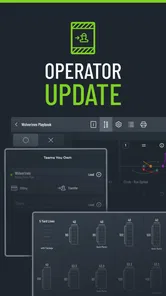
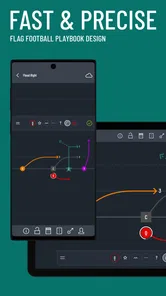
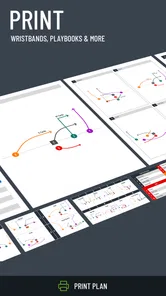
The app’s central purpose is clear: I can work on flag football plays, organize them into a playbook, and prepare material intended for printing. That focus gives it a more practical role than a generic drawing app. A normal notes application may let me type “motion left, then corner route,” but that description still leaves room for several interpretations. A playbook-oriented tool encourages me to make the assignment visible instead of relying on memory or a hurried explanation.
I found the biggest benefit before practice, not during a dramatic game moment. If I am preparing a short session, I can think through the order of the plays first, decide which concepts deserve attention, and give players a visual reference to revisit. That reduces the amount of time spent repeating the same explanation. It also gives an assistant coach something more useful than a verbal summary when the group splits into smaller units.
A realistic example would be a youth or recreational team preparing for a weekend match. The coach may have only a limited practice window and several players who do not process verbal instructions in the same way. A diagram can show where each person starts and where the movement should go. One player may study the full playbook at home, while another may rely on a compact wristband reference during the game. That is where the app’s printing focus becomes more meaningful than a simple on-screen sketch.
I would not treat it as a replacement for coaching judgment. The app can help present a plan, but it cannot decide whether a route is appropriate for a particular player, whether the spacing works on a specific field, or whether the team understands the timing. I still need to test each play physically. A clean diagram can hide a confusing handoff, a crowded area, or a movement that looks simple on paper but is difficult for the players to perform.
Readable diagrams are more useful than clever diagrams
Readability matters because a playbook is often consulted quickly. Players may be looking at a page before practice, while standing with teammates, or checking a wristband between plays. I found that a useful design is not necessarily the one with the most arrows or the most information. The better approach is to keep each page focused on one idea and avoid turning every play into a complete tactical encyclopedia.
More From Our News Desk

 Gmail
GmailGmail in a Busy Inbox: Who Benefits Most?
From first account to crowded workday, Gmail earns its place through dependable search and flexible sorting—but its best fit depends on how much inbox maintenance you can tolerate.

 Prime Video
Switching to Prime Video: What Changes in Your Viewing Routine
Prime Video can make a compelling second home for streaming, but switching means learning a different catalog, rental layer, and route from browsing to playback.

 Universal TV Remote Control
Universal TV Remote Control Works Best as a Reliable Backup
A phone remote earns its place through quick setup and reliable habits. Here is how to get more from Universal TV Remote Control—and where its limits show.

 Weather - By Xiaomi
Weather by Xiaomi Review: Clear at a Glance, Less Clear Up Close
Xiaomi’s weather app makes everyday forecasts quick to scan, but its calm surface can leave useful details and recovery paths harder to find than they should be.

 X
XX Under Pressure: Can It Recover When Posting Goes Wrong?
A resilience-focused review of X, examining setup, mistaken posts, interruptions, weak connections, and the gaps that matter when recovery needs to be dependable.

 Clash of Clans
Clash of Clans Is Won Between the Battles
Its raids are quick; its community is a long-term project of coordination, teaching, rivalry, and shared responsibility—with all the friction that entails.
Latest News



My practical advice is to create separate entries for variations instead of forcing several options into one crowded image. For example, if the same formation has two different responses depending on coverage, I would rather make the distinction obvious than place every possible branch on one diagram. This makes the material easier to scan and gives a player a clearer responsibility. It also helps a coach identify which version needs more practice.
The app’s value increases when the playbook has a consistent visual language. I would use the same naming style, the same order for player assignments, and the same level of detail across the set. If one play uses short labels and another uses long explanations, the team has to learn the format as well as the football concept. That is a small planning decision, but it can make a noticeable difference for players who need extra time to interpret diagrams.
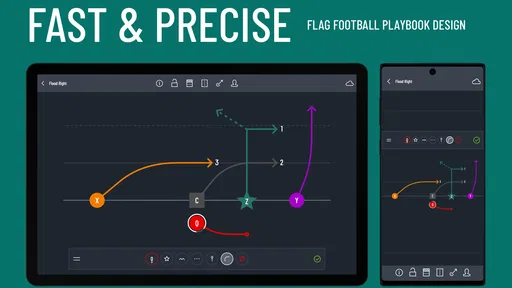
Navigation and readability also depend on the device and the moment. A larger screen is more comfortable for building a play because I can inspect the whole arrangement without feeling cramped. A wristband or printed reference has a different job: it should answer a quick question, not teach an entire system. I would therefore prepare a detailed version for learning and a simplified version for fast recall. That two-stage workflow is one of the most useful ways to get more from the app.
Supporting different ways of understanding a play
Not every player learns from diagrams equally well. Some people understand spatial relationships immediately, while others need the play described in words, demonstrated slowly, or repeated from a fixed starting position. The app can contribute to a more inclusive process by giving the team a visual anchor, but I would never use the diagram as the only explanation.
For a player who finds a full-field image overwhelming, I would introduce one responsibility at a time. First show the starting position, then the initial movement, then the point at which the player must make a decision. This is easier to absorb than presenting every route and adjustment at once. The app is useful here because a coach can prepare a focused reference rather than relying on an improvised sketch that changes from one explanation to the next.
Players who benefit from repetition can keep returning to the same visual reference between sessions. That can reduce the pressure of remembering a verbal explanation delivered once in a noisy environment. It may also help families or volunteer assistants support practice away from the field, since the intended movement is represented in a stable format.
At the same time, I would add spoken instruction, a walk-through, or a physical demonstration for anyone who struggles with symbolic arrows. A diagram is not automatically accessible simply because it is digital or printed. The best result comes from combining the app’s visual planning with coaching that respects different learning speeds and communication preferences.
Motor and sensory considerations during use
From a motor perspective, designing a playbook can be less demanding than trying to draw a polished diagram by hand under time pressure. Digital editing may make it easier to revise a route, correct an assignment, or prepare a cleaner version after practice. That is especially helpful for a coach who finds repeated handwriting tiring or who wants to avoid recreating the same diagram several times.
However, the physical interaction still matters. Creating plays on a small touchscreen may be uncomfortable for someone who has limited fine-motor control, hand fatigue, or difficulty making precise selections. I would do the main design work when there is time to sit comfortably, rather than expecting a coach to build a complete playbook beside the field. If a player needs a reference, the coach should prepare it in advance instead of asking that player to operate the app during a fast session.
Sensory conditions can change the experience as well. Bright outdoor light, glare, noise, and movement around the field are not ideal for studying a detailed diagram. A printed wristband reference may be more practical in that moment because it avoids the need to unlock a device, find the correct screen, and interpret a larger page while play is moving quickly. The app’s printing purpose therefore supports situational flexibility, even though the planning process itself is better handled in a calm environment.
I also think about cognitive load. A playbook can become harder to use when it contains too many nearly identical options. My approach would be to maintain a small game-day set and keep the larger collection for teaching and preparation. This is not a limitation unique to the app; it is a coaching discipline that becomes important whenever digital tools make it easy to keep adding material.
Printing and wristband preparation in everyday coaching
The printing side is one of the clearest reasons to choose this app over a blank drawing tool. A drawing application may help me produce an attractive image, but it does not naturally encourage me to think about how that image will be used by a team. Here, I can plan with the final reference in mind: a complete playbook for study, or a compact wristband aid for quick communication.
I would prepare the printed material only after testing the plays in practice. Early diagrams tend to change once players reveal spacing problems or confusion about assignments. Printing too soon can create unnecessary waste and leave the team working from an outdated version. A better workflow is to draft, walk through, revise, test, and then prepare the final reference.
There is also a trade-off between completeness and portability. A detailed playbook is better for teaching because it can include context and variations. A wristband reference needs to be concise enough to recognize quickly. If I try to squeeze the entire system into the wristband format, I may technically include everything while making nothing easy to use. The app can support both purposes, but I still have to make the editorial decisions.
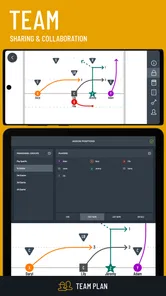
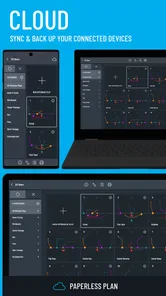
For volunteer coaches, parents, or small clubs, this can be a practical advantage. The same material can be discussed at home, reviewed during practice, and carried into a match in a form suited to the situation. That continuity is harder to maintain when one person has a notebook, another has a phone photo, and a third has a different version of the play drawn on a whiteboard.
Where the usual alternatives may be better
If I only need one quick diagram for a casual game, a paper sheet or a general drawing app may be faster. There is no reason to learn a specialized workflow for a single informal play. A whiteboard is also excellent for group discussion because everyone can see the coach draw, erase, and adjust the idea in real time.
The difference appears when the team needs consistency. A paper sketch can be lost, smudged, or interpreted differently after being copied. A general-purpose design tool may produce a polished page but require more manual work to keep player positions, labels, and variations organized. Flag Football Playmaker X is more appropriate when the output needs to become a repeatable team reference rather than a temporary explanation.
It is also not the right choice for someone searching for a broad sports training platform. This is not where I would expect workout plans, fitness tracking, live scores, or a large library of coaching courses. Its identity is narrower and more useful for that reason. Coaches who want one app to manage every part of a team’s season may prefer a broader team-management service, while coaches focused on visual play design may appreciate the specialization.
Cost, platform expectations, and practical commitment
The app is free to download, which makes it easy for a coach to evaluate the workflow before committing money. Optional in-app purchases range from $7.99 to $12.99 per item, so I would first decide whether the printing and playbook process fits my team before buying anything extra. The important consideration is not just the purchase itself but whether the finished materials will actually be used often enough to justify it.
The app has an average rating of 4.4 from around 261 ratings, with 64 written reviews, and it has passed 50K installs. Those figures suggest that it has found a real audience without making it seem like a universal solution for every football situation. I read that as a reason to try it with a small set of plays first, not as a reason to build an elaborate system immediately.
It was released on August 27, 2019, and the current version is 1.10.0. The minimum operating system is iOS or Android version 9, depending on the device platform. For a team sharing devices or using older hardware, I would check compatibility before planning a full workflow around it. That small check is particularly important for community teams where not everyone uses the same phone or tablet.
The Everyone age rating makes the app suitable in principle for a broad audience, but the way it is used still depends on adult guidance for younger teams. A child may understand a diagram while still needing a coach to explain safety, spacing, decision-making, and the difference between studying a play and improvising one during a match.
Remaining barriers for inclusive team use
The main barrier is that a visual playbook can unintentionally favor players who already understand football diagrams. If the coach assumes that arrows, labels, and formations are self-explanatory, some team members may fall behind even though they are capable of performing the movement. I would treat every diagram as a starting point for explanation, not proof that the instruction is complete.
Another barrier is the gap between preparation and live use. A player who needs more time to process information may benefit from reviewing the play in advance, but a crowded sideline or rapidly changing game can make last-second interpretation difficult. This is why I would agree on a small set of recognizable calls and rehearse them until the player can connect the reference with the action. The app can organize the material, but the team must build familiarity through practice.
Printing helps in some contexts but does not solve every problem. Small text, dense labels, poor contrast, or an overfilled wristband can make a reference difficult to read. I would print a test copy, ask several players to use it under realistic conditions, and simplify anything that causes hesitation. That testing step is especially important for players with visual or attention-related needs, because the coach may not notice a problem from the sideline.
There is also a social barrier when one format is treated as the “correct” way to learn. Some players may prefer a demonstration, a verbal cue, or a physical walk-through. Others may want to study alone. The most effective use of this app is flexible: use its diagrams to keep the plan consistent, then offer different explanations and practice methods around that shared reference.
My verdict for coaches and players
I recommend Flag Football Playmaker X to coaches who want a focused way to turn flag football ideas into organized playbooks and practical wristband references. I especially like it for teams that repeat a system across several practices, need clearer assignments, or have assistants and players who benefit from seeing the same plan in a stable format.
I would skip it if I only needed an occasional sketch, if I wanted a complete team-management platform, or if I was unwilling to spend time simplifying and testing the diagrams. The app does not remove the coaching work. It makes that work easier to organize, but the quality of the result still depends on how thoughtfully I present each play.
For inclusive use, my recommendation is to build two layers: a detailed playbook for learning and a stripped-down wristband reference for quick decisions. Pair every diagram with spoken explanation and a physical walk-through, and invite players to identify anything that feels confusing or crowded. The strongest feature is not merely drawing a play; it is creating a shared reference that can be adapted to how different people learn and perform.
Overall, I see this as a practical sports app with a clear purpose rather than an all-in-one football solution. Its free entry point makes experimentation easy, while the optional purchases deserve a little thought before a team invests in printed material. If your goal is to communicate flag football plays more consistently, I think it is worth trying. If your goal is something broader or more spontaneous, a simpler alternative may serve you better.
Flag Football Playmaker X Frequently Asked Questions
What devices can run Flag Football Playmaker X?
Flag Football Playmaker X is a sports app available for devices running Android or iOS, with an operating-system requirement of version 9 or later. Before downloading, check that your device meets this minimum requirement and has enough available storage for the installation. The app is intended for coaches and players who want to work with flag football plays on a mobile device.
Who develops Flag Football Playmaker X, and is it suitable for all ages?
Flag Football Playmaker X is developed by True Partners, LLC, and its content rating is Everyone. That makes it accessible to a broad audience, including families and younger players. Coaches can use it to organize and explain plays, while players can review formations and assignments. As with any coaching tool, children may benefit from an adult helping them interpret the diagrams and apply them on the field.
What is Flag Football Playmaker X and who is it designed for?
Flag Football Playmaker X is a digital coaching and play-design tool created for flag football teams, coaches, and players who want to organize offensive strategies more effectively. It is useful for planning plays, reviewing formations, and communicating assignments before or during practice. Beginners can use it to learn basic concepts, while experienced coaches may appreciate the flexibility for building a more customized playbook.
Can I create and customize my own flag football plays?
Yes, the main appeal of Flag Football Playmaker X is its play-design functionality. You can generally arrange players, routes, motions, and assignments to create plays that match your team’s style and league rules. This makes the app more practical than relying only on preset diagrams. However, the exact customization options may depend on the version of the app and the device you are using.
Is Flag Football Playmaker X suitable for youth and beginner teams?
The app can be helpful for youth and beginner teams because visual play diagrams are often easier to understand than verbal explanations alone. Coaches can use it to show where each player should line up, run, or block, helping reduce confusion during practice. Younger players may still need guidance from a coach, since the app is a planning aid rather than a complete replacement for live instruction.
Pros
- Design plays quickly with an intuitive drag-and-drop interface.
- Useful for organizing formations
- routes
- and defensive assignments.
- Helps teams share a consistent playbook before and during games.
- Supports visual learning better than relying on written instructions.
- Practical for coaches managing multiple plays and player roles.
Cons
- Advanced playbook tools may take time for new users to master.
- Small phone screens can make detailed route editing less comfortable.
- The app is most useful when every player follows the same playbook.
- Creating a complete play library can require considerable setup time.
- Some features may feel excessive for casual teams with simple plays.





