

Tachiyomi : Manga & Comics
- 0.00
- 0.0
- Installs
- 10.00K
- Price
- Free

Screenshots
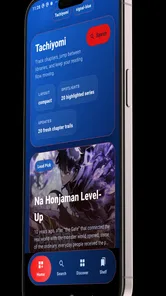
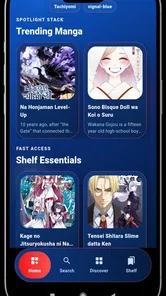
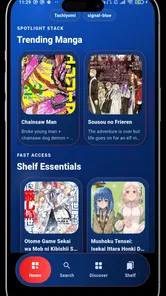
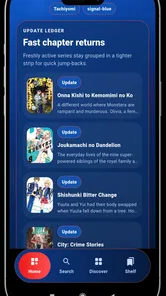
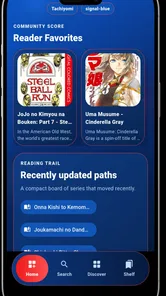
Analysis by Reviewed
When I consider a comic reader, I care less about a long feature checklist than about one practical question: can I get to the kind of chapter I want and settle into reading without unnecessary fuss? Tachiyomi is a comics app from GoldenDev Studio, intended for readers who move among manga, manhwa, comics, and webtoons. That range gives it an appealing starting point, but I’d still judge it by how comfortably it fits your own reading routine.
The app is free to download, so you can try it without an upfront purchase. I see that as a low-risk way to test the reading experience, not a guarantee that every title or source you want will be available. Before making it your main reader, check whether your usual material and preferred way of reading work for you.
What the free reader offers—and what it asks of you
I’d begin by treating the no-cost download as a chance to test a reading routine, rather than assuming it replaces a comic service or includes every title you want. In my view, the useful question is whether it makes your own mix of formats easier to read on a phone. That makes the first trial practical: start with a familiar series, then consider how the broader format range fits your habits.
A convenient home for several comic formats
The central appeal is having one app aimed at several kinds of sequential art. If you read Japanese manga one day and a vertical webtoon the next, a dedicated reader is more convenient than keeping separate apps just to switch formats. I like that the app’s focus is clear: this is for reading, not a broad entertainment hub that happens to include comics.
That focus can also help you decide quickly whether it belongs on your phone. Someone who reads only an occasional chapter may not need a specialized app at all. But if you regularly move between manga, manhwa, and webtoons, having a single place to begin is a sensible convenience—even before you decide whether it suits your longer-term routine.
The app is developed by GoldenDev Studio, and its current version is 1.0.0. I’d keep that early version context in mind when forming expectations: a new reader can be useful right away, but it may not yet feel as settled or predictable as a long-established comic platform. That is not a reason to dismiss it; it is a reason to test your own everyday workflow before building habits around it.
Where the value comes from
Since there is no download charge, the value question is less about whether the app is worth a purchase and more about whether it saves you friction. A good fit could mean fewer app switches, a more comfortable place to read on a commute, or a simple way to keep your comic reading separate from messaging and social feeds. Those are practical benefits, not guarantees about specific tools.
More From Our News Desk

 Gmail
GmailGmail in a Busy Inbox: Who Benefits Most?
From first account to crowded workday, Gmail earns its place through dependable search and flexible sorting—but its best fit depends on how much inbox maintenance you can tolerate.

 Prime Video
Switching to Prime Video: What Changes in Your Viewing Routine
Prime Video can make a compelling second home for streaming, but switching means learning a different catalog, rental layer, and route from browsing to playback.

 Universal TV Remote Control
Universal TV Remote Control Works Best as a Reliable Backup
A phone remote earns its place through quick setup and reliable habits. Here is how to get more from Universal TV Remote Control—and where its limits show.

 Weather - By Xiaomi
Weather by Xiaomi Review: Clear at a Glance, Less Clear Up Close
Xiaomi’s weather app makes everyday forecasts quick to scan, but its calm surface can leave useful details and recovery paths harder to find than they should be.

 X
XX Under Pressure: Can It Recover When Posting Goes Wrong?
A resilience-focused review of X, examining setup, mistaken posts, interruptions, weak connections, and the gaps that matter when recovery needs to be dependable.

 Clash of Clans
Clash of Clans Is Won Between the Battles
Its raids are quick; its community is a long-term project of coordination, teaching, rivalry, and shared responsibility—with all the friction that entails.
Latest News



For example, imagine you have a few quiet minutes while waiting for an appointment. If you already know what you want to read and can reach it quickly, a dedicated reader makes that small window feel usable. If opening the app instead leaves you hunting through several sources or trying to reconstruct where you stopped, the free price does not erase that inconvenience. I’d judge it by the number of steps it takes to get from launch to a satisfying reading session.
One useful habit is to test it with a short, low-stakes reading session before moving your whole routine over. Try a few pages in the format you use most, then return later and see whether picking up again feels natural. This checks something a generic description cannot: whether the app’s basic flow works for your attention span, screen, and reading habits.
A second practical trade-off is format variety. Supporting several comic styles sounds ideal, but those styles do not always call for the same reading rhythm. A page-based manga chapter and a vertically scrolling webtoon can feel very different on a phone. If you switch between them often, pay attention to whether you enjoy the transition rather than assuming one reader will automatically feel equally comfortable for both.
Trade-offs to consider before settling in
The most important limitation I’d keep in view is that a reader app and a complete comic service are not necessarily the same thing. The app is described as a reader for multiple comic formats, but that alone does not tell you what titles or reading sources will be available to you. Before relying on it for a particular series, check that you can actually access the material you want through your intended setup.
This is where it differs from the usual alternative: a major publisher’s or comics platform’s own app may be the more straightforward choice if you want a clearly defined catalog and a direct path to specific titles. A general-purpose reader may be more appealing if you value one reading environment across formats. Neither approach wins for everyone. The first can be simpler when your favorite series are already tied to one service; the second can make more sense when variety and a reader-centered experience matter more than having everything under one catalog.
I would also avoid treating a clean first impression as proof that the app will suit every reading session. New readers can have rough edges, and version 1.0.0 is a sensible reason to take a gradual approach. Start with one series or one format, notice whether the experience stays comfortable over several sessions, and only then decide whether it deserves to replace an app you already know.
That gradual test is especially useful if you read offline, keep a long-running series, or depend on a particular way of organizing chapters. Rather than assuming those workflows are covered, make them part of your trial: check what happens when you leave and return, whether you can find your place without effort, and whether your preferred reading source works consistently. These small checks can prevent the annoyance of switching back after you have already made the app part of your routine.
A further point worth checking is how you plan to discover what to read next. A reader that suits someone who already has a title in mind may not be as useful to someone who expects a service to suggest new series or present a curated catalog. I’d separate those needs during a trial: first see whether it handles reading material you already follow, then decide whether it helps with discovery. That distinction makes it easier to compare the app fairly with subscription platforms, where browsing and catalog access may be central to the experience.
Who is most likely to get value
I think this is most promising for readers who want to explore a dedicated manga and comics reader without paying upfront. It may also suit people whose reading spans manga, manhwa, and webtoons, especially if they are tired of treating each format as a separate habit. The key is to value convenience and experimentation more than a guaranteed, all-in-one catalog.
It is less compelling if you read only through a subscription service you already like, or if your priority is immediate access to a specific licensed series. In that case, the official service may be the easier and more dependable route. Likewise, if you rarely read comics on a phone, downloading another app may add clutter without solving a real problem.
The app is rated for Everyone, so its age classification is broad. That is useful context for households considering a reader, but I would still make content choices based on the individual titles being read. A general app rating is not a substitute for checking whether a particular comic is suitable for a child.
It has reached over 10,000 installs, which suggests that people are trying it, but I would not use that alone as a measure of reading quality. For a personal decision, your own test matters more: can you get to a chapter easily, enjoy the way it presents the pages or scroll, and return without losing your place? Those are the questions that determine whether a free reader has real value for you.
For a reader with a busy day, the useful test might be a short session between errands rather than a long evening read. Open a series you already know, read a little, close the app, and return when you have another spare moment. If the second visit feels straightforward, that is meaningful evidence for your routine; if you need to remember several steps or repeatedly search for your place, it may be a poor fit for quick breaks even if longer sessions feel fine.
It can also be a sensible choice for someone who wants to compare formats without committing to a paid service first. Try the type of comic you read most, then use a different format to see whether one environment actually makes switching easier. The trade-off is that flexibility is useful only when the material you want is accessible and the reading flow feels comfortable. If either condition fails, a focused official app can offer a better experience for that particular series.
Compatibility and a sensible trial
Compatibility starts at Android 7.0, so the app is an option for a range of Android devices rather than only the newest phones. If your device meets that minimum, I’d still judge comfort on the screen you actually use. A smaller phone can make dense comic pages feel cramped, while vertical scrolling may feel more natural for some webtoon readers; your preferred format is a better guide than the minimum operating system.
My practical recommendation is to test one familiar title and one format you do not read as often. The familiar title tells you whether the app can fit your established routine; the less familiar format tells you whether its broader scope is genuinely useful or merely sounds appealing. If either test creates too much friction, there is no reason to force a switch just because the download is free.
If offline reading matters to you, make that part of the same careful trial rather than assuming a reader’s broad format support answers it. Check whether your intended setup lets you prepare material before you leave a reliable connection, and whether you can resume comfortably later. That question is especially relevant for commutes or waiting rooms, where a reader can only save time if it is ready when you are.
My verdict: try it, but let your routine decide
I’d recommend giving Tachiyomi a try if you want a free, focused way to approach manga and other comic formats on Android. Its strongest case is the chance to bring different reading interests into one reader, without an upfront purchase. The honest caveat is that a broad reader description does not by itself guarantee the catalog, workflow, or polish you may expect from a dedicated comic service.
For me, the sensible buy-or-skip decision is really a try-or-skip one: try it if you are curious and willing to test your own titles and reading style; skip it if you need a particular official catalog or already have a service that works smoothly. With a Everyone rating, support for Android 7.0 and later, and an early 1.0.0 release, it is easy to evaluate without a financial commitment. Keep it only if it makes the ordinary act of finding your next chapter simpler.
In short, I’d treat the free download as an invitation to evaluate, not as a reason to switch by default. Readers who value a flexible starting point across comic formats have a clear reason to try it; readers who chiefly want a specific catalog, guided discovery, or a familiar subscription workflow may be better served elsewhere. Give it a small, realistic test with the material you actually read, then let ease of access and comfort—not the breadth of the pitch—make the decision.
Tachiyomi : Manga & Comics Frequently Asked Questions
What is Tachiyomi, and what can you read with it?
Tachiyomi is an open-source manga reader for Android that lets you browse and read comics and manga through online sources you add to the app. It is a reading and library-management tool rather than a store with a single built-in catalog, so available titles depend on the sources you choose and whether those sources are currently working. The app’s name and availability may also vary across versions and related projects.
Is Tachiyomi available for iPhone or iPad?
Tachiyomi has traditionally been developed for Android, and there is no official iOS version of the original app. Be cautious of websites or app listings claiming to offer an official iPhone or iPad edition, as they may be unrelated. iOS users should look for reputable alternatives in the App Store and check each app’s catalog, reading features, and content sources before installing it.
How do manga sources and extensions work in Tachiyomi?
The app relies on sources to find and load manga, and supported sources can change over time as websites update or become unavailable. Depending on the version you use, sources may be added or managed differently; older instructions about installing extensions might not apply to newer releases or forks. Check the project’s current documentation, and avoid installing files from unknown sites because unofficial extensions can create security and privacy risks.
Can I download manga to read offline?
Tachiyomi versions that support downloads can save chapters for offline reading, which is useful when you are traveling or have an unreliable connection. Downloads are generally tied to the selected source and chapter, so availability and behavior can differ between sources. You may need to manage storage yourself by removing chapters after reading, and downloading or sharing copyrighted material may be restricted by local law or the source’s terms.
Is Tachiyomi safe and legal to use?
The reader app itself is a tool, but safety and legality depend on where you obtain it and which sources you access. Download the app only from a trustworthy project page or recognized distribution channel, review permissions, and be wary of repackaged versions. Some sources may host material without authorization, so users are responsible for following copyright law and the terms that apply in their region.
Pros
- Supports multiple reading modes
- including vertical scrolling and page-by-page viewing.
- Offers flexible library organization with categories and filters.
- Reading progress and chapter tracking make it easier to pick up where you left off.
- Includes backup and restore options for transferring library data.
- Open-source project with no in-app advertisements.
Cons
- Not available through the Google Play Store
- so installation requires extra steps.
- Some extensions and content sources may stop working or become unavailable.
- Source catalogs vary in quality
- metadata
- and chapter availability.
- Updates and troubleshooting may require familiarity with community resources.
- The app is designed for Android and has no official iOS version.











