

Stickers and Emoji - WASticker
- 0.00
- 0.0
- Installs
- 500.00K
- Price
- Free

Screenshots
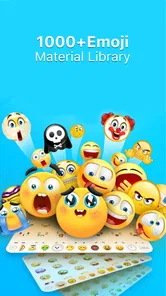
Analysis by Reviewed
I find Stickers and Emoji - WASticker most useful when I want a message to feel more personal without stopping to compose a perfect reply. A sticker can soften a quick answer, add a little humor, or give a familiar group chat its own visual shorthand. This is a free comics app from Lambent Labs, and its appeal is straightforward: it gives everyday conversations more expressive options than plain text alone.
Building a simple sticker routine
My most reliable approach is to treat the app as a small creative toolkit rather than something I need to browse every time I message. I look for a sticker that suits the kind of conversations I actually have, then use it when the moment fits. A cute reaction can work well in a casual chat, while a personal design may feel more natural among friends who know the reference behind it.
That distinction matters. A sticker that feels charming in one conversation can seem out of place in a work-related exchange or a group where people prefer concise messages. I get the best results when I think about the recipient first and use the image to support what I mean, not replace necessary details. For an appointment change or a practical question, text is still clearer; for a quick thank-you or playful reaction, a sticker can do more with less.
Settings and choices worth checking
Before making the app part of my regular messaging routine, I would check which tools are available on my device and how the app fits with the messaging apps I use. The version is 2.78, and it requires Android 7.0 or later. It is rated for Everyone, which makes it approachable for a broad audience, though I would still help younger users choose stickers thoughtfully and understand that a funny image may land differently with different people.
The app is free to download, with in-app purchases listed at $5.49 per item. I would explore what is available before paying for anything and decide whether a particular item adds enough value to my actual chats. If I only send a sticker now and then, the free experience may be all I need. Someone who enjoys collecting or creating more visual options may be more interested in browsing paid items, but I would avoid buying on impulse before I know what I will use.
Compatibility is another practical point. Stickers and emoji are most helpful when they can be used where a conversation is already happening. Since the app presents itself as a sticker and emoji tool, I would test the handoff to my preferred messaging app early, rather than creating a batch of designs and only then discovering that my usual workflow feels inconvenient. That small check can save time and helps set realistic expectations.
Why Choose Stickers and Emoji?
The beauty of Stickers and Emoji - WASticker lies in its simplicity and the sheer variety it offers. Picture this: You're chatting with a friend, and instead of the usual "LOL" or "Haha," you send a cheeky sticker or an emoji that perfectly encapsulates your mood. Isn't that way more fun?
More From Our News Desk

 Gmail
GmailGmail in a Busy Inbox: Who Benefits Most?
From first account to crowded workday, Gmail earns its place through dependable search and flexible sorting—but its best fit depends on how much inbox maintenance you can tolerate.

 Prime Video
Switching to Prime Video: What Changes in Your Viewing Routine
Prime Video can make a compelling second home for streaming, but switching means learning a different catalog, rental layer, and route from browsing to playback.

 Universal TV Remote Control
Universal TV Remote Control Works Best as a Reliable Backup
A phone remote earns its place through quick setup and reliable habits. Here is how to get more from Universal TV Remote Control—and where its limits show.

 Weather - By Xiaomi
Weather by Xiaomi Review: Clear at a Glance, Less Clear Up Close
Xiaomi’s weather app makes everyday forecasts quick to scan, but its calm surface can leave useful details and recovery paths harder to find than they should be.

 X
XX Under Pressure: Can It Recover When Posting Goes Wrong?
A resilience-focused review of X, examining setup, mistaken posts, interruptions, weak connections, and the gaps that matter when recovery needs to be dependable.

 Clash of Clans
Clash of Clans Is Won Between the Battles
Its raids are quick; its community is a long-term project of coordination, teaching, rivalry, and shared responsibility—with all the friction that entails.
Latest News



What sets this app apart is the ease of use. It's super intuitive—you don't need to be a tech wizard to navigate through its features. Just install the app, and you're good to go! Trust me; my grandma uses it too, and if she can, anyone can!
A World of Stickers at Your Fingertips
The range of stickers available is truly impressive. Whether you're a fan of cute animals, quirky characters, or something more traditional, there's something for everyone. The app frequently updates its collection, so you never run out of options. I particularly love the seasonal stickers; they add a festive touch to my messages, especially during holidays.
But it's not just about the stickers. The emoji section is equally vast and diverse. From the classic smiley faces to more elaborate designs, the emojis are a great way to add a personal touch to your texts. Plus, they're compatible across different messaging platforms, so you're not restricted to just one app.
Making custom images feel personal
One useful way to approach custom stickers is to make them for a recurring joke, a pet, or a shared moment that friends will recognize. That gives a design a purpose beyond novelty: it becomes a quick reaction that feels specific to your circle. I would keep the image easy to recognize at a glance, since a detailed photo or design may be less legible when it appears small in a chat.
It is also worth being selective about what becomes a sticker. A funny snapshot might be welcome among close friends but unsuitable in a broader group. I would choose images I am comfortable sharing in that context, and avoid turning every photo into a reaction. The strongest custom stickers are often the ones I can imagine using repeatedly without needing to explain them each time.
Customization and Personalization
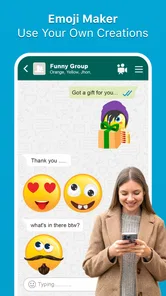
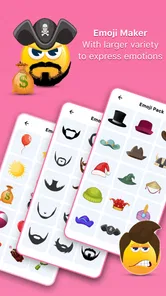
One of the coolest features is the ability to customize your own stickers. Yes, you heard me right! You can create personalized stickers from your photos or designs. This feature has been a game-changer for me. I've made stickers featuring my pets, and they’re a hit among my friends. It's this level of personalization that makes the app so special.
Additionally, the app is lightweight and doesn't hog your phone's resources, which is always a plus. It runs smoothly without any annoying lags or crashes, ensuring a seamless experience every time.
Where it fits—and where it doesn't
Compared with relying only on a messaging app’s built-in emoji, this app is appealing when I want a more distinctive image or a custom design that feels like my own. Built-in options are usually quicker for a basic reaction, so I would not open a separate tool just to send an ordinary smile. The advantage here is the extra personality and creative choice, not a reason to replace text or every sticker collection already available elsewhere.
A realistic everyday use is a family chat where someone shares a small win: instead of sending another generic congratulatory emoji, I can reply with a cheerful sticker that suits the person. For a fast-moving conversation, I would keep a few familiar choices in mind rather than scrolling through a large assortment while everyone waits. That habit makes visual replies feel spontaneous instead of interrupting the conversation.
People who enjoy making playful images, regularly message friends or family, and want a more personal alternative to standard reactions are likely to get the most from it. If you rarely use stickers, prefer a minimal keyboard, or need a dependable text-only workflow for work, the app may add little to your routine. I would also choose a different option if my main priority were a deeply integrated keyboard or a particular editing tool that I already use elsewhere.
Getting more from a small collection
I find it more useful to build a modest personal set than to collect images simply because they are available. One way to do that is to think through the reactions I send repeatedly—thanks, congratulations, playful disbelief, or a friendly greeting—and make or choose images that cover those moments. That gives each sticker a job and makes it easier to pick one quickly without searching through options mid-conversation.
There is a trade-off between variety and speed. A large assortment can be fun to explore, but the right image is less helpful if I cannot find it when the conversation has moved on. I would try a few designs in ordinary chats first, then keep the ones that feel natural and retire the ones that need too much explanation. This is especially helpful for custom images: a familiar visual reference tends to work better than a clever design that only makes sense to its creator.
Everyday fit and practical limits
For a realistic routine, I might use a custom pet sticker when a family member asks how the day is going, then send a plain text answer if they need actual details. In a group chat, I would use the image as a response after reading the tone of the exchange rather than assuming every message calls for a visual reaction. That small pause helps prevent a playful sticker from sounding dismissive when someone is sharing something serious.
Another question I would settle early is whether I want to create images or mainly browse ready-made ones. If I enjoy making something personal, the creative side can justify the extra step. If I only want quick reactions, the emoji already built into a keyboard or messaging app may be more convenient. The choice is less about which tool has the most options and more about whether I will actually use the options often enough to make the added workflow worthwhile.
I would also be cautious about treating stickers as a universal replacement for emoji. Emoji are compact and easy to drop into a sentence; stickers tend to stand out more and can take over the tone of a message. For a quick acknowledgment, a familiar emoji may be the cleaner choice. For a shared joke or a deliberately expressive reply, a sticker earns its space. Knowing when not to use one is part of making the app feel natural rather than noisy.
Final Thoughts
In conclusion, Stickers and Emoji - WASticker is more than just a sticker app; it's a tool for expression and creativity. It brings a whole new dimension to messaging, making it not just about communication but also about fun and engagement. Whether you're looking to spice up your chats or simply want to explore a new way to express yourself, this app is a must-have.
So, if you haven't already, give it a try and watch how it transforms your messaging game. Happy chatting!
My verdict on making it a habit
For me, the best reason to try it is the chance to make familiar conversations feel a little more like your own. I would start with the free app, test how sending stickers works in the messaging app I use most, and make only a few designs I can see myself reusing. That gives me a fair sense of whether its creative side outweighs the extra step of choosing an image.
With over 500,000 installs, it has found an audience, but popularity alone does not determine whether it suits a particular chat style. The current version is 2.78, and Lambent Labs is the developer behind it. My recommendation is simple: try it if visual expression is part of how you communicate, but keep ordinary text close at hand when clarity matters more than charm.
Stickers and Emoji - WASticker Frequently Asked Questions
Can I create my own emoji stickers with Stickers and Emoji - WASticker?
The app is intended for making custom emoji smiley faces and cute emoji stickers using its emoji maker, so it may suit you if you want to personalize your chats rather than use only standard emojis. You can explore the available creation options in the app and see whether they match the style you have in mind before adding stickers to your conversations.
What devices can install Stickers and Emoji - WASticker?
Stickers and Emoji - WASticker is available for Android devices running version 7.0 or later. Before downloading, check your device’s operating system version in its settings to make sure it meets that requirement. The app is free to download, so you can try its sticker and emoji features without paying for the initial download.
What is Stickers and Emoji - WASticker and how does it work?
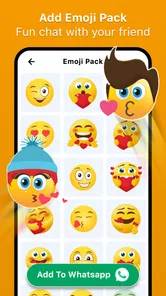
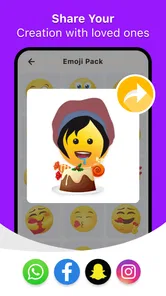
Stickers and Emoji - WASticker is a mobile application designed to enhance your messaging experience by offering a wide variety of stickers and emojis compatible with popular messaging apps like WhatsApp. Users can easily browse through different categories, select their favorite sticker packs, and add them directly to their messaging app, making conversations more fun and expressive.
Is Stickers and Emoji - WASticker free to download and use?
The Stickers and Emoji - WASticker app is free to download and use, offering a basic set of stickers and emojis at no cost. However, there may be in-app purchases available that provide access to premium sticker packs or additional features. This allows users to customize their experience according to their preferences and budget. In-app purchases are priced at $5.49 per item, so review any purchase details before completing a transaction.
How can I add new sticker packs to my messaging app using WASticker?
To add new sticker packs using Stickers and Emoji - WASticker, first download the app from your device's app store. Open the app and browse through the available sticker packs. Once you find a pack you like, tap on it and select the option to add it to your messaging app. Follow the prompts to complete the addition, and you can start using the new stickers in your chats.
Pros
- Wide variety of sticker options.
- Easy to use interface.
- Regular updates with new stickers.
- Compatible with all major messaging apps.
- Highly customizable sticker packs.
Cons
- Contains ads that may be intrusive.
- Some stickers require in-app purchases.
- Limited free sticker packs.
- Occasional app crashes reported.
- Not available offline.











