

SPYPOINT
- 8.05K
- 4.4
- Installs
- 1.00M
- Price
- Free

Screenshots
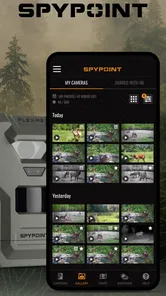
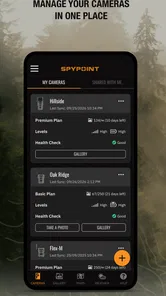
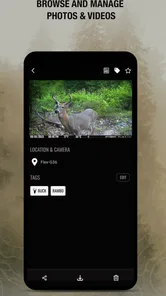
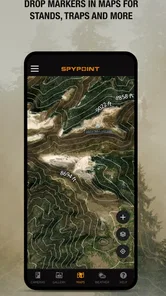
Analysis by Reviewed
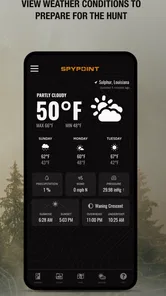
I like the idea of checking a trail camera from home, but the real value of a remote setup is practical: it can save a trip just to see whether anything has passed through. SPYPOINT is a sports app from SPYPOINT built around managing the company’s cellular trail cameras and receiving their photos and videos. It makes the most sense for someone who already uses compatible SPYPOINT equipment; without one, there is little reason to install it.
What the app does day to day
The main routine is straightforward: pair a camera, check incoming images, and use the app to keep tabs on the setup. For a landowner watching a gate or a hunter monitoring a route, that can be more useful than repeatedly driving out to inspect a camera. I’d treat the phone as a way to review activity and make planning decisions, not as a substitute for visiting the location when equipment needs attention.
A small workflow tip: decide in advance what you want each camera to tell you. If you’re checking a trail, look for repeated movement and timing rather than reacting to every single image. If you’re watching a property boundary, a clear naming habit for camera locations can make later comparisons easier. These simple habits matter because remote photos are only useful when you can connect them to a specific place and purpose.
Putting remote images to work
One realistic routine is to check the gallery over breakfast before deciding whether to take a longer route on a weekend walk. A series of images from a particular location might make that route worth prioritizing; a quiet stretch might suggest checking another area instead. I wouldn’t treat a quiet camera as proof that wildlife is absent, though. It only tells me what that camera captured and sent, so I’d combine the images with what I already know about the location.
For shared properties, the app is most useful when everyone agrees on what each camera is for. One person might be interested in wildlife movement while another is checking an access point. Giving cameras clear, consistent names and deciding who should respond to alerts avoids confusion later. That small bit of organization is more valuable than trying to interpret a pile of unlabeled images after several weeks.
It can also help to separate “interesting to see” from “requires action.” Wildlife photos are enjoyable, but a landowner may be using a camera to answer a practical question about a gate or a route. If I were setting one up for that purpose, I’d decide what kind of image would change my plans before the alerts start arriving. That makes it easier to avoid overreacting to routine activity.
Your Digital Hunting Buddy
So, let's talk about what makes SPYPOINT so great. First off, this app is designed to work hand in hand with SPYPOINT trail cameras. These cameras are your eyes in the field, capturing photos and videos of wildlife and sending them straight to your phone. It’s like having a front-row seat to nature’s theater, and you don’t even have to leave your couch!
More From Our News Desk

 Instagram
Instagram’s Power Comes From Its Place in Your Phone
A close look at how Instagram turns Meta’s reach, recommendation systems and everyday camera habits into durable platform power—and what that costs users.

 Gmail
GmailGmail in a Busy Inbox: Who Benefits Most?
From first account to crowded workday, Gmail earns its place through dependable search and flexible sorting—but its best fit depends on how much inbox maintenance you can tolerate.

 Prime Video
Switching to Prime Video: What Changes in Your Viewing Routine
Prime Video can make a compelling second home for streaming, but switching means learning a different catalog, rental layer, and route from browsing to playback.

 Universal TV Remote Control
Universal TV Remote Control Works Best as a Reliable Backup
A phone remote earns its place through quick setup and reliable habits. Here is how to get more from Universal TV Remote Control—and where its limits show.

 Weather - By Xiaomi
Weather by Xiaomi Review: Clear at a Glance, Less Clear Up Close
Xiaomi’s weather app makes everyday forecasts quick to scan, but its calm surface can leave useful details and recovery paths harder to find than they should be.

 X
XX Under Pressure: Can It Recover When Posting Goes Wrong?
A resilience-focused review of X, examining setup, mistaken posts, interruptions, weak connections, and the gaps that matter when recovery needs to be dependable.
Latest News



One of the things I love most about this app is how user-friendly it is. Seriously, even if technology usually has you scratching your head, you’ll find this app a breeze to navigate. The setup process is straightforward, and once your camera is synced, you can access your photo gallery, view the status of your camera, and even adjust the settings remotely. It’s all about making things as easy as possible, so you can focus on what really matters - the thrill of the hunt.
Staying useful between field visits
In an ordinary week, I might check images before deciding whether a spot deserves another visit, then review the camera status before setting off. That second check is easy to overlook: a fresh photo is exciting, but it doesn’t tell me whether the camera is still positioned well or whether I should plan a hands-on inspection. Remote access helps prioritize trips; it doesn’t eliminate them.
This is also where a cellular camera differs from a conventional trail camera that stores images locally. With local storage, you usually need to retrieve the card to see what was captured. With SPYPOINT’s connected setup, images can arrive on the phone, which is a meaningful convenience when the camera is far from home. The trade-off is that the experience depends on a compatible camera and usable cellular coverage at its location. If you prefer a low-tech setup or your spot has poor service, a standard camera and card may be the more dependable choice.
Stay in the Know with Instant Notifications
Now, let’s get into the nitty-gritty of what really sets this app apart: the instant notifications. Every time your camera captures an image, you get an alert on your phone. This means you’ll always be in the loop about what’s happening in your hunting area. Whether it’s a majestic buck or a curious raccoon, you’ll know about it right away. It’s like getting a little surprise every time you check your phone!
For a more useful notification routine, I’d avoid letting every alert dictate an immediate trip. A burst of activity can be interesting without changing your plans, and checking the gallery in batches may be calmer than responding to every ping. If you’re using alerts to monitor a property, think about who needs to receive them and when; frequent updates can become noise if nobody is prepared to act on them.
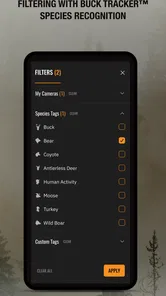
Plus, the app offers a neat feature called “BUCK TRACKER” which uses AI technology to identify and sort images of bucks. It’s pretty cool to see technology being used in such a practical way, especially when it saves you the time and effort of sifting through countless photos.
I’d use that sorting as a shortcut for finding relevant images, not as a final judgment about what a photo shows. The practical benefit is less time spent scanning a large gallery; the sensible trade-off is to open the original image before making a decision based on an automated label. That approach keeps the tool helpful without asking it to replace your own review.
Choosing between connected and local cameras
Compared with the usual alternatives, the main distinction is not simply which camera takes a better picture; it is how you want to retrieve what it captures. A local-storage camera keeps the process straightforward and avoids relying on a cellular link, but checking it means going to the camera. A connected SPYPOINT setup can reduce those inspection trips, while asking you to account for equipment compatibility, signal, and the camera’s data arrangement.
I’d choose the connected route for a camera that is inconvenient to reach, or when seeing images between visits will genuinely change where I go or what I do. For a camera only a short walk from home, local storage may be less fussy. Someone who mainly wants a general wildlife camera for casual use and has no need for remote checks may also find that a simpler offline setup suits them better.
There’s a useful trade-off in how often you check, too. Frequent viewing can make the camera feel engaging, but it can also turn a quiet hobby into a stream of small interruptions. I’d set a regular time to review images unless a particular monitoring need calls for immediate attention. That keeps remote access convenient without making every phone alert feel urgent.
Connectivity, plans, and fit
Now, I know what you’re thinking - what about connectivity? Well, the app offers several data plan options to suit your needs. Whether you’re a casual observer or a serious hunter, there’s a plan for you. The connectivity is generally reliable, but it’s worth checking the coverage in your area to ensure you get the best experience possible.
Because the camera sends media over a cellular connection, I’d check the exact location rather than assume that coverage near a road or house will be the same deeper in the property. Before relying on remote images for a time-sensitive decision, test the setup and confirm that the camera is actually communicating. If you’re still choosing equipment, compare the camera’s intended use and connection needs with your location first; installing the app alone won’t solve a coverage problem.
Another practical question is whether you need photos, videos, or both for the job you have in mind. The app handles images and videos from the camera, but it’s worth thinking through what will be easiest to review and useful for your purpose before placing equipment. A short view of activity may answer one question, while a still image may be enough for another. Matching expectations to the job can prevent disappointment when you begin monitoring.
Let me also mention the app’s support team. They’re super responsive and helpful, ready to assist you with any hiccups you might encounter along the way.
For someone deciding whether to try it, the key question is whether remote viewing is worth building into a camera setup. The app is free, rated for Everyone, and has an average rating of 4.4 from around 52,000 ratings, with more than a million installs. That gives a newcomer a sense of its broad reach, but it doesn’t guarantee that a particular camera location will connect well or that the workflow will suit every property.
Who will get the most from it
I see the strongest fit for people who already own a compatible cellular trail camera and have a concrete reason to check it remotely: hunters deciding which area to visit, wildlife watchers following activity without disturbing a site, or landowners keeping an eye on a distant access point. The app is less persuasive for someone who is only curious about trail cameras but has no compatible equipment, since the phone app by itself cannot capture anything.
It may also be the wrong tool if you want a fully offline experience, dislike maintaining connected equipment, or need a guaranteed response from a remote location. In those situations, a locally stored camera—or direct, in-person inspection—can be the more dependable approach. I’d also avoid relying on the app as the only way to monitor something that requires immediate intervention. A remote image is useful for awareness, but it doesn’t replace a person who can physically check the site.
Where it fits—and where it doesn’t
The app is a good fit for hunters who want to review activity between visits, wildlife watchers who enjoy checking a remote camera, and landowners who use images to understand movement around a property. It is less compelling if you have no SPYPOINT cellular camera, want a camera that works entirely offline, or don’t want to manage a connected setup. In those cases, a locally stored trail-camera workflow may be simpler and less dependent on a phone connection.
One useful way to judge the value is to compare the time saved with the effort of maintaining the remote setup. If a camera is close by, walking out to retrieve a card may be easier. If it is far away or difficult to reach, receiving images remotely can matter much more. The best choice depends less on how exciting a notification feels and more on how often you would otherwise make a trip just to check the camera.
What version history can—and can’t—tell you
The app’s current version is 5.12.0, and it has been available since March 4, 2016. That gives it an established place in SPYPOINT’s camera workflow, but a version number alone doesn’t tell me exactly which changes existing users will notice. I’d judge an update by the practical details: whether camera status remains easy to find, images are straightforward to review, and remote adjustments still fit naturally into a field routine.
For existing users, a sensible habit is to check the app and camera connection before relying on a new setup or changing how you monitor a site. For someone considering a first camera, I’d watch how the chosen equipment, plan, and local signal work together rather than treating the app as the whole system. The software can make remote scouting more convenient, but the camera and its connection determine whether that convenience reaches your location.
That distinction matters when evaluating change over time. An established app may continue to evolve, but I wouldn’t assume that a newer version automatically changes the way every camera behaves. I’d look for the practical result in my own routine: can I still find the right camera quickly, understand its status, and review the images I care about without extra steps? Those are the improvements that matter most to an existing user.
Final Thoughts
In a nutshell, if you’re into hunting or wildlife observation, the SPYPOINT app is a must-have. It’s like having a personal assistant that keeps you in the loop about what’s happening in your favorite hunting spots. From instant notifications to AI-powered image sorting, this app is packed with features that make it stand out from the crowd.
So, grab your gear, set up your camera, and let SPYPOINT bring the wilderness to you. Happy hunting!
SPYPOINT Frequently Asked Questions
Can I use SPYPOINT without owning a SPYPOINT cellular trail camera?
SPYPOINT’s main purpose is to manage SPYPOINT cellular trail cameras and receive the photos and videos they capture. If you do not own a compatible camera, the app may have limited practical value for your needs. Before downloading, consider whether you already use or plan to use a SPYPOINT camera, since the app is designed around that camera connection rather than as a standalone wildlife-viewing service.
Does SPYPOINT let me view photos and videos from my camera?
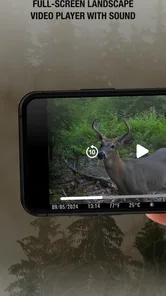
Yes. The app is intended to help you receive photos and videos from SPYPOINT cellular trail cameras and manage those cameras. This makes it a convenient place to check the media sent by your camera instead of relying only on visiting the camera in person. Your experience will depend on having a compatible SPYPOINT camera and using it as part of your setup.
Is SPYPOINT free to download, and what devices can install it?
SPYPOINT is free to download and is intended for managing SPYPOINT cellular trail cameras and receiving their photos and videos. Before installing, check that your phone or tablet runs a compatible operating system; the app requires version 10 or later. Its age rating is Everyone, so it is suitable for a broad audience, including hunters and people interested in observing wildlife.
What is SPYPOINT and what does it do?
SPYPOINT is a high-performance mobile app designed to enhance your wildlife monitoring experience. It connects to SPYPOINT trail cameras, allowing users to easily manage and view images, videos, and other data captured by the cameras. The app offers features such as real-time camera status updates, customizable notifications, and more, making it an essential tool for hunters and wildlife enthusiasts.
Is SPYPOINT compatible with all trail camera models?
SPYPOINT is specifically designed to be compatible with SPYPOINT trail cameras. While the app offers extensive features tailored for these models, it may not work with other brands or models of trail cameras. It's advisable to check the compatibility of your specific camera model with the app before downloading to ensure a seamless experience.
Pros
- Efficient wildlife monitoring tool.
- User-friendly interface.
- Real-time photo updates.
- Low cost subscription options.
- Durable and weather-resistant.
Cons
- Limited battery life.
- Occasional connectivity issues.
- Subscription required for features.
- Dependence on cellular coverage.
- Initial setup can be complex.





