SoulLinker - Video Chat Online
- 126.00
- 4.8
- Installs
- 500.00K
- Price
- Free

Screenshots




Analysis by Reviewed
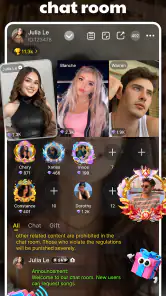
Meeting someone through a video chat can feel more personal than sending messages, but it can also be awkward when you do not know what will happen after tapping the install button. SoulLinker is a social app built around private video conversations with strangers, and my first impression is that it works best when you treat it as a quick, open-ended way to meet people rather than as a replacement for a trusted messaging service. The experience is direct: you are there to see and talk with another person, not to browse a large public feed.
That focus makes the app easy to understand, but it also makes your own boundaries especially important. A stranger on camera can be friendly, boring, interesting, or simply not the right match for you. I would recommend approaching each conversation with patience and a clear exit plan. The best way to use SoulLinker is to stay curious without giving up control of the interaction.
What to expect before your first conversation
SoulLinker belongs to the social category and is developed by Echoo Team. Its store summary presents it as private video chat with strangers, which is a useful description of the central idea: you are connecting with people you do not already know in a more immediate format than ordinary text chat. The app is free to install, although in-app purchases range from $2.99 to $99.99 per item. That makes it sensible to explore the basic experience first before spending anything.
The app is intended for mature users aged 17 and over. That age guidance matters here because live conversations with strangers can be unpredictable, and the format is not a good fit for children or anyone who is uncomfortable handling unexpected behavior on camera. I would also avoid using it when you need a carefully moderated professional conversation, a dependable support channel, or a private call with someone you already trust.
Its current version is 1.0.30, and it runs on Android devices using version 6.0 or later. The app has reached over 500K installs and holds a 4.8 average from around 1.1K ratings, with 126 written reviews. Those figures suggest that many users have found the concept appealing, but they should not be treated as a promise that every match will be enjoyable. Video chat depends heavily on who is available when you open the app and how willing both people are to communicate.
In practical terms, expect a session to be more spontaneous than structured. You may connect quickly, or you may need to move past conversations that do not go anywhere. A useful mindset is to judge success by one worthwhile exchange rather than by the number of people you meet. That single adjustment makes the app feel less like a test and more like a low-pressure social experiment.
Who is likely to enjoy it
I can see SoulLinker working well for someone who wants to practice casual conversation, break out of a routine, or experience a more human form of online socializing. It may suit a person who finds endless text profiles tiring and would rather learn something from a voice, expression, and natural response. It can also be useful when you have a short amount of free time and want an interaction that feels different from scrolling through familiar social networks.
More From Our News Desk

Clash of Clans Is Won Between the Battles

Android Auto Makes the Case for Quieter Car Software

MobiOffice: Transforming Mobile Productivity with Seamless Integration

EA SPORTS FC™ Mobile Soccer: Redefining Mobile Sports Gaming

How Microsoft OneDrive Became a Mobile Productivity Giant

How Google Translate Breaks Language Barriers Effortlessly
It is less suitable for anyone who needs predictable contacts, detailed identity checks, or a carefully controlled audience. If your main goal is to keep up with friends, a conventional messenger is the better choice. If you want to meet people around a specific hobby, a community app with topic-based groups may give you more useful context before the first conversation. SoulLinker is strongest when the surprise of meeting a stranger is part of the appeal.
Getting started without making the first session stressful
After installing the app, I would begin by deciding what I am comfortable sharing before starting a video conversation. This sounds obvious, but live chat can make people answer personal questions more quickly than they intended. Keep your first exchange general. Talk about interests, routines, films, food, travel, or the reason you decided to try the app. There is no benefit in revealing your full name, address, workplace, school, financial information, or other identifying details to a person you have just met.
A quiet setting also makes a noticeable difference. Video chat is harder to judge when background noise, poor lighting, or interruptions make the other person difficult to understand. You do not need a studio setup. A stable position for the phone, a visible face, and enough light to see expressions are more useful than trying to make the scene look polished. If you are testing the app in a public place, remember that people nearby may appear in the background or overhear the conversation.
Take a moment to understand the controls before you become absorbed in the conversation. The important habit is knowing how to leave immediately if the interaction becomes uncomfortable. I would not wait for the other person to agree that the call should end. If you feel uneasy, ending the session is a complete reason by itself.
Because SoulLinker is aimed at private video conversations, privacy should shape your setup from the beginning. Check what your camera is showing, especially if you are at home. A room can reveal more than you realize: family photographs, documents, a visible address, or a distinctive view outside the window. A plain wall or a carefully chosen corner gives you more control without making the call feel unnatural.
How to reach a meaningful first interaction
My practical advice is to prepare two or three easy opening questions instead of relying on a perfect first sentence. “What made you try this app?” is more useful than a forced compliment because it gives the other person a natural subject to answer. From there, listen for a detail you can follow up on. If they mention music, ask what they have been listening to lately. If they talk about a city, ask what they like about living there.
This small preparation solves one of the most common problems with stranger video chat: both people wait for the other to carry the conversation. A question followed by a genuine response creates a rhythm quickly. You do not need to perform or be unusually entertaining. A short, respectful exchange can still count as a successful first use, even if you do not continue talking afterward.
Another useful technique is to set a personal time limit for the first session. I might give myself enough time for a few conversations, then stop and decide whether the format suits me. This prevents the app from turning into an aimless late-night habit and gives me a clear point at which to evaluate the experience. If a conversation is genuinely engaging, I can choose to continue; if not, I can leave without feeling that I have wasted an entire evening.
For a realistic everyday example, imagine having a short break after work and wanting human contact without arranging a full meeting. You open SoulLinker, start with a general question, and discover that the other person is also interested in a film you recently watched. Instead of trying to force a long friendship, you exchange a few thoughtful opinions and end the call politely. That is the kind of modest success the app can deliver: a brief connection that feels more alive than scrolling, without requiring a major commitment.
Where new users can become confused
The biggest source of confusion is expecting every connection to feel like a match. A video conversation exposes compatibility quickly, but it also exposes incompatibility quickly. Someone may not want to talk, may communicate in a style you dislike, or may simply be having a bad day. I would not interpret a dull session as proof that the app is failing. At the same time, you should not feel obligated to keep trying with someone who makes you uncomfortable.
Another point to keep in mind is the difference between privacy and trust. A private call may feel more personal, but privacy does not automatically tell you who is on the other side or what they intend to do with information shared during the conversation. Treat the first call as an introduction, not as evidence that the person is reliable. Trust should develop slowly through consistent, respectful behavior.
Be careful with requests that move the interaction in a direction you did not choose. A stranger may ask for personal contact details, money, intimate material, or access to another account. You do not need to negotiate when a request crosses your boundary. End the conversation and use the app’s available safety controls if the behavior is inappropriate. I would also avoid assuming that a friendly tone makes a request safe.
Purchases deserve similar caution. Since the app is free but offers items from $2.99 to $99.99, a first-time user should understand what any purchase changes before confirming it. I would not spend simply because a conversation was disappointing or because I felt pressure to improve the odds of meeting someone interesting. Try the free experience, decide what problem a purchase would solve for you, and only then consider whether it is worthwhile.
The mature age label is another reason to be deliberate about who uses the app. Parents should not treat the age guidance as a substitute for supervision or a safety conversation, and younger users should choose a platform designed for them instead. For adults who are eligible to use it, the label is a reminder that stranger video chat can involve subjects and behavior that are not appropriate for everyone.
How it compares with familiar social alternatives
Compared with a standard messaging app, SoulLinker offers immediacy. Text gives you time to edit, delay, and decide how much to reveal, while video gives you a faster sense of the other person’s communication style. That can make the interaction feel more genuine, but it also removes some of the protective distance that many people value in online conversation.
Compared with a public social network, it is less about broadcasting a polished identity. You are not necessarily presenting a carefully assembled profile to a broad audience; the emphasis is on the live exchange. That can be refreshing for users tired of feeds, likes, and performance. The trade-off is that you have less context before meeting someone, so the first moments require more judgment.
Compared with interest-based communities, the app is more spontaneous but less focused. A forum or group built around a hobby gives you an immediate topic and a reason to return. SoulLinker gives you the possibility of an unexpected conversation, but you may need to create the subject yourself. I would choose it for openness and variety, not for finding a specialist community or building a highly organized network.
That distinction also affects how you measure value. If you want a reliable way to contact known people, use a familiar messenger. If you want carefully filtered professional networking, use a service built for that purpose. If you want a quick chance to speak with someone new, this app has a clearer advantage. It occupies a narrower space than “social app” might suggest.
Small habits that make the experience better
First, use a neutral opening rather than immediately asking where someone lives or what they do for work. This keeps the conversation comfortable and reduces the amount of personal information exchanged early. Second, notice whether the other person respects a simple boundary. If you say you would rather discuss hobbies than personal details and they accept that, it is a useful sign. If they keep pushing, end the call.
Third, pay attention to your own energy. Video chat can be surprisingly tiring because you are processing words, expressions, pauses, and your own appearance at the same time. Short sessions are often better than forcing yourself to stay online until the experience becomes irritating. This is especially useful for shy users: the goal is not to become instantly outgoing, but to build comfort gradually.
Fourth, keep a clear distinction between an enjoyable conversation and a dependable relationship. One good call can be memorable, but it does not justify rushing into private details or financial decisions. If you decide to continue speaking with someone elsewhere, use the same caution you would use with any stranger met online. The app can open a door; it cannot verify the person’s character for you.
Finally, review your own reasons for returning. If you are using SoulLinker because you enjoy short conversations and unexpected perspectives, it may remain a pleasant addition to your social routine. If you are using it to escape persistent loneliness, replace real-world support, or seek urgent emotional help, the app is not enough. A live stranger chat can be comforting for a moment, but it is not a substitute for trusted friends, family, or professional support.
My recommendation after trying the concept
I think SoulLinker is worth trying for mature users who genuinely want spontaneous private video conversations and understand the trade-offs. Its free entry point makes experimentation easy, and the focused format is more immediate than ordinary text-based socializing. The strong average rating and growing install base show that the idea has found an audience, although individual results will still depend on timing, communication style, and the people available during a session.
I would recommend starting slowly: install it on a compatible Android device, prepare a safe setting, keep the first topics general, and treat the first meaningful exchange as the goal. Do not spend money until you know whether the basic experience fits your habits. Most importantly, leave any conversation that feels wrong. In my view, confidence with boundaries matters more here than having the perfect conversation skills.
My final judgment is positive but selective. This is not the right social tool for everyone, and it cannot provide the structure or predictability of a familiar messenger, interest group, or professional network. For someone who wants a direct chance to meet strangers by video, however, it offers a clear and approachable path from installation to real interaction. If you are comfortable with that uncertainty and use it thoughtfully, SoulLinker can turn a spare few minutes into a surprisingly human conversation.
SoulLinker - Video Chat Online Frequently Asked Questions
Who is SoulLinker - Video Chat Online intended for?
SoulLinker is a social app for adults interested in meeting people and having private video chats with strangers. Its content rating is Mature 17+, so it is not intended for younger users. Before installing, consider whether you are comfortable with online conversations with people you do not know, and make sure the app’s age rating and community expectations are appropriate for you.
What should I check before downloading SoulLinker?
Check that the app is offered through the official store for your device, and review its age rating, permissions, and current version before installing. SoulLinker is developed by Echoo Team, and its current version is 1.0.30. It requires Android 6.0 or later on Android devices. Taking a moment to check compatibility and permissions can help you decide whether it suits your phone and preferences.
What is SoulLinker - Video Chat Online?
SoulLinker - Video Chat Online is a social communication app designed for meeting and talking with people through online video chats. Depending on the available features and your location, you may be able to discover users, send messages, and start live video conversations. It is best suited to adults who want casual social interaction, but users should always review the app’s current description, age rating, and community rules before downloading.
Is SoulLinker - Video Chat Online free to use?
The app is free to download, but some functions can require in-app purchases or other paid options. In-app purchases range from $2.99 to $99.99 per item, so check the price shown for a feature before confirming a purchase. Consider whether optional spending fits your budget, and manage purchase settings through your Google Play or Apple account where applicable.
Is SoulLinker safe for meeting and video chatting with strangers?
As with any random video chat or social discovery service, safety depends on how carefully you use it and how effectively the platform moderates its community. Do not share your address, passwords, financial information, private documents, or exact daily routine. Use blocking and reporting tools when available, avoid moving conversations to unfamiliar services too quickly, and leave any chat that becomes abusive, sexual, threatening, or suspicious.
Pros
- Quick way to meet people through live video conversations.
- Video interaction feels more personal than text-only social apps.
- Simple interface makes starting a chat relatively easy.
- Useful for practicing communication with people from different backgrounds.
- Can provide spontaneous entertainment when you have free time.
Cons
- Matching quality may vary
- so some conversations feel uninteresting.
- Requires a stable internet connection for smooth video calls.
- Unexpected interactions may include inappropriate or unwanted behavior.
- Video chatting can consume significant mobile data and battery.
- Privacy settings should be checked carefully before sharing personal details.
- Category
- Social
- Version
- 1.0.30











