scan my tesla
- 65.00
- 4.2
- Installs
- 10.00K
- Price
- $9.99

Screenshots
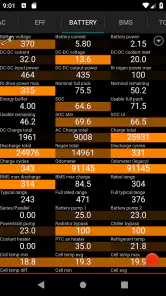
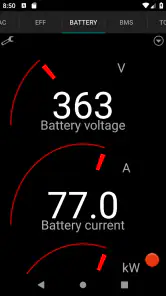

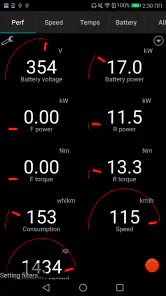
Analysis by Reviewed
I tend to trust a vehicle-diagnostics app most when I know what equipment it needs and what I’m choosing to do with the information it shows. Scan My Tesla is a paid Auto & Vehicles app from Børsand Engineering, aimed at Tesla owners who want to examine technical readings rather than stick to a simple driving display. It costs $9.99, is rated for Everyone, and has a 4.2 average from 419 ratings. Those figures give a useful sense of its audience, but the practical question is whether you want this much detail—and are prepared for the connection setup.
Start with the connection, not the screens
The main hurdle comes before exploring any readings: this app needs an adapter cable and a certain OBD2 adapter to work. That requirement matters more than the download itself. I’d check that I had the specific compatible hardware before paying for the app, rather than assume any Bluetooth diagnostic dongle will do. If you already own the right setup, the app is easier to justify; if not, the overall cost and effort include sourcing the required equipment.
That setup also shapes where the app makes sense. It is for examining a Tesla through a physical diagnostic connection, not a general-purpose car scanner that I’d expect to move casually between vehicles. I’d treat compatibility as the first decision point and avoid buying accessories based only on a familiar connector shape. The app’s developer is Børsand Engineering, and the current version is 3.1.4; it requires Android 5.0 or later. It has passed 10K+ installs, but that does not remove the need to get the adapter arrangement right for your own use.
Who benefits from the extra setup
I would consider this most seriously if I already owned the required equipment and had a recurring reason to inspect my Tesla more closely. A hands-on owner might use it when trying to understand a change in vehicle behavior, or to arrive at a service conversation with a focused question rather than a vague sense that something feels different. The app’s value depends less on how many readings are available than on whether I can connect a reading to a real decision.
For example, imagine noticing that a familiar drive seems to affect the car differently after a change in weather. I would park first, connect the hardware, and compare observations from similar trips rather than treat one session as proof of a fault. Keeping the route and conditions broadly consistent gives the comparison more meaning. If the concern persists, I would take the observation to a qualified technician; I would not use an app reading alone to decide that a repair is necessary.
The opposite case is just as important. If I only want a quick answer about everyday driving, the Tesla’s built-in displays are simpler. If I need a firm diagnosis, professional service is the better tool. And if I am not interested in interpreting technical information, the adapter requirement may feel like effort for little practical return. A broad scanner may be more convenient for someone who works with several makes, but this app is the more focused choice for a Tesla owner who specifically wants to investigate that car.
Reading the car without losing perspective
Once connected, the appeal is the chance to look beyond the simplified information most drivers use day to day. Detailed vehicle readings can help an owner make sense of what is happening during a particular drive or charging session, especially when a dashboard indicator alone leaves questions. I see that as an extra lens on the car, not a replacement for a qualified diagnosis or a reason to make repairs based on one number.
More From Our News Desk

Weather by Xiaomi Review: Clear at a Glance, Less Clear Up Close

X Under Pressure: Can It Recover When Posting Goes Wrong?

Clash of Clans Is Won Between the Battles

Android Auto Makes the Case for Quieter Car Software

MobiOffice: Transforming Mobile Productivity with Seamless Integration

EA SPORTS FC™ Mobile Soccer: Redefining Mobile Sports Gaming
Make the readings useful
A practical approach is to begin with a specific question instead of trying to understand every value at once. If you are checking how the vehicle behaves on a familiar commute, note the conditions and compare like with like on another day. For battery-related observations, charging state and temperature can affect what you see, so a single reading is best treated as a snapshot, not a conclusion about long-term health. This kind of careful comparison is more useful than collecting screens full of numbers without a reason.
That is also where the app’s audience becomes clear. A technically curious owner who likes to understand vehicle behavior may enjoy exploring the information. Someone who only wants to know whether the car is ready to drive may find the extra detail distracting. I would not use a diagnostic display while driving; set things up while parked, and let a passenger handle any checks if there is a genuine need to look during a trip. The value is in informed observation, not watching a phone instead of the road.
What the price asks you to consider
At $9.99, the app is not a free experiment, and its hardware requirement is a separate practical consideration. I would compare that commitment with how often I expect to use detailed Tesla diagnostics. If I am only curious once, a service visit or help from an experienced owner may be more sensible. If I regularly monitor the car and enjoy interpreting technical information, a dedicated app can be more appealing than a broad OBD2 tool whose screens may be designed for many makes and models.
For a routine ownership question, the car’s built-in displays are usually the simpler first stop. For a mechanical concern, a qualified technician is the safer route. This app sits between those options: it can support a more informed conversation and help an enthusiast inspect the car’s behavior, but it should not be treated as an authority on whether a component is safe or needs replacement. That distinction is especially important when a reading looks unusual; confirm the context before drawing a conclusion.
Trust, privacy, and practical control
Because the app works with vehicle information through an adapter, I would think carefully about when I connect it and who can see the phone display. I would keep the device secure, avoid sharing screenshots that reveal personal details, and make a habit of disconnecting the hardware when I have finished. These are sensible user choices for any diagnostic session, not claims about hidden permissions or data handling. I would check the app’s current privacy information and Android permission prompts before installation, then decide whether the access requested fits my comfort level.
One useful habit is to record only what helps answer a real ownership question. For example, if I am comparing behavior before and after a service appointment, I would note the date and conditions alongside the reading rather than keep an unorganized collection of screenshots. That makes the information easier to discuss with a technician and reduces the temptation to overinterpret isolated values. The trade-off is that this more deliberate approach takes time; the app is better suited to an owner who enjoys looking closely than to someone seeking an effortless health score.
Questions to settle before a first session
Before installing, I would check whether the required cable and OBD2 adapter are compatible with my specific setup, rather than relying on the connector’s appearance or assuming a common dongle will work. I would also confirm that my phone meets the Android 5.0 minimum if I plan to use the Android version. These checks avoid the most avoidable frustration: paying for an app and then discovering that the connection hardware is the missing piece.
I would also decide what question I want the first session to answer. That makes it easier to focus on relevant readings, keep notes that are useful, and avoid turning a brief inspection into an attempt to interpret everything on screen. If I cannot explain why I want a reading or what I would do with it, I would leave the inspection for another time. An app can expose information without automatically making that information meaningful.
A cautious recommendation for the right owner
There is a clear dividing line in who should consider it. If you own a Tesla, already have the required adapter cable and OBD2 hardware, and want a closer look at technical data, Scan My Tesla may fit the way you like to manage your car. If you are not interested in interpreting readings, do not have the compatible equipment, or want a straightforward warning-and-repair answer, I would choose a simpler option or speak with a professional instead.
The app is rated for Everyone and has been available since July 21, 2017, but its technical purpose still calls for sensible judgment. The store’s short description is “scan my tesla,” while the real decision is whether detailed diagnostics are worth the setup and the $9.99 purchase for your habits. My recommendation is cautious: it can be a useful companion for a curious, hands-on Tesla owner, provided you verify the adapter requirement first and treat what you see as information to investigate—not a diagnosis in itself.
Hey there, fellow tech enthusiasts! Today, I'm diving into the world of electric vehicles with a nifty app called Scan My Tesla. If you've ever wondered about the intricate details of your Tesla's performance, battery health, or just want to geek out about your car, this app might just be your new best friend. Buckle up as we take a closer look!
Unveiling the Tesla Secrets
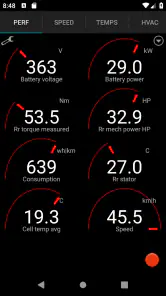
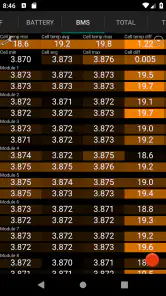
So, what's the deal with Scan My Tesla? Well, this app is like having a backstage pass to your Tesla's internal workings. It taps into your car’s CAN bus, which is basically the nervous system of your vehicle, and pulls out all sorts of data. From battery temperature to motor torque, and even individual cell voltages, it's all there at your fingertips.
Getting Started
First things first, setting up the app is pretty straightforward. You’ll need a Bluetooth OBD-II adapter to connect your phone to your Tesla. Once you’ve got that sorted, you’re good to go. The app is available for both Android and iOS, so no one’s left out. Plus, the interface is pretty user-friendly. I didn’t find myself scratching my head trying to figure things out, which is always a bonus!
For a first visit, I would resist the temptation to explore while the car is in motion. I’d make the connection while parked, choose a limited set of readings to examine, and disconnect once I had what I needed. This simple routine makes the session easier to manage and keeps the phone from becoming another distraction. It also gives me a clean starting point if I want to compare observations later.
Data Galore
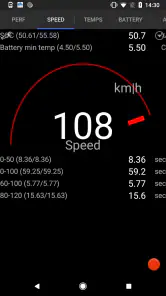
Now, let's talk data. There’s a ton of it – and I mean a ton. For the data-hungry folks out there, this app is a goldmine. It provides real-time data streaming, so you can see how your Tesla is performing on the go. Want to know how many amps your car is drawing while accelerating? Done. Curious about the temperature of your battery pack in different conditions? You got it.
However, I must say, while the data is extensive, it might be a bit overwhelming for some. If you’re not into the nitty-gritty details, you might find yourself a bit lost. But for those who love to tinker and understand their vehicles inside out, it's a dream come true.
Why It Stands Out
What sets Scan My Tesla apart is its community-driven nature. The app is constantly being updated with new features and improvements, thanks to feedback from users. It's like being part of a club where everyone shares a common passion for their Teslas. Plus, the support is pretty great. If you ever run into any issues, there’s a community ready to help out.
Another cool thing is how it allows you to keep tabs on your battery health over time, which is crucial for anyone planning on keeping their Tesla for the long haul. Knowing how your battery is aging can help you make informed decisions about maintenance and usage.
I would still keep any long-term record modest and purposeful. A few observations tied to comparable conditions are more useful than a large archive with no context, especially if I later want to explain a concern to a service professional. I would treat any apparent trend as a prompt to ask better questions, not as a standalone measure of battery condition. That balance lets a curious owner benefit from closer inspection without mistaking access to technical data for certainty.
Final Thoughts
In conclusion, Scan My Tesla is a fantastic tool for any Tesla owner who wants to delve deeper into their car's performance metrics. It’s not for everyone, especially if you’re not into data and details. But if you love knowing what’s happening under the hood, this app is definitely worth a try. It’s like having a personal mechanic in your pocket, always ready to dish out the latest stats about your ride.
So, if you’re ready to geek out over your Tesla, give Scan My Tesla a whirl. It's available for download, so why not take it for a spin and see what secrets your Tesla has been keeping from you?
scan my tesla Frequently Asked Questions
How much does Scan My Tesla cost, and what should I know before buying it?
Scan My Tesla is a paid Auto & Vehicles app from Børsand Engineering, priced at $9.99. Before downloading, consider that the app is only part of the setup: it needs an adapter cable and a compatible OBD2 adapter to work. Check that the required hardware suits your Tesla before purchasing, so you can use the app as intended.
What is Scan My Tesla and what does it do?
Scan My Tesla is an app designed to provide Tesla owners with detailed insights into their vehicle's performance and battery health. It connects to the car's CAN bus using a compatible OBD-II adapter, offering real-time data on energy consumption, battery temperature, and more. This app is particularly useful for Tesla enthusiasts and those who want to monitor their vehicle closely.
Is Scan My Tesla compatible with all Tesla models?
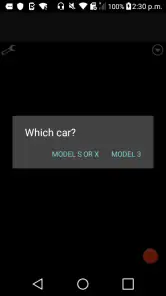
Scan My Tesla is compatible with most Tesla models, including the Model S, Model 3, Model X, and Model Y. However, compatibility may vary depending on the model year and region. It is essential to check the app's compatibility with your specific Tesla model and version before purchasing any additional hardware, such as an OBD-II adapter.
Do I need any extra hardware to use Scan My Tesla?
Yes, to use Scan My Tesla, you will need an OBD-II adapter that is compatible with your Tesla model. The app also needs an adapter cable. This hardware allows the app to interface with the vehicle's CAN bus, enabling it to read and display various performance metrics. Without the required hardware, the app cannot access the necessary data from your car.
Is it safe to use Scan My Tesla with my vehicle?
Using Scan My Tesla is generally safe for your vehicle as long as you follow the manufacturer's instructions and use a compatible OBD-II adapter. The app does not modify any settings or interfere with the vehicle's operation. However, unauthorized use or incorrect installation of hardware might void your warranty, so it's advisable to proceed with caution.
Pros
- Comprehensive real-time data display.
- User-friendly interface design.
- Compatible with most Tesla models.
- Regular software updates.
- Detailed energy consumption insights.
Cons
- Requires Bluetooth OBDII adapter.
- Limited support for older Tesla versions.
- App may occasionally crash.
- Premium features require purchase.
- Can drain smartphone battery quickly.
- Category
- Auto & Vehicles
- Version
- 3.1.4