

QToon: Manga, Manhua & Comics
- 0.00
- 0.0
- Installs
- 50.00K
- Price
- Free

Screenshots
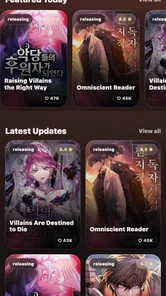
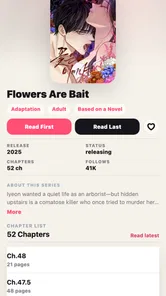

Analysis by Reviewed
I judge a comics reader less by how impressive its catalogue sounds and more by whether it makes it easy to return to a story where I left off. QToon: Manga, Manhua & Comics is aimed at that practical habit: it gives readers a place to read several kinds of illustrated stories and keep their progress together. That makes it worth considering if your reading jumps between manga, manhua, manhwa and other comics, though the experience depends on what you expect from a dedicated reading app.
A realistic place to start
If you are deciding whether to make this your regular reader, I would treat the first few sessions as a practical trial rather than an extended browse. Pick a title you genuinely want to read, use the app in the place you normally read, then come back after a gap. That helps answer a useful question: does the saved position make your real routine smoother, or do you still find yourself searching around before you can continue?
That distinction matters if you read in small windows. Someone who reads during a short break may value an easy return to a chapter more than elaborate library tools. A reader who spends a whole evening exploring new series may care more about discovery and organization. QToon’s central appeal is clearest in the first case, while the second reader should pay closer attention to how its selection and controls suit them.
Making a reading routine work
I use this section to think about how a reading routine can stay dependable without turning into another task to manage. Choosing a natural stopping point and returning to one story at a time makes saved progress more useful, especially when the day only leaves room for a few pages. That habit also helps reveal whether the reader’s everyday flow suits me better than a more specialized alternative.
Start with one story and a simple handoff
My recommended first step is to choose a series you already want to follow, read a little, then close the app and return later. That small test tells you more than browsing for several minutes: you can see whether the reading flow feels comfortable and whether saved progress suits the way you move through chapters. The app’s focus on remembering where you are is especially useful when you read in short bursts rather than finishing a long session at once.
For example, imagine reading a few pages during a commute, putting your phone away, and picking the story up after dinner. With a reader designed to save progress, you spend less time trying to remember the last panel and more time actually reading. I would still make a deliberate habit of leaving a story from its reading screen rather than jumping between several series in a hurry. That gives you a clear way to check that your place is being retained before you rely on it across a busy week.
The range of formats is another practical point. Manga, manhua and manhwa are often scattered across different reading services, so a single app that handles those alongside comics can simplify a reader’s routine. It is most appealing if you already move between these forms. If you follow just one series on a service whose catalogue and reading tools you already like, changing apps may not improve much.
More From Our News Desk

 Gmail
GmailGmail in a Busy Inbox: Who Benefits Most?
From first account to crowded workday, Gmail earns its place through dependable search and flexible sorting—but its best fit depends on how much inbox maintenance you can tolerate.

 Prime Video
Switching to Prime Video: What Changes in Your Viewing Routine
Prime Video can make a compelling second home for streaming, but switching means learning a different catalog, rental layer, and route from browsing to playback.

 Universal TV Remote Control
Universal TV Remote Control Works Best as a Reliable Backup
A phone remote earns its place through quick setup and reliable habits. Here is how to get more from Universal TV Remote Control—and where its limits show.

 Weather - By Xiaomi
Weather by Xiaomi Review: Clear at a Glance, Less Clear Up Close
Xiaomi’s weather app makes everyday forecasts quick to scan, but its calm surface can leave useful details and recovery paths harder to find than they should be.

 X
XX Under Pressure: Can It Recover When Posting Goes Wrong?
A resilience-focused review of X, examining setup, mistaken posts, interruptions, weak connections, and the gaps that matter when recovery needs to be dependable.

 Clash of Clans
Clash of Clans Is Won Between the Battles
Its raids are quick; its community is a long-term project of coordination, teaching, rivalry, and shared responsibility—with all the friction that entails.
Latest News



What kind of reader is it for?
QToon is a comics app from K-drama world, and it is free to use. It has reached over 50,000 installs, which gives a newcomer some context for its audience without telling you whether its selection will match your personal tastes. The age rating is Teen, so it is sensible to keep that in mind when choosing what younger readers use; the label is not a substitute for checking a particular title’s suitability.
I would put it on the shortlist for someone who reads across several illustrated formats and wants saved progress to be part of the everyday experience. It is also a reasonable option for a casual reader who wants to try a comics app without paying upfront. A collector who needs a very specific publisher catalogue, extensive library organization, or a particular reading control should compare those needs against the app itself before committing to it as their main home.
It is less compelling for someone whose reading is tied to one publisher or one narrow niche. In that situation, a dedicated service may offer a more direct route to the titles that matter, and there is little benefit in switching just to keep a broader mix of formats together. I would also hesitate to recommend it as a family’s only comics source: the Teen rating is a useful guide, but choosing suitable stories still calls for a parent or reader to look at each title.
Settings to check before settling in
Rather than assuming a reader will suit you out of the box, take a moment to inspect the controls that are actually available in your installed version. Look for any reading or display options that matter to your eyes and device, and try them on a chapter before building a routine around them. I would not assume that every common feature found in other comics apps is present here; the useful approach is to test what QToon offers instead of planning around unconfirmed tools.
One non-obvious tip is to make your first trial deliberately varied: read a chapter in your usual position, then try a short session one-handed or with the screen held differently. A control that seems fine at a desk can become awkward when you are standing on a train. If the app gives you a way to adjust the reading experience, you can decide whether that adjustment solves the problem; if not, you have learned early that your preferred posture may not fit its controls.
It is also worth checking how you want to manage attention. If you often open a reader for a single chapter, decide on a stopping point before you begin. That is a habit rather than a special feature, but it works well with a progress-saving reader: finish at a natural break, leave the app, and later use the remembered position as your return point. It reduces the chance of rereading panels or losing track when several series compete for your time.
For longer sessions, I would make a quick comfort check before settling in: confirm that the text and panels are comfortable at your usual brightness and that the page movement feels natural. A setting only helps if it works in the conditions where you read. It is sensible to revisit those choices when moving from a large screen to a smaller phone, rather than assuming one setup will feel equally good everywhere.
Repeatable habits beat frantic browsing
For a growing reading queue, I find it helps to separate choosing from reading. Browse when you have time to compare titles, then open a specific story when you have a short window to read. That pattern avoids turning every spare moment into another search session. Since QToon brings multiple comic formats under one roof, it can be tempting to keep switching between them; a simple rule such as “one chapter before choosing the next series” makes progress easier to follow.
A second useful pattern is to use the app at the point where you naturally pause in the day. Read during a lunch break, stop at the end of a scene, and leave the next session for later. Saved progress is most valuable in this kind of fragmented routine, not only when you are juggling dozens of series. If you share a device or regularly hand it to someone else, be more cautious: use a clear stopping point and check that the app has kept your place before switching readers or accounts.
When comparing QToon with the usual alternatives, the key trade-off is breadth of reading formats versus the depth of a specialist service. A manga-focused app may be a better fit if your priority is a particular manga publisher or a highly tailored manga workflow. A web-based reader may suit you if you prefer reading without installing another app. QToon’s appeal is the prospect of keeping varied comics reading and progress in one place; the best choice still depends on whether its available titles and controls match your habits.
A small routine can also keep a mixed reading queue from becoming confusing: choose what you plan to read before a spare moment arrives, then use that session for the chosen story rather than restarting discovery. This is especially helpful when one title is a quick chapter and another asks for more attention. The point is not to impose a strict schedule; it is to keep browsing from eating the few minutes you meant to spend reading.
Where the convenience has limits
A progress-saving feature solves one narrow problem: remembering where you were. It does not by itself guarantee that you will find every series you want, that all formats will feel equally comfortable to read, or that a particular title will suit your taste. I would test the stories you care about first rather than treating the broad range of formats as proof that the catalogue will cover every niche.
There is also a practical cost to keeping reading in one app: you become dependent on its own way of organizing and presenting the material. If you have carefully built a library elsewhere, switching may mean changing a routine that already works. Likewise, readers who want deep customization should verify the available controls directly instead of assuming QToon matches the most feature-rich alternatives. For someone who mainly wants a straightforward place to continue comics, that restraint may be perfectly acceptable; for a power user, it could be decisive.
The version available is 1.0.13, and the app supports Android 7.0 and later. That makes the OS requirement easy to check before installing on an older Android device. Since updates can change an app’s behavior, I would reassess the reading controls after a major update if a familiar habit suddenly feels different, rather than assuming the interface has stayed exactly the same.
One question worth answering before you switch is whether you need your existing reading history to move with you. If you have been following stories elsewhere, make a note of where you stopped before changing apps; that simple step gives you a reliable starting point even if your old and new routines do not line up neatly. It also prevents the first session from becoming a hunt through chapters instead of a test of the reader itself.
A measured verdict for regular readers
I see QToon as a sensible reader to try if your interests cross manga, manhua, manhwa and comics and you want saved progress to support short, repeatable reading sessions. Its free price lowers the barrier to testing that workflow, and the Teen rating gives families a useful starting point when considering age suitability. I would begin with a couple of titles that matter to you, check the available reading settings, and see whether returning to a saved position feels natural.
It is not automatically the right choice for a reader who needs a specific catalogue, extensive customization, or an established library they do not want to rebuild. In those cases, a specialist service or the app you already use may be better. But if your main frustration is losing your place while switching among different kinds of comics, QToon has a clear, practical reason to earn a spot on your phone. My advice is to test it as a daily reading habit, not just as a browsing destination: the way it fits your actual pauses will tell you whether it deserves to stay.
There is one final distinction I would keep in mind: an app can make continuing a story easier without being the best place to discover every story. If you already know what you want to read, testing the saved-position workflow is straightforward. If you are still searching for a particular series or expect a highly curated catalogue, check that first and compare it with the service you currently use. QToon is most convincing when its practical strength—bringing varied comics reading and continuity into one routine—matches the reason you are looking for a new reader.
QToon: Manga, Manhua & Comics Frequently Asked Questions
What is QToon: Manga, Manhua & Comics?
QToon is a mobile reading app for people who enjoy digital comics, including manga, manhua, and other comic formats. It brings titles together in a browsable library, where readers can explore available series and open episodes on their device. The selection, reading options, and catalog may change over time, so check the app listing and current in-app details to confirm that it offers the genres and titles you want.
Is QToon free to download and use?
The app may be available to download without an upfront charge, but that does not necessarily mean every title or feature is free. Comic apps can include advertising, in-app purchases, subscriptions, or other access limits, and availability may differ by region or change with updates. Before reading, review QToon’s store listing and its in-app payment information so you understand any costs, trial terms, or restrictions.
Can I read comics offline with QToon?
Offline reading depends on whether QToon provides a download option for individual chapters or series and on the rules attached to that content. Do not assume that a comic you have opened online will remain available without an internet connection. Check for download controls in the app, make sure the chapters are saved before travelling, and be aware that offline access may require storage space or may be limited by licensing and account settings.
Is QToon suitable for children?
Suitability depends on the specific comics available, since manga, manhua, and other comics can cover a wide range of ages and themes. A general comic catalog should not automatically be treated as child-friendly. Parents and guardians should check the app’s age rating, content notices, and privacy information, then review titles before allowing younger readers to use it. Device-level parental controls may also help manage access and purchases.
What should I check before installing QToon?
Before installing QToon, confirm that your phone or tablet meets the app’s current operating-system requirements and that you have enough storage for the app and any chapters you may save. Review the developer information, permissions, privacy policy, and recent user feedback in the official app store. Also check regional availability, account requirements, and any subscription or purchase terms, as these details can affect access and may change over time.
Pros
- Offers manga
- manhua
- and comics in one reading app.
- Reading progress helps you pick up where you left off.
- A broad catalog makes it easy to discover different series.
- Chapter-based browsing keeps long-running stories organized.
- Useful for readers who want multiple comic formats in one place.
Cons
- Catalog availability may vary by region.
- Some series may have incomplete or delayed chapter updates.
- Finding specific titles can take time in a large catalog.
- Reading experience depends on a stable internet connection.
- Ads or paid options may interrupt access to some content.











