PickFresh App
- 28.00
- 4.1
- Installs
- 10.00K
- Price
- Free

Screenshots
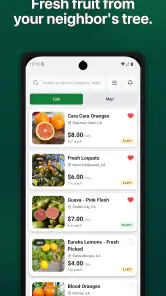
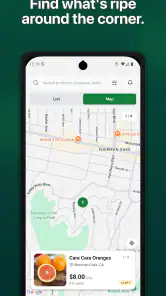
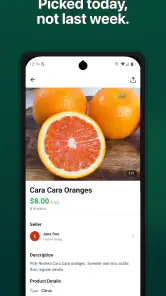
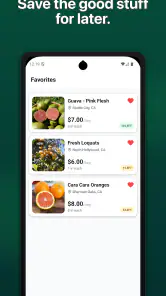
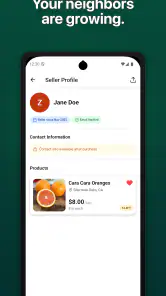
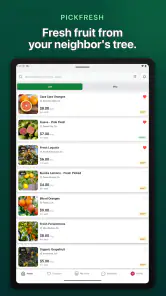
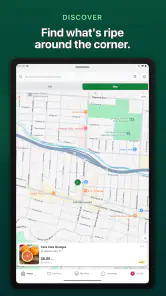
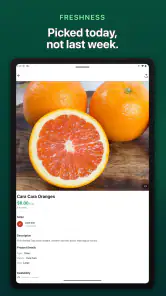
Analysis by Reviewed
Buying fruit locally sounds simple until the practical details get in the way: finding what is available, understanding where it comes from, and deciding whether an extra app is worth using instead of a familiar grocery service. PickFresh App approaches that problem as a shopping app built around a local fruit marketplace. I found its appeal less in flashy extras and more in the possibility of making local produce easier to discover in one place.
My first impression is that it is aimed at people who want a more direct way to look for fruit nearby, rather than treating produce as just another item in a huge general marketplace. That focus can be useful, especially when you care about seasonal choices or supporting nearby sellers. At the same time, a focused marketplace has a narrower job than a full supermarket app, so it is important to know what kind of shopping problem you want it to solve before installing it.
Getting past the first points of friction
The app is free, which removes the biggest barrier to trying it. It comes from PickFresh, Inc., and its current version is 1.0.16. The release is still relatively early in the product’s life, so I would approach it as a developing shopping service rather than a mature replacement for every grocery tool on your phone.
The first place users can get stuck is expectation. A local marketplace is not necessarily the same thing as a large supermarket catalog. If you open it expecting every household item, brand, and delivery option to appear immediately, the experience may feel limited. Its useful territory is fruit-focused local shopping, and that narrower purpose is also what gives it a clearer identity.
A second source of friction is the local nature of the experience. Results can depend on where you are shopping and on what participating sellers make available. That means an empty or thin selection does not automatically mean the app is broken. It may simply reflect the marketplace around you at that moment. I would check the location or market context first, then try again before assuming there is a technical problem.
There is also a difference between browsing and completing a purchase. Seeing a fruit listing is only one part of the process. You still need to pay attention to availability, seller details, pickup or delivery wording, and any timing information shown during the shopping flow. My practical advice is to read each screen instead of tapping quickly through it, particularly when buying produce for a specific meal or event.
The most useful mindset is to treat PickFresh App as a local discovery and shopping tool, not as an all-purpose grocery replacement. That distinction makes its strengths easier to notice and its limitations less surprising.
More From Our News Desk

Weather by Xiaomi Review: Clear at a Glance, Less Clear Up Close

X Under Pressure: Can It Recover When Posting Goes Wrong?

Clash of Clans Is Won Between the Battles

Android Auto Makes the Case for Quieter Car Software

MobiOffice: Transforming Mobile Productivity with Seamless Integration

EA SPORTS FC™ Mobile Soccer: Redefining Mobile Sports Gaming
Small setup checks that prevent larger problems
Before judging the marketplace, I would start with a clean, uncomplicated setup. Install the latest available version, open the app on a stable connection, and give each screen time to load. When a shopping catalog is being assembled from local listings, rushing through the opening steps can make a temporary loading issue look like missing inventory.
Android users should note that the app supports Android 7.0 and later. That covers many older devices, but compatibility alone does not guarantee a smooth experience on every phone. If the display behaves strangely, check that the operating system is updated as far as the device allows, close other demanding apps, and reopen PickFresh App. These are simple steps, but they separate a local app problem from a phone that is short on available resources.
I would also check the basics before creating a shopping plan. Confirm that the phone’s date and time are correct, that the connection is not switching repeatedly between mobile data and Wi-Fi, and that the app has enough room to operate normally. I would not begin by changing advanced phone settings or repeatedly reinstalling it. Those actions can create more confusion, especially if you have already started a basket or saved details.
For a first test, use a small, flexible shopping task. Instead of opening the app five minutes before a dinner gathering and expecting an exact order, browse when you have time to compare what is shown. Look for a fruit you would genuinely buy, inspect the available information, and follow the process far enough to understand the marketplace flow without committing to a large purchase.
This test has a practical advantage: it tells you whether the service fits your routine. A marketplace can be technically functional and still be inconvenient if the available choices do not match your neighborhood, schedule, or preferred way of receiving produce. That is a fit issue, not necessarily a quality issue.
How I would recover a stalled shopping session
When a listing, screen, or checkout step appears to stall, I would recover in stages. First, wait briefly and check whether other parts of the app respond. If only one page is slow, return to the previous screen once and reopen that section. If the entire app is unresponsive, close it normally and launch it again rather than repeatedly tapping the same button.
If the problem continues, test the connection by opening another ordinary website or app. A failed connection can interrupt catalog loading, account actions, or order-related steps while leaving the rest of the phone apparently normal. Switching once between a reliable Wi-Fi network and mobile data can help identify that cause. I would avoid constant switching, because an unstable connection can make the result harder to interpret.
Another useful recovery habit is to write down what you were doing when the issue appeared. For example, note whether it happened while browsing, selecting an item, reviewing a purchase, or returning from another screen. That detail is far more useful than saying only that “the app does not work.” It can also prevent you from repeating the same action and accidentally creating duplicate attempts.
If the app opens but the local selection looks empty, I would not immediately clear all app information. Start by checking the selected area or shopping context, refreshing once, and trying a broader browsing time. Local inventory can change, and a marketplace view may be more sensitive to location and availability than a static product catalog.
Reinstalling should be a later step, not the first one. Before doing it, make sure you remember any sign-in information and understand that a fresh installation may require you to repeat setup. If a purchase was already in progress, I would first confirm its status through the app’s available screens before trying again. The safest recovery is the one that avoids creating a second order or losing track of the first.
Separating app trouble from marketplace reality
One of the most important distinctions with PickFresh App is between a technical failure and a normal change in local supply. A general grocery app may show a broad, standardized catalog even when one store is out of stock. A local fruit marketplace can feel more variable because the selection is tied more closely to what sellers make available. That variation may be inconvenient, but it is also part of the local-shopping model.
Suppose you open the app on Saturday morning and find fewer options than expected. Before blaming the software, consider the practical situation: the local listings may not have been updated yet, a seller may have sold through a popular item, or the available market may simply be smaller than the one you imagined. Try again later and compare the result with another flexible fruit choice. If one item is absent but other parts of the marketplace load normally, the issue is probably availability rather than a broken app.
The same reasoning applies to timing. If you need a guaranteed product for a recipe tonight, a conventional supermarket app may be the safer choice because its inventory and fulfillment process may be more familiar to you. If your priority is exploring local fruit and you can tolerate substitutions or a changing selection, PickFresh App makes more sense.
I also would not assume that every delay belongs to the app. A seller may need time to prepare produce, a pickup window may be limited, or a delivery arrangement may depend on local conditions. Read the wording attached to the purchase carefully. The app can present the marketplace, but it cannot make a local seller’s stock behave like a warehouse with unlimited supply.
Everyday uses that make the app worthwhile
The most convincing use case for me is a flexible weekly fruit shop. Imagine planning breakfasts for the next few days without needing one exact variety. You open the marketplace, see what local sellers are offering, compare the choices that fit your budget and schedule, and select fruit that can actually be used soon. The benefit is not just convenience; it is the ability to adapt the plan to local availability.
It can also work for someone who wants to make local shopping a habit without visiting several places first. Rather than guessing which seller might have suitable fruit, you can use the app as an initial check. Even if you still decide to shop in person, that preview can help you decide whether the trip is worthwhile.
A less obvious workflow is to use it for substitution planning. If you are preparing a meal that needs fresh fruit, choose the recipe’s essential texture or role rather than becoming attached to one exact item. For example, plan a bowl around whatever suitable local option is available, then adjust the rest of the ingredients. This makes a changing marketplace a benefit instead of a constant disappointment.
Another useful habit is to browse before you are in a hurry. Local shopping works better when you have time to notice patterns in availability and decide which sellers or options fit your routine. Last-minute use can still be convenient, but it gives you less room to recover if the selection changes or a listing does not suit your timing.
Families may appreciate the focused purpose if they are trying to buy more fresh fruit and want children to help choose. The app’s Teen content rating is worth keeping in mind for households deciding who should use it independently. I would still treat any purchase, payment decision, or delivery arrangement as something an adult should review, especially when the shopper is young.
Where it compares well, and where another option wins
Compared with a large supermarket app, PickFresh App has a clearer local-fruit identity. That can make browsing feel more relevant when your goal is produce rather than a long list of unrelated goods. It may also encourage a more flexible, seasonal style of shopping. The trade-off is breadth: a supermarket service is usually the better starting point when you need pantry items, household products, or a tightly controlled full order.
Compared with a general marketplace, the focused approach can reduce distraction. You are not sorting through endless categories to find fruit. However, a general marketplace may offer a more familiar account system, wider seller coverage, or more predictable fulfillment in areas where local fruit listings are limited. I would choose the broader option when certainty matters more than local discovery.
Compared with visiting a farmers’ market or nearby shop directly, the app offers a convenient first look, but it cannot fully replace the in-person experience. Seeing and selecting produce yourself may matter if ripeness and appearance are especially important. PickFresh App is most useful when it saves you a trip or helps you find a local option you might otherwise miss, not when you require complete physical inspection before buying.
The app’s average rating is 4.1 from around 84 ratings, with about 28 written reviews. That suggests a generally positive early response, but I would read it as an encouraging signal rather than proof that the same experience is available in every location. A local marketplace naturally depends on the quality and activity of the market around each user.
Who should try it, and who should skip it
I would recommend trying PickFresh App if you buy fruit regularly, enjoy supporting local sellers, or prefer a shopping experience centered on fresh produce. It is also a reasonable choice for people who can adjust their shopping list when a particular fruit is unavailable. The free price makes that experiment relatively easy.
I would be more cautious if you need a complete grocery order, guaranteed stock, or a precise delivery promise every time. Someone managing a strict meal plan, shopping for a large event, or relying on one exact ingredient may find a conventional grocery service more dependable. The same applies if local options in your area are sparse; a focused marketplace cannot solve a supply problem simply by presenting it on a phone.
Because the app has over 10 thousand installs, it has reached a meaningful early audience, but it is still not something I would assume is equally established everywhere. The developer is PickFresh, Inc., and the product’s early-stage feel means patience may be useful when a workflow is less polished than the biggest shopping platforms.
My practical verdict after using it
PickFresh App has a sensible purpose: it brings local fruit shopping into a dedicated mobile experience instead of burying it inside a general store catalog. I like it best as a planning and discovery tool for flexible shoppers. Its value grows when you are willing to work with changing local availability rather than demanding the same inventory every day.
The key to a good experience is preparation. Confirm the app is running on a supported device, use a stable connection, begin with a small browsing task, and distinguish missing local stock from a genuine loading problem. If a session stalls, recover calmly and verify any purchase status before repeating an action. Those habits matter more here than they would with a simple static catalog because marketplace conditions can change independently of the software.
At no cost, it is worth testing if local fruit shopping matches your routine. I would not make it my only grocery app, but I can see it earning a regular place beside one. My recommendation is to use it when flexibility and local discovery matter more than a perfectly standardized supermarket order.
In short, this is a focused shopping app with a clear audience rather than a universal solution. If you want a convenient way to explore nearby fruit options and can accept that supply, timing, and seller activity may shape the experience, it is a promising tool to keep available. If your priority is certainty across a complete weekly shop, another category of service will probably serve you better.
PickFresh App Frequently Asked Questions
Is PickFresh App free to download, and what devices can run it?
PickFresh App is free to download and is listed for devices running Android 7.0 or later. Before installing, check that your device meets this minimum operating-system requirement and has enough available storage. The app is a shopping service focused on a local fruit marketplace, so its usefulness will also depend on whether the service operates in your area.
Who makes PickFresh App, and is it suitable for younger users?
PickFresh App is developed by PickFresh, Inc. Its content rating is Teen, so families should consider that rating when deciding whether it is appropriate for a younger user. The app is intended for shopping rather than entertainment, and anyone planning to place orders should also follow the payment and account guidance shown within the app.
What is PickFresh App and what can I use it for?
PickFresh App is designed to help users discover and order fresh groceries and everyday food items through a mobile device. Depending on the service area, you may be able to browse available products, view prices, add items to a shopping cart, choose delivery or pickup, and follow order updates. Product selection and ordering features can vary by location.
Is PickFresh App available in my area?
Availability is one of the first things to check before downloading or placing an order. PickFresh services may be limited to selected cities, stores, or delivery zones, and the catalog can change according to your location. After installing the app, enter your address or enable location access to confirm whether delivery, pickup, and the full product range are supported nearby.
How do I place an order through PickFresh App?
To place an order, users generally select a store or service location, browse categories, add products to the cart, and review quantities and prices before checkout. You may then choose an available delivery or pickup time, provide the required address details, and select a payment method. Always check substitutions, fees, minimum order requirements, and the final total before confirming.
Pros
- Quickly find nearby fresh produce and grocery deals.
- Simple browsing experience with clear product categories.
- Convenient access to local store information and offers.
- Useful for comparing available products before shopping.
- Can help reduce time spent searching for fresh food.
Cons
- Availability may vary significantly by location.
- Some listings or prices may not update immediately.
- Limited usefulness in areas with few participating stores.
- Offers may have restrictions or short expiration periods.
- The app may require location access for its main features.
- Category
- Shopping
- Version
- 1.0.16











