

OpenToon - Manga Translator
- 151.00
- 4.5
- Installs
- 50.00K
- Price
- Free

Screenshots
Analysis by Reviewed
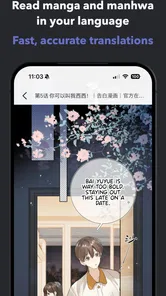
When a comic is drawn in a language I can’t read, even a familiar genre can become a guessing game. OpenToon’s central idea is to translate manhwa and webtoons so readers can follow stories across language barriers. That focus makes it more specific than a general comic reader, but it also sets a clear expectation: the translation has to help you understand the page without making reading feel like a chore. For readers whose main obstacle is language, that is the feature worth judging most closely.
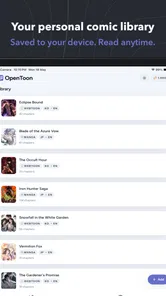
OpenToon is a free comics app from OpenNovel, with optional in-app purchases. I’d consider it when I already have a comic I want to read and need help understanding its dialogue, rather than when I’m simply browsing for a large library of new series. Its appeal is practical: it aims to bring translation into the act of reading, where confusion occurs, instead of asking you to abandon the page and work out every line elsewhere.
Translation is the reason to choose OpenToon
I’d judge OpenToon by how well it keeps translation connected to the comic, not by expecting it to replace every reader or edition. That distinction helps set a fair expectation: the useful question is whether it makes a foreign-language scene easier to follow without turning each panel into a separate task. Next, I’d test that promise on a short exchange before committing to a longer read.
A focused answer to a familiar reading problem
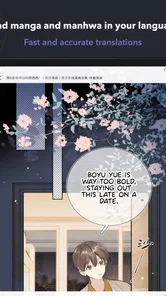
Manhwa and webtoons often depend on quick exchanges, sound effects, and small shifts in tone. Missing a short line can make a whole scene less clear, especially when characters rely on teasing, slang, or an abrupt change of mood. A translator built around comics addresses a different problem from a plain image viewer: the goal is not merely to display a page, but to make its story accessible to someone who does not know the original language.
That distinction matters if you normally copy text into a translation app or switch between several tools. Those workarounds can be effective when a page contains selectable text, but comic lettering is often part of the image. Stopping to inspect a panel, type or capture text, then return to the story breaks the rhythm. OpenToon’s promise is appealing because it puts the translation task closer to the comic itself.
I would still treat any machine-assisted translation as a reading aid, not an authoritative version. A literal rendering can convey who is speaking and what is happening while missing a joke, a cultural reference, or the emotional shade of a phrase. With comics, the surrounding artwork helps fill gaps, but the reader may have to use that context rather than expect every line to sound polished.
What the translated page changes
When translation works well, its value is not just that individual words become readable. It reduces the mental effort of keeping track of a scene. I can look at a character’s expression, follow the dialogue, and stay with the pacing instead of repeatedly leaving the page to resolve a sentence. That is especially useful in a long conversation, where a small interruption can make it harder to remember who said what.
More From Our News Desk

 Gmail
GmailGmail in a Busy Inbox: Who Benefits Most?
From first account to crowded workday, Gmail earns its place through dependable search and flexible sorting—but its best fit depends on how much inbox maintenance you can tolerate.

 Prime Video
Switching to Prime Video: What Changes in Your Viewing Routine
Prime Video can make a compelling second home for streaming, but switching means learning a different catalog, rental layer, and route from browsing to playback.

 Universal TV Remote Control
Universal TV Remote Control Works Best as a Reliable Backup
A phone remote earns its place through quick setup and reliable habits. Here is how to get more from Universal TV Remote Control—and where its limits show.

 Weather - By Xiaomi
Weather by Xiaomi Review: Clear at a Glance, Less Clear Up Close
Xiaomi’s weather app makes everyday forecasts quick to scan, but its calm surface can leave useful details and recovery paths harder to find than they should be.

 X
XX Under Pressure: Can It Recover When Posting Goes Wrong?
A resilience-focused review of X, examining setup, mistaken posts, interruptions, weak connections, and the gaps that matter when recovery needs to be dependable.

 Clash of Clans
Clash of Clans Is Won Between the Battles
Its raids are quick; its community is a long-term project of coordination, teaching, rivalry, and shared responsibility—with all the friction that entails.
Latest News



The format also changes what I would expect from the app compared with a traditional comic reader. A standard reader is usually the better choice if I already understand the language and care most about an uninterrupted view of the art. OpenToon is more compelling when language is the bottleneck. If the translation requires extra attention or produces awkward phrasing, the reader may trade one kind of friction for another.
I would test it on a short scene before settling in for a long chapter. A few panels are enough to see whether translated text is legible on your screen, whether the wording makes the exchange understandable, and whether switching between reading and translation feels natural. If the scene is confusing even with the art and translated dialogue together, a different source or a human-translated edition may be a better fit.
A practical way to read without losing the scene
For an everyday use case, imagine having a few quiet minutes during a commute or a lunch break and wanting to catch up on a webtoon whose original language you don’t know. A separate translation workflow can eat into that short window. An app centered on translating comics is useful precisely when you want to spend those minutes following the panels, not preparing screenshots or moving text between tools.
There is a trade-off, though: reading on a phone already means working with a tall, narrow screen, and translated text can add another layer to a page that was designed around its original lettering. I’d avoid rushing through a dense scene on a small display. Pause when a line seems out of place, compare it with the character’s expression and the surrounding panels, and only then decide whether the translation has changed the meaning. That habit helps prevent a confusing line from distorting the entire scene.
Another useful approach is to use translation selectively. If I can understand most of a chapter but keep stumbling over a particular exchange, I don’t need to treat every panel as equally difficult. Focusing attention on the lines that block comprehension can preserve more of the original reading flow. This is a general reading strategy rather than a claim about a special OpenToon setting, but it suits the app’s translation-first purpose.
Where it sits beside other options
Compared with a general-purpose translation tool, OpenToon is aimed at the comic-reading context rather than translation as a standalone task. A general translator may be more flexible for signs, messages, or copied text, but it can feel clumsy when the source is a sequence of illustrated panels. A conventional webtoon app, on the other hand, may make more sense for readers who already have access to a localized edition and want the cleanest reading experience.
That makes the choice fairly simple. I’d reach for OpenToon when I want help understanding manhwa or webtoons and don’t want translation to be a separate project. I’d choose a standard reader if the comic is already in a language I understand, or if presentation and uninterrupted artwork matter more than language support. For especially nuanced dialogue, a licensed human translation is still preferable when one is available to you.
The app is listed as free, but it also offers in-app purchases priced from $2.99 to $119.99 per item. I’d decide whether the translation workflow suits me before spending anything, and check the purchase details in the app before committing. The range is wide enough that it is sensible to be deliberate rather than assume every useful part of the experience is included at no cost.
Good fit for curious readers, less so for everyone
OpenToon is a sensible option for someone who regularly encounters manhwa or webtoons they cannot read and is willing to accept translation as an aid rather than a perfect literary substitute. Its strongest use case is practical comprehension: following a conversation, understanding why a character reacts, and keeping the story moving without constantly leaving the comic.
It is less suitable if you expect every line to preserve wordplay and cultural nuance, or if you simply want a large catalog of comics with no translation-related steps. Readers who are already comfortable using a separate translator may also prefer the flexibility of their existing routine. The key question is not whether translation is useful in theory; it is whether having it in a comic-focused app makes your own reading easier.
The app has an average rating of 4.5 from around 5,000 ratings, and it has passed 50,000 installs. Those figures suggest that readers have found a reason to try it, but they don’t tell me whether its translation style will suit a particular comic or language pair. I’d use a short, dialogue-heavy scene as my own test, because that reveals more about practical readability than a quick look at a cover or a single panel.
OpenToon is rated for Everyone, runs on operating systems from version 10 onward, and its current release is version 1.1.4. It was released on May 24, 2026. Those details matter when checking whether the app is appropriate for a device or household, but the real decision remains the translation experience: does it help you stay with a story you otherwise could not follow?
My recommendation
I see OpenToon as a focused reading companion for people whose interest in comics is held back by language. It is worth trying if translating a page elsewhere has become a regular interruption and you want a more direct route from panel to meaning. I would start with a short chapter, judge the wording and legibility for myself, and only then decide whether it belongs in my regular reading routine.
OpenToon is not the option I’d pick for everyone: readers who value polished localization above all else, or who already read comfortably in the comic’s language, may be happier with a conventional edition or reader. But for a curious reader who wants to explore manhwa and webtoons beyond familiar languages, its translation-centered approach addresses a real obstacle. If that is the problem you have, a quick trial on a scene you care about is a reasonable next step.
Making a fair first test
For a useful trial, I’d choose a scene with ordinary conversation before judging the app by a page full of jokes, invented terms, or sound effects. That gives me a better sense of whether the translated wording conveys basic relationships and actions. Then I’d compare a more emotionally charged exchange, where tone matters, and ask whether the art still supplies enough context when a line feels stiff. This is a more revealing test than opening a random panel and deciding from one sentence.
I’d also avoid judging a translation only by how natural it sounds in isolation. In a vertical comic, a line may depend on a reaction shown several panels later, so I’d read the exchange as a sequence rather than treating each bubble as a separate caption. If something seems contradictory, looking back one panel can clarify whether the issue is wording or simply a deliberate reveal. That small habit helps keep an imperfect phrase from spoiling a scene that is otherwise easy to follow.
What to expect from the workflow
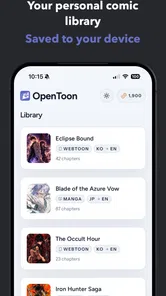
A sensible question is whether OpenToon replaces a comic source or works best alongside one. I would approach it as a translation-focused way to read, not assume it is a complete discovery library or a substitute for every official edition. If I already have a preferred source for a series, I’d first check whether the comic I want is usable in the way I expect, then evaluate the translation on a few pages before planning a long reading session.
It is also worth thinking about what happens when you encounter a difficult name or phrase. Rather than accepting an unfamiliar rendering as a settled fact, I’d keep the character and scene context in mind and see whether the same term appears again. Recurring names and relationships can become easier to follow as the story develops, while a one-off joke may remain ambiguous. Readers who need exact wording for study or close analysis should use a human-translated edition when available; OpenToon’s more natural role is helping me follow the broad action and dialogue.
For someone reading during small breaks, the best routine may be to test a chapter at home first, when there is time to inspect awkward lines and decide whether the display works comfortably. If it passes that test, short sessions away from home become more enjoyable because the reader already knows what to expect. If it does not, finding that out early is better than paying for an option before knowing whether the translation suits the material.
Who benefits most from the focused approach
I think the strongest audience is a curious reader who has found a particular manhwa or webtoon through friends or online discussion but cannot comfortably read its original language. The app may also suit someone learning a language who wants visual context while following dialogue, provided they treat translations as support rather than as a reliable lesson in grammar or nuance. The panels can make a scene easier to interpret, but they cannot guarantee that every idiom carries over cleanly.
By contrast, I’d skip it if my main priority were a curated collection, a polished official localization, or a completely uninterrupted presentation of the art. Those readers are better served by a conventional comic service with editions in a language they understand. OpenToon’s value is narrower and more practical: it is for the moment when the story is appealing, but language is keeping me outside it.
That focus is also why I would not judge the app solely by how it compares with a full-featured comic platform. They solve different problems. A catalog-led reader helps me choose what to read and enjoy a finished localized page; a general translator handles many kinds of text but can pull me away from the panels. OpenToon’s case rests on whether keeping translation close to comic reading makes a foreign-language story easier to follow in my own routine.
OpenToon - Manga Translator Frequently Asked Questions
What is OpenToon - Manga Translator, and what does it do?
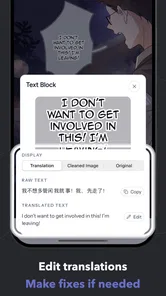
OpenToon - Manga Translator is designed to help readers understand manga and other comic-style pages written in languages they may not know. It can use image translation to recognize text on a page and present a translated version, depending on the app’s supported languages and features. Results can vary with image quality, lettering, and page layout, so it is best treated as a reading aid rather than a perfect substitute for a professional translation.
How do I translate a manga page with OpenToon?
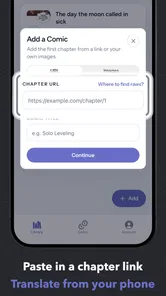
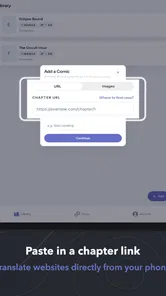
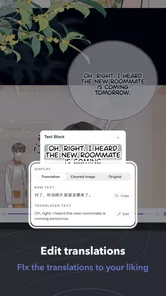
The usual workflow is to provide a manga image or page through the app’s available import or capture options, choose the source and target languages when required, and start translation. The app then attempts to detect text and display translated content over or alongside the original image. Menus and supported input methods can change between versions, so check the current app listing and in-app instructions. Clear, high-resolution pages generally give text recognition a better chance of working well.
Which languages does OpenToon - Manga Translator support?
Language availability depends on the translation and text-recognition services used by the current version of OpenToon. Do not assume that every language pair is supported, or that support is equally accurate in both directions. Before downloading, review the app’s store description or language selector for the specific source and target languages you need. Manga-specific typography, handwritten lettering, vertical text, and sound effects may also be harder to translate than ordinary printed text.
Is OpenToon - Manga Translator free, and does it require an internet connection?
Pricing, usage limits, advertisements, and subscription options may vary by platform and app version, so check the Google Play or Apple App Store listing before installing. Image translation may also rely on online services, which can mean an internet connection is needed for some or all features. If you plan to read while travelling or have limited data, confirm whether offline translation is offered and whether any free-use limits apply.
Is it safe and accurate to use OpenToon for translating manga?
Translation quality is not guaranteed: OCR can misread stylized fonts or text over detailed artwork, while machine translation can miss jokes, names, cultural references, and context. Treat results as an aid to understanding and compare them with the original when meaning matters. Also review the app’s privacy policy and permissions before uploading pages, since image processing may involve online services. Only translate or share material you have the right to use.
Pros
- Translates text in manga images without requiring manual transcription.
- Helps make comics in unfamiliar languages easier to follow.
- Useful for translating image-based pages that standard text translators cannot read.
- Designed around manga
- so its workflow is more focused than a general translator.
- Can make casual reading more accessible to multilingual manga fans.
Cons
- Translation quality may vary with image clarity and lettering style.
- Stylized fonts
- vertical text
- or complex layouts can be harder to recognize.
- Small text may require zooming or cropping for better results.
- Translations may miss jokes
- slang
- and cultural references.
- Availability of features and language support may depend on the app version.











