Obd Mary – Car Scanner for ELM
- 1.11K
- 4.6
- Installs
- 1.00M
- Price
- Free

Screenshots
Analysis by Reviewed
When a dashboard warning appears, it is tempting to guess what it means or book a workshop visit straight away. I like having a way to start with evidence instead. Obd Mary – Car Scanner for ELM is an Android car-diagnostics app from OBD Apps, built around a compatible ELM327 adapter. Its appeal is practical: it can help me read what the car is reporting and follow selected live readings, while leaving the actual repair decision where it belongs—with the owner or a qualified mechanic.
Readability and navigation in everyday use
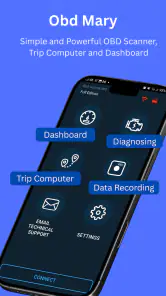
The app presents vehicle information through a dashboard and diagnostic tools, rather than trying to be a general car-maintenance organizer. That focus makes sense once an adapter is connected, but the information can still look technical if you have never dealt with OBD2 codes or engine values. I would approach it with one clear question in mind, such as “What code triggered this warning?” instead of trying to interpret every number at once.
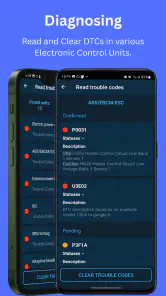
For a first check, I would read and note the trouble code before clearing anything. A code is a clue, not a complete diagnosis: it may point to a system or condition without identifying the failed part. Keeping the original code and the circumstances in which the warning appeared gives a mechanic more useful context than clearing it immediately and hoping the light stays off.
Motor and sensory considerations
Live readings can be useful when I want to observe how a value changes as the vehicle runs, but looking at a screen while driving is a poor trade-off. I would set up the connection and choose what to inspect while parked, then leave the phone alone on the road. If I need readings during a drive, a passenger can monitor them; otherwise, checking before or after the trip is safer and usually enough for basic troubleshooting.
People who find dense technical displays tiring may prefer to focus on a single task at a time: retrieve a code, look up what it generally indicates, then decide whether professional help is needed. I would not treat the app as a substitute for an accessible workshop conversation or a hands-on inspection. Its value is in making vehicle information available, not in making every technical term self-explanatory.
Situational access: when a scan helps
A realistic use is a check-engine light appearing before a planned trip. Park safely, connect a suitable adapter, read the stored code, and record it before making decisions. If the car is running roughly, showing a serious warning, or otherwise seems unsafe, a phone scan should not be used to justify continuing the journey; getting appropriate assistance matters more than collecting more readings.
For routine ownership, the app can also help someone compare a live value at different moments or arrive at a repair appointment with a specific code in hand. That is a different role from a workshop scanner: a professional may have broader vehicle-specific tools and the experience to test a suspected fault. Compared with simply waiting for a warning and asking a mechanic to start from scratch, an owner’s scan can provide a useful starting point—but not a verdict.
More From Our News Desk

Weather by Xiaomi Review: Clear at a Glance, Less Clear Up Close

X Under Pressure: Can It Recover When Posting Goes Wrong?

Clash of Clans Is Won Between the Battles

Android Auto Makes the Case for Quieter Car Software

MobiOffice: Transforming Mobile Productivity with Seamless Integration

EA SPORTS FC™ Mobile Soccer: Redefining Mobile Sports Gaming
Compatibility, costs, and practical trade-offs
An ELM327 adapter is central to the experience, so I would check that the adapter and vehicle connection work before relying on the app in an urgent situation. OBD2 access and the information available can vary by car and system, and a generic code reader should not be assumed to explain every manufacturer-specific issue. This is best for owners who are comfortable pairing an app with separate diagnostic hardware and treating results as guidance.
The app is free to install, with optional in-app purchases listed from $0.99 to $2.99 per item. It has a 4.6 average from around 140,000 ratings and more than a million installs, which suggests it has reached many drivers, though popularity cannot guarantee a good match for a particular vehicle or adapter. It is rated for everyone, runs on Android 6.0 or later, and version 1.285 is the current version. Someone looking for a simple maintenance log, repair booking, or a guaranteed fix would be better served by a tool designed specifically for that job.
A sensible first-scan routine
I would make the first scan a calm, parked exercise rather than an improvised roadside experiment. Before plugging in the adapter, identify the warning or symptom that prompted the check and decide what you want to learn. Once connected, capture the code and any relevant live reading before changing anything. This sequence gives you a useful record even if the connection drops or you later choose to get help.
There is also a practical difference between a scan that answers “What has the car reported?” and one that answers “What should I replace?” The first is where an owner’s app can be useful; the second may require tests, experience, and vehicle-specific knowledge. I would bring the code and a brief description of when it appeared to a repair appointment, then let the mechanic verify the cause instead of buying parts based on a code label alone.
How it fits alongside other diagnostic options
Compared with a basic handheld code reader, this app’s dashboard and live-data approach can be more useful if you want to observe readings rather than only retrieve a fault code. The trade-off is that a phone app depends on a separate adapter and a working connection, so a standalone reader may feel simpler for someone who wants one dedicated device. Neither option automatically turns a trouble code into a reliable repair plan.
A workshop diagnostic session is the better route when a problem is persistent, difficult to reproduce, or tied to a system that needs specialized testing. On the other hand, if a warning appears once and the car otherwise behaves normally, an owner’s scan can help you describe the issue more clearly before deciding what to do. I see the app as a useful middle step between ignoring a warning and asking a professional to start with no information.
Getting Started with the App
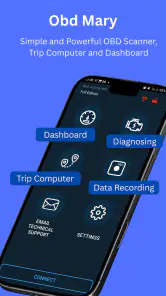
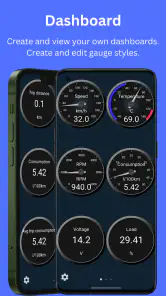
Setting up Obd Mary – Car Scanner for ELM was a breeze. I simply connected my ELM327 adapter to my car’s OBD2 port, opened the app, and voila! It immediately started communicating with my car. The interface is intuitive, with a dashboard that shows all the vital stats. You can monitor everything from engine RPM, speed, to fuel consumption, and more. The app also supports a wide range of car models, which is a big plus.
Features that Stand Out
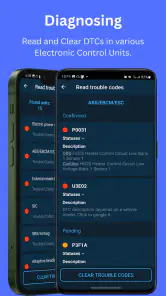
One of the coolest features is the ability to read and clear diagnostic trouble codes (DTCs). If you’ve ever had your check engine light come on and felt that pang of anxiety, this app can help ease your worries. It tells you exactly what the problem is, and once fixed, you can clear the codes yourself. No more unnecessary trips to the mechanic!
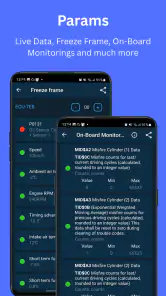
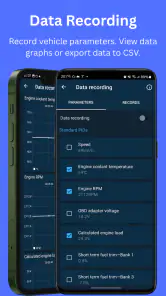
Another feature I found super handy is the live data streaming. You get real-time updates on various parameters like coolant temperature, fuel level, and much more. For someone like me who loves understanding how things work, it’s fascinating to see all this information laid out in real-time.
Usability and Design
Obd Mary – Car Scanner for ELM scores high on user-friendliness. The app’s design is sleek and straightforward. It’s not cluttered with unnecessary features, which makes navigation smooth. Even if you’re not tech-savvy, you’ll find it easy to use. Plus, the app is available in multiple languages, catering to a global audience.
However, I did notice that while the app is quite comprehensive, it might be a bit overwhelming for complete beginners who aren’t familiar with car diagnostics. But once you get the hang of it, the wealth of information it provides is invaluable.
Who will get the most from it
I think this is a good fit for a driver who likes to understand warning codes, has an ELM327 adapter, and is willing to learn what a reading can and cannot tell them. It can also suit a used-car owner who wants a quick way to check a warning before speaking with a mechanic. A driver who wants the app to diagnose every fault automatically, or who has no interest in technical readings, may find a basic code reader or a professional inspection less frustrating.
One useful habit is to keep a short note of the code, when it appeared, and whether the car felt different. Then compare later scans rather than relying on memory. That small workflow makes the data more meaningful and helps avoid the tempting but risky step of clearing a code before understanding why it appeared.
Everyday use without adding pressure
Imagine a warning light comes on while you are leaving work, but the car still feels normal. I would not try to read the screen at a stoplight or start changing settings in a hurry. I would park somewhere safe, connect the adapter, record the code, and make a note of anything unusual I noticed, such as when the warning appeared. That gives me a more useful basis for deciding whether to arrange an inspection than either guessing or repeatedly restarting the car.
If the warning is accompanied by rough running or another worrying change, the same routine has a different endpoint: stop treating the scan as a way to keep driving and seek appropriate help. The app can provide information, but it cannot judge road safety for me. That distinction is especially important for a first-time user, because seeing a code and clearing it can feel like resolving the problem even when the underlying cause remains.
Small choices that make readings more useful
I would avoid treating every available reading as equally important. Start with the code or symptom that matters, and add live values only when they help answer a specific question. Watching several changing figures at once can make the screen harder to interpret without producing a better decision. This focused approach is also kinder to anyone who finds technical displays visually or mentally tiring.
For a recurring issue, comparing notes from separate scans can be more helpful than trying to remember an earlier reading. Record the conditions in plain language—whether the car was cold or already running, and what the vehicle was doing when the warning appeared—alongside the code. Those details do not prove a cause, but they can help you explain the pattern to a mechanic and avoid confusing a new event with an old one.
A measured verdict for different drivers
My main reservation is the gap between seeing a code and knowing what repair is needed. The app can make the first step more accessible, but it cannot make every fault obvious or make an unsafe vehicle safe to drive. I would use it as an information tool, not as permission to postpone an inspection when symptoms are serious. If you are patient with technical details and want a practical window into your car’s diagnostics, it is a useful companion; if you need a plain-language answer with no setup, it may not be the right choice.
In conclusion, if you’re a car enthusiast or just someone who likes to stay informed about their vehicle’s health, it is worth checking out. It’s like giving your car a voice, and who wouldn’t want that? From reading trouble codes to monitoring live data, it’s packed with features that make it a worthy companion for any car owner. So, next time your check engine light comes on, you’ll know exactly what to do!
Obd Mary – Car Scanner for ELM Frequently Asked Questions
Can Obd Mary connect to a vehicle without an ELM adapter?
No. Obd Mary is intended to work with an ELM327 interface that links the phone to the vehicle’s OBD-II system. You’ll need a compatible adapter as well as a supported phone and vehicle. Check that the adapter suits your connection setup before downloading, since the app by itself cannot communicate with the car’s diagnostic port.
Is Obd Mary an official diagnostic tool from my car manufacturer?
Obd Mary is an app developed by OBD Apps, rather than a manufacturer-specific vehicle app. It provides access to diagnostic information through an ELM327 interface, so the experience depends on the vehicle’s diagnostic system and the adapter being used. If you need manufacturer-specific service procedures or a definitive diagnosis, consult your vehicle documentation or a qualified technician.
Can I use Obd Mary while driving?
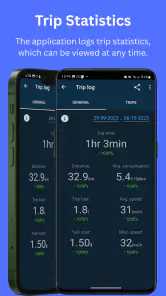
Obd Mary includes vehicle-monitoring and trip-computer functions, but interacting with a phone while driving can distract you. Set up the connection and any dashboard view before setting off, and avoid handling the phone on the road. Use readings only when it is safe to do so, and pull over before changing settings or investigating a warning.
Is Obd Mary – Car Scanner for ELM free to download, and are there in-app purchases?
Obd Mary is free to download, so you can try its car-diagnostics tools without paying upfront. The app also offers in-app purchases, with items ranging from $0.99 to $2.99. Consider whether you need any paid options for your own use, and check the purchase details displayed in the app before confirming a transaction.
What phones and operating systems can run Obd Mary?
Obd Mary is an Android app that requires Android 6.0 or later. Before downloading, check your phone’s Android version in its settings to make sure it meets that requirement. The app is listed for everyone, making it broadly suitable from an age-rating perspective, though you should still consider whether its vehicle-diagnostic features match your needs.
Pros
- Easy to use interface for all users
- Supports a wide range of car models
- Real-time car performance monitoring
- Customizable dashboard options
- Works offline after initial setup
Cons
- Limited free features available
- Occasional connectivity issues
- No support for older OBD devices
- Frequent ads in the free version
- Slow customer support response
- Category
- Auto & Vehicles
- Version
- 1.285