OBD Auto Doctor: OBD2 Scanner
- 877.00
- 4.2
- Installs
- 1.00M
- Price
- Free
Screenshots
Analysis by Reviewed
I like the idea of having a quick way to check what a warning light might mean before deciding what to do next. OBD Auto Doctor: OBD2 Scanner is aimed at that practical moment: it turns a compatible phone and an OBD2 adapter into a window on a car’s diagnostic information. It’s a free Auto & Vehicles app from Creosys Ltd, and I see it as a useful companion for curious owners rather than a replacement for a mechanic.
What to expect from a phone-based scan
The key thing to understand is that the app needs an ELM327-compatible OBD2 adapter to communicate with the car. The phone alone cannot read the vehicle’s diagnostic system, so it’s worth checking adapter compatibility and connection instructions before relying on it. Once connected, the app can show diagnostic trouble codes and live sensor readings; that makes it useful for gathering clues, not automatically identifying the root cause of every problem.
That distinction matters. A code can point to a system or condition without proving which component has failed. I’d use a scan to prepare better questions for a repair shop, compare a warning before and after a repair, or decide whether a fault needs prompt attention. I would not treat a code as permission to replace a part or keep driving when the car feels unsafe.
Where a quick scan fits into everyday driving
A realistic use is a warning light appearing on the way home from work. I’d pull over somewhere safe, check how the car feels, and only then connect the adapter while parked. If the car is running normally, the app can help me record the code and decide what to ask a garage; if it is shaking, losing power, overheating, or showing a flashing warning, I would stop treating an app scan as the next step and seek professional help.
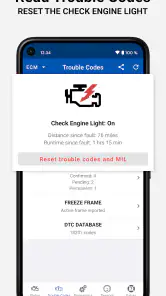
That sequence is more useful than rushing to clear the light. The code and any associated information may help a technician understand what happened, while erasing it too early can remove useful clues. I’d take a screenshot or write down the exact code and conditions before changing anything, then note whether the same warning returns after a repair. This turns a phone scan into a small maintenance record rather than a one-time attempt to make the dashboard look normal.
Latest News
A Mechanic in Your Pocket
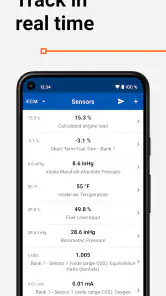
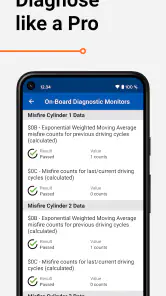
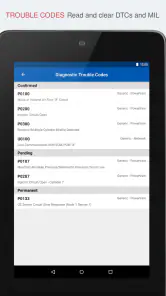
First off, let's talk about what OBD Auto Doctor really is. This app connects to your car's OBD2 system via a Bluetooth adapter, translating complex vehicle data into easy-to-understand information right on your phone. It's like having a mechanic with you at all times, minus the greasy overalls. You'll be able to read diagnostic trouble codes (DTCs), monitor sensor data, and even perform readiness tests for emissions – all from the comfort of your driver's seat.
Ease of Use
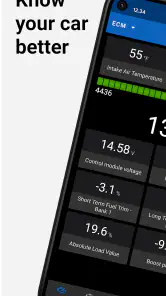
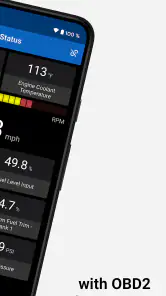
One of the biggest selling points of the OBD Auto Doctor is its user-friendly interface. Even if you're not a car guru, navigating through the app is a breeze. The dashboard is intuitive, displaying real-time data in a way that even my grandma could understand. Plus, the app supports a wide range of car models, making it a versatile tool for almost any vehicle owner.
For a more useful first check, I’d keep the car safely parked, connect the adapter, and note the code before clearing anything. Clearing a warning can also erase clues that a technician might need, and it doesn’t fix whatever triggered it. If a light returns, that repeat pattern is useful information to share. I’d also avoid trying to interpret a single live reading in isolation: sensor values make more sense when you know what the engine is doing and when the reading was taken.
Making readings useful rather than overwhelming
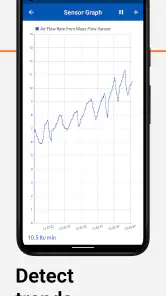
Live data is most valuable when I have a specific question in mind. For example, if I’m investigating a concern that occurs only after the engine warms up, I’d pay attention to the conditions and readings at that point instead of staring at every available value at once. A quick glance at a dashboard can help compare readings over time, but it is not the same as a controlled diagnostic test. The practical tip is to change one thing at a time and keep a note of when the symptom occurred.
There is also a safety trade-off with any phone-based display. I’d set up the information while parked and avoid trying to navigate through menus on the road. If monitoring is important during a test drive, another person can handle the screen while the driver concentrates on traffic. The app is most helpful as a stationary check and a way to collect context, not as an invitation to watch numbers while driving.
Features That Stand Out
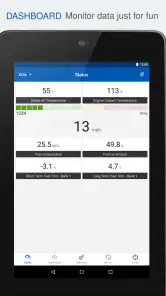
Now, let's geek out a bit on the features. The app provides detailed information on engine and transmission diagnostics, fuel economy, and even allows you to customize dashboards with the data you care about most. I personally love the freeze frame data feature, which captures a snapshot of your car's performance at the moment a DTC is triggered. It's like having a black box for your car!
Freeze-frame information is especially handy when a fault is intermittent. Instead of hoping to catch the symptom while it happens, you can review the recorded conditions associated with a code and bring that context into a conversation with a mechanic. Custom dashboards have a different advantage: I’d keep only the readings I understand and actually use, rather than fill the screen with numbers. That makes a quick glance less distracting and helps a driver avoid turning a monitoring tool into a moving-screen project.
Using freeze-frame details for a better repair conversation
A less obvious benefit of capturing the conditions around a fault is that it can help separate a one-off event from a repeatable pattern. I’d note whether the warning appeared during a cold start, a long drive, or a particular kind of trip, then compare that with the information available in the app. Those notes do not prove a cause, but they can make a mechanic’s first questions more focused and reduce the chance that I forget the circumstances by the time I book service.
For fuel-economy or sensor monitoring, I’d treat trends as more meaningful than a single number. A reading can vary with driving conditions, engine state, and the point at which I look at it. Keeping a simple before-and-after comparison around a maintenance visit can be more informative than trying to judge the car from one screen. The app provides a way to observe; interpreting those observations still takes context.
Why You’ll Love It
Imagine this: you're on a road trip, miles away from the nearest mechanic, and suddenly your check engine light pops on. Panic sets in, right? Not with OBD Auto Doctor in your toolkit. The app lets you identify the issue instantly, providing peace of mind and potentially saving you from an unnecessary trip to the shop. For those who love a DIY approach to car maintenance, this app is a dream come true.
In that situation, I’d use the scan to make a calmer next decision, not to assume the car is safe. A steady warning with no change in how the vehicle drives is different from a flashing light, overheating, unusual noises, or a sudden loss of power; those symptoms call for caution and professional help. The app can give you diagnostic context, but it cannot inspect the car physically or judge road conditions for you.
Who will get the most from it
I think the best fit is an owner who enjoys understanding basic vehicle information, has a compatible adapter, and wants a practical first look before booking service. It can also help someone keep a record of what a warning showed before a repair, or check whether a code has returned afterward. If you only want a one-off diagnosis, buying or borrowing an adapter may be less appealing than asking a garage to scan the car.
Compared with a basic handheld code reader, a phone app can make it easier to view live readings and arrange useful information on a dashboard. A workshop scanner, on the other hand, may offer broader manufacturer-specific diagnostics and technician-oriented functions. So I’d choose this app for everyday OBD2 checks and learning, not for advanced fault-finding or systems that a basic OBD2 connection cannot access.
When a different tool makes more sense
If all I wanted was to read one engine code once, a simple reader borrowed from a friend or a scan performed at a garage could be less hassle than choosing and pairing an adapter. If I were diagnosing a system such as airbags or ABS, I would look for equipment that specifically supports that vehicle and system rather than assume a general OBD2 app can reach it. And if I needed a confirmed repair diagnosis, a technician’s inspection is the better choice because a code is only one piece of evidence.
For a DIY owner who already has the right adapter, the phone format has a different appeal: the same setup can be used to revisit readings, check whether a code reappears, and keep diagnostic context close at hand. That ongoing convenience is the reason I’d choose it over a basic reader for routine curiosity. It is not automatically better for every job; the best option depends on whether I want a quick code, ongoing observation, or a deeper workshop-level diagnosis.
Practical limits and costs
The app is free to install, has an Everyone age rating, and has been available since July 31, 2012. It has an average rating of 4.2 from around 25 thousand ratings, with over a million installs. Optional in-app purchases range from $4.49 to $84.99 per item, so I’d check what a paid option includes before spending. Its long presence in the category is reassuring, but it doesn’t tell me which functions are included in a particular purchase or whether a specific adapter will work with my car.
That adapter dependency is the main practical trade-off: compatibility is a two-part question involving the vehicle and the adapter, not just the app. OBD2 coverage also does not mean every make-specific warning or non-engine system will be available. If your main need is airbag, ABS, or other manufacturer-specific diagnosis, I’d look for a tool explicitly built for that job rather than assume a general OBD2 app can reach it.
Before paying or relying on it
I’d first make sure the adapter is intended to work with the phone and vehicle combination I plan to use, then test the connection at home rather than during an urgent roadside moment. That simple check answers the most practical question: can my setup communicate reliably enough for the sort of reading I need? I’d also review any optional purchase carefully and decide whether its specific functions match my use, rather than paying on the assumption that every capability is necessary.
For an occasional driver, the cost-benefit calculation is different from that of someone who likes to track maintenance. If I expect to scan only once, a garage visit or borrowed reader may be more sensible. If I want to revisit codes, observe live data, and document what changes after service, keeping a compatible adapter available makes the app easier to justify. The free starting point lowers the barrier, but the complete setup still depends on the adapter and any optional features I choose.
What I would watch over time
For an existing user, the most useful measure of change is whether the app and adapter continue to connect reliably and whether the readings answer the same questions after an update. I wouldn’t assume a new version has added a particular capability without checking its release notes. If you depend on it before a trip or emissions check, test the connection and review the relevant information beforehand instead of discovering a pairing issue at the roadside.
Readiness results also deserve a little patience: they indicate whether certain checks have completed, not whether a car is guaranteed to pass an inspection. I’d use them as an early heads-up and follow local inspection requirements rather than treat the screen as a final verdict. That’s a small but important difference between a convenient diagnostic aid and an official test.
What to expect as the app evolves
Because the app has been available since July 31, 2012, it has a long history in a category where phone software, car electronics, and adapter behavior all have to work together. That history is useful context for an established user, but it does not by itself prove what has changed recently. I’d look at the current release notes when updating and keep expectations tied to changes that are actually described, rather than assuming a new version will expand vehicle coverage or add a particular diagnostic function.
For someone already using it, a sensible update routine is to check that the adapter still pairs and that the readings needed for regular checks remain accessible. If the app is part of a pre-trip routine, I’d test it before leaving and keep a separate plan for urgent faults. A diagnostic app is most dependable when it is one tool in a broader maintenance habit, not the only source of reassurance.
In conclusion, whether you're a seasoned car enthusiast or just someone who wants to understand their vehicle a bit better, OBD Auto Doctor: OBD2 Scanner is a must-have. It empowers you with knowledge, potentially saves you money on repairs, and keeps you informed about your car’s health. So next time your check engine light comes on, instead of panicking, you can just whip out your phone, connect to the app, and take control of the situation.
My recommendation is a little more measured: if you already have a compatible ELM327 adapter and want accessible OBD2 information, this is a sensible tool to keep handy. If you need a definitive diagnosis, want to work on advanced vehicle systems, or dislike checking adapter compatibility and optional purchases, a professional scan or a dedicated specialist tool is likely the better fit. Used with those limits in mind, it can help you arrive at the next maintenance decision better informed.
OBD Auto Doctor: OBD2 Scanner Frequently Asked Questions
Will OBD Auto Doctor work on my phone or tablet?
OBD Auto Doctor is designed to let you use a smartphone or tablet as a display for vehicle diagnostics, alongside a compatible OBD2 adapter. Before downloading, make sure your device can connect to the adapter you intend to use and that the adapter supports your vehicle. The app is listed for everyone and is developed by Creosys Ltd.
Can I use OBD Auto Doctor without an internet connection?
The app’s core purpose is to communicate with a vehicle through an OBD2 adapter, so the important connection is between your device, the adapter, and the car. If you plan to use it away from reliable internet access, check that your adapter and device can establish that connection and test the setup before relying on it during a trip. Keep in mind that interpreting a fault may still require research or professional advice.
Is OBD Auto Doctor suitable for beginners, or is it mainly for mechanics?
The app is intended for car owners as well as mechanics, and its diagnostic information can help you investigate warning lights and monitor vehicle data. Beginners should treat readings as clues rather than a substitute for repair knowledge: a code may point to a system or symptom, not identify a complete fix by itself. If a fault is unclear or affects safe driving, ask a qualified mechanic to assess it.
Do I need an OBD2 adapter to use OBD Auto Doctor?
Yes. OBD Auto Doctor works with an OBD2 adapter that connects to your vehicle’s diagnostic system, and the app’s summary describes support for ELM327 adapters. The adapter is a separate piece of hardware, so check that the one you choose is compatible with your vehicle and the device you plan to use. The app itself is free to download, with in-app purchases available.
What is OBD Auto Doctor and how does it work?
OBD Auto Doctor is a professional-grade OBD2 diagnostic tool that allows car owners and mechanics to monitor and diagnose their vehicle's performance using their smartphone or tablet. It connects to the car's OBD2 system, providing real-time data such as engine RPM, fuel consumption, and more. This app helps users identify issues before they become serious problems, making it an essential tool for regular maintenance.
Pros
- User-friendly interface
- Comprehensive diagnostic tools
- Supports various car models
- Real-time data monitoring
- Regular updates
Cons
- Requires OBD2 adapter
- Limited free features
- Some readings need expertise
- Occasional connectivity issues
- Subscription can be pricey

- Category
- Auto & Vehicles
- Version
- Varies with device











