Nordstrom
- 4.21K
- 4.8
- Installs
- 1.00M
- Price
- Free

Screenshots
Analysis by Reviewed
I approach Nordstrom as a focused retail app rather than a universal shopping destination. Its value depends on whether the retailer’s assortment and the option to connect online browsing with a nearby store suit the way you shop. If I have a particular item in mind, it can help me research and keep track of choices; if I want to compare offers from many unrelated sellers, I would look elsewhere.
Decide by how you like to shop
Before installing a retailer’s app, I ask myself whether I expect to browse one store’s selection repeatedly or want a broad marketplace where sellers compete for my attention. Nordstrom is built for the first kind of shopping. That focus can make it easier to explore clothing, shoes, handbags, and beauty in a single retail setting, but it also means the app is not a shortcut to comparing every brand or retailer at once.
The free shopping app is developed by Nordstrom, Inc. and is rated for Everyone. Its average rating is 4.8 from around 38,000 ratings, with more than 1 million installs. Those figures suggest many shoppers use it, but they are not a substitute for checking whether its catalog fits your own needs. The current version is 11.24.0.19375577745 and it requires Android 8.0 or later, a practical detail to check if you are installing it on an older device.
My own decision rule is simple: I would install it if I expect to browse Nordstrom often, want to save possible purchases, or value being able to check a nearby store while shopping. If I only need a one-off item and already know where I will buy it, a browser may be enough. The app is most useful when its shopping tools become part of a repeatable routine, rather than another icon I open once and forget.
Where Nordstrom earns a place on your phone
Let me take you through my experience with Nordstrom, a phenomenal app that brings the luxury of shopping at Nordstrom right to your fingertips. If you’re a fashion enthusiast like me, you’re probably always on the lookout for the next best thing to add to your wardrobe. Well, this app might just be your new best friend.
First Impressions
When I first opened the Nordstrom app, I was immediately drawn to its sleek and user-friendly interface. The design is intuitive, making it easy to navigate through categories, brands, and collections. I appreciated the clean layout, which helps you focus on what truly matters - the clothes! Whether you're looking for the latest trends or timeless classics, the app makes it incredibly easy to find just what you need.
Features That Stand Out
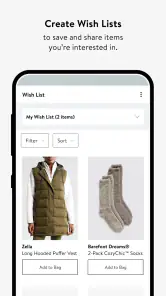
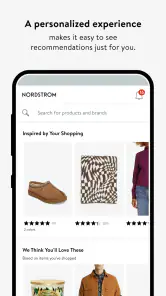
One of the standout features of the Nordstrom app is the personalized recommendations. The app learns from your shopping habits and suggests items you might like. It's like having a personal shopper in your pocket! Plus, the app’s ability to save your favorite items makes it convenient to come back to them later, especially during sale seasons.
More From Our News Desk

Clash of Clans Is Won Between the Battles

Android Auto Makes the Case for Quieter Car Software

MobiOffice: Transforming Mobile Productivity with Seamless Integration

EA SPORTS FC™ Mobile Soccer: Redefining Mobile Sports Gaming

How Microsoft OneDrive Became a Mobile Productivity Giant

How Google Translate Breaks Language Barriers Effortlessly
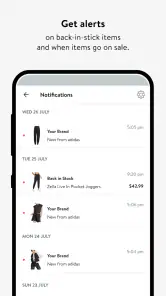
I also love the virtual try-on feature for beauty products, allowing you to see how different shades will look on your skin. This is a game-changer for online shopping, where the fear of choosing the wrong color is real. And for those who love staying in the know, the app offers notifications for sales, new arrivals, and even events happening at your nearest Nordstrom store.
Make a shortlist before you spend
For a more deliberate shopping session, I would decide on a use case before opening the app: a work event, a gift, or replacing a well-worn everyday item. That gives recommendations a useful supporting role instead of letting them turn a specific errand into aimless browsing. I save a few plausible choices, then compare their descriptions and customer feedback in one sitting. It is a small habit, but it makes saved items function like a decision list rather than a collection I never revisit.
That workflow is particularly useful when the item has a detail I care about but cannot judge from a product image alone. For shoes, for example, I might note which options seem suitable for the occasion, then use store availability as a reason to investigate further in person. Availability is a bridge between digital research and a store visit, not proof that an item will fit or feel right. I would check the current listing before setting out and keep a backup choice if the trip depends on finding one exact item.
When a store visit is part of the plan
A realistic lunch-break errand shows where this app can help. Suppose I need a gift soon but have only a few minutes to research it. I can browse on my phone, save a handful of candidates, and later check whether a nearby store appears to have the item available. That is more organized than trying to remember product names or leaving several browser tabs open. If I am choosing something where texture, fit, or color matters, I would treat the store as the final check rather than assuming a screen can answer everything.
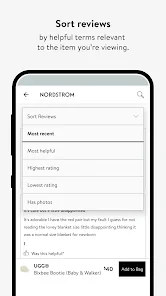
For a purchase that does not need to be seen in person, the same shortlist can help me slow down and compare the information available in the app. I would read reviews for patterns that matter to my intended use, not simply count positive or negative comments. A report about an issue relevant to my needs deserves more attention than an unrelated complaint, while one shopper’s experience should not be treated as a universal rule.
Checkout, research, and the points to verify
Shopping through the app is a breeze. The checkout process is straightforward, and I was impressed with the various payment options available, including Apple Pay, PayPal, and of course, the Nordstrom credit card. The app also keeps you updated on your order status, which is a relief for impatient shoppers like myself.
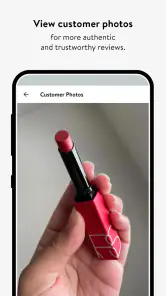
Another thing I appreciate is the detailed product descriptions and customer reviews. They help make informed decisions, especially when you're on the fence about a purchase. Plus, the app’s ability to check for in-store availability is perfect for those who prefer to try before they buy.
There is a trade-off to keep in mind: a smooth shopping journey can also make it easy to browse longer than intended. I try to compare the practical details—such as the item’s description and the experiences other shoppers report—before I let a polished image or a recommendation sway me. The beauty try-on tool can help with shade selection, but I would treat it as a visual aid rather than a guarantee of how a product will look in every light.
What it does not replace
Nordstrom is a better match for shoppers who want to explore this retailer’s offerings than for someone whose main goal is to scan a wide range of sellers for the lowest price. A general marketplace is often more convenient for cross-retailer comparisons; an individual brand’s own app may make more sense if I am committed to shopping only that brand. Those are different jobs, and I would choose based on the decision I actually need to make rather than expecting one app to cover all of them equally well.
It may also be the wrong choice if you rarely shop for clothing, shoes, handbags, or beauty products, or if you prefer to make every purchase in person without doing any mobile research. In those cases, the time spent setting up another retail app may not pay off. The app makes more sense when its saved choices, suggestions, product research, and store checks support purchases you were likely to consider anyway.
Who Should Choose It
This is a strong fit if you already shop at Nordstrom, like browsing clothing, shoes, handbags, or beauty products, and value the option of moving between online discovery and checking a nearby store. It is also useful when I want one place to keep track of possible purchases rather than juggling open browser tabs. Nordstrom, Inc. develops the free shopping app, which is rated for Everyone; it has an average rating of 4.8 from around 38,000 ratings and more than 1 million installs. The current version is 11.24.0.19375577745, and it requires Android 8.0 or later.
If you mainly want the widest possible mix of sellers, bargain hunting across many retailers, or a shopping experience centered on brands outside Nordstrom, a general marketplace or another retailer’s app may fit better. Those alternatives can make cross-store price comparisons easier, while this app is most relevant when you are considering Nordstrom’s own selection. I would also skip installing it if you rarely shop for these kinds of goods; a retailer app is most useful when its catalog and store options match a real need.
Switching Without Losing Your Bearings
If you are moving from a browser or another shopping app, the main adjustment is getting used to keeping your research and saved choices in one retailer’s environment. I would make a short list of what matters before browsing—size, intended use, preferred style, and whether trying the item in person is important. That small step can keep personalized suggestions from turning a focused search into an open-ended scroll. For beauty purchases, I would use virtual try-on to screen shades, then read the product information and reviews before deciding.
Nordstrom was released on May 11, 2015, and its 4.2K reviews reflect a substantial base of written feedback alongside its ratings. I see it as a convenient channel, not a substitute for judgment: read reviews for recurring, relevant observations rather than treating one person’s experience as universal. If an item is difficult to assess from photos or descriptions, checking in-store availability gives you another route to a more confident choice.
Make the change only if the routine fits
Switching from a browser does not require changing how you decide what to buy. I would carry over the same habits: define the need, compare a small number of options, and pause before checkout if the purchase is not urgent. The main difference is that saved items and recommendations can keep research within Nordstrom’s shopping environment. That is convenient when I am genuinely considering its selection, but less useful if I routinely compare across several retailers before deciding.
For someone arriving from another retailer’s app, the adjustment is more about scope than learning a complicated new way to shop. I would not move every saved idea over automatically; instead, I would start with items I am actively considering and see whether the product details, feedback, and local-store option answer the questions I have. If they do, the app earns a place in my routine. If I still need several other sources to make the decision, I would keep those tools and use Nordstrom only for the part of the search it handles well.
A practical recommendation
In conclusion, the Nordstrom app is a must-have for anyone who loves fashion and convenience. It's designed with the user in mind, offering a seamless shopping experience right from the palm of your hand. Whether you’re updating your wardrobe or searching for the perfect gift, this app has got you covered. With its impressive features and easy navigation, it's no wonder why it’s become a staple on my phone.
If you haven't already, give it a try and see how it transforms your shopping experience. Who knows, you might just find your new favorite outfit!
My recommendation is more measured: I would try Nordstrom if its assortment is already relevant to you and you want a convenient way to research, save, and revisit options. I would skip it if your priority is broad seller coverage, constant cross-store comparisons, or avoiding retailer-specific apps altogether. Used with a clear shopping goal, it can make a focused purchase easier to manage; used without one, its polished browsing experience may simply encourage more scrolling.
Nordstrom Frequently Asked Questions
What kind of shopping can I do with the Nordstrom app?
Nordstrom is a shopping app centered on clothing, shoes, and handbags. It gives shoppers a way to explore Nordstrom’s product range from a mobile device. If you are looking for an app dedicated to browsing and shopping for these kinds of items, its focus is clear; the experience is built around Nordstrom rather than serving as a general marketplace for every retailer.
Do I need a Nordstrom account to browse the app?
The app is intended for shopping and lets users browse Nordstrom’s offerings. Whether you are simply exploring products or planning to make a purchase, you can download it and see how its shopping experience fits your needs. For younger users, parents may want to guide account use and purchasing, and device purchase settings can offer an additional layer of oversight.
Is the Nordstrom app free, and which devices can run it?
The Nordstrom app is free to download and is intended for shopping, with a store summary focused on clothing, shoes, and handbags. It is listed for devices running Android 8.0 or later. Before installing, check that your device meets this requirement and has enough available space for the app and its updates.
Who publishes the Nordstrom app, and is it suitable for all ages?
The app is published by Nordstrom, Inc. and has an Everyone content rating, making it suitable for a broad audience. It is a shopping app for browsing Nordstrom’s offerings, so parents may still want to guide younger users around purchases and account use. You can review your device’s purchase settings before letting a child shop.
What is Nordstrom, and what does the app offer?
Nordstrom is a luxury department store chain that offers a wide range of products including clothing, shoes, accessories, and home goods. The Nordstrom app provides a seamless shopping experience, allowing users to browse and purchase from their extensive catalog, access exclusive deals, and keep track of their orders. It's designed to enhance shopping convenience with features like store locator, personalized recommendations, and easy returns.
Pros
- User-friendly interface with a sleek design.
- Wide range of products from top brands.
- Excellent customer service support.
- Easy-to-use mobile app for shopping.
- Regular updates enhance app performance.
Cons
- Limited international shipping options.
- Occasional app crashes reported.
- Some items may sell out quickly.
- High shipping costs for some locations.
- Limited payment options available.

- Category
- Shopping
- Version
- 11.24.0.19375577745












