Nordstrom Rack
- 2.69K
- 4.9
- Installs
- 1.00M
- Price
- Free

Screenshots
Analysis by Reviewed
I find Nordstrom Rack most useful when shopping is a shared household task rather than a solo browse. One person can look for work clothes while another checks for shoes or a practical gift, all from the same shopping app. That convenience has a catch: a shared phone or signed-in account can blur who chose an item, whose preferences shape recommendations, and who is responsible for the cart. I’d treat it as a place to research and compare, then make sure the household agrees on the final order.
When a shared shopping session works well
A realistic use is a quick evening search after someone notices a wardrobe gap: I can look for a replacement jacket, narrow the results, and ask another person to weigh in before buying. The app’s categories and filters make that sort of focused search more manageable than scrolling through an entire retailer’s wider assortment. For a household that already knows the kind of item it needs, it can be a handy starting point; for people who prefer to browse together in person and judge fabric or fit firsthand, a store visit is still the better tool.
I’d keep the cart intentional. When several people add things during a shared session, it is easy to lose track of the intended recipient or to mistake a saved possibility for a decision. A simple routine—say who is shopping, confirm sizes and preferences, and review the cart together before checkout—avoids much of that confusion without assuming the app has household profiles or shared-list tools.
Accounts, age, and household boundaries
Before handing over a device, I’d consider whether the person using it should be able to see account details or complete a purchase. The app is free to download, and its content rating is Everyone, but that rating is not a substitute for a household’s own rules about spending, personal information, or who may place an order. I would keep payment decisions with the adult responsible for the account, especially when children are browsing along with an adult.
Nordstrom Rack is a shopping app from Nordstrom, Inc., rather than a general-purpose marketplace, so it makes most sense when the household is specifically interested in the retailer’s assortment. If you need a broad comparison across many stores, a general shopping search may be more efficient. If you already have a particular product in mind and want to inspect it in person, checking a local shop can answer questions an app screen cannot, such as how a material feels or whether a cut suits you.
Discovering the App
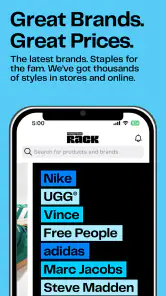
When I first downloaded the Nordstrom Rack app, I was curious to see if it would live up to its hype. The initial setup was a breeze, and I was soon greeted by a sleek interface that made navigation feel as smooth as silk. With everything organized into neat categories, finding what I needed was as easy as pie.
User Experience
One of the first things I noticed was how intuitive the app felt. The search function is a real lifesaver, especially for those moments when you’re on a mission to find something specific. Plus, the app offers personalized recommendations, which felt like having a personal shopper right in my pocket.
More From Our News Desk

Clash of Clans Is Won Between the Battles

Android Auto Makes the Case for Quieter Car Software

MobiOffice: Transforming Mobile Productivity with Seamless Integration

EA SPORTS FC™ Mobile Soccer: Redefining Mobile Sports Gaming

How Microsoft OneDrive Became a Mobile Productivity Giant

How Google Translate Breaks Language Barriers Effortlessly
Speaking of recommendations, I got some great suggestions for items that I wouldn’t have considered otherwise. It’s like the app knew my style better than I did. And let’s not forget about the handy filters that make sorting through thousands of products less daunting.
Deals and Discounts
Now, let’s talk about the deals. Who doesn’t love a good discount? Nordstrom Rack shines in this area, offering significant savings on top brands. I’ve scored some pretty sweet deals on designer clothes that would have otherwise been way out of my budget. The thrill of finding a bargain never gets old, and with this app, it’s a feeling you can enjoy regularly.
Checkout and Payment
Once I’d added a few items to my cart, it was time to check out. I appreciated how the app made the process swift and straightforward. Multiple payment options are available, and I had no trouble using my preferred method. Plus, the app’s security features gave me peace of mind knowing my transactions were safe.
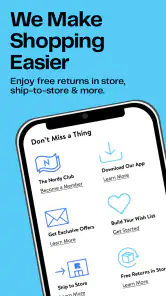
Shipping was another pleasant surprise. With fast and reliable delivery, I didn’t have to wait long to try on my new finds. And if, by chance, something didn’t fit, the return process was hassle-free, ensuring I could shop with confidence.
Finding the right fit before buying
For clothing, my practical tip is to use the search and filters to narrow the field before getting attached to a particular look. I check the details on each candidate, compare the options that matter to me, and pause before checkout if I’m uncertain about fit. A discounted item is only a useful find if I will actually wear it; the lower price should not rush a decision.
This is where the app’s bargain focus can also be a trade-off. Sale browsing is enjoyable, but a tempting deal can pull attention away from the original need. I get more value by starting with a specific gap—such as a versatile layer or a replacement pair of shoes—then treating recommendations as ideas rather than a shopping list. That keeps spontaneous discoveries fun without turning them into clutter.
Who should use it—and who may prefer another route
I’d recommend it to shoppers who like branded fashion, want to browse from home, and are comfortable making choices from product pages rather than handling everything first. It also suits someone buying for another household member when they already know that person’s size and preferences. If sizing is uncertain, the item is needed immediately, or tactile details are decisive, I’d compare options in person instead of relying on a screen.
Against a large general marketplace, this app feels more focused on Nordstrom Rack’s own shopping experience, which can be an advantage when that is exactly where I want to look. It is less useful as a one-stop comparison tool for every retailer. The app is free, has an average rating of 4.9 from around 14,000 ratings, and has been installed over a million times; I see those figures as context, not a guarantee that every search, fit, or purchase will work for me.
Making a household purchase easier to manage
For a shared-device purchase, I’d separate browsing from buying rather than letting an informal group session drift straight into checkout. One person can gather a short list of candidates, while the intended wearer checks the details and confirms the choice. This is especially useful for gifts: the buyer can focus on the budget and occasion, while someone who knows the recipient’s preferences can help avoid a guess based only on a product photo.
I would also treat recommendations as personal to whoever has been browsing, not as a neutral household shortlist. If several people use one signed-in account, their searches and clicks can make the shopping experience feel less relevant to the next person. A quick conversation about whether the device is being used for one person’s purchase or a shared task helps keep those expectations clear. When separate account boundaries matter, using a personal device or account is the simpler choice.
Choosing between app browsing and other shopping routes
Compared with visiting a store, browsing here is more convenient for checking a range of possible styles without making a trip, but it cannot settle questions that depend on touch, exact fit, or seeing a color in person. Compared with a broad marketplace, the narrower retailer focus can save time when I already want to shop this particular assortment, while making it a poor fit for someone trying to compare the same item across many sellers. I’d choose the route based on the question I need answered, not just on which screen is easiest to open.
A useful workflow is to search by the need first, then compare a few plausible options rather than chasing every appealing result. For a work wardrobe, for example, I might look for one versatile piece that works with clothes I already own, instead of building a cart around unrelated discounts. Before ordering, I’d confirm the intended wearer, size, and item details with the person who will use it. That small pause is more valuable than adding extra products simply because they caught my eye.
What the shopping experience can and cannot settle
A product page can help me decide whether an item seems worth considering, but it cannot guarantee that the fit or appearance will match my expectations. I’m cautious with anything where a small difference in cut, material, or color would make the purchase unusable. In those cases, I’d either inspect the item in person or choose only when I’m comfortable with the possibility that the first choice may not work out.
That is also why I would not make a time-sensitive purchase based solely on browsing. If I need something for a particular day, an online order adds uncertainty around when I can actually use it. For a non-urgent wardrobe refresh, by contrast, the app is a convenient way to explore and compare at my own pace. The right use is less about buying as much as possible and more about matching the channel to the level of certainty the purchase needs.
Practical details and final verdict
The app first appeared on November 16, 2015, and its current version is 11.24.0.19375577745, with Android 8.0 as the minimum operating system. Those details matter if you are checking whether an older device can run it; otherwise, the more important decision is whether you want a dedicated way to browse Nordstrom Rack rather than a broad shopping tool.
In a world where time is precious, the Nordstrom Rack app is a game-changer for anyone who loves fashion but not the fuss of navigating crowded stores. With its user-friendly design, incredible deals, and reliable service, it truly makes shopping a joyous experience. Whether you’re looking to revamp your wardrobe or just snag a few unique pieces, this app is definitely worth a download. So, go ahead and dive into a world of fashion at your fingertips. You might just find your next favorite outfit without ever leaving your couch.
Nordstrom Rack Frequently Asked Questions
Is the Nordstrom Rack app available for iPhone as well as Android?
Nordstrom Rack is a mobile shopping app, and its app title and store description identify it as the Android app. If you are deciding whether to download it, check the app store on your device for the version made for your platform. The Android version is free to install, and you can browse before choosing whether to make a purchase.
Is the Nordstrom Rack app suitable for first-time shoppers?
Yes. The app is intended to give shoppers mobile access to Nordstrom Rack, so it can be a straightforward place to begin browsing the retailer’s offerings. Its Everyone content rating also makes it suitable for a general audience. You can explore the shopping experience before deciding whether you want to buy anything.
Does the Nordstrom Rack app require an account to browse?
The app is designed for mobile shopping, and browsing is a useful way to see whether its selection and layout suit you before making a purchase. You can install it for free and explore the available shopping experience. If you plan to buy something, you may need to follow the app’s checkout prompts and provide the details required to complete that order.
Is the Nordstrom Rack app compatible with my phone?
The Nordstrom Rack app is a shopping app for Android, with a minimum operating system requirement of Android 8.0. Before downloading, check your device’s software version to make sure it meets that requirement. The app is free, so you can install it and browse without a subscription; purchases are a separate cost.
Who makes the Nordstrom Rack app, and what can I expect from it?
The app is developed by Nordstrom, Inc. and is designed to give shoppers mobile access to Nordstrom Rack. Its store summary highlights quick access to well-known brands at appealing prices, making it useful if you want to browse offers from your phone. The app is rated for Everyone, so it is suitable for a general audience.
Pros
- Wide variety of discounted designer brands.
- Easy-to-use interface for seamless shopping.
- Frequent sales and additional markdowns.
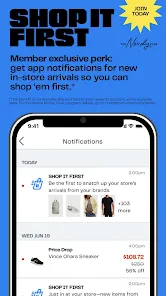
- Mobile app exclusive offers and discounts.
- Loyalty program with reward points.
Cons
- Limited stock on popular items.
- Occasional app crashes reported.
- Shipping fees can be high.
- Limited customer service options.
- No international shipping available.

- Category
- Shopping
- Version
- 11.24.0.19375577745












