Ninja Transfers
- 47.00
- 4.6
- Installs
- 10.00K
- Price
- Free
Screenshots
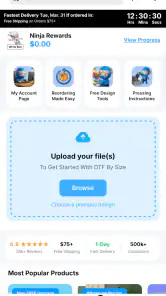
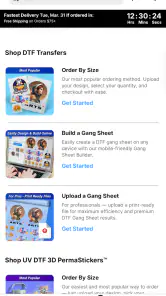
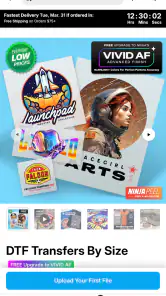
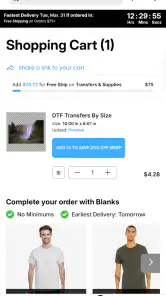
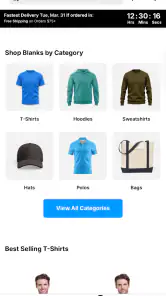
Analysis by Reviewed
I approached Ninja Transfers as a first-time shopper rather than as someone already familiar with DTF printing. That matters because the app sits in a practical space: it is a shopping app from Ninja Transfers for people looking for full-color DTF prints and blanks, including buyers who do not want to commit to a large minimum order. My first impression was that its value depends less on entertainment or endless browsing and more on whether it helps you move from an idea for a shirt, tote, or small apparel project to a purchase with fewer unnecessary steps.
The app is free, carries an Everyone age rating, and has reached over ten thousand installs. Its average score is 4.6 from around two hundred ratings, with several dozen written reviews, so there is enough user response to suggest that it is not an untested storefront. Ninja Transfers released it on July 30, 2025, and the current version is 1.15.0. Those details also set the right expectation: this is a relatively new mobile shopping tool, not a long-established marketplace with every possible ordering workflow.
What to expect before placing an order
The most useful way to think about the app is as a focused purchasing companion for custom-transfer work. Instead of treating it like a general shopping mall, I would open it with a specific purpose: finding a transfer, checking available blanks, or preparing a small run without being forced into a large quantity. That focused approach makes the experience easier because you already know what kind of product you are trying to locate.
Its store summary emphasizes fast, durable DTF prints and blanks, full-color work, and no minimums. In practical terms, that combination is aimed at several different users. A person testing a design can order a small quantity instead of filling a shelf with inventory. A hobbyist can work on a personal project without turning it into a bulk purchase. A small apparel seller can use it when demand is uncertain and avoid guessing too far ahead.
I would still separate the convenience of ordering from the creative work that comes before it. The app can help you shop for the production side, but it does not remove the need to prepare a suitable design, choose the right garment, and think about how the finished item will be used. A colorful graphic for a cotton shirt may require a different decision from a design intended for another blank, even when both are bought for the same general project.
That is the first important trade-off: the no-minimum approach is excellent for experimentation, but it may not be the most efficient route for a repeat seller who already knows exactly what sells. If you are ordering a larger, predictable run, a dedicated wholesale workflow or a direct desktop ordering process may make comparison and quantity planning easier. I see this app as especially useful when flexibility is more important than maximizing every part of a bulk order.
The developer, Ninja Transfers, gives the app a clear identity instead of presenting it as a generic craft marketplace. That focus is helpful for a beginner because the product purpose is easier to understand. You are not opening the app to browse unrelated household goods; you are opening it to make progress on apparel decoration and related blanks.
More From Our News Desk

Weather by Xiaomi Review: Clear at a Glance, Less Clear Up Close

X Under Pressure: Can It Recover When Posting Goes Wrong?

Clash of Clans Is Won Between the Battles

Android Auto Makes the Case for Quieter Car Software

MobiOffice: Transforming Mobile Productivity with Seamless Integration

EA SPORTS FC™ Mobile Soccer: Redefining Mobile Sports Gaming
How I would prepare before opening it
Before installing, I would have three things ready: the general design idea, the type of item I want to decorate, and an approximate quantity. I would also decide whether I am testing a single design or preparing several variations. This small amount of preparation prevents a common beginner mistake: browsing attractive options first and only later trying to make the project fit what was chosen.
For example, imagine I want to make a small set of shirts for a family event. I would first decide whether every shirt uses the same artwork, whether names or numbers vary, and whether the design needs to remain readable at a smaller size. Then I would use the app to look for the transfer or blank that fits that plan. This is more reliable than treating the catalog as a source of inspiration without a finished use case in mind.
A second useful preparation step is to keep the original artwork accessible on the same device or in a cloud location. Mobile shopping is convenient, but switching between an image editor, a file manager, and the store can interrupt the process. Having the design details ready makes it easier to check whether the product you are considering actually matches your intended use.
From installation to the first meaningful success
I would treat the first order as a small, deliberate experiment rather than a race to checkout: choose one design and one intended use, then make sure the transfer and garment choices match. That gives me a clear result to assess and a useful baseline for the next project. The next section looks at the misunderstandings most likely to derail that simple start.
Start with one uncomplicated project
For a first attempt, I would avoid combining too many unknowns. Choose one design, one kind of blank, and a modest quantity. The goal is not to build a complete apparel business in the first session. The goal is to understand how the catalog presents products, how you select what you need, and whether the ordering flow feels comfortable on a phone.
That approach also makes the result easier to judge. If the project works, you will know which choices contributed to the outcome. If something feels wrong, you can identify whether the issue came from the artwork, the selected product, the quantity, or the ordering process. Starting small is not just cautious; it creates a cleaner learning loop.
Once installed, I would browse with a clear distinction between DTF prints and blanks. A transfer is the decorative element, while a blank is the item receiving that decoration. Beginners can easily treat them as interchangeable because both appear within the same shopping purpose. Keeping those roles separate helps prevent ordering only one part of the project.
I would also read each product presentation slowly rather than relying on the first image. Product photography can make a finished shirt look like a single ready-to-wear item, while the actual purchase may involve a transfer, a blank, or another component. The app’s focused catalog is useful, but the responsibility still sits with the shopper to understand what is being selected.
A realistic first-use scenario
Suppose I run a small weekend craft table and want to test a new slogan on a few shirts. I would begin by choosing the artwork and deciding which shirt colors make the design readable. Then I would use the app to find a suitable full-color transfer and a compatible blank, keeping the first order deliberately limited. If the finished items receive interest, I can return to the same workflow with more confidence instead of committing to a large quantity immediately.
This is where the app’s no-minimum positioning becomes genuinely useful. It supports a test-before-scaling mindset. I can learn whether people like the design, whether the color balance works on the chosen garment, and whether the production process suits my schedule. A conventional bulk-first approach may offer better efficiency at scale, but it creates more risk when the design is unproven.
Another good first project is a personalized gift where only a few items are needed. The app is a better fit here than a bulk-oriented supplier because the purpose is not to stock inventory. I would still leave enough time for the complete process, especially if the gift is tied to a fixed occasion. Shopping convenience should not be confused with an instant finished garment.
What counts as a successful first action
For me, success would be reaching a purchase decision that I understand, not simply adding the first attractive item to a cart. I would want to know whether I am buying the transfer, the blank, or both; whether the quantity matches the project; and whether the selected option makes sense for the design I prepared. That checklist is more valuable than rushing through the interface.
I would save a note or screenshot of the choices made during the first order. This is a simple but underused habit. If the result is good, those details give me a repeatable starting point. If I need to adjust something later, I can compare the next choice with the original instead of relying on memory. For a small business, this can gradually become a basic product-testing record.
Where first-time shoppers may hesitate
The main friction is conceptual rather than technical: DTF shopping has its own vocabulary and workflow. Someone accustomed to ordering a finished shirt may expect the app to remove every production decision. In reality, the app helps you obtain the materials or printed element, while the final application depends on the project and the buyer’s own process.
I would also avoid assuming that a full-color transfer automatically solves every design problem. A detailed image can still be difficult to read on a busy garment, and a strong-looking preview may not be the best choice for every fabric color. Before ordering, I would check contrast, intended placement, and whether the design needs a simpler version for smaller items.
Another subtle point is quantity planning. No minimums make small experiments approachable, but ordering one item can hide the difference between a test and a repeatable workflow. If you are evaluating the app for a business, use the first order to learn, then record the choices that affect consistency: artwork version, blank style, color, and intended use. That turns a casual purchase into useful evidence.
Common confusion and how I would avoid it
The main thing I would keep in mind is that browsing a transfer or blank is only one part of making a finished item; the artwork, garment, and intended use still need to line up. I would also pause before confirming the cart, especially if the design has variations, and check that each selection serves the same project. With those checks in place, the shopping flow is easier to judge on its merits.
Confusing a transfer with a completed product
The most important clarification for a beginner is that a transfer is not necessarily the same thing as a finished shirt. If you expect a ready-to-wear item but select a printed transfer, your expectations will be wrong before the order arrives. I would read the product wording carefully and confirm which physical component belongs in the cart.
This distinction also affects budgeting. A low-cost-looking selection may be only one part of the project, while the blank and any equipment or application work belong to separate planning. I would calculate the complete project rather than judging value from one catalog item alone.
Assuming every design is equally easy to use
Full-color printing is appealing because it opens the door to photographs, gradients, illustrations, and complex artwork. However, complexity can create more decisions around contrast and placement. For a first project, I would choose a design with a clear silhouette and strong focal point. Once I understand the workflow, I would move to more detailed artwork.
A practical tip is to prepare two versions of the same design: the original and a simplified alternative. If the first choice looks too busy against the selected blank, the second version gives you a sensible fallback without forcing you to redesign everything during checkout.
Expecting the app to replace project planning
The app makes shopping more accessible, but it cannot decide whether a shirt color suits your artwork or whether a particular design is appropriate for a customer. Those decisions remain part of the creative and business side. I appreciate the app more when I treat it as a focused tool inside a larger workflow rather than as an all-in-one design studio.
This is also where different alternatives may be better. If you want to design, mock up, print, and ship a finished product from one service, a print-on-demand platform may be more convenient. If you already own printing equipment and need only raw supplies, a specialist supplier with a desktop-oriented ordering system may suit you better. Ninja Transfers is strongest for the person who wants access to DTF prints and blanks with room to order selectively.
Mobile convenience versus detailed comparison
Shopping on a phone is useful when I am away from a desk or checking an idea while working on a physical sample. The trade-off is that detailed side-by-side comparison can be easier on a larger screen. For a complicated order with several garment options, I would take notes rather than relying on quick taps and memory.
I would also review the cart before confirming anything, especially when a project contains multiple variations. Small differences in color, size, or quantity can be easy to miss on a compact display. A deliberate final check is one of the simplest ways to prevent an otherwise avoidable ordering mistake.
Who should use it, and who should choose another route?
I would recommend the app to hobbyists, small creators, gift makers, and early-stage apparel sellers who value experimentation. It is particularly appealing when you need only a limited quantity or want to validate a design before investing in stock. The free download lowers the barrier to trying the workflow, and the specialized focus keeps the purpose clearer than a broad shopping app.
It also makes sense for someone who already understands apparel decoration but wants a mobile way to browse DTF prints and blanks. In that case, the app can fit into an existing process without requiring the user to learn every production concept from the beginning.
I would be more cautious about recommending it as the only tool for a high-volume operation. A business with established demand may care more about repeat ordering, detailed inventory control, desktop comparison, and production records than about the flexibility of small purchases. The app can still be useful in that environment for testing new designs, but it may not replace a fuller purchasing system.
I would also point beginners toward a different type of service if they do not want to handle the transfer-to-garment stage themselves. Someone looking for a completely finished product, rather than materials for apparel decoration, may find a print-on-demand service less confusing. The right choice depends on whether you want control over the blank and application process or simply want an item delivered ready to use.
My next-step workflow after the first order
After the first purchase, I would not immediately change several variables at once. I would evaluate the design on the chosen blank, note what looked good and what felt awkward, and then adjust one element for the next project. That might mean changing the artwork, the garment color, or the quantity, but not all three simultaneously.
For repeat buyers, I would create a simple personal checklist: design name, intended blank, color choice, quantity, and the reason for the order. This is especially helpful when testing several full-color designs. The app provides the shopping path, while the checklist supplies the memory that a mobile catalog cannot provide.
I would also use the no-minimum advantage strategically rather than treating it as permission to order without a plan. Small purchases are most valuable when they answer a question: Will this design appeal to customers? Does this color combination work? Is this blank appropriate for the intended audience? Each order should teach you something that guides the next one.
The current version, 1.15.0, is worth keeping updated as you continue using the app. New versions can refine navigation or ordering behavior, and staying current is a sensible part of maintaining any shopping tool. I would still judge each update by whether it makes my actual workflow clearer, not simply by assuming every change improves the experience for every shopper.
My overall view is positive, with a clear boundary around what the app is designed to do. Ninja Transfers is not a replacement for design judgment, garment planning, or production knowledge. It is a focused shopping app that makes the DTF-print and blank purchasing side approachable, especially when you want to start small and avoid unnecessary inventory.
The best reason to try it is controlled experimentation. You can begin with one realistic project, learn how the product choices fit together, and decide whether the workflow deserves a place in your regular routine. If you need finished apparel with no hands-on production decisions, choose a different kind of service. If you want flexible access to full-color DTF work and blanks while testing ideas at your own pace, this app is a practical place to begin.
Ninja Transfers Frequently Asked Questions
What kind of products can I browse in Ninja Transfers?
Ninja Transfers is a shopping app from Ninja Transfers for exploring DTF prints and blanks. Its store description highlights fast, durable, full-color prints with no minimums, making it relevant to shoppers looking for these products. Browse the available offerings in the app and review the product details before deciding what to order.
Is Ninja Transfers free, and what devices can run it?
Ninja Transfers is free to download and is intended for everyone. The current version is 1.15.0, and the app requires Android 7.0 or later. Before installing, check that your device meets that requirement and has enough available storage. The download itself is free; review any order details shown in the app before completing a purchase.
What is Ninja Transfers, and what can I use it for?
Ninja Transfers is a travel and transportation service app designed to help users arrange private or shared airport transfers and other pre-booked rides. Depending on the destination and available service, you can typically select a pickup location, choose a vehicle or transfer option, enter your travel details, and receive booking information through the app. Availability and features may vary by location.
How do I book a transfer with Ninja Transfers?
To make a booking, enter your pickup and drop-off details, travel date, pickup time, passenger information, and any required flight details. The app then shows the available transfer options for your route, allowing you to review the price and service details before confirming. Carefully check the address, terminal, number of passengers, and luggage information to avoid problems on the day of travel.
Is Ninja Transfers reliable for airport pickups and drop-offs?
Ninja Transfers is intended to make pre-arranged transportation more convenient, particularly for airport journeys. Reliability can depend on the local transportation provider, traffic, airport procedures, and the accuracy of the information entered during booking. After confirming a ride, review the meeting instructions, driver or supplier details, and contact options so you know where to go if your flight or schedule changes.
Pros
- Fast booking process for airport and private transfers.
- Professional drivers with local route knowledge.
- Useful for groups needing spacious vehicle options.
- Pre-booking helps avoid last-minute transport stress.
- Convenient pickup and drop-off service at selected destinations.
Cons
- Service availability may be limited in some destinations.
- Prices can vary significantly by route and travel time.
- Flight changes may require contacting support manually.
- Vehicle preferences may not always be guaranteed.
- Cancellation and refund terms should be checked before booking.
- Category
- Shopping
- Version
- 1.15.0











