Naughty Random Live Video Chat
- 372.00
- 4.1
- Installs
- 100.00K
- Price
- Free

Screenshots


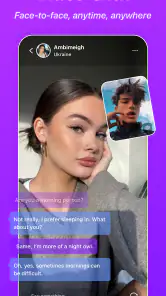


Analysis by Reviewed
I approached Naughty Random Live Video Chat as someone looking for a quick way to meet and communicate with unfamiliar people, rather than as a replacement for every messaging service on my phone. That distinction matters. This is a mature social app built around spontaneous contact, with text, voice, and video communication at its center. My experience was most useful when I treated it as a short, open-ended social session instead of expecting the structure, reliability, or familiar contacts I would get from a conventional messenger.
The app is free to install, which makes trying the basic experience straightforward, but it is intended for adults. Its Mature 17+ rating is not a minor detail: the random-chat concept can lead to unpredictable conversations, so I would not recommend it for younger users or anyone who is uncomfortable ending an interaction quickly. Leading Edways Ltd develops the app, and its current version is 60.0.18 for devices running Android 8.0 or later. That broad minimum requirement should suit many older Android phones, although the quality of a live conversation will still depend heavily on the device and connection.
From opening the app to completing a conversation
Starting with the right expectation
The first useful decision is deciding what I want from the session. If I want to catch up with a friend, share files, or maintain a dependable group conversation, a standard messenger is a better starting point. If I want to discover new people and accept that some conversations will be brief, awkward, or uninteresting, this app makes more sense.
The store presents it as “Naughty Random,” and that wording sets a very different tone from a general-purpose social network. I would approach it with clear boundaries rather than assuming every contact will be friendly or suitable. The app’s communication options are attractive because they let a conversation move between text, voice, and video, but that flexibility also means I should choose the least exposing format first when I do not yet trust the other person.
My preferred starting condition is a quiet moment, a stable connection, and no expectation that the first match will be worthwhile. That mindset prevents the biggest disappointment: judging the whole service by one silent match or one uncomfortable exchange. Random communication is naturally inconsistent, and the app works best when I am prepared to leave a conversation without trying to rescue it.
Moving from text to richer communication
I would begin with text because it gives me time to understand the other person’s tone before sharing more of my attention or surroundings. This is one of the most practical workflows for the app: use writing as a filter, then move to voice only when the exchange feels comfortable, and reserve video for a conversation that has earned that extra level of openness.
That sequence is more useful than jumping straight into video simply because video is available. Text is easier to end, easier to scan, and less intrusive when I am in a public place or do not want to show my face. Voice adds immediacy without requiring the same visual exposure, while video can make a good conversation feel more natural but also creates more privacy pressure.
More From Our News Desk

Clash of Clans Is Won Between the Battles

Android Auto Makes the Case for Quieter Car Software

MobiOffice: Transforming Mobile Productivity with Seamless Integration

EA SPORTS FC™ Mobile Soccer: Redefining Mobile Sports Gaming

How Microsoft OneDrive Became a Mobile Productivity Giant

How Google Translate Breaks Language Barriers Effortlessly
A realistic example would be using the app after work while waiting for a friend. I might start with a short text exchange, discover that the other person is interested in the same kind of music or travel, and shift to voice while walking home. If the conversation becomes genuinely comfortable, video could make sense later. If replies are vague, pushy, or repetitive, I can stop at the text stage without having revealed much.
Handling the handoff between people and modes
The important handoff is not only from one communication mode to another; it is also the handoff from a random encounter to a more sustained interaction. I would avoid treating a pleasant first exchange as proof that the person is trustworthy. A friendly conversation can still remain temporary, and I would keep personal details general until I know why I want to continue talking.
When moving from text to voice or video, I would state the change plainly: a short voice chat, a brief video conversation, or no change at all. That makes the interaction more comfortable because both people know what is happening. If the other person pressures me to turn on video, asks for private information, or ignores a boundary, that is a clear reason to end the exchange rather than negotiate.
This is also where the app differs from familiar alternatives such as WhatsApp, Signal, or ordinary social-network messaging. Those services usually begin with people I already know or with contacts I intentionally add. Here, the discovery step is the point. The benefit is spontaneity; the cost is that I have less context before communication begins. A random-chat app cannot provide the same confidence that comes from a known contact list.
Using the app without wasting the session
I found that a small amount of preparation improves the experience. I would decide in advance whether I am comfortable with text, voice, or video, and I would avoid opening the app when I am distracted, sharing a private room, or relying on a weak connection. Live communication is unforgiving when attention is divided, and a poor environment can make a mediocre interaction feel worse than it is.
Another useful habit is to keep the first exchange short. Instead of spending a long time trying to revive a conversation that has stalled, I would ask one clear question, respond naturally, and judge whether the other person contributes. This turns the random format into a manageable series of small decisions. It also reduces the temptation to disclose more simply because the conversation has not yet become interesting.
Because the app supports different communication styles, it can suit people who dislike the pressure of an immediate camera call. Text provides a slower entry point, while voice offers more personality than typing. The trade-off is that the app’s value depends on finding a willing and compatible participant; no communication mode can solve a poor match.
What the outcome feels like
A successful session is not necessarily a long video call. For me, success would be a respectful conversation that feels easy to end, whether it lasts a few minutes or develops into a reason to return. The app is strongest when it creates that first opening: an unexpected exchange that would not have happened through a normal contact list.
The result is less predictable than using a conventional social platform. There may be an enjoyable conversation, a quick exchange with no follow-up, or an interaction that ends almost immediately. That uncertainty is part of the product rather than a defect that can be completely removed. Anyone installing it should decide whether that unpredictability sounds refreshing or tiring.
The public response suggests that many people find enough value to keep using it. Naughty Random Live Video Chat has an average rating of 4.1 from around 1.9 thousand ratings, along with more than 370 written reviews and over 100 thousand installs. Those figures indicate a real audience, but they should not be read as a promise that every session will match the rating. Random social experiences vary sharply from person to person.
Where the flow breaks down
The first weak point is the match itself. A random contact may not answer, may not share the same conversational goal, or may communicate in a way that makes the session uncomfortable. That is the central limitation of this category, and it is more significant here than interface polish. If I need dependable replies, searchable communities, or organized group spaces, I would choose a different kind of social app.
The second weak point is the transition to voice or video. A text conversation can feel harmless until the other person expects immediate access to my voice, face, or surroundings. I would not treat the availability of video as an obligation to use it. Remaining with text is a sensible choice when I am uncertain, and ending the conversation is better than accepting pressure for the sake of keeping a match.
There is also a financial consideration. The app is free, but in-app purchases range from $1.99 to $144.99 per item. That wide range means I would inspect each purchase carefully and avoid spending simply to compensate for an unproductive random session. The free entry point is useful for testing whether the style suits me, while paid options should be considered only after I understand what I am receiving and whether it improves my actual use.
Another friction point is the mature audience. The 17+ rating makes the app inappropriate for children and unsuitable for families looking for a broadly moderated, all-ages communication tool. Even an adult user should keep the random nature in mind and avoid assuming that a pleasant profile or opening message tells the whole story. I would use the app in a setting where I can end a conversation comfortably and would never share sensitive information to make a stranger more interested.
Speed, connection, and heavier sessions
For an app centered on live conversation, speed matters most at the moment a chat becomes interactive. Text gives me room to tolerate a pause, but voice and video make delays or interruptions much more noticeable. I would not judge the experience by how quickly the app opens alone; the connection between two people is the more important part, and a weak network can undermine even a promising conversation.
That makes the best time to try voice or video a moment when I have a reliable connection and can give the conversation my attention. If I am moving between coverage areas, sharing a busy network, or trying to talk while doing something else, I would stay with text or wait. This is not a guarantee that a call will be smooth; it is simply a practical way to avoid blaming the app for every connection problem.
Longer sessions also ask more of the phone than a few text exchanges. Live audio and especially video can keep the screen and connection active, so I would be more mindful of battery and warmth during extended use than during a short check-in. I would not launch a video conversation when I need the phone for an important call or navigation immediately afterward. Keeping the first session brief is a useful test of both comfort and how the device handles the workload.
Reliability and recovering from a rough encounter
Reliability here has two sides: whether the communication holds up and whether the social encounter is worth continuing. A technically smooth session can still be a poor match, while a good conversation can be interrupted by an unstable connection. I find it more helpful to separate those issues than to assume every unsatisfying moment reflects the same problem.
If a conversation stalls, I would give it one natural opening rather than repeatedly sending messages or switching modes to force momentum. If the connection itself seems to be the issue, I would pause, check that my network is steady, and try again later rather than turning a frustrating moment into a longer session. The app’s random format means there is little value in clinging to one encounter; starting fresh can be the more sensible recovery.
My approach to safety is similar: keep control of the pace and leave when the interaction stops feeling right. I would not rely on a stranger’s reassuring tone as a substitute for judgment, and I would avoid moving a conversation into more personal territory just to preserve it. A short, uneventful exit is a perfectly good outcome when the alternative is sharing more than I intended.
Who will get the most from it
I would recommend it to an adult who enjoys spontaneous conversation, wants to try text before voice or video, and can handle inconsistent results without taking them personally. It may also suit someone who finds ordinary social networks too focused on existing followers and wants a more direct route to meeting unfamiliar people.
It is less suitable for someone seeking a calm, predictable messaging service. If my priority were private conversations with trusted contacts, reliable work communication, or a permanent record of important discussions, I would use a familiar messenger instead. Likewise, anyone who dislikes random matching, feels pressured by live interaction, or wants strong control over who can contact them should probably skip this type of app.
I would also avoid recommending it to a user who expects video to be the main attraction every time. The most sensible workflow begins more cautiously, and the quality of the experience depends on the person on the other side. The app offers the tools for a richer conversation, but it cannot guarantee the trust, chemistry, or consistency that makes those tools worthwhile.
My final take after following the full workflow
Naughty Random Live Video Chat is a focused social app rather than a universal communication platform. Its appeal comes from the path from an unknown contact to a possible text, voice, or video conversation. I like that the available modes allow a gradual handoff instead of forcing every interaction into a camera call, but I also think the random format demands more judgement from the user than a normal messenger does.
My practical advice is to begin with text, keep the first exchange limited, move to voice only when the conversation earns it, and treat video as optional. That approach makes the app more comfortable and reduces unnecessary exposure. I would also check every purchase before confirming it, especially because the in-app price range is broad.
The best reason to try it is curiosity about spontaneous human conversation, not a promise of dependable social connection. For adults who enjoy that uncertainty, the free installation provides a reasonable way to test the experience. For users who value known contacts, predictable privacy, or structured communities, a conventional messaging or social platform will remain the better choice.
Naughty Random Live Video Chat Frequently Asked Questions
Is Naughty Random Live Video Chat available on my device?
Naughty Random Live Video Chat is available for devices running Android 8.0 or later. Before downloading, check your device’s operating system and make sure you have enough room for the app. It is a free social app, though some features may involve in-app purchases. Its current version is 60.0.18, so updating the app when a newer version is available can help you use the latest release.
Who is Naughty Random Live Video Chat intended for?
The app is intended for adults, with a Mature 17+ content rating, and centers on social communication with other users. Its random-chat format can bring you into contact with people you do not know, so it is not a suitable choice for children. Younger users should not try to bypass age restrictions, and adults should approach conversations thoughtfully and use the app’s safety tools if an interaction becomes uncomfortable.
What is Naughty Random Live Video Chat?
Naughty Random Live Video Chat is a social communication app designed for meeting new people through random live video conversations. After creating or accessing an account, users can connect with strangers and decide whether to continue chatting. The experience is built around spontaneous interactions, so the people you meet, conversation quality, and available features may vary depending on your location, activity, and account settings. It also promotes communication through text and voice, alongside video.
Is Naughty Random Live Video Chat safe for meeting strangers online?
As with any random video-chat platform, users should be careful because conversations involve people they do not know. Avoid sharing your full name, address, phone number, passwords, financial details, or private photographs. Use the in-app reporting and blocking tools whenever someone behaves abusively or makes you uncomfortable. Parents should also be aware that this type of service may not be suitable for children or younger teenagers.
Does the app require registration, a camera, or microphone access?
The exact requirements can depend on the version of the application and the device being used, but video-chat services generally need access to the camera and microphone for live conversations. Registration or a sign-in method may also be requested to manage profiles, preferences, or moderation reports. Review the permission prompts carefully and grant only the access needed for the features you intend to use.
Pros
- Meet new people through spontaneous live video conversations.
- Quick matching keeps interactions lively and unpredictable.
- Video chat makes conversations feel more personal than text messaging.
- Simple interface makes starting a chat easy for most users.
- Useful for practicing conversation skills with people worldwide.
Cons
- Random matches may include users with very different interests.
- Some conversations can end abruptly without explanation.
- Live video chat may consume significant mobile data and battery.
- Privacy depends on careful use of camera and personal information.
- The experience can vary greatly depending on active users online.
- Category
- Social
- Version
- 60.0.18











