My Collection: Comic Scanner
- 208.00
- 3.8
- Installs
- 100.00K
- Price
- Free

Screenshots


Analysis by Reviewed
Sharing a comic collection at home sounds simple until two people are trying to remember whether a book is already logged, where it belongs, or who brought it into the pile. I’d use a scanner like this as a practical cataloging aid, not as a replacement for agreeing on how the household handles its books. My Collection: Comic Scanner is aimed at that everyday organizing job, and its appeal is strongest when the goal is to make a collection easier to browse and discuss.
One collection, clear expectations
Before scanning a shared shelf, I’d decide whether the catalog is for everyone’s comics or just one person’s. That small boundary matters: a household list can help avoid duplicate purchases, while a personal catalog is better when people want to keep ownership separate. A barcode scan may speed up adding many books, but it won’t settle questions like who owns a shared gift or whether a comic is available to lend.
For a realistic routine, imagine sorting a box after a weekend market. I’d scan the books that have barcodes, then pause to check the entries before putting the box away. Older or unusual editions may need more care than a quick scan, so I’d keep those aside for manual entry rather than assume every match is correct. That extra check can prevent a mistaken record from becoming the household’s version of the truth.
Make a useful record, not just a long list
The most helpful catalog is one that answers the question you actually ask while standing at the shelf. If you mainly want to know whether a comic is already in the house, a title and a clear note may be enough. If you use the record to remember condition or the story behind a gift, write that detail when you add the book, while it is still easy to recall. I’d avoid trying to document every tiny flaw at first; a short, consistent note is more likely to be maintained than a painstaking description for every issue.
There is also a practical reason to review scans in batches. A quick scan can save typing, but cataloging is only useful when the resulting entry corresponds to the physical book in your hand. I’d compare the displayed match with the cover and edition before filing a stack away, particularly when several comics have similar titles or cover art. When something looks uncertain, setting it aside for a second pass is safer than letting speed turn into a misleading inventory.
Coordination without extra assumptions
When more than one person handles a collection, a catalog is most useful when everyone follows the same simple habit: add a book when it arrives and check the list before buying or lending. The app’s notes can help preserve details about condition or a gift, but I’d use consistent wording so another person can understand them later. For example, “creased corner” is more useful than a private shorthand only one collector recognizes.
I would not treat a catalog as a full family inventory system. It can help people keep track of comics, but household members still need to agree on who updates records and how they distinguish books that are available to trade from ones they want to keep. If that coordination feels like more work than the collection itself, a simple shared spreadsheet or labels on shelves may suit the household better.
More From Our News Desk

Clash of Clans Is Won Between the Battles

Android Auto Makes the Case for Quieter Car Software

MobiOffice: Transforming Mobile Productivity with Seamless Integration

EA SPORTS FC™ Mobile Soccer: Redefining Mobile Sports Gaming

How Microsoft OneDrive Became a Mobile Productivity Giant

How Google Translate Breaks Language Barriers Effortlessly
Age, trust, and choosing the right tool
The app is free, is rated for Everyone, and is developed by HipComic. It has an average rating of 3.8 from around 550 ratings, with more than 100,000 installs. That makes it a familiar option for collectors to consider, though I’d still judge it by whether its scanning and catalog workflow fits the way your household stores comics. The current version is 2.0.0, and it requires iOS 8.0 or later.
For younger readers, I’d make the adult the person who sets the cataloging routine and decides what personal notes belong in it. The age rating is one useful signal, not a substitute for household judgment about device use or account boundaries. If several people share one device, agree on who is responsible for edits; if everyone needs separate ownership records, a tool built around individual accounts may be a better match.
Compared with writing titles in a notebook, scanning can make a large collection quicker to enter and search. Compared with a spreadsheet, it may feel more natural when the main task is identifying books from their barcodes, while a spreadsheet can offer more freedom for custom fields and household-specific rules. I’d choose based on the collection: lots of cataloging to do favors scanning, while a small shelf or highly customized lending system may not justify another app.
When a scanner is the right fit
I’d recommend this kind of cataloging workflow to someone who has enough comics that memory has stopped being reliable, but who still wants to keep the process casual. It can be especially useful after a move, when boxes are being unpacked, or before visiting a shop or convention and wanting to check what is already on the shelf. The payoff is not simply having a bigger digital list; it is being able to make a decision without pulling every box open.
On the other hand, a collector with only a few books may find that a note on a phone or a small notebook is quicker than setting up a catalog. It is also not the obvious choice for someone whose main goal is detailed valuation, tracking every loan, or recording several family members’ ownership separately. I would not choose a scanner just because scanning sounds modern: the tool has to fit a habit you are willing to keep.
A realistic household routine
Picture two people returning from separate errands with comics for the same shelf. Before the purchases disappear into a box, each person can check the catalog and add the new books, using the same brief note style. If one comic is meant to be shared and another belongs to a particular collector, that distinction still needs to be agreed on outside the scan itself. The catalog can make the conversation easier by showing what is already recorded, but it cannot make the household decision for you.
For lending, I’d treat the app as a reference point rather than assume it replaces a handoff routine. A note can preserve context, but the people involved still need a clear way to say that a book has left the shelf and when it is expected back. If lending happens often, a spreadsheet or another tool designed around circulation may be more practical. For occasional borrowing, a simple shared rule may be enough and avoids turning every comic into paperwork.
HipComic’s comic cataloging app is free to try, and it arrived on February 21, 2023. I’d consider it most useful for a collector who wants a more organized record without turning a hobby into a complicated project. It’s less compelling for someone who mainly wants a price guide, a lending tracker, or a carefully separated record for each family member. In a shared home, the best result comes from pairing its scan-and-note approach with a clear agreement about who adds, edits, and lends the books.
Get Your Comics in Order
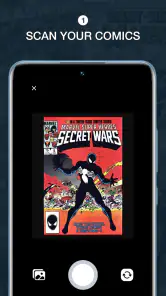
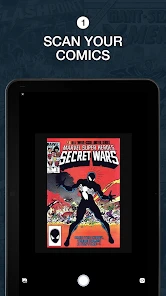
The first thing you'll notice about My Collection: Comic Scanner is its user-friendly interface. As soon as you open the app, it practically invites you to start scanning your comics. Just grab a comic, scan the barcode, and watch as the app magically pulls up all the details about it. It’s like having a personal librarian at your fingertips!
Features That Pack a Punch
One of the standout features of this app is its ability to recognize even the most obscure comics. I tested it with some of my rare finds, and it didn’t miss a beat. Plus, it syncs with the cloud, so your collection is always up-to-date and safe from any mishaps.
But wait, there's more! The app also allows you to manually add comics that might not have a barcode. This is perfect for those vintage editions that you cherish. You can add notes about the condition, purchase date, or even who gifted it to you. Talk about a trip down memory lane!
Why You'll Love It
Aside from the obvious organizational benefits, the app is a joy to use. It’s fast, reliable, and doesn’t bombard you with ads every time you click a button. Plus, the developers are constantly updating it with new features based on user feedback, which is always a plus in my book.
For those of you who are also into trading or selling comics, this app makes it incredibly easy to keep track of what you have and what you’re willing to part with. You can even export your list, which is handy for conventions or meetups.
Final Thoughts
In a nutshell, My Collection: Comic Scanner is a game-changer for comic collectors. It saves time, reduces clutter, and most importantly, it lets you enjoy your collection more fully. Whether you have a modest stack or an extensive library, this app is worth checking out. So go ahead, give it a try and watch your comic organization woes disappear!
My Collection: Comic Scanner Frequently Asked Questions
Is My Collection: Comic Scanner free to download, and what age group is it for?
My Collection: Comic Scanner is a free comic-collection app developed by HipComic, so you can try it without paying to download. It is rated Everyone, making it suitable for a broad audience. If you collect comics or simply want a digital way to keep track of the issues you own, its focus is straightforward: helping you value and organize your comic book collection.
What is My Collection: Comic Scanner and how does it work?
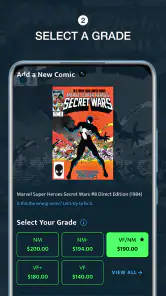
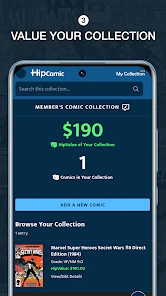
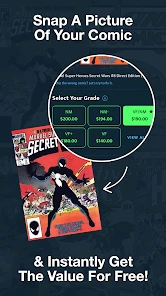
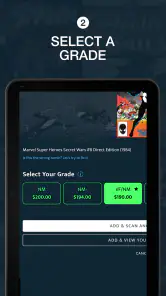
My Collection: Comic Scanner is a digital tool designed for comic book enthusiasts who want to effortlessly organize and manage their comic book collections. The app allows users to scan barcodes of physical comics using their smartphone's camera, automatically fetching detailed information such as title, publisher, and issue number. This data is then compiled into a digital library, making it easy for users to track and reference their collections anytime and anywhere. Its store summary highlights valuing a comic book collection with just the snap of a photo, which captures the app's quick-scan appeal.
Is My Collection: Comic Scanner available for both Android and iOS devices?
Yes, My Collection: Comic Scanner is available for download on both Android and iOS platforms. This ensures that users can enjoy the app's comprehensive features regardless of their device preference. Simply visit the Google Play Store for Android devices or the Apple App Store for iOS devices to download and install the app on your smartphone or tablet.
Does My Collection: Comic Scanner require an internet connection to function?
While My Collection: Comic Scanner can perform basic functions offline, such as scanning barcodes and organizing your collection, an internet connection is required for accessing additional features. These include downloading comic metadata, updating your database, and syncing your collection across multiple devices. For the best user experience, it's recommended to use the app with a stable internet connection.
Can I manually add comics to My Collection: Comic Scanner if they don't have a barcode?
Yes, My Collection: Comic Scanner allows users to manually add comics that don't have a barcode or if the barcode is not recognized by the app. You can input details such as the comic's title, issue number, publisher, and any additional notes. This feature ensures that users can maintain a complete and personalized digital collection, even for rare or older comics.
Pros
- Fast scanning speed
- Easy to use interface
- Supports various comic formats
- High-resolution output
- Syncs across devices
Cons
- Limited free version
- Occasional crashes
- No cloud storage
- Ads in free version
- Requires internet connection
- Category
- Comics
- Version
- 2.0.0