MOJO Sports
- 114.00
- 4.1
- Installs
- 100.00K
- Price
- Free

Screenshots
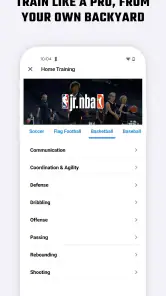
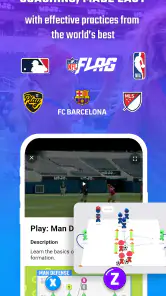
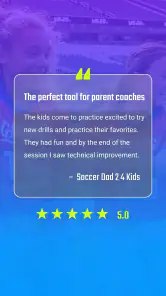
Analysis by Reviewed
I found MOJO Sports most useful when I treated it as a practical team-sports workspace rather than just another coaching app. Its central appeal is straightforward: it brings coaching tools and sports streaming into one mobile experience. That combination can save time for a youth coach, club organizer, or family member who is tired of switching between planning, communication, and video services. My overall view is positive, but with an important condition: it works best when your team is already willing to build its routine around one shared platform.
MOJO Sports is a free sports app from MOJO Sports, available for Android users running version 8.0 or later. It is rated for Everyone, so its intended audience can include players, parents, coaches, and supporters across a broad age range. The app has passed the early-experiment stage too, with over one hundred thousand installs and an average rating of 4.1 from a little under two hundred and fifty ratings. Those figures suggest a product with a real user base, while also reminding me that it is more specialized than a mass-market social or video app.
What makes MOJO Sports useful in everyday team life
The strongest part of the experience is the way it connects the coach’s point of view with the team’s viewing habits. A coach does not only need a place to store ideas; they need a repeatable way to prepare sessions and keep players engaged. Meanwhile, families often want an easy way to follow games or training moments without learning a complicated production system. MOJO Sports aims at that overlap, and that is more valuable than the short store summary might suggest.
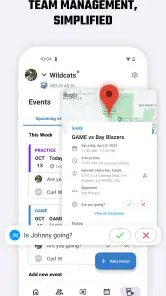
I can imagine using it before a busy weekend tournament. A coach could prepare the team’s work in advance, then use the same general environment to help families follow the sporting activity. The benefit is not one spectacular feature; it is the reduction in small points of friction. Fewer separate tools can mean fewer forgotten logins, fewer messages explaining where a video is located, and less time spent moving information from one service to another.
That convenience matters most for volunteer coaches. They are often doing administrative work late at night, using a phone rather than a laptop, and trying to make a session understandable for players with different experience levels. An app focused on coaching and streaming can fit that reality better than a general-purpose notes app combined with a separate video platform. I would not call it a complete replacement for every team tool, but it has a clear role in simplifying the weekly rhythm.
The coaching side is also potentially useful for keeping preparation consistent. Instead of relying entirely on memory or a paper notebook, I would use the app as a central place to revisit what the team is working toward. That creates a more stable handoff when an assistant coach helps with a session. It can also make conversations with parents clearer because the team’s activity is not scattered across unrelated channels.
One practical tip is to establish the team’s workflow before inviting everyone. Decide who is responsible for preparing coaching material, who handles streaming, and where players or parents should look first. The app becomes much easier to live with when it has a defined job. If every person uses it differently, its all-in-one promise can turn into another layer of confusion.
More From Our News Desk

Clash of Clans Is Won Between the Battles

Android Auto Makes the Case for Quieter Car Software

MobiOffice: Transforming Mobile Productivity with Seamless Integration

EA SPORTS FC™ Mobile Soccer: Redefining Mobile Sports Gaming

How Microsoft OneDrive Became a Mobile Productivity Giant

How Google Translate Breaks Language Barriers Effortlessly
Coaching is more than storing drills
My impression is that the coaching value comes from turning preparation into something repeatable. A coach who opens the app only when a game is about to start may miss much of its usefulness. The better approach is to use it as part of a cycle: prepare, communicate, run the activity, review what happened, and then adjust the next session. That cycle is especially helpful for coaches who want to improve gradually rather than reinvent every practice.
There is a subtle advantage here for mixed-skill groups. When players do not all need the same level of explanation, a coach can use a shared digital reference while giving extra guidance in person. That is more flexible than handing every athlete an identical printed plan. It also gives parents a clearer sense of what the team is trying to develop, rather than leaving them with only a final score or a few disconnected clips.
I would still be careful not to confuse digital organization with coaching quality. MOJO Sports can help a coach prepare and present information, but it cannot replace knowing the players, reading the mood of a group, or adapting an activity when the original plan is not working. The app is a support system, not an automatic coaching method.
Streaming has a different kind of value
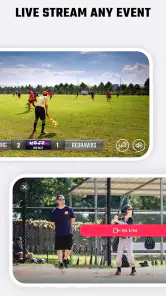
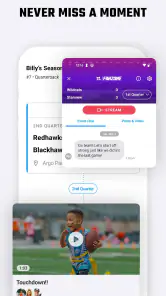
The streaming angle makes the app more relevant to people who are not on the field. A grandparent, separated parent, or friend may not be able to attend every game, and a team-focused streaming option can make participation feel more immediate than a later message saying how the match went. For small clubs without a dedicated media volunteer, combining sports activity and streaming in one app may be less intimidating than assembling a full broadcast setup.
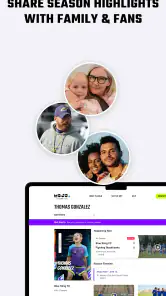
There is also a useful emotional benefit. Youth sports are not only about formal competition; they are about families sharing moments that can be difficult to attend in person. A coach or organizer who can make viewing part of the team’s normal routine may give absent supporters a stronger connection. That is one reason I see the app as more than a coach’s private notebook.
At the same time, I would not judge the streaming experience by the standards of a professional broadcast service. A team app is likely to be chosen for convenience and community, not cinematic production. If your priority is advanced camera control, elaborate graphics, or a highly polished public broadcast, a specialist streaming platform may be the better fit. MOJO Sports makes more sense when the audience is the team’s own community.
A useful workflow is to test the viewing experience with a small group before relying on it for an important match. Ask one person watching remotely whether they can find the stream easily and whether the timing fits their expectations. That simple rehearsal can reveal organizational problems that have nothing to do with the quality of the app itself.
The friction I would want a team to understand first
The biggest limitation is the commitment required from the whole group. An all-in-one app only reduces work when coaches, players, and families actually use the same place. If half the team continues using text messages, another portion relies on email, and streaming is handled elsewhere, the advantage becomes much smaller. This is not a flaw unique to MOJO Sports, but it is especially important here because the app’s value depends on coordination.
There is also a learning curve for coaches who are comfortable with simple tools and do not want another responsibility. Even a well-designed sports app can feel like extra administration during a hectic season. I would introduce it gradually instead of trying to move every team activity into it on the first day. Start with the part that solves the clearest problem, then expand only if the group responds well.
The free price makes trying it less risky, but it does not necessarily mean every useful workflow will remain cost-free. In-app purchases range from $1.99 to $59.99 per item, so I would check the purchase screen carefully before building an important team routine around a paid capability. That is not a reason to dismiss the app, but it is a reason to involve the person responsible for the team budget.
Another trade-off is audience size. MOJO Sports is designed around sports teams and their communities, not around general personal video sharing. If you only want to record occasional clips for yourself, a phone camera and ordinary cloud storage may be simpler. If you are managing a regular team and need coaching plus viewing in the same context, the specialized approach becomes more convincing.
Who should use it, and who should choose something else
I would recommend MOJO Sports most readily to youth coaches, recreational clubs, school teams, and organized groups where one person needs to coordinate activity for many others. It is particularly appealing when the coach is also handling communication and when families want a reliable way to stay connected to games. The broad Everyone age rating also fits the mixed audience that naturally surrounds youth sports.
It is a good candidate for a coach who wants to move away from a notebook-plus-messaging-app routine. The app can provide a more focused home for the team’s sporting life, and that focus may make preparation feel less scattered. I would also consider it for a small club that cannot justify a separate coaching system and a separate streaming service.
I would hesitate to recommend it to a professional organization with demanding broadcast requirements, detailed performance analysis needs, or strict media workflows. Those users may need tools built specifically for advanced video production, athlete tracking, or large-scale operations. I would also steer away from it if your team is unlikely to adopt a shared system. In that case, the app could become one more place to check rather than the single place that simplifies things.
For an individual athlete, the decision depends on the relationship with a team. If your coach actively uses MOJO Sports, joining may be worthwhile because the value comes from shared participation. If nobody around you uses it, downloading it alone may not offer the same benefit. This is a platform whose usefulness grows with the group, not merely with personal exploration.
How it compares with familiar alternatives
The usual alternative is not another sports app; it is a patchwork of ordinary tools. A coach may use messaging for announcements, a notes app for practice ideas, a social network for clips, and a separate streaming service for games. That arrangement can work, especially for a small informal group, but it spreads responsibility across several places. MOJO Sports is more attractive when the cost of that fragmentation is beginning to show.
A general video platform may offer a larger audience and more familiar viewing, yet it is not necessarily built around the needs of a coach and team. A team-management app may organize schedules and messages better, but may not connect as naturally with streaming. MOJO Sports sits between those categories. Its strength is the combination, while its weakness is that it may not match a specialist tool in every individual area.
My advice is to compare workflows rather than feature checklists. Write down what happens from the moment a coach prepares a session to the moment a remote family member watches a game. If your current tools require repeated copying, multiple invitations, or explanations about where to look, MOJO Sports has a practical advantage. If your current system is already simple and everyone uses it reliably, switching may not be worth the disruption.
Version 1.67.0+production-release shows that the app is maintained as a current product rather than an abandoned experiment. I would still update it before an important team event and test the exact devices that coaches and viewers plan to use. That is sensible with any app involved in live sports, where a small setup problem can matter more than an impressive feature list.
My verdict after weighing the trade-offs
MOJO Sports succeeds because it addresses a real problem: sports teams often need coaching organization and shared viewing, but do not have the time or resources to assemble a complicated digital system. I like the idea of one sports-focused environment serving both the people running the activity and the people trying to follow it. The app feels most convincing when it becomes part of a team habit rather than a one-off download.
Its limitations are equally clear. The group must cooperate, coaches still have to do the thinking, and paid options deserve attention before a club commits to a larger workflow. It is not the right choice for every athlete or every broadcast. A specialist service may be better for advanced production, while a basic set of familiar tools may be better for a very small team that rarely streams anything.
Still, I would recommend trying MOJO Sports if you coach or organize a team that has outgrown scattered messages and improvised video sharing. Begin with one concrete use case, such as preparing a weekly session or making a game easier for absent families to follow. If the team adopts that first step naturally, the broader platform becomes much more useful. My clear recommendation is for organized community sports groups that value shared routines more than highly specialized tools.
As a free sports app with optional in-app purchases from $1.99 to $59.99 per item, it offers a reasonable way to explore that workflow before making a larger commitment. The 4.1 average and 100K-plus installs indicate that it has found an audience, but the real test is personal and practical: can your team agree to use it consistently? If the answer is yes, MOJO Sports can make the weekly sporting routine feel more connected and manageable.
MOJO Sports Frequently Asked Questions
Is MOJO Sports suitable for coaches, players, or families?
MOJO Sports is a sports app from MOJO Sports, with the store summary “Coach & Stream Sports.” That makes it worth considering if you are looking for a sports-focused app connected with coaching or streaming. Its audience and available tools may depend on the activities you want to follow, so take a look at the app’s current description and features before downloading to see whether they fit your needs.
What devices and operating systems can run MOJO Sports?
MOJO Sports runs on Android devices using Android 8.0 or later. Check your phone’s operating system before installing, and make sure there is enough available storage for the app and its updates. If you use an iPhone or iPad, check the App Store listing for compatibility with your particular device. Keeping your operating system and the app up to date can also help you access the latest available version.
What is MOJO Sports and what can I use it for?
MOJO Sports is a sports-focused mobile platform designed to help users follow sporting activities, discover relevant content, and stay connected with teams, players, or competitions, depending on the features available in their region. Before downloading, check the current app description and supported sports because the experience may differ by country, account type, and platform. It is best suited to users who want sports information and related features in one convenient application.
Is MOJO Sports free to download and use?
MOJO Sports is free to download, but some features or content can require in-app purchases, a subscription, registration, or access through a participating organization. In-app purchases range from $1.99 to $59.99 per item, and the available services may vary between Android and iOS and can change over time. We recommend reviewing the store listing, subscription terms, and payment details before creating an account or confirming any purchase through the application.
Do I need to create an account to use MOJO Sports?
Some basic areas of MOJO Sports may be accessible without signing in, but an account could be required for personalized content, saving preferences, joining activities, managing a team, or accessing premium functions. Registration may request information such as an email address, name, or sports-related details. Users should review the privacy policy and account settings so they understand how their information is stored, used, and managed.
Pros
- Live scores and updates help you follow matches in real time.
- Covers multiple sports
- leagues
- and competitions in one app.
- Match statistics make it easier to compare teams before games.
- Personalized alerts keep you informed about selected teams and events.
- Clean navigation lets you find fixtures and results quickly.
Cons
- Coverage and statistics can vary significantly between competitions.
- Frequent notifications may feel excessive unless carefully customized.
- Some features may require an account or additional personal data.
- Information can occasionally lag during busy live sporting events.
- The app may use considerable battery and mobile data with alerts enabled.
- Category
- Sports
- Version
- 1.67.0+production-release





