

MN DNR Licensing
- 16.00
- 3.7
- Installs
- 10.00K
- Price
- Free
Screenshots
Analysis by Reviewed
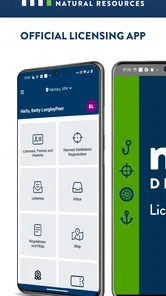
For anyone who hunts, fishes, or spends time outdoors in Minnesota, MN DNR Licensing aims to replace a paper-heavy licensing routine with a more direct digital option. I found it most useful as a practical sports app rather than an all-purpose outdoor companion: its purpose is narrow, but that focus is exactly what makes it appealing. It is the official licensing app of the Minnesota DNR, and it is free to use, with an Everyone age rating.
My overall view is positive but measured. The app makes the most sense for Minnesota residents and visitors who want licensing tasks close at hand instead of relying on a wallet full of documents or a browser session at the last minute. At the same time, I would not install it expecting trail maps, weather tools, species identification, trip planning, or a social community. This is a licensing utility, and judging it by that standard gives a much clearer picture of where it succeeds.
What using the licensing app feels like
The biggest strength is the reduction of friction around a task that is usually easy to postpone. Outdoor preparation often happens in fragments: I may remember a permit while packing gear, notice that a season is approaching, or realize that another person in the group needs to handle their own paperwork. Having a dedicated Minnesota DNR service on a phone makes that moment more manageable than searching through unrelated websites or trying to remember which page handles which license.
The app is published by Sovereign Sportsman is now PayIt LLC, while its role is tied to the Minnesota DNR. That distinction matters because users are not simply looking for a generic fishing or hunting organizer. They are looking for a government licensing channel presented in mobile form. For me, that makes its value depend less on entertainment and more on whether it helps me complete a necessary step with confidence.
I also like the clarity of its intended audience. The store short description, “MN DNR Licensing,” says almost everything a prospective user needs to know without promising a broader outdoor toolkit. That restraint is helpful. Many sports apps try to cover forecasts, maps, equipment, communities, and records all at once. This one is easier to evaluate: if licensing is the job, the app has a clear reason to exist.
Its current version is 1.2026.0729.1, and it supports devices running Android 7.0 or later. That broad operating-system reach should make it accessible to people using older phones, which is particularly relevant for an app that may be used outdoors rather than as a daily entertainment download. I would still update the phone before a trip and open the app ahead of time, rather than treating any licensing tool as something to test for the first time beside the water.
A useful part of trip preparation
A realistic use case is a weekend fishing trip planned after work. Instead of waiting until the morning of departure, I can open the app while checking tackle, confirm that my licensing needs are handled, and keep the phone available with the rest of my preparation. The benefit is not dramatic in a flashy way; it is the quiet removal of one avoidable errand.
More From Our News Desk

 Gmail
GmailGmail in a Busy Inbox: Who Benefits Most?
From first account to crowded workday, Gmail earns its place through dependable search and flexible sorting—but its best fit depends on how much inbox maintenance you can tolerate.

 Prime Video
Switching to Prime Video: What Changes in Your Viewing Routine
Prime Video can make a compelling second home for streaming, but switching means learning a different catalog, rental layer, and route from browsing to playback.

 Universal TV Remote Control
Universal TV Remote Control Works Best as a Reliable Backup
A phone remote earns its place through quick setup and reliable habits. Here is how to get more from Universal TV Remote Control—and where its limits show.

 Weather - By Xiaomi
Weather by Xiaomi Review: Clear at a Glance, Less Clear Up Close
Xiaomi’s weather app makes everyday forecasts quick to scan, but its calm surface can leave useful details and recovery paths harder to find than they should be.

 X
XX Under Pressure: Can It Recover When Posting Goes Wrong?
A resilience-focused review of X, examining setup, mistaken posts, interruptions, weak connections, and the gaps that matter when recovery needs to be dependable.

 Clash of Clans
Clash of Clans Is Won Between the Battles
Its raids are quick; its community is a long-term project of coordination, teaching, rivalry, and shared responsibility—with all the friction that entails.
Latest News



That workflow also reveals a practical tip: use the app before leaving reliable connectivity, not only after arriving at a remote location. A mobile licensing service is convenient, but convenience should not be confused with guaranteed access everywhere. I would complete the important steps at home, allow time to resolve any account or payment issue, and then carry the phone as one part of my preparation rather than as the only thing I rely on.
Another useful habit is separating licensing preparation from general trip planning. I would use a map app for directions, a weather service for conditions, and any specialized outdoor tool for regulations or identification if needed. MN DNR Licensing works best when it is treated as the official licensing piece of that setup. Trying to make one app perform every outdoor task usually creates more clutter, not less.
Why the official focus matters
For a government-related service, trust and clarity matter more to me than visual novelty. A dedicated licensing app can be easier to recognize than a chain of browser tabs, especially when I am trying to remember whether I completed a transaction or merely read about it. The official positioning also gives the app a more specific purpose than third-party sports applications that may collect trip notes or organize gear but cannot serve as the licensing destination itself.
That does not mean I would stop checking the rules that apply to my particular activity. Licensing and regulation are related but not identical. A person may still need to understand seasons, locations, limits, or other requirements through the appropriate Minnesota DNR information. The app can be part of responsible preparation, but it should not encourage the assumption that holding a digital license answers every question about a day outdoors.
This is one of the less obvious trade-offs. A focused official app may be more dependable for its central task than a broad outdoor platform, yet it may leave more of the surrounding research to me. I consider that a reasonable exchange, provided I recognize it before heading out. The app reduces administrative friction; it does not replace judgment or preparation.
Where the experience can become frustrating
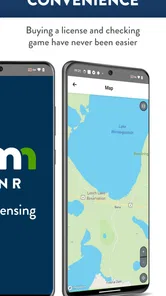
The main weakness is the narrowness that is also its strength. Someone searching for a complete Minnesota outdoor companion may find the experience limited because licensing is only one part of a trip. If I want forecasts, lake information, navigation, trip logs, or a way to compare equipment, I will still need other apps. That is not a flaw in the licensing function itself, but it affects how much value the download provides to occasional users.
I would also be cautious about relying on a phone as the sole proof of readiness. Battery life, a damaged device, forgotten credentials, or an unexpected login problem can turn a simple digital process into a stressful one. My practical approach would be to finish the transaction early, keep the device charged, and retain any permitted confirmation or reference information in a sensible place. The app is most helpful when it supports preparation rather than becoming a last-second gamble.
The public response is reasonably encouraging but not overwhelming. It has an average rating of 3.7 from around thirty ratings, along with around twenty written reviews. I read that as a sign that the app has a real audience and a usable core, but not as proof that every user will find it polished. With a relatively small pool of feedback, individual experiences can carry a lot of weight, so I would judge the app by my own licensing needs rather than by the rating alone.
There is another subtle limitation for households and groups. A person arranging a trip for several people may still need to make sure each participant’s licensing situation is handled correctly. A central app does not automatically remove the responsibility of checking who needs what. I would avoid assuming that completing my own process covers everyone in the vehicle or boat. That small distinction can prevent an otherwise well-prepared outing from becoming confusing.
How it compares with the usual alternatives
The obvious alternative is using a mobile browser to reach Minnesota DNR licensing services. A browser can be perfectly adequate, especially for someone who buys a license once a year and does not want another app installed. For that user, the app may offer too little additional value to justify space on the home screen. The browser also remains useful when I am already researching regulations and want to move directly between official information pages.
The app has a stronger case for people who return to Minnesota outdoor activities regularly. A dedicated icon is easier to find than a saved tab, and the focused presentation can make the licensing task feel separate from general web research. I prefer that separation when I am preparing quickly, because it reduces the chance of confusing an informational page with a completed licensing action.
Third-party hunting and fishing apps are a different comparison. They may be better for maps, weather, forecasts, journals, or community features, but those extras do not make them substitutes for an official licensing channel. I would use one of those services alongside MN DNR Licensing if its specialized tools helped with the trip. I would not choose a recreational app simply because it has more features and assume it handles the official part of the outing equally well.
The trade-off is therefore straightforward: choose the browser for occasional, one-off access; choose the dedicated app when repeated licensing access and a focused workflow matter; add a broader outdoor app only when you need planning tools beyond licensing. That is a more realistic setup than expecting one download to cover every stage from choosing a destination to complying with the rules.
Who should install it
I think MN DNR Licensing is a good fit for Minnesota anglers, hunters, and other outdoor participants who want a direct mobile route for licensing tasks. It is also sensible for people who dislike carrying paper documents or who often prepare for trips away from a desktop computer. Because it is free, the decision is mainly about usefulness and convenience rather than an added purchase.
The app should also appeal to users who prefer official tools over general-purpose services. Its Everyone rating makes it broadly approachable from an age-classification standpoint, although the actual relevance obviously depends on whether the person has a Minnesota licensing need. A parent helping a family member prepare, a regular angler checking arrangements before a trip, or a hunter organizing seasonal paperwork can all understand its role quickly.
I would skip it if I rarely participate in activities requiring Minnesota DNR licensing and already have a browser routine that works well. I would also skip it as a primary download if my real need is navigation, weather, regulations research, or wildlife information. Those are legitimate outdoor needs, but they point toward different tools. Installing this app will not turn it into a map or a field guide.
For travelers, the decision depends on how often they visit Minnesota and what they need to arrange. A visitor planning a single outing may be satisfied with the browser, while someone returning for multiple trips may appreciate having a dedicated licensing option ready. In either case, I would handle licensing before the trip and confirm that the phone is usable when I need to show or reference the relevant information.
My verdict after weighing convenience against scope
MN DNR Licensing earns its place as a focused sports utility because it addresses a specific administrative problem without pretending to be an entire outdoor ecosystem. I value that honesty. The app is free, has passed the ten-thousand-install mark, and is aimed at a clear audience: people who need Minnesota DNR licensing access on a mobile device.
My recommendation is strongest for regular Minnesota outdoor users and more cautious for occasional visitors. The app can make preparation cleaner, particularly when I use it early, keep my device ready, and treat it as one part of a larger trip checklist. Its limitations become obvious only when someone expects maps, forecasts, regulations guidance, or group management to be included.
The best reason to use it is not that it replaces every outdoor tool; it is that it keeps licensing from getting lost among them. If that is the exact gap in your current routine, I would install it and build it into preparation at home. If your licensing needs are rare or your browser already handles them comfortably, the dedicated app may feel unnecessary. For the right Minnesota user, though, its narrow purpose is a practical advantage rather than a weakness.
In the end, I see MN DNR Licensing as a useful official companion for the paperwork side of hunting and fishing preparation. It will not make the trip itself more exciting, and it does not remove the need to understand the rules or plan responsibly. What it can do is give that one important part of the process a clear, accessible place on the phone. That is a modest promise, but in everyday use, modest promises are often the ones an app can fulfill best.
MN DNR Licensing Frequently Asked Questions
Is MN DNR Licensing free to download, and which devices can run it?
MN DNR Licensing is free to download and is designed for mobile use. It requires Android 7.0 or later, so check your device’s operating system before installing. As the official Minnesota DNR licensing app, it may be useful for people who want to handle licensing tasks on their phone. The app is rated for everyone.
Who publishes MN DNR Licensing, and is it the official Minnesota DNR app?
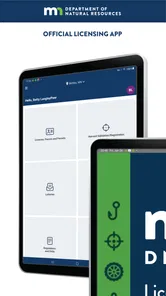
The app is described as the official licensing app of the Minnesota DNR. Its developer, Sovereign Sportsman, is now PayIt LLC. That official purpose makes it relevant for people seeking Minnesota DNR licensing services, rather than a general outdoor information app. The sports category reflects its connection to hunting, fishing, and other regulated outdoor activities.
What is MN DNR Licensing used for?
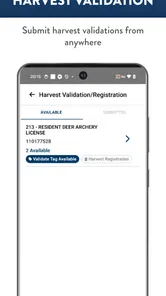
MN DNR Licensing is the official Minnesota Department of Natural Resources service for purchasing and managing licenses, permits, and related authorizations. Depending on the season and activity, users may be able to obtain fishing, hunting, trapping, and other outdoor recreation licenses. It is designed to make transactions more convenient, while still requiring users to provide accurate personal and eligibility information.
Can I buy Minnesota fishing and hunting licenses through the app?
The service is intended to help eligible users purchase Minnesota DNR licenses and permits digitally, including common fishing, hunting, and outdoor activity options. Availability can depend on the current season, license type, residency status, age, and applicable regulations. Before completing payment, carefully review the selected license, dates, and any required stamps or permits.
Do I need an account to use MN DNR Licensing?
Some features may be available without creating a full account, but signing in or providing personal details is generally necessary when purchasing licenses, checking customer information, or accessing digital license records. Have your identifying information and, when applicable, previous license details available. Creating or using an account can also make future renewals and purchases faster.
Pros
- Official Minnesota DNR source for purchasing and managing licenses.
- Supports multiple license types for hunting
- fishing
- and outdoor activities.
- Convenient digital access reduces the need to carry paper documents.
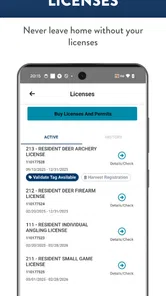
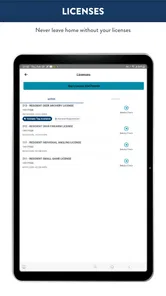
- Useful for reviewing license details and expiration information.
- Helps keep permits and licensing records available while traveling.
Cons
- Availability and features may vary depending on license type or season.
- Requires a stable internet connection for some purchases and updates.
- Account setup and identity details may take time to complete.
- Not all outdoor regulations or trip-planning tools are included.
- A phone battery failure can make digital license access inconvenient.





