

HuntFish OH
- 160.00
- 4.2
- Installs
- 100.00K
- Price
- Free

Screenshots
Analysis by Reviewed
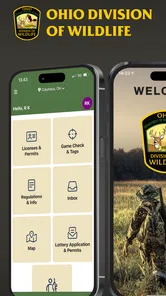
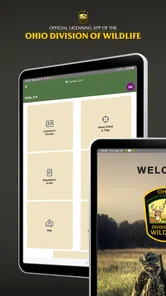
For an Ohio outdoor trip, I’d think of HuntFish OH as a practical companion for state-specific hunting and fishing tasks, rather than as an all-purpose guide to the outdoors. It is a free sports app from Sovereign Sportsman, centered on licensing and game checks. That focus gives it a useful role alongside the tools I’d use for navigation, weather, or broader trip planning.
Readability and navigation in the field
The first thing that caught my eye was how user-friendly the app is. When you’re out in the wild, the last thing you want is to fumble with complicated menus. The interface is super intuitive, which means you can focus more on your adventure rather than figuring out the app. From checking the latest regulations to buying licenses, it’s all right there at your fingertips.
That simplicity matters most when you are preparing before leaving home. I would use the app to handle licensing and game-check tasks in a calm setting, then confirm I can reach the relevant screens before heading out. This small habit can reduce last-minute tapping when you are wearing gloves or dealing with poor light. It is also a sensible way to avoid treating a phone as a substitute for knowing the rules that apply to your specific activity.
There is a useful distinction between an app that is easy to browse and a process that is easy to complete in every circumstance. I’d take a few minutes indoors to learn where the tasks I expect to need are located, rather than assume I’ll remember the route after a long drive or at the end of a tiring day. If I’m going with someone who is less comfortable using a phone, I’d show them the basic flow before the trip, not while they are trying to manage equipment or keep up with a group.
Motor and sensory considerations
On a practical level, any phone-based process can become harder with cold fingers, wet hands, glare, or a screen that is difficult for you to read. I would complete important account or licensing steps before a trip rather than relying on fast, precise interaction outdoors. If you use screen magnification, voice features, or other device settings, it is worth checking how they work with the app before you depend on them in the field.
The app’s Everyone age rating describes its content classification, not whether every interaction will suit every ability. I would not assume it replaces a paper backup or help from another person when a motor, vision, hearing, or cognitive need makes phone use challenging. For a companion group, agreeing ahead of time who will manage the shared practical steps can make the outing smoother without putting all the pressure on one person.
For anyone who relies on larger text or a particular contrast setting, I’d test those settings across the screens needed for the trip, rather than checking only the opening screen. Outdoor readability changes quickly with sun angle and reflections, and a display that feels comfortable at home may be less so beside water or under tree cover. A simple plan is to make sure the phone’s brightness and accessibility controls are familiar before leaving, and to keep the device protected in a way that still allows deliberate tapping.
More From Our News Desk

 Gmail
GmailGmail in a Busy Inbox: Who Benefits Most?
From first account to crowded workday, Gmail earns its place through dependable search and flexible sorting—but its best fit depends on how much inbox maintenance you can tolerate.

 Prime Video
Switching to Prime Video: What Changes in Your Viewing Routine
Prime Video can make a compelling second home for streaming, but switching means learning a different catalog, rental layer, and route from browsing to playback.

 Universal TV Remote Control
Universal TV Remote Control Works Best as a Reliable Backup
A phone remote earns its place through quick setup and reliable habits. Here is how to get more from Universal TV Remote Control—and where its limits show.

 Weather - By Xiaomi
Weather by Xiaomi Review: Clear at a Glance, Less Clear Up Close
Xiaomi’s weather app makes everyday forecasts quick to scan, but its calm surface can leave useful details and recovery paths harder to find than they should be.

 X
XX Under Pressure: Can It Recover When Posting Goes Wrong?
A resilience-focused review of X, examining setup, mistaken posts, interruptions, weak connections, and the gaps that matter when recovery needs to be dependable.

 Clash of Clans
Clash of Clans Is Won Between the Battles
Its raids are quick; its community is a long-term project of coordination, teaching, rivalry, and shared responsibility—with all the friction that entails.
Latest News



Planning, features, and real-world trade-offs
One of the standout features is the real-time weather updates. We all know how quickly weather can change, especially when you’re out in the woods or on the water. Having access to up-to-date weather conditions directly in the app is a game-changer. It’s like having your own personal meteorologist!
I would still check conditions before leaving and make a fresh safety decision as circumstances change; a phone display should support judgment, not replace it. Battery life and reception can also affect how useful any connected tool is on a long day outdoors, so I would start with a charged phone and avoid assuming that every service will be available everywhere.
That makes the app most useful as one part of a small planning routine, not as the single source for every decision. I’d check what I need while I have a reliable connection, charge the phone, and decide in advance what I’ll do if reception is poor. For a longer outing, I would also avoid making a final safety call from a quick glance at one screen; changing conditions on the ground still matter more than a convenient summary.
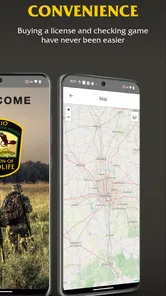
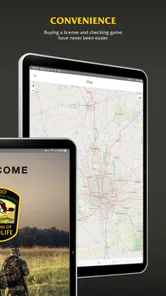
Moreover, the interactive maps are a blessing. With detailed information about public lands, wildlife areas, and fishing spots, planning your next trip becomes a breeze. I found this particularly helpful when exploring new areas. You can even mark your favorite spots for future reference.
A useful workflow is to save a few candidate locations while planning, then compare them with the access and rules relevant to your trip before setting out. A marked spot is a personal planning aid, not proof that a place is currently open or suitable for your purpose. For unfamiliar areas, I would use those map details alongside current official guidance rather than relying on a pin alone.
For a first visit, I’d make a short list of possible places instead of committing to one pin too early. That gives me room to change plans if access or conditions do not suit the group. I’d also treat saved locations as reminders, not as complete directions: someone who needs step-free access, a particular kind of parking, or a quieter setting should verify those practical details separately before making the journey.
Situational access and who benefits most
Picture a weekend angler planning a quick stop after work: checking the license situation at home, looking over possible fishing locations, and keeping the phone ready for official tasks makes more sense than trying to sort everything out at the water’s edge. The same approach can help a hunter prepare ahead of a trip. The app is a particularly natural fit for Ohio residents or visitors whose plans involve the state’s hunting and fishing requirements.
Compared with a generic outdoor map, its value is the official licensing and game-check purpose; compared with a standalone forecast app, it brings Ohio outdoor administration into the same place as trip planning. I would not choose it as my only navigation tool, nor expect it to serve as a universal fishing or hunting guide. If your plans are outside Ohio, a tool tailored to the destination is likely more relevant.
It is also a sensible choice for someone who makes occasional Ohio trips and wants state-related tasks close to the rest of their preparation. A visitor can use it for the Ohio part of an itinerary, while relying on other sources for travel, route finding, or activities elsewhere. By contrast, if your main need is turn-by-turn directions, detailed offline maps, or a broad database covering many states, a dedicated navigation or outdoor platform is the better primary tool.
In a realistic after-work scenario, I’d settle the administrative part at home, identify a couple of plausible fishing locations, and then leave with the phone charged and the relevant screens familiar. Once I arrive, I can focus on the outing instead of trying to learn the app in a hurry. If a screen is hard to read or the connection is unreliable, having prepared earlier reduces the pressure, though it does not remove the need for another plan when a task cannot be completed on the phone.
Who should skip it? I would pass if I did not need Ohio hunting or fishing services, or if I expected one app to provide every map, route, forecast, and field reference. It may also be a poor fit for someone who cannot comfortably use a smartphone outdoors and has no companion or alternative process for the necessary tasks. In those cases, a more specialized tool—or help arranged before the trip—can be more dependable.
Community, resources, and remaining barriers
Another element I appreciate is the community aspect. The app connects you with other outdoor enthusiasts, making it easy to share tips and experiences. There’s something comforting about knowing you're part of a bigger community passionate about the same interests.
Plus, the resource section is rich with educational content. Whether you're a seasoned pro or a newbie, there’s always something new to learn. From conservation efforts to species identification guides, it’s like having a library in your pocket.
For a new participant, educational material can make preparation feel less intimidating; for an experienced one, it can be a useful prompt to revisit details before a trip. I would treat community advice as a starting point rather than a substitute for official requirements, since personal tips may not match the rules or conditions for a particular place and day. If you mainly want social discussion, a dedicated community platform may offer a better experience.
The community and learning material serve different needs, so I would not assume that a helpful discussion settles a practical question. If a tip affects where I can go or what I can do, I’d check the relevant official information as well. That distinction is especially useful for newer hunters and anglers: the app can make preparation feel more approachable, but judgment and current requirements still belong in the decision.
The app has an average rating of 4.3 from around 340 ratings and has passed 100,000 installs, which suggests it has found an audience among people looking for Ohio-focused outdoor support. It is free, rated for Everyone, and its current version is 1.3.7, with Android 5.1 as the minimum operating system. Those details make it approachable for many users, though an older phone or a difficult outdoor setting can still affect comfort and performance.
For someone deciding whether to try it, the main question is not whether it can replace every outdoor app; it cannot. It is whether keeping Ohio’s licensing and game-check tasks alongside other planning is useful enough to earn a place on the phone. Since it is free, trying it before a planned outing is a low-commitment way to see whether the navigation and text work for your needs, but I would still test it before a time-sensitive trip rather than during one.
My inclusive verdict
In conclusion, HuntFish OH is not just an app; it’s a companion for anyone who loves the great outdoors. It’s packed with features that make your experiences safer and more enjoyable. Whether you're hunting, fishing, or just exploring nature, this app has something to offer. So, next time you plan an outdoor adventure, make sure you have this trusty tool along for the ride. You won’t regret it!
My more measured recommendation is to use it when Ohio licensing and game-check needs are part of your plans, and to prepare key tasks before you are outdoors. If accessibility is a priority, test the screens and controls in your usual phone setup before relying on them under pressure. For an Ohio outdoor enthusiast who wants official tasks close at hand, it is a practical option; for someone seeking accessible navigation, offline-first mapping, or a destination outside Ohio, a more specialized alternative may be the better companion.
My inclusive verdict is that usefulness depends as much on the setting as on the app itself. A person who can comfortably prepare at home and use a phone for occasional outdoor tasks may find it straightforward. Someone who needs highly legible displays, hands-free interaction, dependable offline access, or detailed information about physical access should check those needs separately and bring another option where necessary. I would recommend it as a focused Ohio resource, not as a promise that every part of an outdoor day will be accessible through one screen.
HuntFish OH Frequently Asked Questions
Who publishes HuntFish OH, and who is it designed for?
HuntFish OH is published by Sovereign Sportsman and is the official licensing and game-check app of the Ohio Division of Wildlife. It is aimed at people who hunt or fish in Ohio and want related services in one place. The app is free to download and has an Everyone content rating, so its subject matter is presented for a broad audience.
What devices and software does HuntFish OH require?
HuntFish OH is available for Android and iOS devices. On Android, it requires version 5.1 or later, so it is worth checking your device’s software before downloading. The app is designed around Ohio hunting and fishing services, making it most relevant to people who need those tools rather than users looking for a general outdoor guide.
What is HuntFish OH and what does it offer?
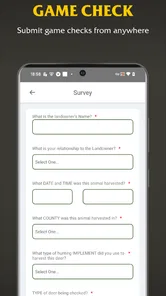
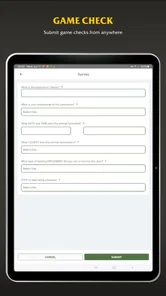
HuntFish OH is an all-in-one app designed for outdoor enthusiasts in Ohio. It provides essential tools for hunters and anglers, including real-time information on regulations, licensing, and permits. Users can access maps, check weather forecasts, and even report harvests directly through the app, making it an indispensable companion for outdoor activities.
How can I purchase licenses and permits using HuntFish OH?
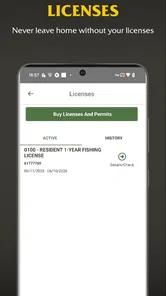
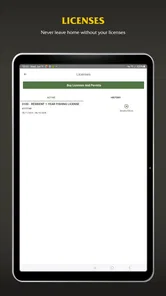
Purchasing licenses and permits through HuntFish OH is straightforward. You simply need to create an account or log in, navigate to the 'Licenses' section, and select the required license or permit. The app supports secure payment methods, ensuring your transactions are safe. Once purchased, digital copies are stored within the app for easy access.
Is HuntFish OH available for both Android and iOS devices?
Yes, HuntFish OH is available for both Android and iOS platforms. The app can be downloaded from the Google Play Store for Android devices and the Apple App Store for iOS devices. It is designed to offer a seamless user experience across both platforms, ensuring all features are accessible regardless of the device used.
Pros
- User-friendly interface for easy navigation.
- Comprehensive hunting and fishing maps.
- Real-time weather updates.
- Detailed species information and regulations.
- Offline access to maps and resources.
Cons
- Limited to Ohio region only.
- Occasional app crashes reported.
- Requires frequent updates.
- Some features require in-app purchases.
- Battery consumption is relatively high.





