Mastodon
- 1.08K
- 3.6
- Installs
- 1.00M
- Price
- Free

Screenshots


Analysis by Reviewed
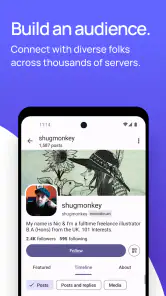
I found the easiest way to approach Mastodon is to treat it less like one giant social network and more like a set of connected neighborhoods. That difference can feel unfamiliar at first, but it also gives the experience a more personal scale. The Android app is a free social app from Mastodon, with a Mature 17+ age rating; its current version is 2.11.7 and it requires Android 6.0 or later. It has a 3.6 average from around 9,500 ratings, and more than a million installs. I’d recommend it most to people who want to follow conversations and communities without expecting the same centralized, highly guided experience as the biggest social platforms.
What to expect from a network of communities
Before you install, it helps to know why the first screen may not immediately feel like a familiar, fully populated feed. Mastodon is made up of independently run servers, often called instances, that connect with one another. Your account belongs to one server, while you can still follow people elsewhere in the wider network. The result is less like joining a single town square and more like choosing a local base from which to explore a larger map.
That structure is a genuine difference, not just a technical detail. A server can have its own community focus and rules, so the place you start can influence what feels visible and relevant. The trade-off is that choosing a server adds a decision that most mainstream social apps avoid. If you want a familiar feed with no setup choices, this may feel like extra work; if you value smaller communities and a more open network, the choice can make your account feel better grounded.
First setup: choose a home, not a perfect match
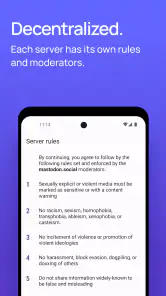
When you sign up, choose a server whose subject and community rules seem comfortable, rather than trying to find a flawless permanent home. I’d read the server’s description and rules before committing, then get started instead of spending ages comparing options. Your first meaningful goal is simply to make an account and find a few people whose posts interest you. That gives you something concrete to judge the experience by, rather than judging an empty timeline.
It’s also useful to think about what you want from the app before you follow widely. Are you looking for artists, local discussion, technology talk, or a calm place to share your own interests? Searching with a purpose makes the network easier to navigate. Start with a few accounts, pay attention to the conversations around them, and expand gradually. A smaller, relevant feed is often more useful than following everything that catches your eye on day one.
Your first satisfying use
For me, the best first session is a short loop: find an account or community that matches an interest, read a few posts, follow people who consistently offer something worthwhile, and reply when you have something genuine to add. That small action shows what Mastodon does well: it can make social browsing feel like following people and ideas, rather than trying to keep up with a platform-wide trend cycle.
A realistic everyday use is checking in during a lunch break to catch up with a handful of writers, hobbyists, or local voices, then posting a thought or question for that circle. The chronological timeline helps keep the sequence understandable: newer posts appear in time order instead of being rearranged around a predicted ranking. That can make it easier to see what happened since your last visit, though it also means a busy feed can move past posts quickly.
More From Our News Desk

Clash of Clans Is Won Between the Battles

Android Auto Makes the Case for Quieter Car Software

MobiOffice: Transforming Mobile Productivity with Seamless Integration

EA SPORTS FC™ Mobile Soccer: Redefining Mobile Sports Gaming

How Microsoft OneDrive Became a Mobile Productivity Giant

How Google Translate Breaks Language Barriers Effortlessly
Small habits that make the network easier
One practical tip is to keep your first follows intentional. If a timeline becomes noisy, unfollowing accounts is a simple way to restore a useful signal; you don’t need to abandon your server or rebuild your account just because your feed needs tidying. I also find it helpful to treat the server’s rules as part of the social context, not as setup paperwork. They tell you what kind of participation is welcome and can prevent awkward misunderstandings when you begin posting.
Another useful habit is to give the network time before deciding it feels quiet. A new account starts without the history and relationships that make an established feed lively. Follow a few people whose interests overlap with yours, check in again, and take part in conversations rather than waiting for the app to instantly assemble a perfect feed. This is a more hands-on start than many large platforms offer, but it gives you more say in what your social space becomes.
Getting Started with Mastodon
Jumping into Mastodon is like stepping into a bustling community town hall rather than a global metropolis. The first thing you’ll notice is that it’s not just one big space but a collection of smaller communities called "instances." Each instance is like its own little neighborhood with unique rules and cultures. Setting up an account is straightforward, but you might spend a bit of time deciding which instance best suits your vibe. Whether you’re into tech, art, or just general banter, there’s a corner of Mastodon waiting for you.
Interface and User Experience
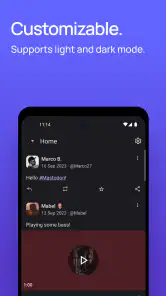
The interface of Mastodon is refreshingly simple. If you’re accustomed to the fast-paced, hyper-stimulating feeds of other social networks, this might feel like a slow dance in comparison. And that’s a good thing. The timeline is chronological, which means no more battling against algorithms that show you posts from last week. It’s all about being in the moment. The layout is clean, with easy navigation that even the least tech-savvy user can master in minutes.
Features and Functionalities
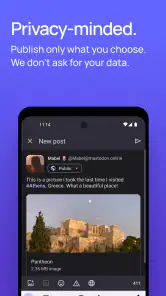
One of the coolest features in Mastodon is its emphasis on privacy and control. You decide who sees your posts and can even set them to disappear after a certain period. There’s also a strong community focus, with users often engaging in more meaningful conversations. The absence of ads contributes to this, as the platform feels more like a genuine exchange of ideas rather than a marketplace.
Because communities are spread across servers, it’s worth thinking about where a conversation lives before jumping in. A post that makes sense among people who share a niche interest may need more context when it reaches a broader audience. I’d add enough background for a newcomer to follow along, and avoid assuming everyone has seen the earlier discussion. That small adjustment helps replies feel welcoming rather than like an inside conversation with the door half shut.
Finding a rhythm that suits you
Compared with a conventional centralized social app, Mastodon asks you to do more of the work of shaping your experience. In return, the feed can feel less driven by recommendations and more connected to the accounts you choose. If your main goal is viral discovery, creator analytics, or a single, seamless global feed, another social platform may suit you better. If you mainly want to keep up with people and conversations you deliberately follow, this app’s slower, more intentional pace can be a real advantage.
It’s also a better fit for people who are comfortable learning a few community conventions as they go. Someone who wants to open an app and immediately see familiar friends, polished suggestions, and a clear route to every feature may find the first days uneven. I’d give it a fair trial by following a small, focused group and checking whether the conversations are worth returning to. If they are, the extra setup starts to feel like a useful choice rather than a hurdle.
Features and Functionalities
One of the coolest features in Mastodon is its emphasis on privacy and control. You decide who sees your posts and can even set them to disappear after a certain period. There’s also a strong community focus, with users often engaging in more meaningful conversations. The absence of ads contributes to this, as the platform feels more like a genuine exchange of ideas rather than a marketplace.
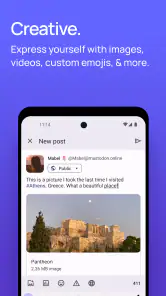
For a first post, I’d keep the wording clear and give readers enough context to respond, especially if you’re asking a question. A specific prompt usually works better than a vague announcement because it gives people an easy opening to join in. You can also use the early days to observe how people in your chosen community talk to one another before deciding what tone feels right. That is a low-pressure way to learn without needing to master every convention in advance.
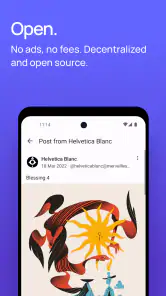
What truly sets Mastodon apart is its open-source nature. Developers from all over the world contribute to its growth, ensuring that it remains a platform by the people, for the people. This collaborative spirit is palpable and makes every interaction feel a bit more personal.
The Learning Curve
Now, if you’re someone who’s used to the polished, user-friendly interfaces of mainstream social media, there might be a slight learning curve. But don’t let that deter you. Take it as an adventure. Exploring the different instances and understanding the nuances of each can be quite rewarding. Plus, the community is generally welcoming and eager to help newcomers find their footing.
Who will enjoy it, and who may not
I think this app is strongest for readers, writers, artists, hobby groups, and anyone who prefers following chosen voices over chasing whatever is trending. It can also be a good place to keep separate interests in view: follow one set of accounts for a hobby and another for professional discussion, then use your own feed to decide what deserves attention. The useful part is the deliberate curation; the cost is that you need to do that curation yourself.
I’d steer away if your priority is reaching the broadest possible audience with the least effort, or if all your friends already use a different network and you mainly want one shared place to message them. Mastodon’s distributed structure is part of its appeal, but it can make finding the right people less immediate. It is a social app, not a guaranteed shortcut to an active audience, so success depends on whether the communities you care about are present and whether you enjoy taking part.
Settling into a useful routine
Once you have a few worthwhile follows, the next step is to make the app fit your day rather than letting it fill every spare moment. I’d check the timeline when I have time to read and respond, then leave it alone when I don’t. Since posts arrive in chronological order, a quick scan can be satisfying, but there is no need to treat every missed post as something you must catch up on. The feed works best as a window into conversations, not as a task list.
If the first server you chose doesn’t feel like home, that doesn’t mean the whole network is a poor fit. The important distinction is between disliking one community’s atmosphere and disliking the idea of a connected network altogether. Notice what is bothering you: too little activity, rules that don’t suit your style, or simply a feed that needs more relevant follows. That diagnosis helps you decide whether to adjust your habits or look for a different social experience.
At its core, Mastodon offers a refreshing alternative to the social media giants. It’s all about real-time communication with real people, without the noise and clutter of traditional platforms. Whether you’re looking to escape the digital hustle or simply want to try something new and exciting, Mastodon might just be the oasis you’ve been searching for.
So, why not give it a whirl? Dive into the diverse world of Mastodon and discover how liberating decentralized social networking can truly be.
Mastodon Frequently Asked Questions
What should I know about Mastodon’s age rating before downloading?
Mastodon is a social app with a Mature 17+ content rating, so it may not be suitable for younger users. The experience depends in part on the communities and accounts you choose to follow, and individual servers have their own rules and moderation practices. Review the app’s rating and the guidelines of the server you plan to join before creating an account.
What is Mastodon and how does it differ from other social media platforms?
Mastodon is a decentralized social media platform that operates on a network of independent servers or "instances." Unlike traditional social media platforms like Twitter or Facebook, Mastodon allows users to choose the instance they want to join, each having its own rules and community guidelines. This decentralization aims to give users more control over their data and the community they want to participate in. It's an open-source platform that emphasizes privacy and community-driven governance.
Is Mastodon free to use and are there any hidden costs?
Mastodon is completely free to use. Since it is open-source software, any individual can set up and run a Mastodon server without incurring any mandatory costs. However, some instances may accept donations to cover server costs and maintenance. Users should verify the terms of their chosen instance to understand any potential voluntary contributions.
How do I find people or communities to follow on Mastodon?
Finding people or communities on Mastodon can be a bit different than on centralized platforms. Start by exploring the local timeline of your instance to see posts from users on the same server. You can also search for hashtags relevant to your interests. Many instances have directories or "About" pages listing recommended users or hashtags to follow. Additionally, joining larger instances may make it easier to discover diverse communities.
Is it safe to use Mastodon with respect to privacy and data security?
Mastodon places a strong emphasis on user privacy and data security. Since it is decentralized, each instance has its own policies regarding data management. Users should carefully read the privacy policy of their chosen instance. Generally, Mastodon does not sell user data to advertisers, unlike some major social media platforms. The open-source nature of Mastodon allows for transparency, and users can choose instances with the best privacy practices.
Pros
- Decentralized network enhances privacy
- Open-source with active community support
- Ad-free experience ensures no distractions
- Customizable interface for personalized use
- Strong focus on community engagement
Cons
- Smaller user base compared to giants
- Learning curve for new social media users
- Limited third-party app integration
- Server downtime can affect accessibility
- Content moderation varies by server

- Category
- Social
- Version
- 2.11.7