

Mango: Comics & Manga
- 0.00
- 0.0
- Installs
- 100.00K
- Price
- Free

Screenshots

Analysis by Reviewed
When I choose a comic app, I want more than a shelf of titles: I want to know whether I can read comfortably on the screen I have, find a story that fits my mood, and put the phone down without losing my place. Mango is a comics app from DramaHome Studios for readers interested in webtoons, manhwa, and other comics. Its emphasis on vertical scrolling gives it a clear identity, but also makes questions of readability, hand movement, and reading context especially important.
Who may find Mango a useful fit
I can see Mango working well for someone who already reads mobile-first comics and wants a convenient option for short breaks, a quiet evening, or a commute with a seat. It may also suit readers who would rather follow a tall sequence of panels than adapt a phone-sized screen to a traditional page. The best reason to try it is a genuine preference for that format, not simply the broad appeal of comics on a phone.
It is less compelling if your main interest is a particular series, a complete catalog, page spreads, or a highly customized reading setup. Before making it your default, spend a little time checking whether the available stories match your taste and whether the reader feels comfortable in your hands. That quick trial can answer more than a general promise about convenience.
Reading flow, comfort, and access
I look at reading comfort as a combination of the comic’s layout, the screen, and the way a reader navigates—not just how quickly a chapter loads. In this section, I’ll focus on how Mango’s vertical flow may suit some readers while asking more of others, then consider practical adjustments and the situations where another format may work better. Testing a short chapter on your usual device is the clearest first step.
A format that suits long panels
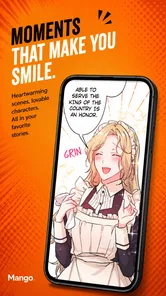
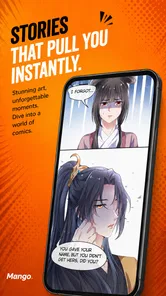
Mango is built around a continuous downward reading flow rather than the familiar page-turning layout of a print comic. I find that approach particularly natural for webtoons, where tall panels and deliberate gaps guide the eye through a scene. There is less need to pause and work out how a page’s panels connect; the sequence unfolds as I scroll. For readers coming from manhwa or mobile-first comics, that can make the format feel immediately familiar.
The same design is less ideal for every kind of comic. A page composed to be viewed as a whole can lose some of its intended balance when encountered panel by panel. If you care about spreads, page composition, or seeing several panels together before moving on, a reader with a dedicated page view may serve you better. Mango’s vertical approach is a clear preference, not a universal improvement.
In practical use, continuous scrolling makes it easy to stop at a natural point and resume without thinking about page numbers. It also means the reader’s thumb is part of the navigation. I would treat the scroll itself as the central interaction, not assume that the app works like a traditional e-reader with page controls. That distinction matters if you are choosing an app for long sessions or for someone who finds repeated touch gestures tiring.
More From Our News Desk

 Gmail
GmailGmail in a Busy Inbox: Who Benefits Most?
From first account to crowded workday, Gmail earns its place through dependable search and flexible sorting—but its best fit depends on how much inbox maintenance you can tolerate.

 Prime Video
Switching to Prime Video: What Changes in Your Viewing Routine
Prime Video can make a compelling second home for streaming, but switching means learning a different catalog, rental layer, and route from browsing to playback.

 Universal TV Remote Control
Universal TV Remote Control Works Best as a Reliable Backup
A phone remote earns its place through quick setup and reliable habits. Here is how to get more from Universal TV Remote Control—and where its limits show.

 Weather - By Xiaomi
Weather by Xiaomi Review: Clear at a Glance, Less Clear Up Close
Xiaomi’s weather app makes everyday forecasts quick to scan, but its calm surface can leave useful details and recovery paths harder to find than they should be.

 X
XX Under Pressure: Can It Recover When Posting Goes Wrong?
A resilience-focused review of X, examining setup, mistaken posts, interruptions, weak connections, and the gaps that matter when recovery needs to be dependable.

 Clash of Clans
Clash of Clans Is Won Between the Battles
Its raids are quick; its community is a long-term project of coordination, teaching, rivalry, and shared responsibility—with all the friction that entails.
Latest News



Finding a story that fits your mood
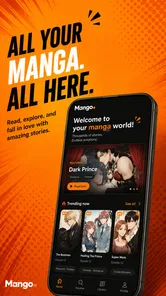
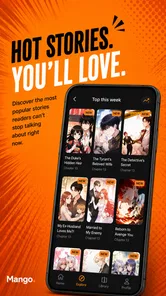
The app’s appeal is the chance to browse trending comics alongside reading them. That gives a curious reader a straightforward way to move from a familiar genre toward a new series, rather than needing to pick a specific title before opening the app. Mango’s description is brief, though, and I would not choose it on the assumption that every series has a particular discovery tool or catalog filter. The sensible approach is to open it with a title or mood in mind and see whether its available selection matches what you want to read.
A useful habit is to sample a chapter before making a new series part of your routine. The first few screens tell you whether the artwork remains clear at your usual phone size and whether the panel spacing suits your pace. They also help you spot whether a comic’s lettering is comfortable to read without constant zooming. This small check is more informative than judging a series by its cover or popularity alone.
For someone who reads in short bursts, a vertical chapter can be easier to pick up between tasks than a book that requires setting aside a quiet stretch of time. I would still avoid beginning a complicated story when I know I have only a minute: the format makes it easy to continue, but it does not make plot-heavy chapters easier to remember. If you often return after a long gap, a quick glance at where you stopped before scrolling on can save the frustration of rereading half a scene.
Comfort for different hands and eyes
Scrolling is straightforward for many people, but it is a repeated movement. A reader with limited dexterity, hand pain, tremor, or difficulty making precise gestures may find a long chapter more demanding than the simple interface suggests. I would test a short reading session first, using the hand and grip you normally rely on. If your thumb tires quickly, switching hands or resting the phone on a stand may make the experience more manageable; neither changes the app, but both reduce the work of holding and moving a device.
Screen size and text rendering matter just as much. Art styles vary, and small dialogue lettering can be difficult to read on a compact display even when the panels look crisp. Before settling into a series, check whether the lettering is legible at your normal viewing distance. If you find yourself repeatedly pinching or leaning closer, that title may be a poor match for the screen, regardless of how appealing the story is.
People who are sensitive to bright screens can make the reading environment gentler by lowering their device brightness and choosing a comfortable room light. That is a general device adjustment, not a special capability I would attribute to Mango. Likewise, anyone who relies on a particular text-size setting, screen reader, switch control, or other assistive technology should test the actual reading and browsing screens on their own device before committing. A vertically arranged comic is visual by nature, and compatibility can depend on both the app and the operating system.
Small adjustments for real reading situations
On a commute, Mango’s scroll-based format can suit a short ride: I can read a little, pause when I need to look up, and continue when the moment is right. But a moving bus or train is a poor place to assume that a long session will feel comfortable. Small text, motion, glare, and the need to hold a phone can combine quickly. I would keep the screen brightness modest, avoid reading while walking, and save a demanding chapter for a steadier setting.
At home, the app is easier to enjoy when the phone can rest against a cushion or stand. That is especially helpful for readers who prefer not to grip a device for an entire chapter. In a shared room, a private screen also gives you control over what is visible around other people, which matters because Mango is marked Mature 17+. I would check the age suitability of the app and the specific reading context before handing it to a younger reader.
For low-bandwidth or offline reading, I would not plan around capabilities I have not personally established. If you expect to read somewhere with unreliable service, open the app beforehand and check that the content you want is available in the conditions you have. This is a practical precaution rather than a promise about downloading or offline access. It can prevent a frustrating discovery after you have already settled in for a chapter.
How it compares with other ways to read
Compared with a general digital bookshelf, Mango’s appeal is narrower: it puts vertically presented comics at the center instead of trying to make every kind of reading feel alike. That focus can feel more natural for webtoons than a page-based reader, where panel order and small print may require more attention. On the other hand, a reader built around full pages is often the better choice for traditional comic layouts, spreads, or readers who want to see a page’s overall composition at once.
Print has different strengths again. A physical volume gives you a stable page and does not require holding a bright display in front of your eyes, though it is less convenient to carry several stories in a pocket. Mango is most useful when the phone is already with you and the comic’s art has been composed for a vertical flow. I would choose according to the artwork and the setting rather than assume one format is better for every title.
For example, if I had a short wait before an appointment, I would open a series I had already sampled rather than spend that time browsing unfamiliar titles. I would read a manageable stretch, stop at a scene break, and check that I could comfortably resume before putting the phone away. That routine makes the app’s quick-entry format useful without asking a brief gap to support a complicated first chapter.
Where the experience can still get in the way
The strongest limitation is the format’s reliance on steady visual attention and repeated scrolling. It works well when the artwork is designed for a phone, but it can be awkward for page-oriented comics or readers who want a hands-free, audio-led experience. If you prefer physical books, double-page art, or reading without looking at a screen, a print edition or another kind of reading app is likely a better fit.
Another trade-off is that “trending” is not the same as “right for me.” Popular stories can be a useful starting point, but a reader may want narrower ways to find a particular tone, art style, or subject. I would not assume that a prominent title reflects the full range of what you might enjoy. Take time to sample the artwork and dialogue rather than letting a trend label make the decision for you.
It is also worth separating the app’s age label from an individual reader’s preferences. Mature 17+ is a clear signal that Mango is intended for an older audience, but it does not tell me whether a particular comic will suit every adult reader. If you are sensitive to specific themes, inspect a story’s presentation before continuing. That is a sensible step for any comics catalog, and especially important when recommending an app to someone else.
Mango is free to use and has passed 100,000 installs. It was released on August 14, 2026, and version 1.0.4 is the current version. It supports Android 7.0 and later. Those details make it easy to judge basic fit, but they do not replace a personal test: comfort with the scrolling, legibility on your screen, and the comics available to you are what will determine whether it earns a place in your routine.
Who I would recommend it to
I would recommend Mango to readers who already enjoy mobile-first comics and want a simple way to spend a spare moment with webtoons or manhwa. It is also worth trying if page turns interrupt your reading rhythm and you prefer a story to move downward in one continuous stream. Since it is free, a short trial is a reasonable way to see whether the format and selection suit you.
I would steer readers who need strong, dependable support for a specific assistive setup toward a careful hands-on check before relying on it. The same goes for anyone who tires from touch gestures, needs unusually large text, or prefers to read without a screen. A page-based comic reader may be more comfortable for print-style layouts, while physical editions may be better for people who want a stable page, less screen exposure, or a broader view of the artwork.
My overall view is that Mango’s promise is focused: it puts vertically scrolling comics at the center, which is a real advantage for the right reader and a meaningful constraint for others. Its accessibility depends as much on your hands, eyesight, device, and reading setting as on the app itself. If a brief trial feels comfortable and the available stories appeal to you, it is an easy option to keep nearby. If scrolling, small lettering, or visual-only reading gets in your way, choosing a different format is not a compromise—it is the more inclusive choice.
Mango: Comics & Manga Frequently Asked Questions
What is Mango: Comics & Manga?
Mango: Comics & Manga is a mobile app for reading digital comics and manga. It is designed to help readers discover titles and follow stories on a phone or tablet, though the available catalog, reading features, and language options can vary by region and app version. Check the app listing and its details before downloading to confirm that it offers the genres and content you want.
Is Mango: Comics & Manga free to use?
The app may be free to download, but access to every title or feature is not necessarily free. Some reading apps offer a mixture of free chapters, paid content, subscriptions, or in-app purchases, and their terms can change over time. Review the store listing and the purchase information shown in the app before paying, especially if you plan to subscribe or buy chapters.
Can I read comics or manga offline with Mango?
Offline reading depends on whether Mango: Comics & Manga provides a download option for the titles you want and on any restrictions attached to that content. Do not assume that opening a chapter once will make it available without an internet connection. Look for download controls in the app, check how much storage files may use, and test access before traveling or going somewhere with limited connectivity.
Does Mango: Comics & Manga offer content in my language?
Language availability can differ between titles, chapters, and regions, so the app may not have every comic or manga in your preferred language. Check the catalog and the description of individual series rather than relying only on the app’s name or general listing. If a specific translation matters to you, confirm that recent chapters are available in that language before deciding to use the app.
Is Mango: Comics & Manga safe for children, and what permissions should I check?
Comics and manga can include material intended for mature readers, so parents should review the app’s age rating, content notices, and individual titles before allowing a child to use it. Also check the permissions requested during installation and the privacy information on the store page. Avoid sharing personal details unnecessarily, and use available device or account controls to manage purchases and screen time.
Pros
- A broad mix of comics and manga makes it easy to find something new to read.
- Personalized recommendations help surface titles suited to your interests.
- A library feature keeps track of comics you want to follow or revisit.
- The mobile-friendly reading experience is convenient for reading on the go.
- Regular content updates can give readers fresh chapters and titles to explore.
Cons
- Availability of specific titles may vary by region or change over time.
- Some content may require payment or a subscription to access.
- Reading comfortably on a small screen can require frequent zooming or scrolling.
- Recommendations may take time to match your tastes accurately.
- An internet connection may be needed to access much of the catalog.











