

Manga Translator - Translate
- 40.00
- 3.1
- Installs
- 100.00K
- Price
- Free

Screenshots

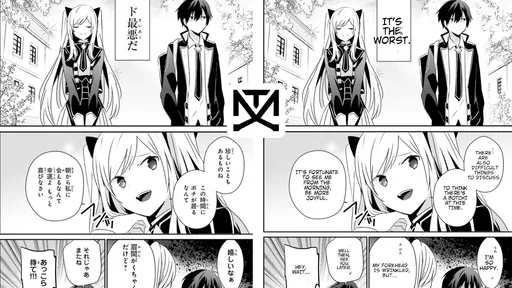
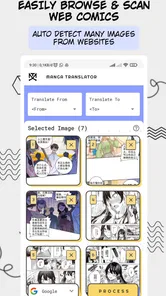
Analysis by Reviewed
I approach comic translation as a trade-off: I want to understand a scene without breaking the flow, but I also want to know what I’m trusting with the page I choose. That’s where Manga Translator may be useful. It is a free comics app from Wiryaimd, aimed at helping readers make sense of manga and other illustrated stories in unfamiliar languages. I’d treat it as a quick reading aid, not a substitute for an official translation or a language-learning tool. Its average rating is 3.1 from around 1,400 ratings, which makes me cautious about expecting every page to work equally well.
Trust starts with what you can check
Translation apps sit close to personal reading habits: a page can reveal what you enjoy, and translating it may involve pointing a camera at the artwork or choosing an image. I think it’s sensible to pause before granting access or importing anything. The app is rated for Everyone and has reached over 100,000 installs, but neither fact tells me how it handles personal information. I would make a decision based on the permission prompts and choices shown on my own device, not on assumptions about privacy.
That distinction matters if you’re translating a page from a private message, a paid digital comic, or a work you don’t want to share. I’d avoid putting sensitive material into any translation tool unless I understood the on-screen choices and was comfortable with them. For ordinary reading, a useful habit is to try a non-sensitive page first and notice what the app asks you to allow before deciding whether to continue.
Make the first test a useful one
If you’re deciding whether this app suits you, don’t judge it by a page packed with tiny lettering or dramatic sound effects. Start with a clear panel and a short speech bubble, then check whether the translation preserves the basic meaning. That gives you a better feel for the result without confusing translation quality with difficult artwork. When a line seems odd, compare it with the surrounding panel: comic dialogue often depends on who is speaking and what just happened.
For a quick everyday use, imagine opening a chapter during a commute and wanting to understand one exchange before your stop. A camera-based translation approach can be convenient in that small window, while a full-page reading session may expose more awkward text placement or missed details. I’d use it to get the gist, then return to the panel or a trusted human translation if a plot point hinges on a subtle joke, name, or relationship.
Reading with realistic expectations
The app is currently at version 2.9.1 and is free to install, with in-app purchases listed from $0.99 to $49.00 per item. I’d check the purchase screen carefully before confirming anything, especially if I’m only trying the app once. It was released on July 31, 2021, and runs on Android 8.1 or later. Those details help set expectations, but the best test is still whether its translation workflow fits the way you read.
What to check before paying or continuing
Since the app costs nothing to install but offers in-app purchases, I would separate “trying the translation” from “committing to a paid option.” If a purchase screen appears, I’d read the displayed terms and amount in full, then back out if I’m unsure. The listed purchase range is broad enough that I wouldn’t assume every option is a small one-time extra. A free start is useful, but it is not a reason to tap through a payment prompt quickly.
More From Our News Desk

 Gmail
GmailGmail in a Busy Inbox: Who Benefits Most?
From first account to crowded workday, Gmail earns its place through dependable search and flexible sorting—but its best fit depends on how much inbox maintenance you can tolerate.

 Prime Video
Switching to Prime Video: What Changes in Your Viewing Routine
Prime Video can make a compelling second home for streaming, but switching means learning a different catalog, rental layer, and route from browsing to playback.

 Universal TV Remote Control
Universal TV Remote Control Works Best as a Reliable Backup
A phone remote earns its place through quick setup and reliable habits. Here is how to get more from Universal TV Remote Control—and where its limits show.

 Weather - By Xiaomi
Weather by Xiaomi Review: Clear at a Glance, Less Clear Up Close
Xiaomi’s weather app makes everyday forecasts quick to scan, but its calm surface can leave useful details and recovery paths harder to find than they should be.

 X
XX Under Pressure: Can It Recover When Posting Goes Wrong?
A resilience-focused review of X, examining setup, mistaken posts, interruptions, weak connections, and the gaps that matter when recovery needs to be dependable.

 Clash of Clans
Clash of Clans Is Won Between the Battles
Its raids are quick; its community is a long-term project of coordination, teaching, rivalry, and shared responsibility—with all the friction that entails.
Latest News



My practical test would be deliberately narrow: use one ordinary, non-sensitive panel, check what access the app requests, and see whether the translated text is legible enough for the way I read. If it asks for a permission that doesn’t make sense for the action I’m taking, I’d pause rather than grant it automatically. That approach keeps the decision in my hands without pretending that a rating, install count, or age label answers questions about data handling.
Using it without losing the reading flow
A translation tool can interrupt a comic in a different way from a dictionary. With a dictionary, I decide which word to look up; with image translation, the app has to identify text in the artwork before it can help. That makes page composition part of the experience. I’d begin with a single panel, not a double-page spread, and avoid cropping so tightly that a speech bubble loses its neighboring visual context. If a line comes back strangely, checking the panel as a whole is often more useful than staring at the translated sentence in isolation.
For a reader who follows a story on short breaks, this can be a reasonable compromise: translate a key exchange, get the broad point, and continue reading rather than turning every bubble into a separate research task. It is less compelling for a quiet, careful session where I want every joke, honorific, and voice distinction to feel right. In that situation, the repeated camera or image step may become more distracting than helpful.
Seamless Translation at Your Fingertips
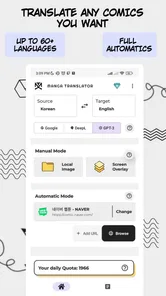
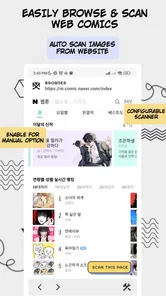
First off, let’s talk about ease of use. Manga Translator does exactly what it promises—translates manga text from one language to another with minimal fuss. You simply take a picture of the manga page you’re itching to understand, and the app works its magic. It’s pretty much like having a little translator elf who whispers the meanings directly into your brain. What stood out to me was the app’s ability to handle multiple languages. Whether you’re dealing with Japanese, Korean, or Chinese, this app has got you covered.
Features That Make It Shine
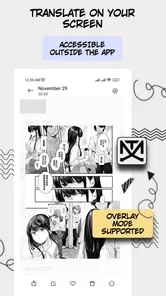
The app comes packed with features that make reading foreign manga a breeze. One thing I found particularly nifty is the real-time translation feature. As you hover your camera over the text, you can actually see the translations pop up instantly on your screen. This is a game-changer if you're someone who’s impatient (like me) and wants instant gratification. Plus, there’s an option to save translations for later, which is super handy when you want to revisit your favorite panels.
Another feature that deserves a shout-out is the text-to-speech option. It’s perfect for those lazy days when you’d rather listen to the translated text than read it. The voice is surprisingly natural, which makes the whole experience more immersive. And if you’re worried about data usage, the app has an offline mode that works like a charm.
When another approach is better
Compared with a general-purpose camera translator, this app is aimed more directly at comic reading, so it makes sense when the source is a speech bubble rather than a menu or street sign. A dictionary or language-learning app is a better choice when you want to study grammar and remember vocabulary; an official localized edition is better when you need polished dialogue, consistent names, and the author’s intended nuance. I’d keep this app for quick comprehension and use those alternatives when accuracy or context matters more than speed.
A small workflow can also reduce frustration: translate one page at a time, keep the original visible, and check who is speaking before trusting a short isolated line. If the result is confusing, try a cleaner image or a panel with less crowded lettering rather than repeatedly treating a difficult page as a fair test. Those steps won’t fix every translation, but they help separate an image-reading problem from a wording problem.
My Personal Take
In terms of performance, I found Manga Translator to be pretty reliable. There were a few hiccups here and there, especially with complex kanji, but overall, the translations were accurate enough to grasp the storyline. The interface is user-friendly, making it a great tool for both tech-savvy users and newbies alike.
One thing to note, however, is that the app does come with ads. They’re not overly intrusive, but they do pop up occasionally, which can be a bit distracting. If you’re someone who gets easily annoyed by ads, you might want to consider upgrading to the premium version. But honestly, for a free app, the ads are a small price to pay for the wealth of features you get.
Who is likely to enjoy it?
I’d recommend trying it if you already read manga, manhwa, or manhua and regularly encounter pages in languages you don’t understand. It is especially useful for someone who wants the gist of a scene without leaving the comic to search every line separately. It is less suitable if you expect publication-quality localization, need exact wording for study, or find camera-based reading disruptive. A reader who mainly wants to build language skills will get more from a dictionary and structured lessons than from quick translated overlays.
There are also trade-offs between a fast glance and a careful read. A short bubble may be easy to interpret, while vertical lettering, stylized fonts, crowded panels, or sound effects can make the same process less dependable. I wouldn’t let a single awkward line spoil a chapter, but I also wouldn’t rely on an uncertain translation for a twist or a character’s exact intention. When the story turns on a detail, comparing context—or waiting for a reliable edition—is the safer call.
Keep control of the material you translate
There is a useful difference between translating a page you own or are allowed to use and submitting something private just because it is convenient. I’d use a public sample or a personal, non-sensitive page to learn the workflow first. For a paid comic, I’d also keep the translation task separate from any decision to redistribute images or translated text; understanding a page for personal reading is not the same as having permission to share it.
If I were helping a friend choose, I’d ask what they actually need. Someone who wants a rough sense of an unfamiliar chapter may accept occasional awkward wording. Someone translating a message, studying a passage closely, or relying on exact dialogue should be more cautious and consider a tool that exposes individual words or a human translation. The best option depends less on the genre label and more on how much uncertainty the reader is willing to tolerate.
A cautious recommendation
All in all, the Manga Translator app is a fantastic tool for manga enthusiasts who want to dive into stories beyond their linguistic reach. It’s user-friendly, efficient, and packed with features that make it stand out in the crowded world of translation apps. Whether you’re a seasoned manga reader or just dipping your toes into the genre, this app will definitely enhance your reading experience. So, go ahead, give it a try—you might just find yourself binge-reading like never before!
My more careful recommendation is to try it on a low-stakes page, review the choices presented on your device, and decide whether the results and interruptions suit your habits. The 38 written reviews offer another place to weigh other readers’ experiences, while the modest average rating is a reminder that results may vary. If quick access to a rough understanding is your goal, it can be worth exploring; if you need dependable nuance on every panel, I’d choose a human-translated edition instead.
I’d also keep an eye on whether the app’s translation method suits the source you read most. A clean printed page with clear bubbles is a fairer test than a heavily stylized scene, and a comic reader who mainly wants to follow action may need less precision than someone parsing a relationship-heavy conversation. If a page consistently takes longer to prepare than it would to check a trusted translation, there is no reason to force this into the routine.
That is why I see its strongest role as an occasional bridge, not the only way to read comics in another language. It may help me stay with a chapter when curiosity wins, while a proper localized edition remains the better choice for comfort and confidence. I’d install it only if that quick, imperfect help is genuinely useful to me, and I’d keep permission and payment choices deliberate throughout.
Manga Translator - Translate Frequently Asked Questions
What devices and operating systems can run Manga Translator?
Manga Translator is an app for translating and reading manga, manhwa, manhua, and other comics. Before downloading, check that your device runs Android 8.1 or later, since this is the minimum operating system requirement. The app is listed as suitable for Everyone, but the comic material you choose to read may still vary in content.
Who makes Manga Translator, and what should I know about its track record?
Manga Translator is developed by Wiryaimd and is listed in the Comics category. It has been available since July 31, 2021, and its current version is 2.9.1. It has passed 100,000 installs and has an average rating of 3.1 from around 1,400 ratings, so readers may want to consider their own translation needs when deciding whether it is a good fit.
What is Manga Translator and how does it work?
Manga Translator is an innovative application designed to translate manga and comic content from various languages into your preferred language. It utilizes advanced optical character recognition (OCR) technology to detect text within images, and then employs machine translation to convert the text into the target language. This allows users to enjoy their favorite manga without language barriers.
Is Manga Translator free to use, or are there any in-app purchases?
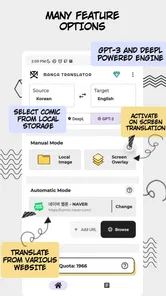
Manga Translator is free to download, with in-app purchases ranging from $0.99 to $49.00 per item. The app’s store summary describes automatic comic translation and reading for manga, manhwa, manhua, and other comics. Check the purchase options in the app before paying, as the available items may suit different usage needs.
Which languages are supported by Manga Translator?
Manga Translator supports a wide range of languages, including but not limited to Japanese, English, Korean, Chinese, Spanish, and French. The app constantly updates its language database to include more languages, catering to a global audience. Users can select their target language from the app’s settings for seamless translations.
Pros
- Easy to use interface
- Fast translation process
- Supports multiple languages
- Offline mode available
- Accurate text recognition
Cons
- Limited free features
- Occasional translation errors
- Ads in free version
- Requires camera access
- No text editing feature











