

Manga Library - مكتبة المانجا
- 76.00
- 4.1
- Installs
- 500.00K
- Price
- Free

Screenshots
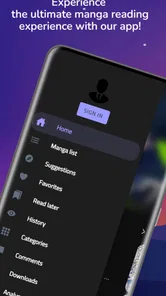


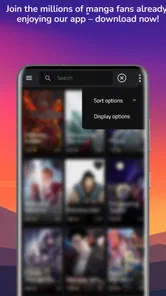
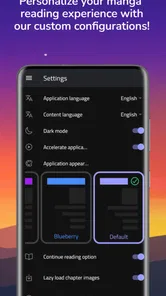
Analysis by Reviewed
I judge a manga app less by how many titles it appears to offer than by whether it makes a real reading routine easier. Manga Library - مكتبة المانجا is built around browsing manga and reading chapters, with tools that can help when I’m switching between a quiet evening at home and a short session on the move. Its appeal is the directness of that setup: I can look for something to read without first importing and organizing a personal collection. That focus is useful, though it also means the app is not automatically the right choice for every kind of comic reader.
What I would check before settling in
When trying a new reader, I like to test a familiar series first rather than start something new immediately. A known title makes it easier to judge whether page movement feels natural, whether the artwork is comfortable to view, and whether I can pick up where I meant to. With this app, I would also try the search before spending time browsing. If I can find a title I already care about, I have a practical reason to return; if I cannot, a large-looking library will not solve my problem.
I would also treat the reading controls as part of the experience, not as settings to ignore. Screen orientation and brightness can make a noticeable difference when I move from a well-lit room to a dim bus or train. Settling those choices before opening a chapter helps avoid interrupting the story later. Readers who are particular about page layout should test this early, because comfort matters more over a long chapter than during a quick preview.
A small routine for following chapters
For someone following several manga at once, a little planning can prevent the app’s browsing side from taking over the reading session. I would pick the series I intend to continue before opening the library, read that chapter first, and browse for new titles afterward. This is a simple way to keep a short break short. It also makes it easier to notice whether the app is helping me follow the stories I care about or mainly tempting me into unrelated searches.
Offline reading fits naturally into that routine, but I would not assume that a chapter is ready just because I planned to read it later. I would save it while connected and open it once before heading out. That quick check is useful for a commute or a waiting room, where reception may be weak and time is limited. The trade-off is that switching among many titles can make it harder to remember what is available without a connection, so I would keep downloads focused on the next chapters I genuinely expect to read.
When discovery is the main attraction
The app makes the most sense to me when I want to browse manga as well as read it. Search gives me a direct route to a known title, while exploring the library leaves room for an unexpected find. Those are different moods: looking up one series is efficient, while wandering through choices is enjoyable when I have time. If I only have a few minutes, I would go in with a title or genre in mind so that browsing does not consume the whole break.
That balance is also where I would compare it with the usual alternatives. A general comic reader may be better for someone who already owns files and wants to organize them in one place. A manga-focused library is more appealing when the goal is to discover and read titles within the app rather than maintain a personal archive. I would not choose between those approaches by looking for a single “best” reader; I would ask whether I need a place to find manga or a tool to manage comics I already have.
More From Our News Desk

 Gmail
GmailGmail in a Busy Inbox: Who Benefits Most?
From first account to crowded workday, Gmail earns its place through dependable search and flexible sorting—but its best fit depends on how much inbox maintenance you can tolerate.

 Prime Video
Switching to Prime Video: What Changes in Your Viewing Routine
Prime Video can make a compelling second home for streaming, but switching means learning a different catalog, rental layer, and route from browsing to playback.

 Universal TV Remote Control
Universal TV Remote Control Works Best as a Reliable Backup
A phone remote earns its place through quick setup and reliable habits. Here is how to get more from Universal TV Remote Control—and where its limits show.

 Weather - By Xiaomi
Weather by Xiaomi Review: Clear at a Glance, Less Clear Up Close
Xiaomi’s weather app makes everyday forecasts quick to scan, but its calm surface can leave useful details and recovery paths harder to find than they should be.

 X
XX Under Pressure: Can It Recover When Posting Goes Wrong?
A resilience-focused review of X, examining setup, mistaken posts, interruptions, weak connections, and the gaps that matter when recovery needs to be dependable.

 Clash of Clans
Clash of Clans Is Won Between the Battles
Its raids are quick; its community is a long-term project of coordination, teaching, rivalry, and shared responsibility—with all the friction that entails.
Latest News



Getting Started with Manga Library
Jumping into Manga Library - مكتبة المانجا is like diving into a sea of endless manga possibilities. The app boasts a vast collection of manga titles spanning various genres, from action-packed adventures to heartwarming romances. Whether you're a seasoned manga reader or a newbie just starting out, this app has something for everyone.
The user interface is refreshingly straightforward, making it easy to navigate through the extensive library. The search function is a real lifesaver, especially when you're in the mood for a specific series or author. I found myself getting lost for hours, exploring new titles and rediscovering old favorites.
Finding a place in your reading routine
That simple search-and-browse approach suits a particular kind of reader: someone who likes to explore between chapters rather than manage a carefully organized collection. I’d use it to look for a series during a break, then save a chapter for a commute if I knew I might lose my connection. For a long-running story, it helps to decide before opening the app whether I’m continuing one title or browsing for something new; otherwise, the abundance of choices can turn a quick read into a long detour.
A practical point is that manga reading depends on more than the catalog. Screen size, panel detail, and the direction in which a reader prefers to move through pages can all affect comfort. The original reading experience described here includes adjustable brightness and orientation, which are useful controls for shifting between a bright room and a dim commute. I’d still take a moment to settle those settings before starting a chapter, since changing them mid-read can break the rhythm.
A Seamless Reading Experience
One of the standout features of this app is its seamless reading experience. The pages load quickly, ensuring that there's no interruption in my reading flow. Plus, the app offers customizable reading settings, allowing you to adjust brightness and orientation to suit your preferences. It's like having a personalized manga reader right in your pocket.
Another aspect that I truly appreciate is the offline reading capability. As someone who's always on the go, being able to download chapters and read them anywhere, without worrying about internet connectivity, is a game-changer. I can catch up on my favorite series while commuting or during my lunch break.
Making offline reading work for you
Offline chapters are most helpful when they’re planned, not left until the moment a train enters a tunnel. I’d download the next chapter while connected, then open it once before leaving to make sure it is ready to read. That small habit makes this feature useful for travel, waiting rooms, or a lunch break in a place with unreliable reception. The trade-off is that downloads need some attention: if you switch between several series, it is worth keeping track of what you saved so the chapter you want is actually available offline.
Compared with a general comic reader, which may be built around importing files you already own, this app is aimed at finding and reading manga within its own library. That makes it a more direct choice if discovery is part of the fun. Readers who need precise file management or want one app to organize comics from different sources may be happier with a dedicated reader instead. I’d choose based on the job I need done: browsing and following manga here, or managing a personal archive elsewhere.
Community and Updates
What sets Manga Library apart from other manga apps is its vibrant community feature. You can connect with fellow manga fans, share recommendations, and even engage in lively discussions about plot twists and character developments. It's like having a book club dedicated to manga lovers!
The app also stays up-to-date with the latest manga releases, ensuring that you're always in the loop with new chapters and series. The regular updates mean there's always something fresh to look forward to, keeping your manga journey exciting and ever-evolving.
What to expect from its current version
Manga Library is a free comics app from SOUSSI NIAIMI Badr-Eddine. It was released on January 2, 2023, and its current version is 2.3.5, with Android 7.0 as the minimum system requirement. The version number tells me which build a new user can install, but by itself it does not explain what changed between releases. I would treat the app’s live chapter access as the main reason to keep checking it, while remembering that availability and timing can matter when I’m following a series closely.
For someone already reading in the app, the useful question is whether the current build continues to fit their routine: can they find the titles they follow, read comfortably, and prepare chapters for offline moments? The app has an average rating of 4.2 from around 4,100 ratings, and more than 100,000 installs. Those figures suggest a real audience, though they cannot tell me whether a particular title or reading habit will suit me. Its Everyone age rating makes it broadly accessible, but parents should still choose manga appropriate to the reader, since an app’s age label is not a guide to every story’s themes.
Who will enjoy it, and who may prefer another reader
I’d recommend giving it a try if you want a straightforward way to browse manga, keep up with chapters, and make use of offline reading without first building your own digital library. A realistic use is checking for a new chapter over breakfast, saving it before leaving home, and reading during a commute without depending on mobile data. The community can also help when you want recommendations from other fans rather than relying only on your own searches.
It may not be the best fit if you mainly read comics outside manga, need detailed collection controls, or prefer a reader focused on files you supply yourself. Likewise, readers who want a predictable update schedule for every series should avoid assuming that “real-time” means every title appears at precisely the same moment. I’d use the app as a convenient manga destination, not as a promise that every release or reading preference will be handled identically.
In conclusion, Manga Library is a must-have for any manga aficionado. With its extensive collection, user-friendly interface, and community-centric features, it offers an unrivaled manga reading experience. Whether you're diving into a new series or revisiting an old favorite, this app provides the perfect platform to indulge in your manga obsession. So why wait? Dive into the world of manga with Manga Library today!
My recommendation
My view is more measured: it is worth trying if its manga-focused browsing, chapter reading, and offline option match what you want from a phone app. I would start with a series I already know, test the reading controls, and save a chapter before relying on it away from Wi-Fi. That gives a quick sense of whether the interface and workflow suit me, without committing to a new reading habit. If those basics feel comfortable, the discovery and community aspects are a welcome bonus; if not, a reader built around a personal comic collection is the better choice.
Questions I would settle during a first session
If you are wondering whether you need an account or can simply start reading, I would approach the first session by opening the library and testing search and chapter access before building a routine around it. The practical question is not just how quickly you can begin, but whether your usual title is easy to locate and whether the reading view feels comfortable on your device. That test gives a clearer answer than judging the app by its catalog size alone.
For readers concerned about updates, I would separate the app’s ongoing availability of chapters from a guarantee that every series will appear on a fixed timetable. The best workflow is to check the title you follow when you have a connection, then prepare for offline reading if a commute is coming up. If a specific release must be available at a precise time, keep a second source in mind rather than letting one app determine your whole reading schedule.
Another sensible question is whether the offline option makes this a replacement for a file-based reader. In my view, not necessarily: offline chapters make travel easier, but they do not turn the app into a general organizer for a personal archive. Someone who reads only a few manga and wants discovery may be happy with that distinction. Someone maintaining a carefully arranged collection across different comic formats will likely prefer a reader designed around their own files.
What I would watch as I keep using it
The most useful signs of continued fit are ordinary ones: whether the titles I follow remain easy to find, whether chapters are available when I want to read, and whether I still find the browsing experience pleasant after the novelty wears off. The current version, 2.3.5, identifies the build available now, but I would not infer a particular feature change from a version number alone. For an existing reader, that means judging the app by the parts that affect daily use rather than expecting every update to alter the experience.
I would also keep expectations grounded around community features. Recommendations and discussion can make a manga app feel more social, but they are a bonus rather than a substitute for a comfortable reader and a useful selection of titles. If I mainly want quiet reading, I can ignore the social side and focus on chapters; if I enjoy comparing reactions, it can add another reason to return. That flexibility is part of the appeal, provided the core reading workflow continues to suit me.
Overall, I see Manga Library as a practical option for readers who value manga discovery, chapter access, and the ability to prepare reading for offline moments. It is less compelling for people who want detailed file management, a single home for every kind of comic, or firm expectations about release timing. I would try it with one familiar series, test the controls and offline workflow, then decide whether its focused approach earns a place in my regular reading routine.
Manga Library - مكتبة المانجا Frequently Asked Questions
What devices and operating systems can run Manga Library - مكتبة المانجا?
Manga Library - مكتبة المانجا is a comics app for mobile devices, with a minimum operating-system requirement of version 7.0. Before downloading, check that your device meets that requirement and has enough available storage for the app and any manga content you choose to keep on it. The app is free to download.
Is Manga Library - مكتبة المانجا suitable for children?
The app has an Everyone content rating, so its stated age classification is suitable for a general audience. As with any comics app, parents may still want to look through the available titles and decide what is appropriate for their child. Readers should also consider their own preferences when browsing the manga collection and choosing what to read.
What is Manga Library - مكتبة المانجا?
Manga Library - مكتبة المانجا is a mobile application designed for manga enthusiasts who want to access a vast collection of manga titles in one place. The app provides a user-friendly interface for browsing, reading, and organizing manga series, offering both popular and lesser-known titles for readers to enjoy on their Android and iOS devices. Its store summary highlights real-time manga chapter reading with advanced features, making it a comics-focused option for readers who want to follow chapters through an app.
Is Manga Library - مكتبة المانجا free to use?
Yes, Manga Library - مكتبة المانجا is free to download and use, offering a selection of manga titles at no cost. However, there may be optional in-app purchases or subscription plans available for users who want to access premium features or exclusive content, enhancing their reading experience. The app is listed as free, so readers can start without paying to download it, while checking the app itself for any purchase options before using them.
What features does Manga Library - مكتبة المانجا offer?
Manga Library - مكتبة المانجا offers a variety of features such as a comprehensive search function, customizable reading settings, bookmarking capabilities, and offline reading options. The app allows users to create a personalized library, follow their favorite series, and receive notifications about new releases or updates to ensure they never miss a chapter. Its focus on real-time chapter reading is appealing if you like keeping up with manga as you read, though the exact experience can depend on the titles you choose and your reading habits.
Pros
- Extensive manga collection available.
- User-friendly interface with easy navigation.
- Regular updates with new manga releases.
- Offline reading feature available.
- High-quality images and translation.
Cons
- Contains ads which can be intrusive.
- Requires internet for initial download.
- Limited customization options.
- Some manga may have incomplete series.
- Occasional glitches in loading pages.












