

LineStar for FD
- 678.00
- 4.5
- Installs
- 50.00K
- Price
- Free

Screenshots

Analysis by Reviewed
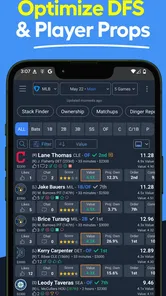
Daily fantasy sports can look simple until I try to turn a slate of games into a sensible lineup. The difficult part is rarely finding player names; it is deciding how much weight to give projections, recent form, matchup context, salary limits, and the rules of the contest. LineStar for FD is built for that decision-making stage. It is a free sports app from BetFully, Inc. that focuses on lineup help, projections, and strategy for FanDuel users.
After spending time with it, I see it less as a complete replacement for every fantasy tool and more as a focused companion for building and checking lineups. Its appeal is strongest when I already know which contests I want to enter but need a faster way to compare options. The app has earned a 4.5 average from around two thousand ratings, and its audience has grown beyond fifty thousand installs. Those figures suggest a reasonably established niche product, but they do not remove the need to decide whether its particular workflow suits the way you play.
How I would decide whether LineStar fits my routine
My first question would be whether I want guidance inside a FanDuel-centered workflow or a broad fantasy sports dashboard covering several platforms. LineStar for FD points clearly toward the former. That focus can be useful because it keeps attention on lineup construction rather than making me sort through tools for services I do not use.
The second question is how much independent research I want to do. An app that supplies projections and strategy ideas can reduce the time spent organizing information, but it cannot decide what kind of risk I am comfortable taking. A projection is a starting point, not a guarantee. I still need to consider contest size, lineup correlation, late news, and whether a popular player is worth using when many other entries will have the same idea.
I also pay attention to friction. A fantasy app can be technically capable and still become annoying if I have to jump between screens, repeatedly enter the same information, or treat every recommendation as equally important. The useful test is practical: can I open it shortly before a slate, identify the decisions that matter, and finish with a lineup I understand rather than one I accepted blindly?
For a new daily fantasy player, that distinction matters. LineStar may make the process feel more organized, but it is not a substitute for learning roster rules, salary management, or the difference between a safe lineup and a high-variance tournament lineup. I would use it as a decision aid while learning, not as an automatic answer machine.
What the app is actually good at
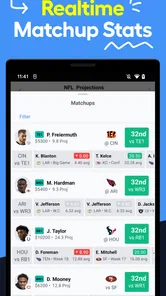
The strongest use case is comparison. Instead of looking at one player in isolation, I can use projections and strategy guidance to create a shortlist, then examine the trade-offs between a higher-cost option and a cheaper player who frees salary elsewhere. That is more valuable than simply being shown a “best” player, because daily fantasy lineups are built around combinations.
More From Our News Desk

 Gmail
GmailGmail in a Busy Inbox: Who Benefits Most?
From first account to crowded workday, Gmail earns its place through dependable search and flexible sorting—but its best fit depends on how much inbox maintenance you can tolerate.

 Prime Video
Switching to Prime Video: What Changes in Your Viewing Routine
Prime Video can make a compelling second home for streaming, but switching means learning a different catalog, rental layer, and route from browsing to playback.

 Universal TV Remote Control
Universal TV Remote Control Works Best as a Reliable Backup
A phone remote earns its place through quick setup and reliable habits. Here is how to get more from Universal TV Remote Control—and where its limits show.

 Weather - By Xiaomi
Weather by Xiaomi Review: Clear at a Glance, Less Clear Up Close
Xiaomi’s weather app makes everyday forecasts quick to scan, but its calm surface can leave useful details and recovery paths harder to find than they should be.

 X
XX Under Pressure: Can It Recover When Posting Goes Wrong?
A resilience-focused review of X, examining setup, mistaken posts, interruptions, weak connections, and the gaps that matter when recovery needs to be dependable.

 Clash of Clans
Clash of Clans Is Won Between the Battles
Its raids are quick; its community is a long-term project of coordination, teaching, rivalry, and shared responsibility—with all the friction that entails.
Latest News



A practical workflow is to begin with the slate and contest type, identify positions where I feel uncertain, and use the app to narrow those choices. I would then check whether the resulting lineup still makes sense as a whole. If one expensive selection forces several uncomfortable punts, the projected advantage may not be worth the loss of flexibility. This is one of the less obvious benefits of having lineup-oriented guidance: it encourages me to think in roster structures rather than isolated picks.
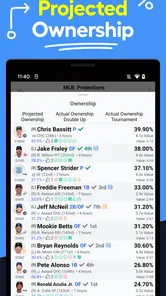
Another useful habit is to treat projections as a filter for research. I do not need to investigate every available player with the same intensity. I can use the app to find the few decisions that deserve a closer look, then verify relevant news and availability through current sources before committing. That saves time without pretending that the app knows everything that can happen before a game.
The best way to use LineStar is as a disciplined second opinion, not as a button that replaces judgment. That approach also helps me notice when I disagree with a projection. A disagreement can be useful if I can explain it through role, expected opportunity, matchup, or contest strategy. If I cannot explain it, I am probably guessing rather than making an informed adjustment.
Where it has an advantage over a basic manual process
Compared with building lineups entirely in notes, spreadsheets, or a browser search, a dedicated sports app is more convenient for keeping projections and lineup thinking together. I do not have to create my own structure before I can begin comparing players. For someone who plays several slates each week, that reduction in setup work can be the difference between making a considered lineup and submitting the first acceptable combination.
Its narrow identity is also a strength. A general fantasy app may offer news, scores, community discussion, and multiple sports, but that breadth can distract from the actual lineup decision. LineStar for FD is easier to understand: it is aimed at FanDuel lineup optimization, projections, and strategy. If those are the tools I need, the more focused approach feels cleaner than a crowded all-purpose product.
I would especially value it on a busy weekday. Imagine checking a slate during a lunch break, with only enough time to review a few positions before returning to work. I could use the app to organize the candidates, identify where salary pressure is highest, and form a preliminary lineup. Later, when final news arrives, I would revisit the uncertain spots rather than rebuild everything from memory. That workflow is realistic because it separates early planning from late confirmation.
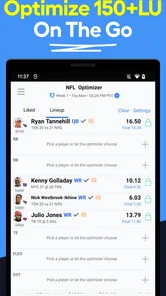
A second scenario is useful for someone who normally enters one or two contests rather than many. In that case, the main benefit is not generating endless variations. It is helping me avoid obvious construction mistakes, such as spending heavily at one position while leaving the rest of the roster dependent on several low-confidence choices. The app can support a more deliberate process even when the entry volume is small.
Three habits that make the guidance more useful
First, I would save my own reasoning outside the app, even if only in a short note. For each unusual choice, I might write why I selected the player and what would make me change my mind. This prevents a projection from becoming a vague feeling and makes late adjustments faster. It also shows whether my results are poor because the process was weak or because normal variance went against a reasonable decision.
Second, I would compare the app’s suggestions with the contest I am entering. A lineup intended for a small, conservative contest should not automatically be treated the same as one intended for a large-field tournament. The projections may be useful in both settings, but the balance between floor, ceiling, ownership expectations, and correlation can differ. The app can inform the choice, while I remain responsible for applying the right contest lens.
Third, I would avoid changing every position simply because the app presents a new angle. A common mistake is overreacting to fresh information and losing the coherent structure of the original lineup. I prefer to identify the one or two spots where new information genuinely changes the decision, then make targeted edits. This is a small workflow improvement, but it reduces impulsive tinkering.
Where another type of fantasy tool may fit better
LineStar is not automatically the best choice for every fantasy player. Someone who wants a single app for multiple daily fantasy platforms may prefer a broader service, even if that means navigating more menus. A multi-platform user may value consistency across accounts more than a focused FanDuel experience.
Likewise, a player who mainly wants breaking news, injury alerts, live scoring, or a large social community may find a news-first or community-first app more suitable. Projections and lineup strategy are helpful, but they do not cover every part of the daily fantasy routine. If my biggest problem is learning that a player is unexpectedly unavailable, I need a reliable current-news habit in addition to any projection tool.
Experienced users who already maintain detailed spreadsheets may also see less benefit. If I have a tested model, a personal database, and a repeatable process for adjusting salaries and projections, a simplified app may feel restrictive. In that situation, the question is not whether LineStar is useful in general; it is whether it adds enough speed or perspective to justify changing a familiar system.
There is also a learning trade-off. Recommendations can help a beginner get started, but relying on them too heavily can hide the mechanics of lineup construction. I would not want a new player to follow a list without understanding why a player fits the roster. If learning is the main goal, I would use the app alongside manual lineup exercises, reviewing the differences rather than accepting them automatically.
The app’s age rating is Teen, which makes it approachable in presentation, but daily fantasy still involves real-money decisions for some users. I would treat the rating as an audience classification, not as a sign that the activity is risk-free. Anyone using paid contests should set a firm budget, understand the rules of the relevant platform, and avoid chasing losses. An analytical tool can improve preparation, but it cannot make an uncertain outcome certain.
What the free price does and does not mean
LineStar can be installed for free, which makes it easy to test without committing immediately. That is important for this type of app because usefulness depends heavily on personal workflow. I would spend time checking whether the projections are understandable, whether the lineup process feels quicker, and whether the strategy material helps me make decisions I can defend.
The app also contains in-app purchases ranging from about ten dollars to around two hundred forty dollars per item. That is a wide range, so I would be careful before assuming that every useful function is included at no cost. I would inspect the purchase screen and decide what I actually need before paying. For a casual player, a premium option may not make sense if the app is used only occasionally.
The cost is not only financial. Switching to a new lineup tool takes time. I have to learn its terminology, understand how it presents projections, and develop a habit of checking it at the right point in the slate cycle. If I already have a system that works, I would test LineStar on a limited number of slates rather than abandoning everything immediately. That makes the comparison fair and keeps the learning curve from becoming a hidden expense.
On the other hand, a regular player may find that the time saved is the real value. If the app helps me reduce repetitive research and focus on meaningful choices, even a modest improvement in organization can matter. I would judge that value by the quality of my process, not by whether one lineup wins. A single result is too noisy to prove that a tool works.
Platform details worth knowing before installing
The app comes from BetFully, Inc. and is currently listed as version 3.7.0. It requires Android 6.0 or newer, so I would check the operating system on an older phone before planning to use it there. It is categorized under Sports, which matches its purpose more closely than a general productivity label would.
It has been available since October 22, 2014, giving it a longer presence than a brand-new fantasy utility. That history is reassuring in one narrow sense: the concept has had time to develop beyond an initial experiment. Still, I would judge the current version and my own experience rather than assuming longevity guarantees a perfect interface or current strategy.
The store short description is simply “LineStar,” while the longer summary points to FanDuel lineups, projections, and daily fantasy strategy. I find that useful because it sets the right expectation. This is not an all-purpose sports news reader, a general score tracker, or a game in the traditional sense. Its value depends on whether I want help with the analytical side of FanDuel contests.
My recommendation for different kinds of users
I recommend trying it if you regularly build FanDuel lineups and want a focused way to organize projections and strategic choices. It is particularly suitable for players who spend too much time jumping between manual notes and scattered research, but who still want to make the final decisions themselves.
I would also suggest it to an improving beginner who is willing to learn. The right method is to compare the app’s guidance with my own thought process, identify where they differ, and investigate those differences. That turns the tool into a study aid instead of a source of unexplained picks.
I would be more cautious if I played across several fantasy platforms, depended mainly on breaking news, or already had a sophisticated personal model. In those cases, a broader or more customizable alternative may fit better. I would also skip paid upgrades until I had confirmed that the free experience solves a real problem in my routine.
Overall, LineStar for FD earns a place in my fantasy workflow because it addresses a specific problem well: turning a large player pool into a more manageable set of lineup decisions. Its focused FanDuel orientation is both its biggest strength and its clearest boundary. I would install it for the projections and lineup strategy, verify late information elsewhere, and keep control of the final roster. Used that way, it is a practical companion for players who want a faster, more structured process without pretending that any app can remove the uncertainty from daily fantasy sports.
LineStar for FD Frequently Asked Questions
Is LineStar for FD available for my device?
LineStar for FD is an app for sports-focused daily fantasy research. Its listed minimum operating-system requirement is version 6.0, so check your device’s software version before downloading. The app is free to download, and its current version is 3.7.0. On iOS or Android, availability and compatibility can depend on the particular device and the app store you use.
Who develops LineStar for FD, and what age group is it intended for?
LineStar for FD is developed by BetFully, Inc. Its content rating is Teen, which gives families a useful starting point when deciding whether the app is appropriate for a younger user. The app focuses on fantasy sports research and lineup preparation, so it is most relevant to people interested in daily fantasy contests. Consider your household’s preferences and the rules that apply to fantasy sports in your area before installing.
What is LineStar for FD, and what does it offer users?
LineStar for FD is a companion app designed to help users research and organize information for FanDuel-style daily fantasy contests. After exploring its features, the main focus appears to be lineup preparation, player research, projections, statistics, and contest strategy. It is intended for fantasy sports players who want more data and structure before submitting lineups, rather than for users looking for a traditional sports news or live-score application.
Is LineStar for FD free to download and use?
The app is free to download, but some features may require an in-app purchase. Prices for in-app purchases range from $9.99 to $239.99 per item, so check the purchase details in the store before paying. Review the payment terms, renewal conditions, and exactly which tools are included in any paid option so you can decide whether the added features suit your needs.
Which sports and FanDuel contests are supported by LineStar for FD?
Support can depend on the app’s current version and the contests available in your region. LineStar for FD is primarily aimed at FanDuel users, but the specific sports, leagues, contest formats, and slate types may change over time. Before downloading, confirm that the sport you play is supported and that the app covers the contest type you normally enter, especially if you focus on niche leagues or specialized formats.
Pros
- Fast access to Lineage 2M game information and resources
- Useful reference for checking character and item details
- Simple interface makes browsing content straightforward
- Convenient for players who want game data in one place
- Can help plan upgrades and improve in-game decisions
Cons
- Content may become outdated after game updates
- Primarily useful only to Lineage 2M players
- Some features may require an internet connection
- Limited value for users unfamiliar with the game
- May include ads or promotional elements during browsing





