

LineStar DFS & Props Optimizer
- 182.00
- 4.6
- Installs
- 10.00K
- Price
- Free

Screenshots


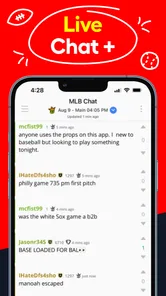
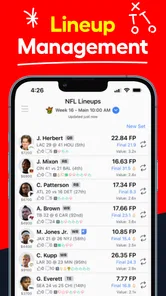
Analysis by Reviewed
LineStar DFS & Props Optimizer is a sports app for people who want help building daily fantasy sports lineups without doing every comparison by hand. I approached it as a first-time user would: install it, look for a sensible starting point, and try to understand whether its tools actually make the process less overwhelming. My overall impression is that it is most useful as a decision-support workspace rather than a magic button that guarantees a winning lineup.
The app comes from BetFully, Inc., and its focus is clear from the first screen: organize lineup choices, speed up optimization, and work with player props in one place. That combination makes it more specialized than a general sports-score app, but it also means the experience assumes you already understand basic DFS language. If you know what a slate, salary, projection, or prop means, the learning curve is manageable. If you are completely new to daily fantasy sports, the app can still be useful, but you will need to learn the underlying contest rules alongside it.
Getting from installation to a useful first lineup
I’d use the first session to learn the path from choosing a slate to reviewing the lineups it produces, rather than trying to tune every option at once. I’d also keep a note of one decision I want to test, so the first comparison tells me something useful about my process instead of leaving me with a pile of unexplained alternatives.
What to expect before you begin
The app is free to install and is listed for Everyone, which makes it easy to try without committing money at the download stage. It is a sports app rather than a sportsbook or a full contest platform, so I would not approach it expecting to enter contests directly from the same screen. Its role is to help you think through lineup construction and player-prop decisions before you take those choices elsewhere.
The store listing presents it as a tool for optimizing more than 150 DFS lineups, with advanced tools and prop bets. In practical terms, that points toward a workflow for users who manage several possible combinations instead of choosing one player at a time with no broader plan. The important distinction is that optimization can reduce repetitive work, but it does not remove the need to choose the right slate, understand the contest format, or decide how much risk you are comfortable taking.
I also noticed that the app is not aimed only at occasional sports fans. Its current version is 3.7.2, and the product has been available since August 26, 2015. That history gives it the feel of a dedicated tool that has stayed focused on the DFS niche rather than a newly released sports companion. At the same time, a long-running specialist app can feel denser than a simple score tracker because it has more concepts competing for your attention.
The audience size is modest compared with the biggest mainstream sports apps, with over 10 thousand installs and an average rating of 4.6 from around 1.2 thousand ratings. I read that as a useful sign that the app has found a committed audience, not as proof that every newcomer will find it effortless. DFS tools are judged heavily by personal strategy, sport preference, and contest habits, so your experience may differ from someone who uses it every day.
More From Our News Desk

 Gmail
GmailGmail in a Busy Inbox: Who Benefits Most?
From first account to crowded workday, Gmail earns its place through dependable search and flexible sorting—but its best fit depends on how much inbox maintenance you can tolerate.

 Prime Video
Switching to Prime Video: What Changes in Your Viewing Routine
Prime Video can make a compelling second home for streaming, but switching means learning a different catalog, rental layer, and route from browsing to playback.

 Universal TV Remote Control
Universal TV Remote Control Works Best as a Reliable Backup
A phone remote earns its place through quick setup and reliable habits. Here is how to get more from Universal TV Remote Control—and where its limits show.

 Weather - By Xiaomi
Weather by Xiaomi Review: Clear at a Glance, Less Clear Up Close
Xiaomi’s weather app makes everyday forecasts quick to scan, but its calm surface can leave useful details and recovery paths harder to find than they should be.

 X
XX Under Pressure: Can It Recover When Posting Goes Wrong?
A resilience-focused review of X, examining setup, mistaken posts, interruptions, weak connections, and the gaps that matter when recovery needs to be dependable.

 Clash of Clans
Clash of Clans Is Won Between the Battles
Its raids are quick; its community is a long-term project of coordination, teaching, rivalry, and shared responsibility—with all the friction that entails.
Latest News



Setting up without getting lost
My advice for a first session is to avoid trying every advanced control immediately. Start by identifying the sport, slate, and contest type you actually intend to play. The most common beginner mistake is treating all lineups as interchangeable. A lineup designed for a large-field tournament has a different purpose from one built for a smaller contest, and an optimizer cannot make that strategic distinction for you unless you make the context clear first.
Before entering player selections, decide what you want the app to solve. Are you trying to save time when creating several lineups? Are you comparing a few uncertain players? Or are you exploring props because you do not yet trust your own projections? Choosing one goal makes the interface easier to interpret. Otherwise, it is easy to jump between lineup generation and prop research without recording why a player was included.
A useful beginner workflow is to make a short personal checklist outside the app: the slate you are playing, the contest style, your preferred risk level, and any players you already know you want to examine. Then use the app to test those ideas rather than allowing the available controls to dictate your entire strategy. This keeps the optimizer in its proper role: a fast way to compare possibilities, not a substitute for your judgment.
Device compatibility is also worth checking before you commit to a regular routine. The app requires Android 6.0 or later. That is not a demanding requirement for many current phones, but older devices may not qualify, and performance can vary when you are working through many lineup combinations. I would use a stable connection and enough battery before a busy slate, especially if you plan to review several versions rather than stopping after the first result.
Your first meaningful action
The first useful test is not simply pressing an optimization control and accepting whatever appears. Instead, create a small, deliberate experiment. Choose one slate, identify a few players you are considering, and compare the resulting lineups with your original assumptions. Look for changes that make sense: a salary adjustment, a position swap, or a different balance between safer selections and more speculative ones.
This approach gives you a way to judge the app even before you have a winning result. If it helps you see combinations you would not have considered, removes tedious manual repetition, or exposes where your lineup is too concentrated, it is already providing value. A single outcome cannot tell you whether the process was sound because DFS results contain too much short-term randomness.
For prop work, I would use the same discipline. Treat each suggested or considered prop as a question rather than a prediction: what has to happen for this choice to make sense, and what would make it fragile? A player may look attractive in isolation but become less appealing when several of your lineups depend on the same game script. The app can help you organize those choices, but the responsibility for noticing correlated risk remains with you.
One of the more useful habits is to save or note the reasoning behind a lineup before changing it. Even a brief note such as “balanced exposure” or “testing a high-variance angle” can prevent you from forgetting why the lineup was built. Without that discipline, optimization can turn into endless cycling through alternatives, where every new version feels better simply because it is new.
A realistic everyday scenario
Imagine that I have a short break before work and want to prepare several lineups for an evening slate. I do not have time to compare every eligible player manually, but I also do not want to submit identical combinations. I would begin with the contest type, narrow my attention to the players and positions that matter, and use the optimizer to produce alternatives. Then I would remove lineups that repeat the same core assumptions too heavily.
After that first pass, I would inspect the prop choices separately. If several lineups rely on one player exceeding a projection, I would decide whether that is intentional or merely an accidental result of the same input appearing repeatedly. This is where the app can save time while still requiring thought. The fast part is generating and comparing options; the careful part is checking whether those options are genuinely different.
For a beginner, the first success should be a clean, understandable set of lineups rather than a dramatic score. You should be able to explain why each group exists, what risk it takes, and which assumptions it shares with the others. If LineStar helps you reach that point faster than a spreadsheet or a series of browser tabs, it has earned a place in your routine.
Where new users commonly get confused
The word “optimizer” can create unrealistic expectations. It does not mean the app knows the future, and it does not turn uncertain sports events into certain outcomes. Optimization is about arranging available choices according to selected priorities. If your projections, exclusions, or contest assumptions are weak, a faster process can simply produce weak lineups more efficiently.
Another source of confusion is the difference between creating many lineups and creating diverse lineups. A large batch may contain small variations while still depending on the same players, teams, or game conditions. I recommend checking the lineups as a group rather than reviewing only the one that looks best. Diversity should be intentional, especially when you are entering contests where a single narrow scenario determines whether the result is strong.
Props can also blur the line between research and action. A prop tool may make a choice feel more authoritative because it is presented in a structured interface, but presentation is not certainty. I would compare each prop with the rest of the lineup and ask whether it duplicates an existing opinion. If your player pool already leans heavily toward one outcome, adding more related props may increase exposure without improving the quality of the underlying analysis.
There is also a practical financial consideration. The app itself is free, but it includes in-app purchases ranging from about ten dollars to around 240 dollars per item. That makes it important to understand what you are using before paying for anything. I would begin with the free experience, decide whether the workflow genuinely saves me time, and only then consider whether an optional purchase fits my usage. A paid tool is not automatically worthwhile if I only play occasionally.
Users should also separate the app from the contest operator they use. LineStar can support lineup preparation, but the rules, scoring, eligibility, and entry decisions belong to the platform where you submit those lineups. Always check those details there instead of assuming that an optimized lineup is valid everywhere. This is particularly important when switching sports or contest formats.
Three techniques that make the app more useful
First, use it as a comparison engine instead of a one-click answer. Build a baseline lineup with your own reasoning, then generate alternatives and compare what changed. The differences often reveal more than the final lineup itself. You may discover that one position is consuming too much salary, that your preferred player is forcing several compromises, or that your supposed variety is actually very narrow.
Second, create deliberate exposure groups. Rather than producing a large number of nearly identical lineups, divide them by a clear idea: a conservative group, a balanced group, and a higher-variance group. The labels do not need to be complicated. What matters is that you know what each group is testing. This makes post-contest review far more useful because you can evaluate a decision pattern rather than blaming or praising one random result.
Third, use prop analysis to challenge your lineup, not merely confirm it. If a lineup assumes a fast-paced game, examine whether the props you selected support that story or contradict it. If the choices disagree, decide which assumption deserves priority. This cross-check is easy to skip when tools are separated into different screens, but it is one of the best ways to avoid building a lineup from disconnected opinions.
A fourth habit is to stop optimizing at a sensible point. More versions do not always mean more insight. Once you have a few lineups that represent genuinely different strategies, continuing to regenerate them can encourage indecision and make it harder to track your choices. I prefer a short review of purposeful options to an enormous pile of variations that I cannot explain.
How it compares with simpler alternatives
The obvious alternative is a spreadsheet. A spreadsheet gives you complete control over formulas, notes, filters, and personal projections, and it may be better for someone who enjoys building a custom model. The trade-off is time. You have to design and maintain the workflow yourself, and it is easier to make a formula or copying mistake when you are working quickly.
Manual research through sports sites and contest pages is another option. That approach can provide broader context and may suit users who prefer to read news, study matchups, and make every selection independently. It is also slower when the goal is to compare many combinations. LineStar is more attractive when your bottleneck is lineup organization rather than access to general sports information.
A basic lineup generator may feel friendlier to a complete beginner because it presents fewer decisions. However, fewer controls can also mean less ability to test a personal strategy. LineStar makes more sense once you want to move beyond a single suggested lineup and start examining alternatives, diversification, and props together.
I would skip it if I only want live scores, schedules, news, or a casual sports feed. Those needs call for a general sports app, not a specialized DFS optimizer. I would also skip it if I dislike reviewing assumptions or if I expect an automated tool to tell me exactly what to play. The app is best for an engaged user who wants speed without surrendering all judgment.
Is the upgrade worthwhile?
Because the app can be installed for free but offers in-app purchases, I would treat payment as a workflow decision rather than a status upgrade. First ask whether you play often enough to benefit from faster lineup work and whether the available tools address a problem you actually have. If you only prepare one lineup now and then, manual work may be perfectly adequate.
If you regularly build multiple lineups, the value question becomes more practical: does the app reduce repetitive work, help you compare strategies, and make your process easier to audit? Those are reasonable reasons to pay. The wrong reason is believing that a purchase guarantees better results. No feature can remove injuries, unexpected performances, changing information, or the natural uncertainty of sports.
I would also set a personal spending limit before exploring paid options. The upper end of the listed purchase range is substantial, so casual users should be especially careful not to buy simply because an advanced control looks appealing. Try the basic workflow, measure whether it saves real time, and keep your contest budget separate from your app budget.
Who will get the most from it?
LineStar is a strong match for DFS players who already understand the basic rules and want a more organized way to produce and compare multiple lineups. It is also useful for someone who has been relying on a spreadsheet but wants a quicker, more focused workflow for lineup variation and props. The app’s specialist design is valuable when you have a repeatable routine and need to make that routine more efficient.
It can work for a first-time DFS user too, provided that person is willing to learn gradually. Start with one slate, one contest style, and a small number of intentional lineups. Do not judge the app by whether the first result wins. Judge it by whether you understand what it generated and can improve your process after reviewing it.
It is less suitable for people who want a broad sports companion, who play so rarely that setup takes longer than manual selection, or who prefer complete control over every calculation. In those cases, a general sports app or a personal spreadsheet may feel clearer. The right choice depends on whether your main problem is lack of information, lack of time, or lack of confidence. This app primarily addresses the second problem and can help with the third, but it does not solve the first by itself.
My final take
After using it as a newcomer would, I see LineStar DFS & Props Optimizer as a focused tool for turning a messy DFS preparation routine into a more structured one. Its strongest quality is not the promise of a perfect lineup; it is the ability to help you examine more combinations while keeping your attention on strategy. That is meaningful for players who regularly build several entries and want to avoid repetitive manual work.
The main caution is that the app rewards active participation. You need to understand the contest you are entering, question repeated assumptions, and review groups of lineups instead of blindly trusting the first output. Beginners should move slowly, while experienced players should use the optimizer to test ideas rather than outsource them.
With a free starting point, an Everyone age rating, Android compatibility from version 6.0 onward, and a clear sports-focused purpose, it is easy to try. I would recommend beginning with one small, explainable workflow and delaying any in-app purchase until the app has proved that it saves you time. The best first victory is not a lucky lineup; it is a process you can understand, repeat, and improve.
LineStar DFS & Props Optimizer Frequently Asked Questions
What devices can run LineStar DFS & Props Optimizer?
LineStar DFS & Props Optimizer is available for Android devices running Android 6.0 or later. Before downloading, check your device’s operating-system version and make sure you have enough storage for the app. Keeping your device and app updated can also help you access the latest tools and maintain compatibility as the app develops.
Who develops LineStar DFS & Props Optimizer, and what is its age rating?
LineStar DFS & Props Optimizer is developed by BetFully, Inc. It is a sports app with an Everyone content rating, so its rating is not restricted to adults. However, the app focuses on daily fantasy sports and player props, and users should consider local rules and their own circumstances before using related services or entering contests.
What is LineStar DFS & Props Optimizer used for?
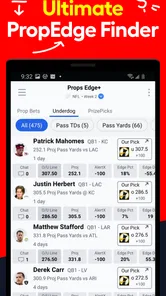
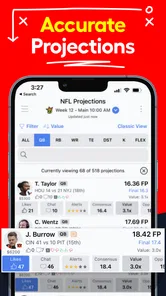
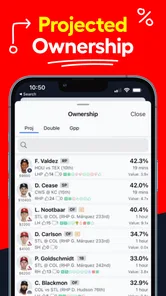
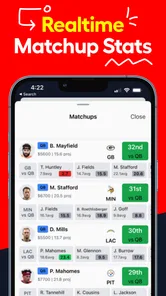
LineStar DFS & Props Optimizer is a research and lineup-building tool for daily fantasy sports and player-prop betting. It brings projections, matchup information, player trends, ownership-related data, and lineup optimization features into one interface. Instead of manually comparing every player, you can use the app to identify value, review statistical context, and create lineups more efficiently before entering contests.
Which sports and fantasy platforms does LineStar support?
Support can vary by app version, location, and the fantasy platforms available in your region, so it is worth checking the current listing and in-app options before downloading. LineStar is designed around popular daily fantasy sports and prop markets, with tools that may cover leagues such as football, basketball, baseball, hockey, and other supported contests. Platform availability should not be assumed for every sport or operator.
Does LineStar automatically create winning DFS lineups or guaranteed picks?
No. LineStar can help organize research and generate optimized lineup suggestions, but it cannot guarantee wins, profits, or successful prop selections. Projections are based on available data and models, while injuries, rotations, weather, coaching decisions, player usage, and late news can change outcomes quickly. Treat the recommendations as decision-support tools and always review the information yourself.
Pros
- Combines DFS lineup building with player-prop research in one app.
- Optimizer helps compare projections across multiple contest formats.
- Useful filters make it easier to narrow players by slate and position.
- Regular updates can reflect late injury news and changing player roles.
- Helpful for users who want data-driven decisions beyond basic box scores.
Cons
- Advanced tools may be difficult for beginners unfamiliar with DFS terminology.
- Projection accuracy can vary
- especially for volatile players and smaller slates.
- Some features or sports may require a paid subscription or premium plan.
- Heavy data use may increase battery consumption during active slate research.
- Coverage and contest support can differ between Android and iOS versions.





