Howbout: social calendar
- 471.00
- 4.6
- Installs
- 1.00M
- Price
- Free

Screenshots



Analysis by Reviewed
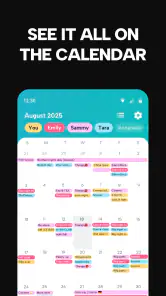
When a group chat fills with “What day works?” messages, I usually want a plan more than another conversation thread. Howbout is a social calendar app built around that gap: it gives friends a shared place to coordinate dates, discuss events, and keep plans visible. I’d consider it when arranging meetups is a recurring chore, rather than when I simply need a private calendar for work and appointments.
Is a shared calendar the right fit?
My first question is whether your group will actually use a separate planning space. Howbout is most useful when several people need to compare availability and settle details together. If your friends already agree on plans in one message, adding another app may feel like extra admin. But for groups that routinely lose dates in chat, putting the event and its discussion together can make the next step clearer.
A practical example: I’m trying to arrange dinner with friends who have different schedules. Instead of suggesting dates one by one and searching the chat later, I can use the app’s availability sharing and poll to narrow down a time, then keep the event conversation in the same place. That workflow is especially helpful when the group has to decide between options, not just announce a finished plan.
How it fits into a group’s routine
Howbout is a free social app from Howbout, with an Everyone age rating. It has a 4.6 average from around 15 thousand ratings and more than 1 million installs. The app first appeared in 2019, and version 13.2.0 supports Android 8.0 and later. Those figures suggest it has found an audience, though the real test is whether your own friends are willing to join in.
Getting started and keeping plans clear
Setting up was a breeze! Once you download the app, you’re prompted to create an account or sign up using Google or Facebook. I chose the Facebook route, and within seconds, I was in. The interface is sleek, intuitive, and not cluttered with unnecessary buttons. You’re greeted with a clean dashboard that clearly displays your upcoming events and invites.
Before moving every social plan into a new tool, I’d start with one group and one upcoming event. That gives everyone a low-pressure way to see whether the shared calendar suits them. It also helps avoid duplicate planning: agree that the app is the place for the event time and updates, while ordinary chat remains for unrelated conversation. If your group splits details across several channels, the calendar only helps when people know where the final decision lives.
Planning together, not just messaging
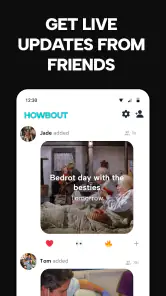
What really caught my eye was the event planning feature. You can create an event, add all the details, and then invite friends directly through the app. The best part? You can chat about the event within the app, so all the planning deets are in one place. No more scrolling through endless text threads to find out who’s bringing the snacks!
More From Our News Desk

Clash of Clans Is Won Between the Battles

Android Auto Makes the Case for Quieter Car Software

MobiOffice: Transforming Mobile Productivity with Seamless Integration

EA SPORTS FC™ Mobile Soccer: Redefining Mobile Sports Gaming

How Microsoft OneDrive Became a Mobile Productivity Giant

How Google Translate Breaks Language Barriers Effortlessly
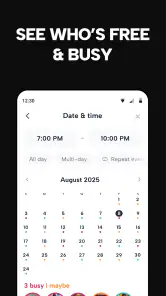
Another cool feature is the availability sharing. You can mark when you’re free, and your friends can do the same. It’s like a matchmaking service for your social life! I also loved the ‘polls’ option, where you can get everyone's opinion on the best time or place for an event. It’s super handy when you’re trying to coordinate a group hangout.
Making a poll useful rather than noisy
A small planning choice makes a noticeable difference: give a poll a short list of realistic options instead of turning it into an open-ended debate. For a weekend outing, I’d first settle what kind of plan the group wants, then offer a few possible dates or places. That way, people can make a clear choice without the poll becoming another conversation that needs managing.
I’d also treat availability as a snapshot for making a decision, not a promise that someone is free forever. People’s schedules change, and a marked opening may not mean they have committed to the event. Once the group picks a time, confirm the actual plan in the event details and make sure anyone with a conflict can speak up. This keeps the shared calendar helpful without making a tentative response feel like a firm RSVP.
Where it beats the usual options
Compared with a standard messaging app, Howbout’s advantage is that a plan has a dedicated event space instead of being buried among unrelated messages. Compared with a conventional calendar, its social focus makes coordination the point: friends can contribute availability and discuss choices, rather than simply receiving a date someone has already chosen. That distinction matters most for recurring groups, trips, and gatherings where the decision itself takes effort.
There is a trade-off: everyone you need to coordinate with has to participate for shared availability and event chat to work well. If one person never checks another app, you may still end up copying the final details into your usual group chat. For a simple one-to-one appointment, or a household that already relies on a shared calendar, the usual calendar may be quicker and easier to maintain.
When another kind of tool makes more sense
Howbout sits between a chat app and a personal calendar, so the alternatives depend on what is slowing your group down. If the main problem is conversation, a group chat may be enough: it is familiar, and nobody has to learn a new place to look. If the date is already decided and you only need a reminder, a regular calendar is more direct. If the challenge is finding a mutually workable time, Howbout’s shared availability and polling are more relevant than either of those options.
For a group that plans around a fixed weekly routine, a simple shared calendar may also be easier to keep current than asking everyone to participate in each decision. Conversely, friends organizing a trip with several possible dates, activities, and changing details may benefit from having the discussion attached to the event. I wouldn’t choose a tool just because it has more planning features; I’d choose the one that matches the kind of decision the group actually needs to make.
A realistic week with the app
Imagine a few friends trying to meet after work. One person suggests dinner, but nobody knows whether Tuesday or Thursday is better. I’d create one event, invite the people who need to weigh in, and use a poll to compare those dates. Friends can share when they are free, and the event conversation can handle practical details such as where to meet or whether the plan has changed.
Once the group agrees, I’d put the settled time and location in the event rather than relying on a final message that can get lost. If someone cannot make it, the group can see the decision in context instead of reopening the entire chat history. This is a modest workflow, not a guarantee that everyone will respond promptly, but it gives the planner a clearer record of what was decided and where to check for updates.
Making the switch without creating more work
I’d treat Howbout as a home for social plans, not as an automatic replacement for every calendar you use. Start with a single event, invite the people who need to decide, and put the agreed time and key details in the event itself. If you rely on a personal calendar too, check that the plan is represented where you normally look; the Google Calendar sync lag I encountered is a reason not to assume every change appears instantly.
One useful habit is to use a poll only when the group has genuine choices to make. If the date is already settled, a straightforward event avoids asking people to vote on something decided. Likewise, availability sharing is most valuable before a plan is fixed; after that, it can become another step people have to maintain. These small choices keep the app focused on solving coordination rather than adding ceremony.
What to settle before inviting everyone
Before asking friends to join, I’d tell them what you want the app to replace for this particular plan. Is it the place to choose a date, the place to keep the details, or both? That simple expectation prevents people from answering a poll in one place and then asking for the final time somewhere else. It also gives a group that is hesitant about another app a limited trial rather than an open-ended commitment.
It is worth considering how much schedule information you are comfortable sharing, too. Availability is useful because it makes coordination easier, but not everyone wants to mark out their free time for friends. In that case, people can still take part in a plan by responding to a specific poll or event, while the group avoids treating a full availability view as mandatory. The best workflow is the one members will use willingly.
My Experience
Using Howbout has genuinely made my life easier. I’m usually the 'planner' in my group, and this app took a huge load off my shoulders. I could easily see who was coming, what the plan was, and even chat with everyone without switching apps. Plus, the notifications are subtle – they don’t bombard you every minute, which is a relief.
The only hiccup I encountered was a slight lag when trying to sync my calendar with Google Calendar. It wasn’t a deal-breaker, but it’s something to keep in mind if you rely heavily on multiple calendar integrations.
Who benefits most, and who should skip it
I’d suggest it to the friend who usually has to chase replies, to a club of friends arranging regular outings, or to a group trying to choose a date before making other arrangements. It is also a sensible fit for people who enjoy planning together and want one place to revisit the outcome. Groups with changing schedules can get more from the availability and poll workflow than friends who usually make spontaneous plans face to face.
I’d skip it if you prefer not to share availability, if your plans are usually spontaneous and settled in person, or if the people you coordinate with won’t adopt another app. Those are not flaws in the idea; they are situations where a messaging thread or a basic calendar can be the more natural tool.
What I’d check during a first trial
For a first event, I’d pay attention to whether the people you invited can find the plan again without being reminded where it lives. If they respond to the poll but keep asking for details in the old chat, that is useful evidence that the group may prefer a lighter approach. If they return to the event space for updates, the separate planning hub is doing its job.
I’d also check the plan from the perspective of someone who is not organizing it. Are the date and key details easy to understand? Is it obvious what still needs a decision? A shared tool should reduce the organizer’s effort without shifting confusion onto everyone else. If the event is clear to a late-arriving invitee, that is a better sign of fit than simply creating several events in the first week.
The Final Word
All things considered, I’d say Howbout is a must-try for anyone looking to streamline their social life. It’s perfect for those of us who love planning but hate the hassle that often comes with it. The app is available for both Android and iOS, so no one’s left out of the fun. Give it a shot, and you might just find yourself wondering how you ever managed without it!
So, go ahead, download Howbout, gather your tribe, and make planning as fun as the events themselves!
Howbout: social calendar Frequently Asked Questions
Can I use Howbout to see when my friends are free?
Howbout is designed to help friends coordinate plans by sharing events and schedules in a social calendar. This makes it useful for checking plans together and finding a time that works for a group, rather than relying on separate conversations to keep everyone updated. Its group chat and event-sharing features bring social planning into one place.
Does Howbout include group chat and event sharing?
Yes. Howbout brings together group chat, shared events, and schedules so friends can discuss plans and keep the details together. Instead of separating a conversation from the event it concerns, you can use the app’s social planning tools to coordinate with the people involved and keep everyone on the same page.
Is Howbout available on both Android and iOS?
Howbout is a social calendar app for friends, and it is available for Android and iOS users. Before downloading, check that your device’s operating system meets the app’s minimum requirement: version 8.0. The app is free to download, so you can try its planning features and see whether they suit the way your group organizes plans.
Do my friends need Howbout to join an event or group chat?
Howbout is built around making plans with friends, sharing events and schedules, and chatting in groups. That makes it most useful when the people you plan with can take part in the app as well. You can invite friends and coordinate plans in one place, while notifications help keep everyone aware of upcoming events.
What is Howbout and how does it work?
Howbout is a social calendar app designed to make organizing events with friends and family easier. It integrates with your existing calendar and allows you to create, share, and manage events all in one place. You can invite friends, chat within the app, and receive notifications about upcoming events, making it a seamless tool for social planning.
Pros
- Seamless event scheduling
- Integrated chat feature
- User-friendly interface
- Cross-platform availability
- Customizable notifications
Cons
- Limited integration with other apps
- Occasional syncing issues
- Requires internet connection
- No offline mode
- Limited color-coding options

- Category
- Social
- Version
- 13.2.0