

HanGraphy
- 6.00
- 4.2
- Installs
- 10.00K
- Price
- Free

Screenshots
Analysis by Reviewed
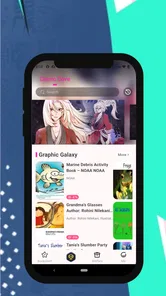
I approached HanGraphy as a comics reader first, not as a utility or a social platform. Developed by Tooning Inc, this free comics app is aimed at people who want colorful, character-led reading with a more distinctive visual personality than a plain text-heavy catalog. My first impression was that its appeal depends less on complicated controls and more on how comfortably it lets you settle into illustrated stories.
The important question is not simply whether it has comics. Most apps in this category do. The better question is whether its presentation, content rating, and reading rhythm fit the way you actually consume manga and comics. In my experience, HanGraphy makes the most sense for readers who enjoy browsing visually rich work in short sessions, especially on a phone, while readers looking for a huge, highly organized mainstream library may prefer a more established alternative.
How HanGraphy feels during ordinary reading
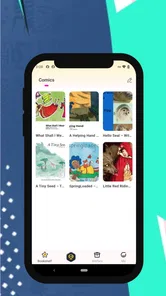
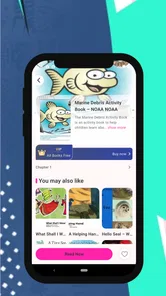
The app’s store summary describes comics and manga full of color, character, and charm, and that gives a fair indication of its intended mood. This is not an app I would choose because I need a bare-bones document viewer. I would open it when I want illustrated storytelling to feel lively and approachable, with the artwork doing much of the work before I have even decided what to read.
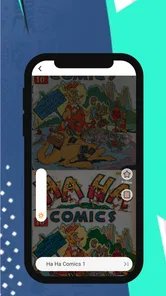
That visual emphasis also affects speed expectations. Comic pages contain more artwork than a simple article, so the perceived responsiveness depends on how quickly a page becomes readable rather than on the tap response alone. When I move through a chapter, I pay attention to whether the next panel appears naturally, whether the reading position is easy to recover, and whether the interface gets out of the way. Those details matter more here than decorative menus.
HanGraphy is currently at version 1.0.14 and supports Android 7.0 or later. That makes it accessible to people who are not using a recent flagship phone, although compatibility is not the same as identical performance on every device. A newer handset should offer a more comfortable experience when artwork is detailed or when several pages are being viewed in one sitting. On an older phone, I would keep expectations practical and avoid judging the app solely by how quickly a lightweight text app opens.
The app has an average rating of 4.2 from roughly 73 ratings, with six written reviews. I see that as a useful but still modest signal: enough to suggest that readers are finding value, but not enough to treat the score as a complete picture of long-term behavior across every Android model. The install count is over 10 thousand, so it has a real user base without having the scale of the biggest comic services.
Why the visual approach matters
Color can make a comic easier to browse because thumbnails and covers communicate tone quickly. It can also make a session more demanding on a small screen, particularly when lettering is compact or a page uses a busy composition. My practical advice is to test one complete reading session rather than judging the app from its opening screen. A cover may look excellent while the actual question is whether your eyes remain comfortable through several chapters.
More From Our News Desk

 Gmail
GmailGmail in a Busy Inbox: Who Benefits Most?
From first account to crowded workday, Gmail earns its place through dependable search and flexible sorting—but its best fit depends on how much inbox maintenance you can tolerate.

 Prime Video
Switching to Prime Video: What Changes in Your Viewing Routine
Prime Video can make a compelling second home for streaming, but switching means learning a different catalog, rental layer, and route from browsing to playback.

 Universal TV Remote Control
Universal TV Remote Control Works Best as a Reliable Backup
A phone remote earns its place through quick setup and reliable habits. Here is how to get more from Universal TV Remote Control—and where its limits show.

 Weather - By Xiaomi
Weather by Xiaomi Review: Clear at a Glance, Less Clear Up Close
Xiaomi’s weather app makes everyday forecasts quick to scan, but its calm surface can leave useful details and recovery paths harder to find than they should be.

 X
XX Under Pressure: Can It Recover When Posting Goes Wrong?
A resilience-focused review of X, examining setup, mistaken posts, interruptions, weak connections, and the gaps that matter when recovery needs to be dependable.

 Clash of Clans
Clash of Clans Is Won Between the Battles
Its raids are quick; its community is a long-term project of coordination, teaching, rivalry, and shared responsibility—with all the friction that entails.
Latest News



One useful habit is to choose reading moments deliberately. HanGraphy suits a short break, a commute, or a quiet wind-down session better than a situation where you need to skim dozens of titles quickly. I would start by selecting a visually clear series, checking how the page flow feels, and only then deciding whether the catalog deserves a regular place on my home screen.
The app’s mature 17+ content rating is also part of that decision. It means I would not treat HanGraphy as a general family comics shelf or hand a phone to a younger reader without checking the material first. For adults, the rating may be a useful sign that the selection is not designed around children’s reading habits. For parents, shared-device users, and anyone curating a family library, this is a reason to choose another app or supervise access.
What happens during heavier sessions
The most demanding moments are likely to be the ones that combine large illustrated pages, repeated scrolling or swiping, and a longer uninterrupted session. I would expect a difference between opening a single comic for a few minutes and moving through a substantial amount of colorful artwork. That does not make the app inefficient; it simply means the reading format asks more from a phone than a mostly text-based service.
In real use, I would avoid starting a long session when the device is already busy with several demanding apps. Closing unused apps can make the experience feel more predictable, especially on older hardware. I would also keep the phone charged if I planned to read for a long time. That is not a special flaw unique to HanGraphy, but illustrated content makes battery and memory comfort more relevant than they are in a simple news reader.
A realistic everyday scenario would be reading during a lunch break. I might open the app, browse by artwork rather than by title, read a few pages, lock the phone, and return later. That stop-and-start pattern is where recovery becomes important. If I have to search repeatedly for the same story or reconstruct my place after every interruption, the experience becomes tiring even if the artwork itself is appealing. I therefore recommend testing the pause-and-return routine early, not just the first launch.
Another scenario is a long evening session at home. Here, the main trade-off is immersion versus device comfort. A bright, colorful page can be engaging, but it may feel intense in a dark room. Lowering screen brightness and using the phone at a comfortable distance can make more difference than chasing a faster device. If your priority is reading on a large display, a tablet or a comics service with stronger large-screen support may be a better fit than relying on a phone-centered experience.
Stability, interruptions, and recovery
I judge reliability in a comics app by what happens after ordinary interruptions: a call, a locked screen, a switch to another app, or a brief loss of attention. A good reader should make it easy to continue without turning every break into a restart. HanGraphy’s value is therefore tied not only to its comic selection but also to how confidently I can leave and return to a story.
Because the app is free to download, trying this recovery test costs nothing. I would open a title, read far enough to become familiar with the page flow, leave the app for a few minutes, and then return. I would also rotate my routine between browsing and reading rather than assuming that a smooth first launch proves everything. This is one of the most useful checks for anyone with an older Android phone or a device that frequently clears background apps.
There is another kind of reliability: knowing what a tap will do. Comic readers can become frustrating when browsing controls and reading controls feel too similar, or when a reader accidentally leaves a page while trying to advance. I prefer an interface that rewards simple habits. If HanGraphy feels natural after a few sessions, that lowers the mental cost of reading. If I need to remember unusual gestures or repeatedly correct accidental navigation, a more mature competitor may be preferable even if its visual style is less charming.
I would also separate app stability from content availability. A reader can be technically stable and still disappoint someone who expects a particular genre, creator, or publishing model. HanGraphy’s concise store short description, “HanGraphy,” does not tell me enough by itself to define the whole catalog, so I would browse before committing to it as my only comics source. For many readers, it may work best alongside a larger service rather than replacing every other reading option.
Older phones, storage, and practical limits
Android 7.0 support is a positive starting point for compatibility, but it should not be mistaken for a promise that every supported phone will feel equally quick. Older devices often have less memory, slower storage, and smaller displays. Those constraints become noticeable when artwork is detailed or when the reader has to move through many pages without a break.
If I were installing HanGraphy on an older phone, I would make three checks. First, I would leave enough free storage for the app and normal device operation rather than filling the phone completely. Second, I would read with unnecessary background activity reduced. Third, I would test whether returning from another app preserves a comfortable place in the comic. These steps help distinguish a device limitation from a problem with the reader itself.
Screen size is just as important as raw processing power. A compact phone may be easy to carry but less comfortable for small lettering and detailed panels. A larger phone can improve readability while making one-handed use less convenient. I would not buy a new device specifically for HanGraphy, but I would choose the app more confidently if my current screen already works well for manga and comics.
Resource demands also include attention. A colorful catalog can encourage browsing when I intended to read only one chapter. That is enjoyable for some people, but it can make the app feel less efficient for readers who want a strict, task-like reading routine. If you prefer a simple queue, a familiar library system, and minimal discovery, a conventional manga reader may suit you better.
Free access and the cost question
HanGraphy is free to download, which makes experimentation straightforward. The app also includes in-app purchases ranging from $2.99 to $199.99 per item. That range is important because “free” describes the entry point, not necessarily the cost of becoming a regular reader. I would browse the available reading path and understand where purchases fit before investing emotionally in a long series.
For occasional readers, free access may be enough to decide whether the art style and pacing appeal to them. For committed readers, the purchase structure deserves closer attention. A low-priced individual purchase may feel reasonable for a favorite installment, while repeated spending can change the value calculation over time. The high end of the listed range is especially significant: I would never assume that every reader needs to spend anywhere near it, but I would treat it as a reminder to review each purchase carefully.
This is also where HanGraphy differs from subscription-based alternatives. A subscription can feel simpler for someone who reads widely and wants predictable access across a broad catalog. A purchase-based approach may be better for someone who wants to support or keep specific works, provided the individual costs match their habits. If your budget depends on a fixed monthly amount, check the purchase flow before making this your primary comics app.
Who will enjoy it most
I think HanGraphy is a good match for adult readers who choose comics through artwork, atmosphere, and character appeal rather than through a massive catalog alone. It is especially promising for someone who wants to discover colorful material in a focused app and is comfortable spending time browsing. The mature rating also makes it more naturally suited to adults than to children.
It may also work well for a reader who uses a phone in short bursts. A few pages during a break, a chapter before bed, or a quick return to a favorite story are realistic use cases. The free download lowers the risk of testing it on your current device, and the Android 7.0 minimum means people with older phones can at least consider it rather than being excluded immediately.
I would be more cautious if you need a family-friendly environment, a very large established library, or a fully predictable subscription bill. I would also hesitate if your phone struggles with illustrated apps generally, if your eyesight makes small panels uncomfortable, or if you dislike purchase systems that require close attention. In those situations, a larger-screen reader, a child-focused catalog, or a subscription service may be a better choice.
How it compares with familiar alternatives
Compared with a general ebook reader, HanGraphy is more purpose-built for visual storytelling. An ebook app may offer excellent text controls and broad book support, but it will not necessarily make comic discovery feel central. HanGraphy’s advantage is its visual identity; its trade-off is that it may be less useful for someone who wants novels, documents, or a mixed reading library in one place.
Compared with a large manga platform, HanGraphy appears more focused and less intimidating. That can make browsing feel personal rather than endless. The downside is that readers who already know exactly which major series they want may get more value from the service with the strongest catalog coverage and search tools. I would use HanGraphy for its particular style and discoverability, not assume it can replace every specialist platform.
Compared with free web reading, a dedicated app can feel more comfortable on a phone because the reading experience is gathered in one place. Web alternatives may offer broader discovery, but they can also involve more distractions and inconsistent presentation. HanGraphy’s appeal is strongest when I want to read rather than jump between unrelated pages. Still, readers who prioritize maximum choice over a curated visual experience may prefer browsing elsewhere.
My performance verdict
HanGraphy is not an app I would recommend blindly to every comics fan, but it is easy to justify trying if colorful, character-focused reading is what attracts you. Its performance expectations are sensible for a visual reader: newer devices should feel more comfortable during demanding sessions, while older Android phones may need a little care with background activity, storage, and screen comfort.
The app’s strongest practical quality is the low-risk entry point. Since it is free to download, I can test the browsing rhythm, interruption recovery, and page comfort on my own phone before deciding whether the catalog deserves regular use. That trial matters more than the rating alone because comic reading is personal: eyesight, screen size, attention span, and spending habits all shape the result.
My honest recommendation is to treat it as a focused adult comics discovery app rather than an all-purpose replacement for every manga service. Give it a short but realistic test: browse, read through an uninterrupted stretch, leave and return, and inspect the purchase path before committing to a series. If the artwork draws you in and the app recovers smoothly on your device, HanGraphy can become an enjoyable companion for short reading sessions. If you need family access, a huge known catalog, or tightly controlled recurring costs, another option will probably serve you better.
Overall, I see HanGraphy as a promising niche choice with a clear visual personality and a reasonable opportunity for Android users to explore it without an upfront download fee. The mature audience, in-app purchase range, and device-dependent reading comfort are the points I would keep in mind. For the right reader, the best reason to try HanGraphy is not its size, but the way its colorful comics invite you to slow down and browse with your eyes.
HanGraphy Frequently Asked Questions
Who develops HanGraphy, and what is its age rating?
HanGraphy is a comics app developed by Tooning Inc. Its content rating is Mature 17+, so it may not be suitable for younger readers. If you are choosing the app for someone else, check that age rating before downloading and consider whether its comics are appropriate for the intended reader.
What is HanGraphy, and what can I use it for?
HanGraphy is an app focused on helping users explore, study, and practice Chinese characters, commonly known as Hanzi. It is designed for learners who want to understand character structure, review meanings, and improve recognition through visual references and practice activities. It may be useful for beginners as well as students looking for an additional study tool alongside a Chinese course or textbook.
Is HanGraphy suitable for complete beginners learning Chinese?
Yes, HanGraphy can be useful for beginners because it presents Chinese characters in a visual and organized way rather than assuming advanced language knowledge. However, users should not expect it to replace a complete Chinese course. Learning pronunciation, grammar, listening, and conversation still requires other resources. The app works best as a supplementary tool for building character familiarity and developing a regular study routine.
Does HanGraphy include character meanings, pronunciation, and writing information?
HanGraphy is intended to provide helpful information about Chinese characters, such as their visual composition, meanings, and learning-related details. Depending on the character or feature being viewed, the amount of information may vary. Users who need detailed pronunciation practice, example dialogues, or handwriting correction should check the app’s current feature list and consider using it together with a dictionary or dedicated Chinese writing application.
Can I use HanGraphy offline, or do I need an internet connection?
Offline availability can depend on the version of HanGraphy installed and the specific content or functions being used. Basic character information may be accessible without a constant connection if the necessary data is stored locally, while updates, online resources, advertisements, or certain interactive features may require internet access. It is recommended to open the app once after installation and test the sections you plan to use while offline.
Pros
- Simple interface makes browsing handwriting samples quick and intuitive.
- Useful for discovering different handwriting styles and visual references.
- Images are generally easy to view and save for later inspiration.
- Lightweight design should run smoothly on most modern devices.
- Helpful for lettering
- journaling
- calligraphy
- and creative projects.
Cons
- Content quality may vary depending on the handwriting sample or contributor.
- Limited practical tools if you expect a full handwriting or drawing editor.
- Some examples may require an internet connection to load properly.
- Search and filtering options may feel basic for large collections.
- Not all handwriting styles will be equally useful for language learners.











