

Handy Art Reference Tool
- 383.00
- 4.7
- Installs
- 50.00K
- Price
- $2.99
Screenshots


Analysis by Reviewed
When I’m drawing away from my desk, the hardest part is often not finding inspiration but checking whether a pose or angle looks convincing. Handy Art Reference Tool gives me a way to study forms on a phone instead of guessing or searching through scattered images. It’s a focused tool for artists who want a visual reference close at hand, though it works best as a guide rather than a substitute for observation or practice.
A quick reference when an idea is moving faster than a sketch
The app is a paid comics-category app from Belief Engine, priced at $2.99, with optional in-app purchases listed at $1.99 per item. Its Teen age rating makes it suitable for a broad range of aspiring artists, while the practical appeal is simple: open a reference, inspect it, and get back to drawing. I’d consider it most useful for sketchers, illustrators, and students who regularly need to check anatomy or pose details.
A realistic use for me would be a short drawing break on a train. If a character’s hand is turned toward the viewer and I can’t work out the thumb placement, I can inspect a hand reference from another angle, then return to the page with a clearer idea. That small check can be more helpful than repeatedly erasing a guess. It is also handy at a café or in a waiting room, where setting up a full reference library on a larger device may be awkward.
Speed depends on the kind of work you bring to it
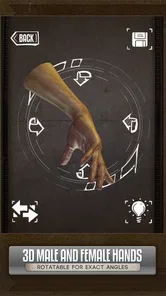
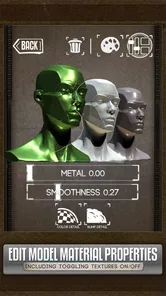
This is not a general drawing or painting studio. Its value is in inspecting references: rotating and zooming 3D models, changing lighting, and looking at subjects such as hands, animals, skulls, and anatomy. Those controls make it easier to answer a specific visual question than flipping through a stack of fixed images, especially when the angle you need is unusual.
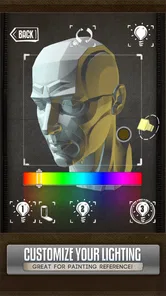
For a quick check, I would keep the task narrow: choose the subject, adjust the view, study the silhouette or overlap, and make a small note or sketch before moving on. This helps avoid losing drawing time to endless camera adjustments. The lighting control is particularly useful when I want to understand where a form turns into shadow, but it should inform my interpretation rather than dictate the final lighting in a finished illustration.
Your Pocket-Sized Art Studio
Imagine having a tool that fits right in your pocket yet offers a treasure trove of reference materials. That's exactly what the Handy Art Reference Tool offers. It's like carrying a mini art studio wherever you go. Whether you're chilling at a café, on a train, or just lounging at home, you can whip out your phone and dive into a world of poses and references.
Features That Make It Shine
One of the standout features of this app is the 3D models. You can rotate them, zoom in, and view them from any angle. It's incredibly intuitive and gives you the freedom to explore perspectives you might not have considered before. This is especially handy for those tricky angles.
More From Our News Desk

 Gmail
GmailGmail in a Busy Inbox: Who Benefits Most?
From first account to crowded workday, Gmail earns its place through dependable search and flexible sorting—but its best fit depends on how much inbox maintenance you can tolerate.

 Prime Video
Switching to Prime Video: What Changes in Your Viewing Routine
Prime Video can make a compelling second home for streaming, but switching means learning a different catalog, rental layer, and route from browsing to playback.

 Universal TV Remote Control
Universal TV Remote Control Works Best as a Reliable Backup
A phone remote earns its place through quick setup and reliable habits. Here is how to get more from Universal TV Remote Control—and where its limits show.

 Weather - By Xiaomi
Weather by Xiaomi Review: Clear at a Glance, Less Clear Up Close
Xiaomi’s weather app makes everyday forecasts quick to scan, but its calm surface can leave useful details and recovery paths harder to find than they should be.

 X
XX Under Pressure: Can It Recover When Posting Goes Wrong?
A resilience-focused review of X, examining setup, mistaken posts, interruptions, weak connections, and the gaps that matter when recovery needs to be dependable.

 Clash of Clans
Clash of Clans Is Won Between the Battles
Its raids are quick; its community is a long-term project of coordination, teaching, rivalry, and shared responsibility—with all the friction that entails.
Latest News



Then, there's the customizable lighting. You can adjust the lighting to see how shadows and highlights play across forms, which is crucial when you're trying to add depth and realism to your work. It's like having a virtual spotlight that you can control with just a few taps.
References work best as a study aid, not a shortcut
I find the real benefit comes from treating each model as a problem-solving aid, not a picture to copy. If an arm looks stiff, I would rotate the figure until the shoulder, elbow, and wrist read clearly, then make a quick gesture sketch before refining anything. For hands, it helps to compare the palm’s direction with the fingers’ direction; those planes can turn independently, which is easy to miss when relying on a flat photo.
There is a trade-off in that flexibility: a movable model can show an angle that is useful but not necessarily natural or expressive. I would use it to understand structure, then check the pose against the action or mood I want to draw. For convincing character work, a reference should answer “how is this form built?” without deciding “what should this character feel like?”
A Treasure Trove of References
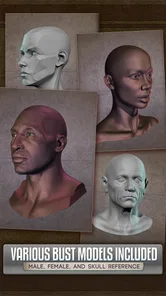
The app isn't just about human poses. It boasts a collection of animal references too. Whether you're sketching a majestic lion or a playful puppy, this app covers you. Plus, it includes skulls and anatomy references, which are gold for artists focusing on realism.
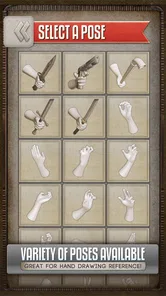
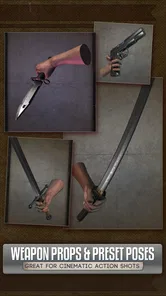
And let's not forget about the hands—arguably one of the trickiest parts of the human body to draw. The app offers various hand poses, and trust me, this alone can save you countless hours of frustration.
When a photo library or art app is the better choice
Compared with a folder of photographs, a rotatable model is more adaptable when I need to inspect a particular side or change the view without hunting for a matching image. But photos have the advantage of showing real expressions, fabric, lighting, and the small irregularities of a living subject. For those details, I would still use photographs or observe people and animals directly. Likewise, someone who needs brushes, layers, canvases, or finished image editing should choose a drawing app; this tool is for reference, not making the artwork itself.
To get more from a study session, I would avoid tracing every contour. Instead, use the view to identify the major masses, note the direction of the joints, and then draw the pose from memory. If the result feels wrong, revisit the model and compare one relationship at a time. That routine turns a quick lookup into practice rather than a dependency on the screen.
User-Friendly Experience
The interface is sleek and user-friendly. You don't need to be a tech guru to navigate it. Everything is laid out clearly, making it easy to jump from one section to another. It's smooth sailing, even for those who aren't particularly tech-savvy.
One thing I love about this app is its offline capabilities. Once you've downloaded the references, you don't need an internet connection to access them. This is perfect for those moments when you're out and about and inspiration strikes.
What to expect from regular use
In day-to-day use, I’d treat it as a companion for focused checks rather than something that needs to stay open throughout a whole drawing session. A few minutes spent correcting a hand angle or checking an animal’s structure can be worthwhile; prolonged browsing can interrupt the flow that makes sketching enjoyable. If you plan to work offline, prepare the references you need before heading out, so you are not depending on a connection at the moment you want to draw.
Its performance also depends on the device in a way that matters for this kind of tool: rotating and zooming a 3D model is more demanding than looking at a still image. I would expect a newer, responsive phone to make those adjustments feel more comfortable, while an older device may make repeated viewpoint changes less pleasant. The app supports Android 6.0 and up, but that minimum does not guarantee identical responsiveness across every compatible phone.
Who will get the most from it
I’d recommend it to artists who draw on the go, beginners who want help understanding hand structure, and experienced illustrators who need to check a difficult viewpoint without interrupting their workflow for long. It may be less useful if your process depends mainly on photographic references, if you want a complete anatomy course, or if you expect an app to teach drawing fundamentals by itself. The 4.7 average from around 4,400 ratings and more than 50,000 installs suggest that many users find the focused approach worthwhile, but the right fit still depends on how often you reach for visual references.
The app was released on March 27, 2012, and version 5.1 is the current version. I wouldn’t judge its value by version number alone; what matters is whether the reference controls suit your habits and whether your device handles them comfortably. Since it costs money upfront and offers optional purchases, I’d decide based on how regularly you draw subjects that benefit from adjustable views, rather than treating it as an impulse download. It has 380 reviews, but that figure matters less than the practical question of whether you will use it in your own routine.
Reliability in a portable drawing routine
A reference app earns trust by being useful at the moment a drawing problem appears, not by keeping me entertained between tasks. I’d build a simple habit around it: pick one subject before a session, make sure the relevant reference is ready, and use the model only to resolve the question that is blocking the sketch. That routine also makes it easier to notice whether the app is genuinely helping or whether I’m just scrolling and postponing the drawing.
Offline access can be particularly reassuring for a commute or a location with unreliable service, provided I have prepared what I need in advance. I would not assume that every reference is already available without preparation; the sensible approach is to check the intended subject while connected, then test access before relying on it away from home. This small bit of planning is more useful than discovering a gap in the middle of a study session.
Small workflows that make the models more useful
For a difficult pose, I like to separate the reference check into passes. First, I look at the outer contour and the direction of the torso. Then I rotate the view to understand which limbs overlap and where the joints turn. Only after that would I use the adjustable light to inspect the larger planes. Looking for all of those answers at once can make a model feel busy; breaking them apart gives me a clearer drawing decision.
Another useful approach is to compare two views instead of settling on the first attractive angle. A hand can look readable from the palm side but confusing in profile, and a quick rotation can reveal whether the fingers actually sit in the arrangement I imagined. I would not treat the model as proof that a pose is anatomically perfect, but as a way to test how forms relate when the viewpoint changes.
What it can and cannot replace
For a student practicing construction, adjustable models can be more helpful than a single textbook diagram because the student can inspect a form from a different direction. But that flexibility does not replace a teacher’s explanation, a structured anatomy course, or feedback on a finished drawing. If I were learning how to build believable figures from the ground up, I’d use this as one reference source alongside lessons and regular sketching, not as the whole curriculum.
It is also not the best choice when the key information is specific to a real moment: the way a sleeve bunches at an elbow, the expression in someone’s face, or the weight shift in a candid pose. In those cases, a photograph or quick observation is more truthful. The app’s strength is controllable structure; the limitation is that structure alone cannot capture every detail that makes a subject feel alive.
Choosing it without expecting a complete studio
If you already draw on a phone or tablet and often pause to search for hand or anatomy references, the purchase can make practical sense. If you only sketch occasionally, already have a dependable photo collection, or mainly need to paint and edit images, the value is less obvious. I would ask myself whether I repeatedly lose time to the same reference problem; if the answer is yes, a dedicated tool is easier to justify than another general-purpose art app.
The optional purchases are worth considering as part of that decision, but I would start by working out whether the core reference workflow fits my needs before spending more. A specialist app is most useful when its particular controls solve a recurring task. It does not need to become the center of an artist’s setup to be worthwhile; even a brief, targeted check can earn its space if it helps a sketch move forward.
Final Thoughts
In a nutshell, the Handy Art Reference Tool is a must-have for anyone serious about improving their art skills. It's like having a personal tutor that fits in your pocket. Whether you're a seasoned artist or just starting, this app provides a wealth of resources that can help elevate your work to new heights. So, if you're looking to enhance your art game, give this app a shot. It's worth every penny and then some!
My performance verdict
For me, its strongest performance is practical rather than flashy: it brings adjustable references into a portable format and lets me return to the sketch with a more informed eye. I would not choose it for broad image browsing, finished artwork, or a long lesson in anatomy, and I would give an older phone a quick try before building it into a daily routine. If your main frustration is checking a hand, pose, or form from a useful angle, though, this is a compact tool that can earn its place beside your sketchbook.
Handy Art Reference Tool Frequently Asked Questions
How much does Handy Art Reference Tool cost, and are there in-app purchases?
Handy Art Reference Tool is a paid app, priced at $2.99, so you can consider the upfront cost before downloading. It also offers in-app purchases priced at $1.99 per item. If you prefer to try a free app first, this purchase model is worth keeping in mind; the tool is aimed at artists who want a portable source of drawing references.
What is the Handy Art Reference Tool and how does it benefit artists?
The Handy Art Reference Tool is a versatile application designed to assist artists by providing a wide range of reference images and tools. It includes 3D models, hands, skulls, and other anatomical references that can be rotated and zoomed for detailed study. This app is invaluable for artists looking to improve their anatomy skills and drawing accuracy.
Is the Handy Art Reference Tool suitable for beginners?
Yes, the Handy Art Reference Tool is suitable for artists of all skill levels, including beginners. The app provides accessible and easy-to-use reference images and models that can help beginners understand anatomy and perspective. It's a great tool for learning and enhancing artistic skills, making it ideal for anyone starting their artistic journey.
What types of reference models are included in the Handy Art Reference Tool?
The Handy Art Reference Tool includes a variety of 3D models such as hands, skulls, skeletons, and other anatomical figures. These models can be manipulated in 3D space, allowing users to view them from different angles and lighting conditions. This diversity of models helps artists with accurate anatomy drawing and understanding complex structures.
Who develops Handy Art Reference Tool, and what should I know about its audience?
Handy Art Reference Tool is developed by Belief Engine and is categorized as a Comics app. Its content rating is Teen, which gives users and families a useful indication of the intended audience. The app is focused on artists who want to keep reference material close at hand, making it relevant to people practicing illustration as well as those drawing for personal projects.
Pros
- Comprehensive art reference library
- User-friendly interface
- Regular updates
- High-resolution images
- Offline access
Cons
- Limited free features
- Occasional app crashes
- Requires large storage space
- No community features
- Subscription can be pricey











