

GIF Keyboard: What’s a Gif
- 22.00
- 4.1
- Installs
- 500.00K
- Price
- Free
Screenshots



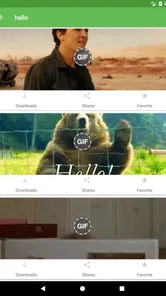
Analysis by Reviewed
GIF Keyboard: What’s a Gif is the kind of Android app I reach for when an ordinary text message feels too flat. It sits in the Comics category, but I use it less like a reading app and more like a visual reply tool: I search for a reaction, browse a funny clip, and share it when words are not quite enough. The app is free to install, with optional purchases priced at $0.99 per item, and its Teen content rating is worth remembering if you are choosing it for a younger family member.
My first impression was that its value depends almost entirely on how quickly it can help me find the right image. A GIF keyboard is useful when it removes the need to leave a conversation, open a separate search engine, save a file, and then return to the chat. That convenience is the central idea here. It is not trying to replace a full messaging service or become a social network; it is a compact way to add animated reactions and memes to conversations.
OSmart Apps has kept the app available across a broad range of Android devices, with the current release listed as version 3.0.2 and a minimum requirement of Android 7.0. That makes it approachable for people using older phones, although the experience can still vary depending on the keyboard behavior, messaging app, and network connection on a particular device.
How the search experience changes when the network is involved
The most important thing to understand is that the useful part of this app is closely tied to connectivity. Searching for a GIF or meme is not the same as opening a picture already stored on the phone. When I want a very specific reaction, the app needs to retrieve results, and the quality of that moment depends on whether the connection is responsive enough for images to appear quickly.
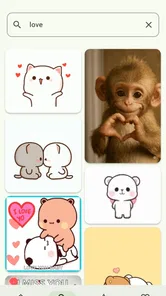
On a strong connection, the workflow feels natural. I can think of a phrase such as “when the meeting ends,” search it, scan the visual results, and choose something that fits the mood. That is much faster than searching the web in a browser, copying an image, checking whether it will display properly in a chat, and switching back to the conversation. The keyboard format keeps the action close to where I am already typing.
On a weak connection, the same advantage can disappear. A text keyboard still works when a page is slow, but a GIF search has to wait for visual results. This is where expectations matter: I see the app as a connected discovery tool rather than a guaranteed instant library of every reaction. If I am already in a place with unreliable service, I do not depend on it for an important conversation.
There is also a practical difference between searching for a broad emotion and searching for a precise joke. General terms tend to be easier because many results can match them. A niche reference may take more attempts, and the time spent refining the search can cancel out the convenience of using a keyboard. My best results come from short, descriptive searches rather than complete sentences.
More From Our News Desk

 Gmail
GmailGmail in a Busy Inbox: Who Benefits Most?
From first account to crowded workday, Gmail earns its place through dependable search and flexible sorting—but its best fit depends on how much inbox maintenance you can tolerate.

 Prime Video
Switching to Prime Video: What Changes in Your Viewing Routine
Prime Video can make a compelling second home for streaming, but switching means learning a different catalog, rental layer, and route from browsing to playback.

 Universal TV Remote Control
Universal TV Remote Control Works Best as a Reliable Backup
A phone remote earns its place through quick setup and reliable habits. Here is how to get more from Universal TV Remote Control—and where its limits show.

 Weather - By Xiaomi
Weather by Xiaomi Review: Clear at a Glance, Less Clear Up Close
Xiaomi’s weather app makes everyday forecasts quick to scan, but its calm surface can leave useful details and recovery paths harder to find than they should be.

 X
XX Under Pressure: Can It Recover When Posting Goes Wrong?
A resilience-focused review of X, examining setup, mistaken posts, interruptions, weak connections, and the gaps that matter when recovery needs to be dependable.

 Clash of Clans
Clash of Clans Is Won Between the Battles
Its raids are quick; its community is a long-term project of coordination, teaching, rivalry, and shared responsibility—with all the friction that entails.
Latest News



Why the built-in format is useful
The keyboard approach is most helpful when I am replying in real time. In a group chat, the moment can pass quickly; opening another app often means losing the rhythm of the conversation. With this tool, I can stay near the message field and use a GIF as a quick emotional shortcut. That is especially effective for reactions such as disbelief, celebration, embarrassment, or playful agreement.
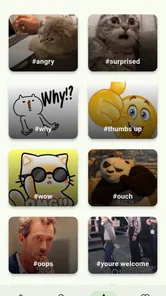
I also found that the search engine is more useful when I treat it as a visual thesaurus. Instead of trying to locate one exact clip, I search for the feeling I want to communicate. For example, a search based on “confused,” “awkward,” or “finally” usually gives me more usable choices than a long explanation of the situation. This is a small workflow change, but it makes the app feel considerably faster.
The trade-off is that the app is less valuable when I already know exactly which image I want and have it saved elsewhere. In that case, a phone gallery or the sharing tools built into a messaging app may be simpler. This keyboard earns its place when discovery matters more than merely sending a stored file.
Using it in everyday mobile situations
I think the strongest use case is casual messaging on a phone. Imagine receiving a message from a friend saying that they have finally finished a difficult task. A written “well done” works, but a celebratory GIF can make the reply feel more personal without requiring a long response. I can open the keyboard, search for a celebration reaction, choose one, and return to the conversation without building a separate message from scratch.
It is also handy for conversations where tone is easy to misunderstand. A short sentence can sound sarcastic or cold, while a carefully chosen reaction can show that I am joking. That does not make GIFs foolproof, but it gives me another way to communicate mood. I still check the result before sending it, because a search term can surface reactions that are more dramatic or more suggestive than I intended.
For work chats, I would be more selective. A restrained reaction can make an informal team conversation warmer, but a random meme may not suit a professional setting. The Teen rating is another reason I would not assume every result is appropriate for every audience. I treat the search result as a starting point, not an automatic recommendation.
On a smaller phone, the keyboard can feel crowded, especially if I am switching between normal typing and GIF search while someone is waiting for a reply. On a larger screen, browsing several visual results is more comfortable. This is not a reason to reject the app, but it affects how I use it: on a compact device, I prefer short searches and choose the first suitable result instead of browsing endlessly.
Battery and data use are also more relevant here than they might seem. Animated media requires more than sending a plain text message, and repeated browsing can become wasteful if I am searching for entertainment rather than a specific reply. I avoid opening the search repeatedly just to scroll through random content. A focused search is quicker, kinder to a limited mobile plan, and less distracting.
A workflow that saves time
My most reliable routine is simple. I first decide what emotion or idea the GIF should communicate, then search with one or two words, review the first group of results, and stop once I find something clear. If nothing fits, I change the wording rather than scrolling without direction. This keeps the app in its best role: a fast reaction picker, not an endless content feed.
Another useful habit is checking the recipient and the surrounding conversation before sending. A GIF that works perfectly among close friends may be confusing in a family chat or inappropriate in a professional thread. Because the search is designed to make sharing quick, it is easy to send something before considering how it will look to someone else.
I would also avoid using it as a replacement for an important explanation. A GIF can soften a message, but it cannot reliably communicate details, plans, or instructions. When clarity matters, I write the words first and use the animation only as an extra layer of tone.
What happens when a search fails
Connectivity problems are the biggest source of friction. If results take too long to appear, I do not keep tapping the search button repeatedly. That usually makes the experience feel more frustrating without improving it. I wait briefly, try a shorter term, or send a normal text instead. Having a fallback prevents the keyboard from becoming an obstacle in the middle of a conversation.
A failed search can also come from the wording rather than the connection. Very specific phrases may produce little that feels relevant. I get better results by moving from the exact event to the emotion behind it. If “my train was delayed again” is too narrow, “annoyed” or “waiting” may reveal more useful reactions.
There are moments when the result itself is the problem. A GIF may technically match the search but carry a tone that is too aggressive, romantic, sarcastic, or childish for the conversation. I do not assume that the first result is the best result. The app speeds up discovery, but judgment still belongs to me.
When the connection returns after a slow period, I find it better to restart with a fresh, focused search than to keep trying to recover a half-loaded browsing session. The exact recovery behavior can depend on the phone and the app receiving the GIF, so I judge success by whether the item reaches the message composer cleanly. If it does not, I use the simpler option available in that conversation.
This is also where the difference between a GIF keyboard and a dedicated meme app becomes clear. A dedicated app may offer more room to browse, edit, or organize content, while this tool is built around speed inside a conversation. If I want to spend time creating a custom meme, I would choose a different type of app. If I want a quick reaction without leaving the chat, the keyboard has the stronger argument.
Keeping the experience sensible on mobile data
I would not use the search casually on a limited data plan. The app’s purpose involves finding and viewing animated media, so repeated browsing can consume more data than ordinary text messaging. I use it when I have a clear reason to send something, rather than opening it every few minutes to explore.
That approach also improves privacy in a practical, everyday sense: I share less impulsively. Searching with a specific intention means fewer accidental choices and less time spent exposing the details of a private conversation to a visual search workflow. I still read the screen before sending, especially when the chat includes people I do not know well.
For people who mainly message over Wi-Fi, the connectivity trade-off is easier to accept. For commuters, travelers, or anyone often moving between weak signals, the app is more situational. I would keep ordinary text, emojis, and the messaging app’s built-in media tools as dependable alternatives. The keyboard is an extra layer of expression, not something I would make essential to every conversation.
The optional purchases also deserve a practical look. The app itself is free, while individual in-app items cost $0.99. I would only spend money after deciding that the free experience genuinely fits my habits. A paid item may be worthwhile for a frequent user who wants a particular extra, but occasional users can reasonably treat the free installation as a trial rather than assuming they need to buy anything.
Because the app is rated Teen, I would also use normal discretion when handing a phone to a child or letting a younger user search without supervision. Animated reactions can be harmless, but search-based content is not automatically suitable for every age or setting. That is especially important when the phone is shared among family members.
Who should use it, and who should skip it?
I recommend it to people who communicate heavily through casual chats, enjoy expressive reactions, and dislike leaving a conversation to hunt for a suitable image. It is a particularly good fit for users who want a lightweight way to search rather than maintain a personal collection of downloaded memes.
It also suits someone who values immediacy over detailed editing. The app makes more sense when the goal is “find something that captures this feeling now.” If I want captions, cropping, stickers, advanced organization, or carefully branded content, I would look toward a dedicated meme creator or a fuller media editor instead.
I would skip it if most of my communication is formal, text-only, or conducted in places with unreliable connectivity. I would also hesitate to install it for someone who rarely sends animated media, because another keyboard or the existing sharing panel may already cover that occasional need. The app is specialized, and its usefulness grows with frequency of use.
The audience size suggests that the concept has broad appeal: it has passed 500K installs and holds an average rating of 4.1 from around 3.5K ratings. I read that as a sign that many users find the basic idea worthwhile, while also leaving room for individual differences in keyboard comfort, search quality, and network conditions. My own view is similar: it is helpful when the situation matches its strengths, but not a universal replacement for every way of sharing media.
My connectivity verdict
After using GIF Keyboard: What’s a Gif, I see it as a convenient conversation accessory rather than a complete content platform. Its best moments happen when I have a stable connection, a clear emotional reaction in mind, and a chat where a visual reply feels natural. In those conditions, the keyboard saves steps and makes messages more lively.
Its weaknesses appear when the network slows down, the search is too precise, or the result needs more control than a quick picker can provide. I also think users should be mindful of data use, audience, and the Teen rating before treating every searchable reaction as suitable. Those are manageable limitations, but they are part of the real experience.
OSmart Apps has made a free Comics app that is easy to understand: search, choose, and share. I would recommend trying it if you regularly send GIFs and want to find them without breaking the flow of a conversation. I would not recommend relying on it as an offline emergency tool or as a replacement for a full meme editor. Its real strength is connected, fast expression when a plain text reply needs a little more personality.
GIF Keyboard: What’s a Gif Frequently Asked Questions
What devices and operating systems can run GIF Keyboard: What’s a Gif?
GIF Keyboard: What’s a Gif is an app for devices running Android 7.0 or later. It is designed to be enabled as a keyboard through the device’s settings, so you should make sure your operating system supports third-party keyboards before downloading. Once installed and enabled, you can switch to it when using compatible apps and return to your usual keyboard whenever you prefer.
Who develops GIF Keyboard: What’s a Gif, and what kind of app is it?
GIF Keyboard: What’s a Gif is developed by OSmart Apps and is categorized as a comics app. Its focus is animated GIFs and other visual content for conversations, rather than long-form reading or creating comics. It has an average rating of 4.1 from around 3,500 ratings, and has been downloaded over 500,000 times, making it an established option for people looking for a GIF keyboard.
What is GIF Keyboard: What’s a Gif, and how does it work?
GIF Keyboard: What’s a Gif is a keyboard app designed to help you search for and share animated GIFs, stickers, emojis, and other visual reactions while chatting. After installation, you typically enable it in your device’s keyboard settings and switch to it from any compatible messaging app. Its main purpose is to make finding expressive content faster than opening a separate GIF website or application.
Is GIF Keyboard: What’s a Gif free to download and use?
The app is free to download, and it offers in-app purchases priced at $0.99 per item. What is included without a purchase may depend on the version installed and the platform you use. Check the purchase details before confirming any optional item, particularly if you share your device with someone else or want to avoid accidental spending.
Does GIF Keyboard: What’s a Gif work with WhatsApp, Instagram, and other messaging apps?
Compatibility depends on the operating system, the messaging application, and whether that app accepts GIFs directly from third-party keyboards. Keyboard-based sharing is most useful in common chat and social apps, although the exact process can vary. If a GIF does not send immediately, the app may copy it to the clipboard or open a share option instead.
Pros
- Large GIF library with reactions for chats and social posts.
- Quick search helps find suitable GIFs in seconds.
- Keyboard integration makes sharing GIFs fast and convenient.
- Supports multiple messaging and social media apps.
- Includes stickers and other expressive visual content.
Cons
- Some GIFs may load slowly on weaker connections.
- The keyboard can require extra storage and battery usage.
- Search results may occasionally feel repetitive or irrelevant.
- Privacy permissions may concern users who avoid third-party keyboards.
- Free content may include ads or prompts for premium features.











