FPL EVolution
- 164.00
- 4.5
- Installs
- 50.00K
- Price
- Free
Screenshots
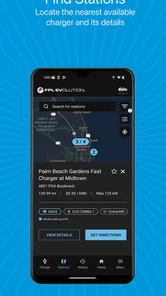
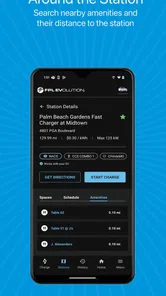
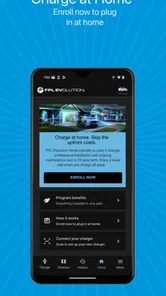
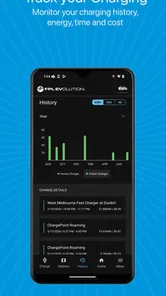
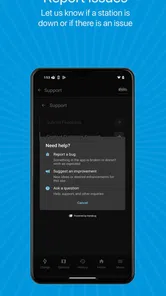
Analysis by Reviewed
Charging an electric vehicle is easy when everything goes smoothly, but the experience becomes much less comfortable when you are unsure where to plug in, whether a station belongs to the right network, or how your charging session is progressing. FPL EVolution is built around that practical problem. It is a free Auto & Vehicles app from NextEra Energy, Inc., aimed at making public EV charging easier to approach in Florida.
I see FPL EVolution less as a general-purpose driving companion and more as a focused tool for people who need a clearer path from “I need power” to “my vehicle is charging.” That narrow purpose is its main strength. It does not need to compete with every navigation, traffic, or vehicle-maintenance app to be useful. Its value comes from helping an electric-car driver interact with the FPL EVolution charging experience without relying entirely on guesswork.
The app has been available since September 2020, and its current version is 3.5.8. It is rated for Everyone and runs on devices using iOS or Android version 9 or later, making it accessible to many everyday phone users. With a 4.5 average from around 1.1 thousand ratings and more than 50 thousand installs, it has found a modest but meaningful audience among drivers looking for a dedicated charging tool.
What the charging-focused capability changes
The most important capability here is the app’s role as a digital companion for FPL EVolution charging. In practical terms, that means I can approach an EV charging stop with a single purpose: finding and using the charging service rather than piecing together information from unrelated apps, browser searches, and physical signs.
That distinction matters because electric-car ownership often involves more planning than filling a conventional vehicle. A fuel stop is usually familiar and quick, while charging may require checking location, allowing time for the session, and making sure the selected station fits the trip. A dedicated app can reduce some of that mental overhead by keeping the charging task in one place.
I also appreciate that the app is not presented as a broad lifestyle platform. Its identity is clear: FPL EVolution. If you are already interested in that charging network, the focused design makes more sense than installing a large collection of unrelated mobility tools. The app’s store summary, “Plug in and energize Florida’s future,” points toward that regional EV purpose without pretending to be a complete replacement for every driving service.
For a new EV owner, this kind of focus can be reassuring. The first few public charging sessions often feel more complicated than they should, especially when the driver is still learning how much planning a particular journey requires. Having the network’s own app available gives the process a recognizable starting point.
More From Our News Desk

Weather by Xiaomi Review: Clear at a Glance, Less Clear Up Close

X Under Pressure: Can It Recover When Posting Goes Wrong?

Clash of Clans Is Won Between the Battles

Android Auto Makes the Case for Quieter Car Software

MobiOffice: Transforming Mobile Productivity with Seamless Integration

EA SPORTS FC™ Mobile Soccer: Redefining Mobile Sports Gaming
Why a dedicated network app can be useful
There is a trade-off between using one network’s app and relying on a universal charging directory. A general EV app may cover more networks and can be better for long-distance route planning across several providers. However, it may also present a lot of information that is irrelevant when I am specifically trying to use an FPL EVolution station.
A network-specific app can be more direct. I do not have to begin by filtering a huge collection of charging providers just to focus on the one I want. That is especially helpful for routine travel, such as commuting or visiting the same shopping area repeatedly. Once I know which charging service I intend to use, a dedicated app can feel less cluttered than an all-in-one alternative.
The important caveat is that this advantage depends on where I drive. If my regular routes include several charging networks, I would not want FPL EVolution to be my only charging reference. I would keep a broader mapping or EV-planning app available as a companion, using this one when the FPL EVolution network is the relevant choice.
Using it in a real driving routine
My preferred way to use an app like this is before the car is low on charge, not after the warning appears. When I know I will be away from home for several hours, I can check the charging option ahead of time and make the stop part of the journey rather than treating it as an emergency interruption. That small change in habit is more valuable than simply opening the app at the last possible moment.
A realistic example would be a weekday trip across Florida. I leave home with enough charge for the first part of the journey, but I know I will be driving farther than usual and may need a public top-up. Before leaving, I use FPL EVolution to orient myself around the available charging option, then plan my stop around a meal, a break, or an appointment. The app does not eliminate the need to manage time, but it helps make charging a deliberate part of the schedule.
That workflow also reduces one common EV mistake: waiting until the battery is uncomfortably low before thinking about the next stop. I would rather identify a practical charging point while I still have flexibility. If a location is inconvenient, I have time to reconsider the route or use another resource. This is where a charging app becomes a planning aid rather than merely a session button.
What I would do before arriving
I would check the app while parked or before starting the drive, rather than trying to study charging information while moving. That sounds obvious, but it is an important usability habit. Charging decisions involve location and timing, and neither belongs in a driver’s attention while the vehicle is in motion.
I would also keep the phone charged and make sure I can sign in or access the service before reaching a station. A dedicated app is convenient, but it also creates a dependency on the phone. If the battery is nearly empty, mobile connectivity is unreliable, or the account setup has not been completed, the experience can become stressful at exactly the wrong time.
For repeated use, I would treat the app as part of a small charging routine: check the intended station before departure, arrive with a backup plan, and confirm the session has started before walking away. That final check is easy to overlook when I am in a hurry. A few seconds spent verifying the connection can prevent a much longer delay later.
What the app is like during a stop
The app’s real test is not whether it looks useful in a store listing. It is whether it helps me feel confident during the short sequence around a charging stop: identifying the right place, beginning the session, and knowing what to do next. A focused charging interface should reduce uncertainty at those moments.
Even so, I would not expect the app to make every station visit automatic. I still need to park correctly, connect the vehicle, follow the charger’s physical instructions, and pay attention to the car itself. The app supports the process; it does not replace the hardware or remove the driver’s responsibility to confirm that charging is actually underway.
This is also why I would avoid judging it solely as a navigation product. If I want traffic-aware routing, detailed road conditions, or a complete trip plan involving several unrelated charging networks, a standard maps app or a broader EV planner may be stronger. FPL EVolution makes the most sense at the charging-service layer.
The best scenario for FPL EVolution
The strongest use case is a Florida EV driver who regularly encounters FPL EVolution charging locations and wants a straightforward network-specific tool. That person benefits from familiarity. Instead of learning a new process at every stop, they can build a repeatable habit around the same app and charging service.
It is particularly suitable for drivers who are still becoming comfortable with public charging. A first-time EV owner may not yet know which information matters before a stop or how early to plan. The app gives that driver a dedicated place to begin, which can make the transition from home charging to public charging feel less intimidating.
I can also see value for someone who drives an EV occasionally rather than every day. A rental or borrowed electric vehicle may create a need for quick orientation. In that situation, a focused app is useful if the relevant charging network is part of the trip. The driver does not need to become an expert in the entire EV ecosystem; they need enough confidence to complete the immediate charging task.
Another good scenario is a household with one electric vehicle and several drivers. Each person may have a different comfort level with charging. Keeping the same network app available on their phones can make the process more consistent, especially when one person normally handles charging but another needs to do it during a longer outing.
A less obvious benefit: planning around human time
One of the more useful ways to think about the app is not “Where is the charger?” but “When can I realistically charge?” A station may be technically convenient yet awkward if I have somewhere to be immediately afterward. I would use the app early enough to match the charging stop with a natural pause in my day.
For example, if I am stopping near a destination where I expect to spend time, charging may fit better there than at a separate location chosen only because it is closer to the route. This approach turns charging into part of the schedule instead of a separate chore. The app helps me organize that decision, while the final choice still depends on my destination and timing.
That is a small but important shift for EV drivers. The best charging stop is not always the one with the shortest detour. It can be the one that creates the least disruption to the rest of the day.
Where the experience can become frustrating
The biggest limitation is the app’s network focus. If I travel outside the areas or charging locations that fit FPL EVolution, I may need another service to complete the picture. A driver who expects one app to identify every useful charger across every provider could find this approach too narrow.
There is also the normal friction that comes with depending on an app during a physical task. A weak signal, a phone with low battery, or an account problem can make a simple charging stop feel more complicated. I would not rely on any charging app as my only plan for a long journey. I would keep the vehicle’s range in mind and know what alternatives are available before committing to a route.
Another trade-off is that dedicated tools can encourage tunnel vision. If I only look at the FPL EVolution option, I might overlook a better-located charger from another provider. That does not make the app poor; it simply means I should use it alongside a broader map when the trip is unfamiliar or covers a large distance.
Drivers who rarely use public charging may also question whether they need a separate app at all. If most charging happens at home and public stops are extremely occasional, a general maps service may be sufficient for discovering options. FPL EVolution becomes more worthwhile when I expect to use its network repeatedly or want a consistent charging workflow.
Questions I would settle before depending on it
A new user will reasonably want to know whether the app costs anything. FPL EVolution is free to download, which removes the barrier of paying simply to try the service. That does not mean every aspect of a charging session should be assumed to work without any separate account or station-specific step; I would still read the in-app instructions and the charger’s information carefully before relying on it.
Device compatibility is another practical concern. The listed minimum is Android or iOS version 9, so users with very old phones should check their operating system before planning around the app. On a supported device, I would still keep the app updated, especially because charging tools need to communicate reliably with current phone software.
Parents and shared-device users may also ask whether the app is suitable for younger users. Its Everyone content rating makes it broadly appropriate from a content perspective, although the actual charging account and vehicle should remain under the control of a responsible driver.
Finally, I would ask whether it replaces a route planner. My answer is no—not completely. I would use it for the FPL EVolution charging task and pair it with a normal navigation app when I need traffic, turn-by-turn directions, or a route that includes several charging networks. That combination is more realistic than expecting one specialized app to handle every part of an EV journey.
Who gains the most from this app
FPL EVolution is best for an EV owner who values a simple, repeatable way to interact with a Florida-focused charging service. The strongest match is someone whose daily or weekly travel regularly brings them near the network and who would rather use a dedicated tool than search from scratch each time.
It is also a sensible choice for a new electric-car driver who wants to build good habits. Planning the stop early, checking the intended location while parked, confirming that charging begins, and keeping a backup option are all easier when the charging service has a clear digital home. The app cannot teach every part of EV ownership, but it can support those habits.
I would be more cautious about recommending it as the only charging app for frequent road-trippers, drivers who cross multiple service areas, or people who need sophisticated multi-network route planning. Those users will likely gain more from a broader EV platform, with FPL EVolution kept as a network-specific companion when appropriate.
The app’s 4.5 average shows that many users find its focused approach worthwhile, while the number of reviews—around 164—suggests a smaller feedback pool than the rating alone might imply. I would read that as a positive signal, not a guarantee that every phone, vehicle, or charging stop will feel identical.
After using it as a dedicated charging companion, my opinion is favorable but practical. I like the clear purpose, the free entry point, and the way it can turn public charging into a planned part of a trip. I would not ask it to replace navigation or cover every charging provider. Its real strength is reducing uncertainty when FPL EVolution is the network I intend to use.
For the right driver, that is enough to make it worth installing. If your EV routine is tied to FPL EVolution locations, this app can become a useful part of preparing, starting, and managing charging stops. If your routes are network-independent, keep a broader alternative nearby and use this one selectively rather than forcing it to solve a problem it was not designed to handle.
FPL EVolution Frequently Asked Questions
Is FPL EVolution available for my phone, and what age group is it for?
FPL EVolution is an Auto & Vehicles app from NextEra Energy, Inc. It is available for Android devices running version 9 or later and is rated for Everyone, making it suitable for a broad audience. Before downloading, check that your device meets the minimum operating-system requirement and that you are selecting the version intended for your platform.
What is FPL EVolution and who is it designed for?
FPL EVolution is a fantasy football companion app created for users who play Fantasy Premier League and want additional help managing their squads. It is designed for both beginners and experienced managers, offering tools and information that can support decisions about transfers, captaincy, fixtures, player form, and team planning. It should be viewed as a planning aid rather than an automatic replacement for your own judgment.
What features can I expect to find in FPL EVolution?
The app generally focuses on practical Fantasy Premier League management features, such as player and fixture information, performance analysis, transfer planning, team monitoring, and recommendations intended to help users prepare for each gameweek. Depending on the current version, some tools or data displays may change. Before downloading, it is worth checking the official listing to confirm the latest features, supported leagues, and any recently added functionality.
Does FPL EVolution connect directly to my Fantasy Premier League account?
Account integration depends on the version and permissions requested by the app. Some FPL tools allow users to enter or connect team information so that suggestions and analysis can be personalized, while others work mainly as independent research tools. Always review the sign-in method and requested permissions before proceeding. Avoid sharing your Fantasy Premier League password unless the official service and the app clearly explain how your information is protected.
Is FPL EVolution free to download, or does it include paid features?
FPL EVolution is free to download. The complete experience can depend on advertising, optional purchases, subscriptions, or premium analytical tools. The exact pricing model can vary between Android and iOS and may also change after updates. Check the relevant app-store page carefully for subscription details, trial periods, recurring billing information, and which features are included without payment before installing.
Pros
- Clear tools for planning transfers
- captains
- and weekly FPL strategy.
- Helpful player statistics make comparisons faster than using the official app alone.
- Useful fixture information supports short-term planning and rotation decisions.
- Clean interface keeps key fantasy data easy to find on mobile devices.
- Can save time for managers who regularly analyze several transfer options.
Cons
- Some advanced insights may require a paid subscription or in-app purchase.
- Predictions and recommendations can be inaccurate
- as FPL outcomes remain unpredictable.
- Frequent users may find the amount of statistics and filters overwhelming at first.
- The app depends on an internet connection for current fixtures and player updates.
- It is a companion tool
- not an official Premier League Fantasy Football product.












