Flashscore: Scores & News
- 398.00
- 4.7
- Installs
- 100.00K
- Price
- Free

Screenshots

Analysis by Reviewed
I use sports score apps for one simple reason: I want dependable information quickly, without turning every match into a hunt through social feeds, club websites, and television schedules. Flashscore: Scores & News approaches that job as a broad sports companion from Flashscore. It is a free sports app covering football, basketball, hockey, baseball, American football, tennis, golf, and more, so its appeal is obvious if your interests change from one day to the next.
After spending time with it, my impression is that its biggest strength is concentration. Fixtures, live developments, finished results, and sports news sit within the same general experience rather than being scattered across separate services. That makes it useful for a person following several competitions at once, but it also means the app can feel busier than a single-league tracker. My recommendation depends less on whether you like sports and more on whether you value breadth over a quieter, narrower interface.
What Flashscore feels like in everyday use
The app belongs to the Sports category and comes from Flashscore, a developer whose name is closely associated with live results. Its store profile shows a 4.7 average from around 2.7 thousand ratings, with over 100 thousand installs. Those figures suggest that the app has found an audience, although I would not treat popularity as proof that every match page or notification choice will suit everyone.
It is free and rated for Everyone, which makes the initial decision easy: there is no purchase barrier to testing it, and the age classification is broad. The app was released on February 24, 2025, and the current version is 26.8.2. It requires Android 9 or later. For anyone using an older phone, that operating-system requirement is the first practical check to make before planning around it.
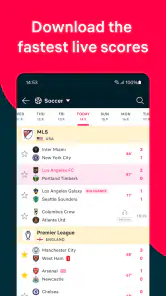
The first thing I noticed is how quickly an ordinary score-checking task can expand. I might open the app to see whether a football match has finished, then notice a tennis match I had forgotten, scan a basketball schedule, and read a related news item. This is convenient when I want a general sports dashboard. It is less ideal when I only want one result and prefer an app that presents almost nothing else.
The range is the main differentiator. Flashscore covers the major sports people commonly follow, including NFL, NBA, NHL, MLB, football, tennis, and golf, along with more than thirty sports overall. That choice makes it especially practical for households or friend groups with different interests. One person can follow a football fixture while another checks baseball or tennis without changing services.
Trust starts with what the app lets me control
For a live-score service, trust is not only about whether a number appears on screen. It is also about whether I can tell what I am following, what reaches me as an alert, and how much attention the app demands. I prefer services where my choices are visible rather than hidden behind an endless stream of updates. Flashscore is most useful when I treat it as a configurable reference tool, not as something that should automatically dictate my sports routine.
More From Our News Desk

Clash of Clans Is Won Between the Battles

Android Auto Makes the Case for Quieter Car Software

MobiOffice: Transforming Mobile Productivity with Seamless Integration

EA SPORTS FC™ Mobile Soccer: Redefining Mobile Sports Gaming

How Microsoft OneDrive Became a Mobile Productivity Giant

How Google Translate Breaks Language Barriers Effortlessly
That distinction matters because a broad sports app can quickly become noisy. If I follow too many teams, tournaments, or individual events, the value of a notification can fall. A score that matters greatly on one evening may be irrelevant the next morning. My practical advice is to begin with only the competitions I genuinely check, then add more gradually. This keeps the app useful while giving me a clearer sense of which alerts deserve my attention.
I also look at whether the app supports a deliberate workflow. Before a busy sports day, I can use it to inspect upcoming events and decide what deserves monitoring. During the day, I can return for live progress. Later, I can use the results and news areas to catch up instead of opening several unrelated apps. That three-stage habit is more valuable than simply leaving the app open all day.
There is a subtle trade-off here: the more sports a service covers, the more important personal filtering becomes. A specialist football application may feel calmer if football is all I follow. Flashscore makes more sense when I want one place for several sports and am willing to spend a little time shaping the experience around my interests.
Using live scores without losing the wider context
Live scores are the obvious reason to install this app, but I find the surrounding context just as important. A bare score answers one question; a fixture list helps me understand what is happening next; a result history helps me catch up; and news can explain why a match is receiving attention. Moving between those needs in one sports app reduces the temptation to rely on a search engine result that may be incomplete or out of date.
A realistic example is a weekday evening when I am commuting home and cannot watch a match. I can check the current state, see whether the event has ended, and then look at the available surrounding information when I have time. The app is not a replacement for watching a full game, and I would not use it to pretend that a score tells the whole story. Its role is to keep me oriented when live viewing is not possible.
The same approach works during a tournament with several simultaneous events. Instead of repeatedly searching for each participant or team, I can use the app as a central checkpoint. The benefit is not just speed; it is reduced mental switching. I spend less time remembering which website covers which sport and more time deciding what I actually want to follow.
Golf and tennis also show why a multi-sport service can be useful. Their rhythms differ from a conventional team match, and I may check progress at irregular intervals rather than follow a single continuous contest. A broad score app accommodates that changing attention better than a service designed around one league’s calendar.
Where data-sensitive moments deserve care
Sports apps often become personal through the choices we make inside them: favourite teams, selected competitions, preferred sports, and notification habits. I treat those choices as meaningful rather than trivial. They reveal what I follow and when I care, so I prefer to review them occasionally instead of assuming the initial setup will remain right forever.
My cautious approach is simple. I check the app’s visible settings before enabling anything I do not need, pay attention to system permission prompts, and avoid granting access that is unrelated to checking scores. I do not assume that a sports app needs broad access to my device merely because it offers live information. If a prompt appears, I read it and decide based on the exact wording shown on my phone.
The same principle applies to notifications. Alerts are helpful when they mark a genuinely important match, but they can become intrusive when every selected event produces activity. I would rather receive a small set of meaningful updates than turn the phone into a constant sports ticker. This is one of the most important user-controlled trade-offs in the whole experience.
I also recommend checking the phone’s notification controls after installing the app, not only the in-app choices. Android’s system settings can make it easier to silence, limit, or adjust alerts if my preferences change. That gives me a second layer of control and prevents a temporary interest in one competition from becoming a permanent stream of interruptions.
Account choices and personal agency
Whether I use an account depends on how much continuity I want between sessions. For casual checking, I prefer the lightest possible setup: open the app, find the event, and leave. For repeated use, personal selections can make the experience more efficient because I do not have to rebuild the same sports view every time. The right choice is therefore connected to routine, not to a claim that every user needs personalization.
I would encourage anyone who creates an account or saves preferences to understand the controls available on their own device and inside the app. Review what is selected, remove interests that no longer matter, and revisit notifications after a major season ends. These are small habits, but they protect the sense that I am using the app rather than being pulled along by it.
There is also a useful distinction between convenience and dependence. A personalized score service can save time, but I should still be able to open it for a one-off result without feeling obliged to configure every category. Flashscore works best for me when I use personalization selectively: enough to reduce repeated searching, but not so much that the home experience becomes crowded.
People who are especially sensitive about data should make their decision from the permissions, account options, and privacy information displayed in the app and on their device. I would not infer extra protections or risks beyond those visible controls. The sensible method is to inspect the choices personally, enable only what supports the intended use, and remove access or alerts that no longer feel necessary.
Three workflows that make the app more useful
My first useful workflow is the “morning scan.” I check the day’s schedule across the sports I follow, identify the events that matter, and avoid opening every competition simply because it is available. This turns a huge catalog into a manageable plan. It is particularly helpful on weekends, when several sports may overlap and a general-purpose app can otherwise feel overwhelming.
The second is the “interruption check.” When I have only a few seconds, I use the service for orientation rather than exploration: find the event, confirm its current state, and close it. I deliberately avoid browsing news at that moment. Separating quick checks from deeper reading keeps the app from consuming more time than the original question required.
The third is the “catch-up window.” After work or travel, I review completed events and relevant news together. This is more efficient than trying to reconstruct the day through social media posts, where spoilers, commentary, and unrelated stories are mixed together. I still look elsewhere when I want analysis or a full replay, but Flashscore is a sensible starting point for rebuilding the basic picture.
These workflows reveal a non-obvious limitation: the app’s wide coverage can encourage unnecessary browsing. Its strength becomes a weakness if I confuse availability with relevance. The solution is not to avoid the app, but to decide in advance whether I am checking, planning, or catching up. Each purpose calls for a different level of attention.
Who should choose it, and who may prefer something else
I think Flashscore is a strong fit for people who follow multiple sports, travel during matches, or regularly need quick results without opening several specialist services. It is also useful for someone whose interests change seasonally. Football may dominate one month, tennis the next, and American sports later; a broad app avoids repeatedly changing tools.
It is less compelling for a person who follows one club and wants a highly focused team experience. A dedicated club or league app may offer a cleaner route to team-specific material and fewer unrelated competitions. Likewise, someone who dislikes notifications, news feeds, or dense sports dashboards may prefer a minimal score tool that does one job and stays quiet.
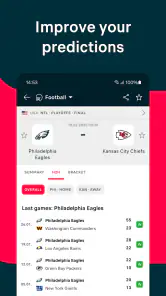
I would also hesitate to recommend it as the only source for serious analysis. Scores and timely updates help me know what happened, but they do not automatically provide the depth of a specialist publication, broadcast, or official competition channel. For informed decisions about a match, I may still need primary sources and detailed reporting. Flashscore is best viewed as a fast information layer, not a complete substitute for every sports medium.
The free price makes experimentation straightforward, but “free” does not remove the need to manage attention and permissions. I would install it, test the sports I actually follow, inspect the visible controls, and decide whether the notification experience remains comfortable after several days. That trial tells me more than a rating alone.
My cautious verdict after using it
Flashscore: Scores & News is most convincing as a broad, user-directed sports dashboard. I like it because it can support quick checks, daily planning, and catch-up across a wide selection of sports without forcing me to maintain a separate app for every interest. The combination of live information and news gives the experience more usefulness than a simple scoreboard.
My reservation is not about the idea of the app, but about the discipline it asks from me. A service covering so many sports can become noisy, and alerts or saved interests need regular attention. I also would not mistake a convenient score for full match understanding, or assume that a high rating guarantees a perfect fit for my habits.
If I wanted a single place to monitor football, tennis, basketball, hockey, baseball, golf, American football, and other competitions, I would recommend giving it a try. I would begin with a narrow selection, review every permission prompt, keep notifications purposeful, and revisit those choices when my season changes. If I wanted only one team, the quietest possible interface, or deep specialist analysis, I would look elsewhere.
Overall, the app earns my recommendation for breadth and practical speed, with one condition: the best experience comes from actively choosing what follows you. Used that way, Flashscore is a sensible free sports companion for Android users on version 9 or later, rather than an endless stream that controls the conversation.
Flashscore: Scores & News Frequently Asked Questions
Can I use Flashscore without creating an account?
Flashscore is designed to make scores and match information accessible without a lengthy setup, so you can use it to check results and schedules after downloading. Creating an account may be useful if you want to keep preferences, such as followed teams or competitions, consistent across sessions or devices. The core appeal is quick access to sports updates, whether you are casually checking a score or following matches regularly.
Will Flashscore work on my Android or iPhone?
Flashscore is available for Android and iOS, and the Android version requires Android 9 or later. Before downloading, check that your device meets the operating-system requirement and that you are using the official app from Flashscore. The app is categorized as Sports and is rated for Everyone, making it suitable for a broad audience interested in following scores and sports news.
What is Flashscore: Scores & News used for?
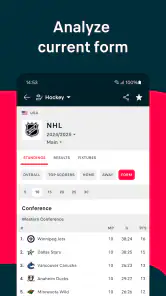
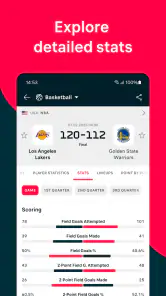
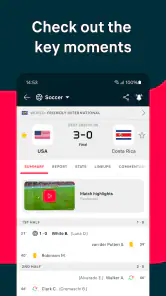
Flashscore: Scores & News is a sports-tracking app designed for following live scores, fixtures, results, standings, statistics, and breaking updates from a wide range of competitions. It covers popular sports such as football, basketball, tennis, hockey, and more. During testing, its main strength was providing quick match information without requiring users to watch the event live.
Which sports and competitions are available in Flashscore?
The app offers coverage for many sports, including football, tennis, basketball, ice hockey, volleyball, handball, baseball, rugby, motorsports, golf, and others, depending on the region. Football generally has the broadest selection, from major international tournaments to domestic leagues and lower divisions. Available competitions and the depth of statistics can vary by country and sport.
Does Flashscore provide live notifications and match alerts?
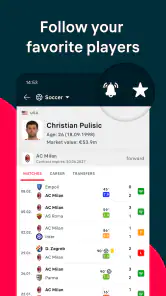
Yes. Flashscore allows users to follow selected teams, players, matches, or competitions and receive notifications for important events. Depending on the sport, alerts may include goals, score changes, match starts, red cards, set results, final scores, and other updates. Notification settings can usually be customized, which is useful if you only want alerts for specific teams or events.
Pros
- Fast live updates for scores
- results
- and match events
- Covers a wide range of sports and international competitions
- Custom alerts keep you informed about selected teams and matches
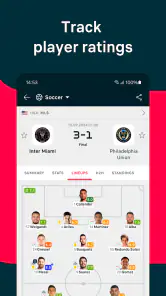
- Detailed statistics
- lineups
- standings
- and head-to-head records
- Personalized favorites make following specific competitions convenient
Cons
- The large amount of information can feel overwhelming at first
- Some advanced content may require a stable internet connection
- Frequent notifications can become distracting without careful setup
- Advertising may appear prominently in the free version
- Coverage depth can vary between sports and smaller competitions
- Category
- Sports
- Version
- 26.8.2





