FIXD OBD2 Scanner
- 12.90K
- 4.3
- Installs
- 1.00M
- Price
- Free

Screenshots
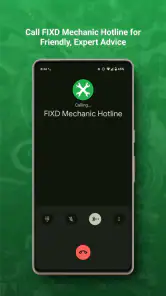
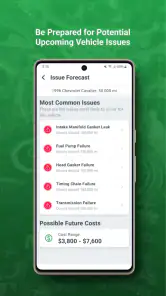
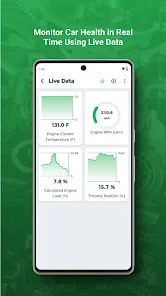
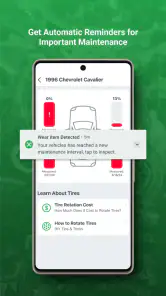
Analysis by Reviewed
I judge a car diagnostic app by whether it helps me make a sensible next move, not by whether it sounds like it can replace a mechanic. FIXD is designed for that first step: it works with a separate OBD2 sensor to make vehicle trouble codes easier to understand. If a check-engine light comes on and you would rather not begin with a web search full of unexplained letters and numbers, this can make the situation feel more manageable.
Speed starts with the right setup
The app is free to download, but its diagnostic workflow depends on having a compatible FIXD sensor; a phone by itself cannot read a car’s OBD2 data. That distinction is important if you are comparing it with a code-lookup app, which can explain a code you already know but cannot retrieve it from your vehicle. FIXD’s practical advantage is the connection between the car and an everyday explanation, not a guarantee that the app can identify every mechanical cause.
In ordinary use, the process is straightforward: connect the sensor to the vehicle’s OBD2 port, open the app, and read the available information on your phone. Bluetooth pairing and finding the port are the likely sources of initial friction. I would set it up while parked at home rather than wait until I am pulled over somewhere or rushing to leave. That bit of preparation makes a warning light less stressful, and it gives you a chance to learn where the port is before you need a scan.
What a scan can tell you in a busy moment
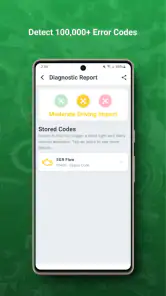
A useful everyday scenario is a check-engine light appearing before a commute. FIXD can provide a code and a plain-language explanation to help you decide whether to arrange a service visit promptly or ask a mechanic a more informed question. I would treat any severity guidance as a starting point, not permission to ignore a warning: a code describes what the vehicle’s system detected, and a professional inspection may still be needed to find the cause.
That makes the app most useful when you have a little time to pause and interpret the result. If the car is behaving unusually, or a warning suggests an urgent problem, I would prioritize safe driving and professional help rather than spend time trying to make the app settle the question. A scan can add context, but it cannot tell you whether the vehicle is safe to drive in every circumstance.
Useful context, not a repair verdict
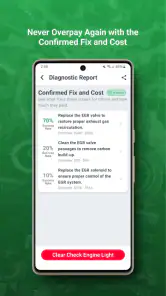
It is also worth separating a helpful explanation from a confirmed repair plan. One code can have more than one possible cause, so replacing a part based only on an app’s description can waste money. My preferred workflow is to note the code, the symptoms, and when they happen, then share that context with a technician. FIXD can make that conversation more specific, but it cannot inspect a loose connection, hear an unusual noise, or judge how a car handles.
A small but useful habit is to record what was happening around the time a warning appeared: whether the car was starting, idling, or being driven normally, and whether you noticed another symptom. That context is not a substitute for testing, but it can help you explain the issue clearly rather than relying on memory during a service visit. I would also keep the exact code instead of remembering only the app’s summary, since the code gives a technician a more precise starting point.
More From Our News Desk

Weather by Xiaomi Review: Clear at a Glance, Less Clear Up Close

X Under Pressure: Can It Recover When Posting Goes Wrong?

Clash of Clans Is Won Between the Battles

Android Auto Makes the Case for Quieter Car Software

MobiOffice: Transforming Mobile Productivity with Seamless Integration

EA SPORTS FC™ Mobile Soccer: Redefining Mobile Sports Gaming
Who will get the most from it
This is most appealing if you own a compatible sensor, want a less mysterious first look at engine warnings, and are comfortable using a phone as part of basic car care. The ability to keep track of multiple vehicles may also suit a household where different drivers share maintenance responsibilities. By contrast, if you only need an occasional definition for a code from a mechanic, a free code reference may be enough; if you need a hands-on diagnosis or repair, a workshop and proper testing equipment are the better choice.
It can also suit a driver who wants to arrive at a garage with a clearer question, rather than someone hoping to avoid a garage altogether. That is a meaningful difference. I would use the app to understand what the vehicle reported and to discuss the next step, not to authorize a repair based on a single interpretation. Drivers who enjoy doing their own mechanical testing may prefer a more advanced scanner and the knowledge to use it; FIXD is aimed at making the first layer of information more approachable.
Connection, recovery, and limits
There is a practical trade-off in relying on Bluetooth and a phone: both the sensor connection and the app need to cooperate when you want a reading. If pairing does not work immediately, I would check that the sensor is seated properly, keep the phone near the vehicle, and try again with the car parked. I would not assume a failed connection means the vehicle has no problem, or that a successful scan has ruled out issues the system does not report.
For a smoother first attempt, I would avoid trying to pair in a hurry and make sure I know which vehicle I am checking before starting. If a scan does not appear, I would repeat the basic connection steps once rather than treating the lack of a result as a diagnosis. The device is one link in a chain, alongside the car’s port, the sensor, Bluetooth, and the phone. If any link is not working, the sensible response is to troubleshoot the connection or seek help—not to infer that the car has no fault.
FIXD is an app in the Auto & Vehicles category, developed by FIXD. It is free to download, with optional in-app purchases ranging from $0.99 to $119.99 per item. The app is rated for Everyone, and its current version is 25.34; it requires Android 10 or later. It has a 4.3 average from around 29,000 ratings, with over 1 million installs. Those figures suggest that it has reached a broad audience, but they do not change the main practical question: whether you have the compatible sensor and want help interpreting vehicle information.
How it compares with other ways to check a car
Compared with a basic code-reference app, FIXD has the advantage of working with a sensor to obtain information from the vehicle rather than asking you to enter a code by hand. Compared with a garage visit, it is a much lighter first step, but it cannot provide the same inspection or repair work. And compared with a more technical scan tool, its appeal is accessibility: a driver can start with a plain-language explanation instead of needing to interpret every diagnostic term alone.
That convenience has limits. If your goal is detailed live data, advanced testing, or a repair procedure, I would look at equipment and guidance meant for that level of work, or go directly to a qualified technician. If you simply want to understand a warning before making a call, the sensor-and-app approach is more relevant than buying a tool with capabilities you may never use. The best choice depends on whether you need an explanation, deeper testing, or an actual repair.
Where the app fits in everyday ownership
For drivers who want to learn more before calling a garage, the app can reduce uncertainty without turning car care into a technical project. It is less suitable for someone expecting a standalone scanner, a complete mechanical inspection, or a guaranteed diagnosis. That boundary is important: FIXD is a useful interpreter and conversation aid, while decisions about safety and repairs still belong to the driver and, when needed, a qualified mechanic.
Ever felt like your car was speaking a language you just couldn't understand? Well, that's exactly how I felt until I discovered the FIXD OBD2 Scanner. Imagine having a gadget that translates all those mysterious codes your car throws at you, right into plain English. Intrigued? Let me tell you all about it.
Getting to Know FIXD
When I first heard about the FIXD OBD2 Scanner, I was a little skeptical. Could a small device really diagnose car troubles as effectively as a mechanic? But after using it, I’m genuinely impressed. Essentially, FIXD is a tiny sensor that you plug into your car's OBD2 port. It works its magic by communicating with an app on your smartphone, giving you real-time updates on your car’s health.
How Does it Work?
Setting up FIXD was a breeze. I just plugged it into the OBD2 port beneath my car's dashboard, downloaded the app, and paired it with my phone via Bluetooth. Boom, just like that, my car became a chatty friend. The app provides detailed information on what’s ailing your vehicle, whether it’s a minor hiccup or something that needs urgent attention.
One of the coolest things is how it translates those cryptic error codes into layman’s terms. Instead of seeing “P0302”, you get “Cylinder 2 Misfire Detected”, which is far more helpful if you’re not mechanically inclined. Plus, it offers maintenance reminders, so you’re never caught off guard by upcoming repairs or routine checks.
Why You’ll Love It
What I really love about FIXD is its straightforward approach to car diagnostics. It takes the guesswork out of understanding what's wrong with your vehicle. No more panic when the check engine light comes on. The app tells you not only what the problem is, but also the severity and potential consequences of ignoring it. This means you can make informed decisions about when to visit the mechanic.
Another feature that’s worth mentioning is the ability to monitor multiple vehicles. If you’re a family with several cars, you can track each one using the same app, which is super convenient!
Final Thoughts
In a world where technology sometimes complicates life, the FIXD OBD2 Scanner simplifies it. It empowers everyday drivers by giving them the knowledge once reserved for mechanics. While it doesn’t replace professional advice, it’s a fantastic first step in car diagnostics. If you’re like me and want to keep your car running smoothly without all the stress, FIXD is definitely worth considering. So why not give it a whirl and let your car do the talking?
FIXD OBD2 Scanner Frequently Asked Questions
Can I use FIXD to keep track of more than one vehicle?
FIXD is intended to support multi-vehicle monitoring through the same app, which can be useful if you manage more than one car. You will still need a compatible FIXD OBD2 Scanner to read diagnostic information from each vehicle. The app can help you keep maintenance details and vehicle condition in view, while its explanations offer a convenient starting point for understanding what may need attention.
What should I check before downloading FIXD OBD2 Scanner?
First, make sure your phone runs Android 10 or later and that you have, or plan to obtain, a compatible FIXD OBD2 Scanner. The app is free to download, but optional in-app purchases are available for added features. FIXD is in the Auto & Vehicles category, is rated for Everyone, and has an average rating of 4.3 from around 29,000 ratings.
Do I need to buy a separate scanner to use the FIXD app?
The FIXD app is designed to work with a FIXD OBD2 Scanner, which plugs into your vehicle’s OBD2 port and connects to the app via Bluetooth. The app alone cannot read your car’s diagnostic codes without a compatible scanner. Before downloading, consider whether you have or plan to get the hardware, since the app’s main purpose is to help interpret information from your vehicle.
What is the FIXD OBD2 Scanner and how does it work?
The FIXD OBD2 Scanner is a diagnostic tool that connects to your vehicle's OBD2 port, providing real-time data and insight into your car's health. By pairing with the FIXD mobile app via Bluetooth, it translates complex error codes into simple terms, helping users understand potential issues and necessary maintenance. It's designed for both DIY enthusiasts and everyday drivers who want to stay informed about their vehicle's status.
Is the FIXD OBD2 Scanner compatible with my car?
The FIXD OBD2 Scanner is compatible with gas-powered vehicles made in 1996 or later, including hybrids. However, it does not support electric or diesel vehicles. It's important to verify compatibility with your specific vehicle model, which can be easily checked through the FIXD app or their website, ensuring you can fully utilize its diagnostic capabilities.
Pros
- Easy to install and set up.
- Provides real-time car health data.
- Compatible with most vehicles.
- User-friendly interface.
- Affordable price point.
Cons
- Limited advanced diagnostic features.
- Requires app for full functionality.
- May not detect all issues.
- Occasional connection drops.
- Subscription needed for premium features.
- Category
- Auto & Vehicles
- Version
- 25.34