

Ficbook: Read Fictions Anytime
- 304.00
- 4.2
- Installs
- 1.00M
- Price
- Free

Screenshots



Analysis by Reviewed
In a home where a phone or tablet gets passed around, a reading app can be a welcome way to fill a quiet stretch—but it helps to decide whose reading time and account activity are whose. I see Ficbook: Read Fictions Anytime as a better fit for adults who want to discover fiction than as a shared family bookshelf. Its appeal is the combination of browsing, reading, and reader discussion; the main household trade-offs are its Mature 17+ age rating and the need to keep optional purchases in mind.
A quick reading break in a shared home
I can see this working well in a household where one person likes to read in short bursts while everyone else is watching television or using a shared living space. Ficbook is a comics and fiction-reading app from Infinite Stories, and its appeal is the chance to move from browsing to a story without needing to plan a whole reading session. If I had ten minutes before dinner, I would use that time to look for something that suits my mood, then save a longer chapter for later rather than trying to finish a story in one sitting.
That casual rhythm is different from choosing a print book or opening a general e-book reader with a title already in mind. Ficbook is more useful when I want to discover fiction and explore what is available; a conventional reader is usually the better fit when I already own a particular book or want a carefully organized personal library. The trade-off is that discovery can take time. I would set a small limit on browsing when I only have a few minutes, so choosing a story does not consume the whole break.
Discover a Universe of Stories
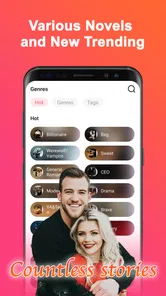
One of the first things that struck me about Ficbook is the sheer variety of stories it offers. Whether you're a fan of romance, thrillers, fantasy, or sci-fi, this app has got you covered. It’s like having a library in your pocket, except it's digital and way cooler. You can browse through countless categories, and there's always something new waiting to be discovered. I found myself lost in stories for hours on end, and honestly, it's been a while since an app did that to me!
Choosing a story without losing the break
Discovery is a real strength when I am open to a new story, but it can also turn a short pause into a long search. I would go in with a rough mood in mind—something light, suspenseful, or fantastical—rather than browsing every possibility. That small choice makes the app more useful during a commute or a lunch break, when the reading window is short and I would rather spend it on a story than on deciding what to read.
It also helps to judge a title by whether its premise and opening hold my attention, not just by how quickly it appears in a browse session. A reader who already knows exactly which book they want may find a standard e-book store or library app more direct. Ficbook makes more sense when I enjoy the search itself and am willing to try a story I had not planned to pick up.
Setting boundaries before sharing a device
For shared-device use, I would treat reading as personal rather than assume everyone should use the same account or reading space. Before handing a phone or tablet to someone else, I would check what is open on the screen and agree on whose turn it is; that simple habit avoids mixing up reading choices and keeps a younger reader from casually landing in an adult-oriented corner. I would not count on the app to provide household profiles or parental controls.
More From Our News Desk

 Gmail
GmailGmail in a Busy Inbox: Who Benefits Most?
From first account to crowded workday, Gmail earns its place through dependable search and flexible sorting—but its best fit depends on how much inbox maintenance you can tolerate.

 Prime Video
Switching to Prime Video: What Changes in Your Viewing Routine
Prime Video can make a compelling second home for streaming, but switching means learning a different catalog, rental layer, and route from browsing to playback.

 Universal TV Remote Control
Universal TV Remote Control Works Best as a Reliable Backup
A phone remote earns its place through quick setup and reliable habits. Here is how to get more from Universal TV Remote Control—and where its limits show.

 Weather - By Xiaomi
Weather by Xiaomi Review: Clear at a Glance, Less Clear Up Close
Xiaomi’s weather app makes everyday forecasts quick to scan, but its calm surface can leave useful details and recovery paths harder to find than they should be.

 X
XX Under Pressure: Can It Recover When Posting Goes Wrong?
A resilience-focused review of X, examining setup, mistaken posts, interruptions, weak connections, and the gaps that matter when recovery needs to be dependable.

 Clash of Clans
Clash of Clans Is Won Between the Battles
Its raids are quick; its community is a long-term project of coordination, teaching, rivalry, and shared responsibility—with all the friction that entails.
Latest News



There is also a practical distinction between a shared screen and shared reading. A family member can browse while I wait, but that does not mean my recommendations, saved stories, or community activity should be treated as a household record. If keeping those boundaries matters, I would avoid leaving the app open unattended and would choose a separate reading option for a child. That is not a knock on Ficbook so much as a sensible limit for any fiction app that is not being used as a dedicated family library.
Keeping reading and spending coordinated
Ficbook is free to install, which makes it easy to try without committing to a paid reading service. Optional in-app purchases range from $0.99 to $49.99 per item, so I would make sure anyone using a shared device understands that free access and optional purchases are not the same thing. If several people take turns on one device, I would agree in advance who can approve a purchase and check the device’s payment settings rather than relying on a casual verbal reminder.
For a household that reads together, coordination can be as simple as sharing story recommendations aloud instead of passing around an account. One person might point out a title they enjoyed, while another searches for it during their own turn. This keeps discussion social without assuming that reading progress, comments, or purchases are automatically coordinated between people. If your main goal is a family collection with a single shared shelf, a conventional library app may be a more straightforward choice.
User-Friendly and Intuitive Design
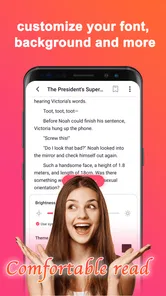
Let's talk about the app's design. You know how some apps are so complicated you need a manual just to figure out how to use them? Well, that's not the case here. Ficbook boasts a user-friendly interface that even a tech newbie would find easy to navigate. The search function is incredibly intuitive, allowing you to find exactly what you're looking for without any hassle. Plus, the reading experience is smooth, with adjustable font sizes and a night mode for those late-night reading sessions.
Those reading adjustments matter most when the same device is used in different lighting or by someone who prefers larger text. I would change the display before settling in, then restore it for the next reader if we share the screen; small adjustments can make a longer session more comfortable without turning setup into a project. The app is free, but the optional purchases make it worth keeping an eye on the device’s purchase prompts, especially when someone else is browsing.
Community, age and trust
Another feature that makes Ficbook stand out is its community aspect. You can connect with other readers, share your thoughts on the stories, and even follow your favorite authors. It's like social media but for book lovers. This sense of community enhances the reading experience, making it more interactive and engaging. I've had a blast discussing plot twists and character developments with fellow readers. It's a fun way to bond over shared interests!
The social side is a reason to choose it over a plain reading app, but it also calls for a little judgment about what gets shared. I would keep comments focused on the story and avoid treating a public discussion as a private conversation. Ficbook is rated Mature 17+, so I would not hand it to a younger reader as an all-ages option. If I were choosing something for a teen below that age, I would look for a service explicitly suited to their age instead of relying on a quick glance at a title or a family member’s recommendation.
For adults, the community element is most useful when a story leaves me wanting to compare interpretations or see what other readers noticed. I would treat it as an optional layer rather than a reason to comment on every chapter: a quiet reading session can still be the point. If I prefer books without public discussion or social activity, a conventional reader will probably feel calmer and more focused.
Offline reading and choosing the right fit
For those who love to read on the go, Ficbook has an offline reading feature that’s a lifesaver. You can download stories to read later, even when you’re stuck somewhere without internet access. Whether you’re on a plane or in a remote cabin, your stories are just a tap away. It’s like having your personal library that you can take anywhere, anytime.
A useful routine is to prepare a story before leaving home, then check that it is available for reading before relying on it during a commute or trip. That avoids discovering at the station that I meant to save something but never completed the step. For readers who mostly want offline access to books they already own, a dedicated e-book reader may still offer a more focused experience; Ficbook is strongest when I want fiction discovery as well as reading. It has a 4.2 average from around 3,200 ratings, and more than a million installs, which suggests a sizeable audience without telling me whether any particular story will match my taste.
Offline preparation is especially handy for a predictable gap—say, a train ride where I know service may be unreliable. I would select what I want before setting out rather than depend on browsing once I am disconnected. That makes Ficbook easier to use as a planned companion, but it is not a substitute for checking that a story is ready before leaving. Readers who need a personal archive of purchased titles above all else may prefer an e-reader built around that library-first routine.
Who I would recommend it to
I would recommend Ficbook to adults who enjoy finding fiction through browsing, like discussing stories with other readers, and are comfortable keeping an eye on optional purchases. It can also suit a reader who wants a bookish distraction during a lunch break, a quiet wait, or a journey where they have prepared something to read offline. It is less suitable for someone looking for a child-focused library, a tightly managed shared family account, or a simple shelf for books they already own.
The app is free, was released in 2018, and its current version is 1.5.0; it supports devices running Android 7.0 or later. Those details make it straightforward to assess basic compatibility, but my decision would still hinge on the reading experience and age fit. If I wanted a dedicated comics reader or a conventional e-book collection, I would compare those options first rather than assume Ficbook covers every kind of reading equally well.
For a first try, I would use my own device, browse for one story that genuinely catches my interest, and see whether I enjoy the balance between reading and community. That is a better test than judging it by the size of its catalog or assuming every title will suit me. Its 304 reviews offer another source of reader impressions, but personal taste is still the deciding factor: an enthusiastic community cannot make a story work for someone who does not like its style.
The app’s free entry point makes experimentation relatively easy, while the optional purchases mean I would still pay attention to what is being offered before tapping through. In a household, I would keep purchasing decisions with the device owner and avoid letting a shared session blur that responsibility. Someone who wants a no-surprises family reading setup should choose a service designed around that use instead.
A sensible household verdict
As a household app, Ficbook works best when one adult treats it as a personal reading space and shares recommendations rather than handing over an open account indiscriminately. It can add a useful pocket of fiction to a busy day, particularly for someone who enjoys exploring stories and occasionally joining reader conversations. But its mature age context, optional purchases, and discovery-first character make it a poor default for children or for a family that expects one managed library for everyone.
I would choose it for myself if I wanted fiction to browse during small breaks, and I would prepare a story in advance when I expected to read offline. I would choose a dedicated e-book or comics app instead if my priority were a tidy collection of books I already have, a child-appropriate environment, or clear shared-library organization. That distinction is the most useful way to decide: Ficbook is appealing when discovery is part of the fun, but it is not the answer to every reading need in a shared home.
In conclusion, Ficbook: Read Fictions Anytime is more than just an app; it's a portal to countless worlds. Whether you're an avid reader or just looking for something to pass the time, this app is worth checking out. So go ahead, give it a try, and let your imagination run wild!
Ficbook: Read Fictions Anytime Frequently Asked Questions
Is Ficbook suitable for younger readers?
Ficbook is rated Mature 17+, so it is intended for adult readers rather than children or younger teens. Because it is a comics and fiction app with stories from a range of writers, readers should consider that rating before installing it or allowing a younger person to use it. Parents can discuss age-appropriate reading choices and supervise access where needed.
What kind of reading experience does Ficbook offer?
Ficbook is a comics app built around fiction, with a focus on giving readers access to novels and frequent updates. Its summary highlights a broad selection of stories, so it may suit readers who like exploring different works and following ongoing fiction. The app is free to download, while optional in-app purchases are available for users who choose to make them.
What is Ficbook and how does it work?
Ficbook is an innovative app designed for fiction lovers to read and share stories anytime, anywhere. Users can browse through a vast library of user-generated stories across various genres. The app allows readers to discover new authors and follow their favorite writers. Users can also interact with authors and other readers through comments and discussions, making reading a more engaging and communal experience.
Is Ficbook free to use or are there any subscription fees?
Ficbook is free to download and offers access to stories without an upfront purchase. The app also includes optional in-app purchases, with individual items priced from $0.99 to $49.99. These purchases are separate from the free download, so readers can decide whether they want to spend money while using the app. Check the purchase details shown in the app before confirming any transaction.
Can I write and publish my own stories on Ficbook?
Yes, Ficbook encourages budding writers to share their creativity with the community. Users can write and publish their own stories on the platform. The app provides easy-to-use tools for writing and editing content, and authors can gain followers who can comment on and review their work. This feature allows writers to receive feedback and grow their audience.
Pros
- Wide variety of fiction genres available.
- User-friendly and intuitive interface.
- Offline reading mode available.
- Regular content updates and new stories.
- Customizable reading settings.
Cons
- Contains ads in the free version.
- Limited features without premium subscription.
- Occasional app crashes reported.
- Requires account for full access.
- Some stories need premium access.











