

EZ Manga: Webtoon & Manhwa
- 4.00
- 3.4
- Installs
- 10.00K
- Price
- Free

Screenshots
Analysis by Reviewed
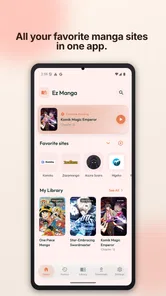
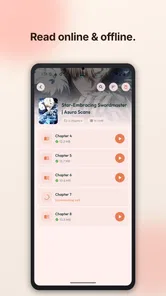
I approached EZ Manga: Webtoon & Manhwa as a reading tool rather than as a source of comics by itself. That distinction matters. The app is presented as a smart manga and webtoon browser with a reader mode and synchronization, so its appeal is mainly in bringing browsing and reading into one place. I found the idea useful for people who move between series often, especially when a normal mobile browser feels cluttered or awkward for long vertical chapters.
It is a free Android app from EZ Apps Studio in the Comics category, with a mature 17+ content rating. The current release is version 1.0.50 and it requires Android 7.0 or later. The public response is mixed rather than overwhelming: it carries a 3.4 average from roughly sixty ratings and has passed ten thousand installs. Those numbers do not decide whether it will suit you, but they do suggest approaching it as a relatively small, still-evolving utility instead of a polished replacement for every established comic platform.
How the reading experience fits into everyday use
The most convincing use case is a short reading session where I want less friction than a regular browser provides. Imagine waiting for a train with a phone in one hand: opening a saved browsing session, switching into reader mode, and continuing a webtoon is more comfortable than repeatedly adjusting a web page around menus, banners, and unrelated page elements. The value is not simply “more comics”; it is the attempt to make web-based reading feel closer to a dedicated reader.
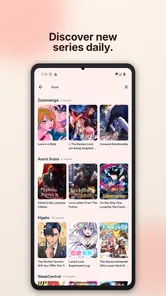
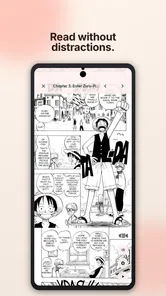
Reader mode is especially relevant for vertical webtoons and manhwa. These formats depend on continuous scrolling, so a good reading workflow should keep attention on the artwork instead of forcing constant interaction with navigation controls. I would use the app when I already know what I want to read and need a cleaner route from browsing to the chapter itself. For casual discovery, the benefit depends more heavily on how well the browser handles the particular source or page I am visiting.
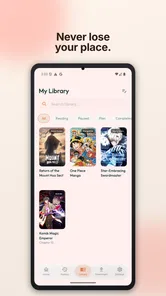
Synchronization is another practical part of the concept. When I read on more than one device, the ability to keep a place connected to an account or reading setup can prevent the familiar problem of remembering a chapter and scroll position manually. I would still treat synchronization as a convenience to verify during actual use, not as a reason to assume every page will behave identically. Web pages vary, and a browser-based reader can face different layouts, loading behavior, or navigation patterns from one source to another.
That is the first important trade-off: this is not the same experience as a closed comic service with a single catalog, unified chapter formatting, and one publisher-controlled account system. A dedicated platform may be better if you want licensed discovery, consistent downloads, or a carefully managed library. EZ Manga makes more sense when flexibility and browser-style access matter more than a completely uniform ecosystem.
What I would check before making it my main reader
My first test would be deliberately simple. I would open a familiar webtoon, enter reader mode, read several pages, leave, and then return later to see whether the route back is clear. I would also try a manga page with a different layout. This reveals more than a quick glance at the interface because it tests whether the app is genuinely helpful across formats rather than only on one convenient page.
More From Our News Desk

 Gmail
GmailGmail in a Busy Inbox: Who Benefits Most?
From first account to crowded workday, Gmail earns its place through dependable search and flexible sorting—but its best fit depends on how much inbox maintenance you can tolerate.

 Prime Video
Switching to Prime Video: What Changes in Your Viewing Routine
Prime Video can make a compelling second home for streaming, but switching means learning a different catalog, rental layer, and route from browsing to playback.

 Universal TV Remote Control
Universal TV Remote Control Works Best as a Reliable Backup
A phone remote earns its place through quick setup and reliable habits. Here is how to get more from Universal TV Remote Control—and where its limits show.

 Weather - By Xiaomi
Weather by Xiaomi Review: Clear at a Glance, Less Clear Up Close
Xiaomi’s weather app makes everyday forecasts quick to scan, but its calm surface can leave useful details and recovery paths harder to find than they should be.

 X
XX Under Pressure: Can It Recover When Posting Goes Wrong?
A resilience-focused review of X, examining setup, mistaken posts, interruptions, weak connections, and the gaps that matter when recovery needs to be dependable.

 Clash of Clans
Clash of Clans Is Won Between the Battles
Its raids are quick; its community is a long-term project of coordination, teaching, rivalry, and shared responsibility—with all the friction that entails.
Latest News



I would then repeat the process on a slower connection or while moving between Wi-Fi and mobile data. Browser-based reading can feel excellent when pages load smoothly and considerably less pleasant when images arrive in stages. I would not judge the app only by its first screen; the important question is whether it reduces the work involved in reaching and continuing a chapter.
A useful habit is to keep the app focused on reading rather than treating it as a general-purpose browser. I would avoid opening many unrelated pages in parallel, because a dedicated reading flow is easier to understand when the session contains only the series I actually intend to follow. This also makes it easier to notice whether synchronization and history are helping or merely adding another layer to manage.
Trust begins with visible choices, not promises
For an app that sits between me and web content, trust is less about a dramatic feature and more about what I can see and control. Before using it regularly, I would inspect Android’s permission screen, the app’s account options, and any in-app settings related to synchronization or browsing. I prefer to know which choices are optional, which are needed for the core reader, and whether I can use the basic reading flow without creating an account.
I would also look at the system-level controls after installation. Android lets me review permissions, restrict background activity, clear stored data, and remove the app if I change my mind. Those controls are useful because they do not depend entirely on the app presenting every choice in the same place. If I only want a lightweight reading tool, I would keep permissions limited to what the phone shows as necessary for the functions I choose to use.
The app’s free price lowers the barrier to trying it, but free does not automatically mean frictionless or cost-free in every situation. In-app purchases range from $2.99 to $69.99 per item. I would therefore check the purchase screen carefully before confirming anything, especially if the app offers an upgrade or optional service during setup. A cautious approach is simple: read the label, confirm the account being charged, and use Android purchase authentication.
The safest way to evaluate EZ Manga is to test its controls before building a reading habit around it. I would not grant broad access reflexively, connect an account without understanding why synchronization is useful to me, or assume that a browser-style app handles every source in exactly the same way. These are ordinary precautions, but they matter more when one tool combines web navigation, reading history, and optional account features.
Data-sensitive moments happen during ordinary reading
The moments I would watch most closely are not limited to registration. They include opening a comic source, following an external page, saving a position, and moving between devices. Each action can involve a different kind of information or a different system boundary. A reader may feel like one continuous screen, but the underlying experience can change when content is loaded from elsewhere.
That is why I would pay attention to the address or page context shown while browsing, the behavior of redirects, and any prompt asking me to sign in. I would avoid entering credentials into a page simply because it appears inside a reading flow. If a source requires an account, I would first decide whether that account belongs to the source itself or to the reader app, then use a unique password where appropriate.
Synchronization deserves the same care. Its benefit is obvious when I switch devices, but it also means I should understand what is being connected to my account and how I can disconnect later. I would look for sign-out, account removal, or reset options before relying on the feature. If I only read on one phone, leaving synchronization unused may be the cleaner choice.
Another practical point is shared-device privacy. Reading history, open tabs, and saved positions can reveal interests to anyone who uses the same phone. On a personal device this may not matter, but on a family tablet or borrowed handset it does. I would close active pages, review history controls, and avoid saving sensitive browsing sessions on hardware that other people can access.
The mature 17+ rating is also a useful reminder to treat the app as an adult-oriented reading environment, not as a general children’s comic shelf. Parents should not assume that a browser and reader interface filters every page into an age-appropriate experience. I would keep the app away from a child’s unmanaged device and use the platform’s parental controls when necessary.
Where user agency feels most important
I like tools that let me decide how much of their ecosystem I actually use. With this app, I would separate the functions into three levels: browsing, reader mode, and synchronization. If reader mode solves my main problem, I do not need to make synchronization central. If browsing is less reliable for a particular source, I can return to a normal browser instead of forcing every comic through one app.
This modular approach is more realistic than expecting one reader to replace every alternative. A standard browser gives me broad control and familiar privacy settings, but it may be less comfortable for long chapters. A dedicated publisher app usually offers more consistent formatting and account management, but it may limit me to its own catalog. A local comic reader can be excellent for files I already own, while EZ Manga is aimed at browsing web content rather than organizing a personal offline collection.
That comparison also clarifies who should skip it. I would not choose this app as my first option if my priority is guaranteed offline access, a single curated catalog, parental filtering, or a highly predictable reading interface across every title. I would also be cautious if I dislike browser-based workflows or do not want to inspect account and permission settings myself. In those cases, a conventional publisher app or a local reader may be less flexible but easier to trust and operate.
On the other hand, I can see the appeal for readers who jump between manga and webtoon pages, prefer a browser-like discovery process, and want a reading mode that removes some of the visual clutter. It is also a reasonable experiment for someone who reads on Android 7.0 or newer and wants to try a free tool before paying for a more specialized service. The purchase range means I would explore the free experience first and only consider an optional item after understanding what it changes.
Small workflow improvements that make a difference
My first practical tip is to test one short session before importing the app into a daily routine. Choose a series you already know, note where you stop, close the app, and return without relying on memory. This exposes whether the combination of history, reader mode, and synchronization actually saves time for your habits.
My second tip is to keep separate expectations for manga pages and vertical webtoon pages. A reader mode designed around one layout may not feel equally natural on the other. I would adjust my scrolling speed, screen brightness, and zoom behavior for each format rather than assuming one setting will work everywhere. If a page becomes difficult to read, switching back to the ordinary browser view may be more sensible than repeatedly fighting the reader.
My third tip is to treat account creation as an optional decision, not an automatic step. I would begin with the least connected workflow that still provides value, then add synchronization only if moving between devices becomes a real need. This reduces the amount of personal setup involved and gives me a clearer comparison between the app’s basic reading experience and its connected features.
My fourth tip concerns purchases. Because the app is free but includes optional items priced from $2.99 up to $69.99, I would enable purchase authentication and avoid confirming a payment while distracted. I would also take a screenshot or note of what an item promises before buying, so I can later tell whether it improved the specific problem I wanted to solve.
Finally, I would review the app after a week rather than after one impressive session. Does it help me resume reading? Does it make discovery easier, or do I still leave for a normal browser? Do the account controls remain understandable? These questions are more useful than judging the interface alone, because the app’s real value lies in the complete browsing-to-reading routine.
My cautious verdict for different kinds of readers
My overall view is interested but measured. EZ Manga has a sensible purpose: it tries to make manga, webtoon, and manhwa browsing more comfortable by combining a web-oriented experience with reader mode and synchronization. For me, that makes it worth trying when I want a flexible Android reading companion rather than another closed comic catalog.
The 3.4 average from around sixty ratings makes me temper my recommendation. I would not present it as a universally smooth or fully mature solution, especially because browser content can behave differently from one page to the next. The app’s relatively modest install base also fits the impression of a smaller product that users should evaluate personally instead of trusting reputation alone.
I would recommend it to an adult reader who understands the difference between a browser-based reader and a licensed, self-contained comic service. Start with the free experience, inspect permissions and account choices, test a couple of formats, and confirm that returning to a chapter is genuinely easier. If those checks go well, the app can earn a place in a practical reading setup.
I would skip it when offline libraries, strict content control, or a single polished publisher ecosystem are non-negotiable. In those situations, another category of app is likely a better fit. For everyone else, my advice is to use EZ Manga selectively: let it handle the browsing and reading tasks it improves, keep control of your account and device settings, and do not pay for an optional item until its value is clear. That cautious approach gives the app a fair chance without asking it to be something it is not.
EZ Manga: Webtoon & Manhwa Frequently Asked Questions
What devices and operating systems can run EZ Manga: Webtoon & Manhwa?
EZ Manga: Webtoon & Manhwa is an app for mobile devices, and its Android version requires Android 7.0 or later. Before downloading, check that your phone or tablet meets this minimum and has enough available storage for the app and its data. Compatibility can also depend on your device and the app store’s requirements, so confirm the listing for your particular device.
Who develops EZ Manga: Webtoon & Manhwa, and how popular is it?
EZ Manga: Webtoon & Manhwa is developed by EZ Apps Studio and is a comics app for readers interested in digital manga, manhwa, and webtoons. It has more than 10,000 installs and an average rating of 3.4 from 64 ratings, with four written reviews. Those figures offer a quick snapshot of its reach and feedback, but individual experiences can differ.
What is EZ Manga: Webtoon & Manhwa?
EZ Manga: Webtoon & Manhwa is a reading app aimed at fans of digital comics, including manga, manhwa, and webtoons. It is designed to bring comic chapters together in a mobile-friendly interface, making it easier to browse titles, open series, and continue reading from a phone or tablet. Its focus is on smart manga and webtoon browsing, with a reader mode and sync. The available catalog, genres, languages, and reading options may vary depending on the app version and region.
Is EZ Manga: Webtoon & Manhwa free to download and use?
EZ Manga: Webtoon & Manhwa is free to download, though it offers in-app purchases priced from $2.99 to $69.99 per item. Free access does not always mean that every title or chapter is unrestricted, and paid options may affect the overall cost of using the app. Before downloading or making a purchase, review the pricing information and payment terms shown in the app store.
Does EZ Manga: Webtoon & Manhwa offer manga, manhwa, and webtoons in English?
The app is intended for readers interested in manga, manhwa, and webtoons, but the exact language support depends on the individual title and the version of the service. Some series may be available in English while others could use different languages or have limited translation coverage. It is worth checking the description, search filters, and sample chapters before relying on the app for a particular series.
Pros
- Large catalog of manga
- webtoons
- and manhwa in one app.
- Clean reading layout makes panels easy to follow on mobile screens.
- Regular content updates help users discover new chapters quickly.
- Bookmarking features make it simple to keep track of favorite series.
- Supports reading manga across different genres and storytelling styles.
Cons
- Some titles or chapters may be unavailable depending on your region.
- Free access can include ads or limits on certain reading features.
- Translation quality may vary between different series and publishers.
- The catalog may contain unfinished series with irregular update schedules.
- A stable internet connection may be needed for loading newer chapters.











