Crossbar
- 136.00
- 4.7
- Installs
- 100.00K
- Price
- Free

Screenshots
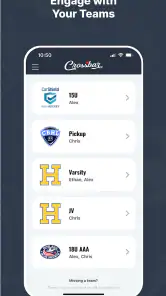
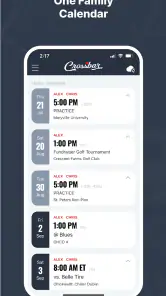
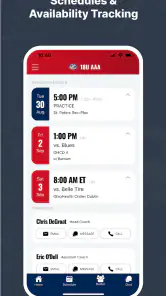
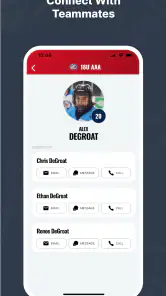
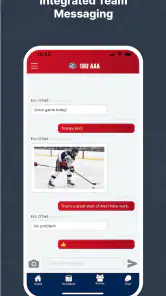
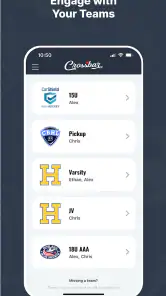
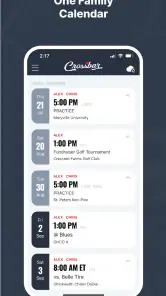
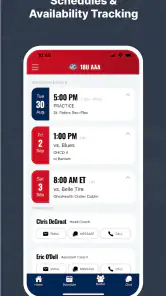
Analysis by Reviewed
When youth sports information is scattered across messages, paper notes, and separate team conversations, even simple tasks can become surprisingly tiring. I looked at Crossbar as a practical sports app for bringing that routine into one organized place. My overall impression is that it is most useful when several people need to stay aligned around the same team activity, especially parents, coaches, and players who are all dealing with changing schedules and repeated reminders.
Crossbar is free, developed by Crossbar, and aimed at an Everyone audience. It belongs to the sports category rather than trying to be a general calendar or a social network. That focus matters: the app makes more sense when your week revolves around youth sports than when you only need to remember an occasional game. It has a 4.7 average from around 4.3 thousand ratings, with more than 100 thousand installs, so it has clearly found an audience beyond a small group of early users.
From a messy sports week to a shared routine
The starting condition is familiar. A coach sends one message about practice, another arrives about a weekend event, and a parent later asks whether the location changed. Someone has the latest information, but not always the person who needs it. Crossbar’s role is to make the sports schedule a shared reference point instead of leaving every family member to reconstruct the week from individual conversations.
I find that distinction important because this is not simply a replacement for a personal calendar. A personal calendar is excellent for recording your own appointments, but it does not automatically solve the communication problem around a team. Crossbar is better suited to the group context: the activity belongs to the sports organization or team, and the people involved can use the same place to keep track of what is happening.
The app is especially appealing for households with more than one child playing sports. In that situation, the real challenge is not remembering one event. It is separating overlapping practices, checking which child needs which equipment, and avoiding the assumption that one team’s schedule applies to another. A sports-focused organizer can reduce that mental load because the information stays connected to the activity that created it.
There is also a useful emotional benefit. Parents often become unofficial information managers, forwarding messages and answering questions that should have been settled by a shared schedule. When the group uses Crossbar consistently, that responsibility can shift from one particularly organized person to a common workflow. The strongest value is not the calendar itself; it is the reduction of repeated clarification.
How I would set up the week
I would begin by treating the app as the central place for team information, not as another notification stream to check occasionally. The first practical step is to identify the relevant sports group and make sure the people who need access are using the same source. If only one parent opens the app while everyone else continues relying on private messages, the organizational benefit remains limited.
More From Our News Desk

Clash of Clans Is Won Between the Battles

Android Auto Makes the Case for Quieter Car Software

MobiOffice: Transforming Mobile Productivity with Seamless Integration

EA SPORTS FC™ Mobile Soccer: Redefining Mobile Sports Gaming

How Microsoft OneDrive Became a Mobile Productivity Giant

How Google Translate Breaks Language Barriers Effortlessly
Once the group is in place, I would review the week from the team perspective rather than from the order in which messages arrived. That small change is useful. Instead of asking, “What did the coach say today?” I can ask, “What does this team require from our family over the next several days?” The answer may include practices, games, travel, and preparation tasks that are easier to understand when viewed together.
For a busy household, I would check the schedule at a fixed moment, such as the beginning of the week, and then make a short second check before the weekend. This is more reliable than opening the app every time I hear a notification. It also makes changes easier to spot because I already know what the original plan looked like.
A practical tip is to use the schedule as a planning trigger rather than merely an attendance record. When I see an evening practice, I can immediately think about transport, food, clothing, and homework. When I see a game away from the usual location, I can plan extra travel time. Crossbar cannot remove those responsibilities, but it can give them a dependable starting point.
Following the information from entry to action
The useful flow begins when an event or update enters the team’s shared space and ends when a family member knows what to do. That sounds simple, but the handoff between those stages is where many sports-management systems succeed or fail. A schedule that looks complete to a coach may still leave a parent wondering about timing, location, or who is expected to attend.
My advice is to read each item as an action, not just as a date. Ask what has to happen before the event, who needs to know, and whether the information affects more than one person in the household. This approach helps prevent a common mistake: noticing that a game exists without preparing for the practical details surrounding it.
For example, imagine a child has practice after school and a game later in the week. I would first use Crossbar to see the team’s sequence of activities, then compare that with our family commitments. If two events overlap with work or school, the conflict becomes visible early enough to arrange transport. If the schedule changes, the shared source gives everyone a better chance of seeing the same update instead of following an outdated private note.
This is also where the app can be more useful than a paper schedule. Paper is easy to glance at, but it becomes unreliable when information changes or when several people need the same update. A personal calendar can handle reminders well, yet it often requires manual copying. Crossbar’s sports context reduces that duplication when the team information is maintained properly.
At the same time, I would not assume that opening the app once solves every communication issue. A team still needs people to enter accurate information and families still need to pay attention. The app can organize the handoff, but it cannot correct an unclear message or guarantee that every participant has interpreted an update in the same way.
The handoffs between coaches, parents, and players
Youth sports involve several handoffs, and each one creates room for confusion. A coach or organizer communicates an activity. A parent turns that information into transport and preparation. A player needs to know where to be and when. In some families, the player is old enough to manage part of the routine; in others, the parent remains responsible for nearly everything.
Crossbar is most effective when each person uses it according to their role. Coaches need a dependable way to keep the team’s information current. Parents need a quick way to understand the family’s obligations. Players may use it as a reminder of the sports routine, but younger children will still need an adult to translate the schedule into practical instructions.
That last point is an important limitation. A shared sports app does not automatically make a child independent. If the player is young, the parent still has to check equipment, transportation, and timing. Crossbar can make the information easier to find, but it does not replace parental coordination.
Another realistic handoff occurs between households. If a child stays with another parent or relative, a common team schedule is more useful than a private calendar stored on one phone. The person handling transport can consult the same sports information rather than waiting for a forwarded screenshot. This is one of the less obvious advantages of a shared system: it helps when responsibility moves from one adult to another.
For separated households, shared access can also reduce the need to act as a messenger. That does not solve every communication issue, and it depends on both adults using the same team information, but it can make routine scheduling less personal and less error-prone. The schedule becomes the neutral reference instead of one parent’s version of events.
What the workflow looks like on a real weekday
Consider a normal Tuesday. I check the team schedule in the morning and see that practice is part of the day’s plan. Before school, I can confirm whether the activity affects pickup. Later, if another family member is collecting the child, that person has a clearer source than a message buried in a long conversation. After practice, the next scheduled activity remains visible, so the household can prepare rather than react at the last minute.
The value here is cumulative. One event is not difficult to remember. The benefit appears after several days, when a family has multiple activities and several people are sharing responsibility. The app gives the week a shape, making it easier to move from “I think there is something tonight” to “I know what is happening and what we need to do.”
For tournaments or unusually busy periods, I would use the same approach but add a deliberate review of the entire sequence. Look at the first activity, the transition to the next one, and the return-home plan. A sports organizer is useful for seeing the official schedule, but the family still needs to build its own practical checklist around it. That division of labor is healthy: Crossbar handles the shared sports information, while the household handles personal logistics.
Another useful habit is to avoid relying on memory after checking the app. If the schedule reveals a conflict, resolve it immediately by arranging a ride or telling the relevant person. The app’s greatest weakness would be using it only as a passive display. Its information becomes valuable when it changes what the family does next.
Where it compares well with familiar alternatives
The usual alternatives each solve part of the problem. A group chat is fast and conversational, but important details disappear as new messages arrive. A paper handout is simple and accessible, but it does not adapt gracefully to changes or multiple caregivers. A general calendar is flexible, but someone usually has to copy the sports information into it and maintain that copy.
Crossbar sits between those options. It is more structured than a chat and more connected to youth sports than a generic calendar. That makes it a sensible choice for a team that wants one shared place rather than a collection of personal workarounds. I would choose it over a general calendar when the main issue is team coordination, not just personal time management.
However, a general calendar may still be better for a family that needs a complete view of work, school, medical appointments, and sports in one timeline. Crossbar’s sports focus is a strength when sports information is the center of the problem, but it can feel like an extra app if your household already has a reliable all-purpose planning system and the team communicates clearly elsewhere.
A group chat remains better for urgent conversation or questions that need an immediate answer. I would not expect a schedule-oriented app to replace discussion. The most practical arrangement may be to use Crossbar for the stable team record and a messaging channel for quick clarification. The trade-off is that families must remember which type of information belongs in which place.
Small habits that make the app more useful
My first recommendation is to establish one source of truth inside the family. If one person records events in a notebook, another uses a calendar, and a third checks Crossbar, discrepancies are inevitable. Even when the household keeps a separate calendar for work and school, the sports details should be checked against the team’s shared information before being copied elsewhere.
Second, review changes before making travel plans. A schedule that was correct earlier in the week may no longer be the schedule you need to follow. This is not a criticism unique to Crossbar; it is a general rule for any shared organizer. The app is most helpful when it becomes part of the preparation routine rather than something opened only after a missed event.
Third, separate official information from family assumptions. If a parent remembers that practice usually starts at a certain time, that memory should not override the current team entry. Treat the app as the reference for the activity itself, then add personal decisions around it. This prevents a familiar routine from hiding a one-day change.
Finally, use the app to support handoffs explicitly. If someone else is driving, point them to the relevant team information rather than summarizing it from memory. That habit reduces the chance that a small detail will be lost between the person who read the update and the person who acts on it.
Friction, limitations, and who should skip it
The biggest limitation is dependence on group adoption. If the coach, organizer, or families do not keep the information current, Crossbar cannot create order by itself. A beautifully organized app is still unhelpful if the real update appears in a different channel and nobody reflects it in the shared sports space.
There is also a learning curve for households that already have an established routine. Even a focused app adds another place to check. If your team has very few events and communicates reliably through a simple calendar, moving everything into Crossbar may feel like unnecessary work rather than an improvement.
I would also be cautious about choosing it as the only planning tool for a complex family schedule. Sports may be the center of the app, but parents still need to coordinate school, work, appointments, and personal commitments. A general calendar is better for that complete overview. Crossbar works best alongside broader planning when the sports schedule needs its own shared home.
Families who want detailed personal task management may find a dedicated productivity app more suitable. Likewise, someone looking for live sports scores, training analysis, or a social community should not choose Crossbar expecting those priorities. Its value is organizational and team-centered, not entertainment-driven or performance-focused.
Device support and everyday accessibility
The app runs on Android devices using version 7.0 or later, which gives it a reasonably broad starting point for families using older phones. Its current version is 48, and the free price removes the financial barrier to trying it with a team. The Everyone content rating also makes it appropriate for a household setting, although younger children may still need an adult to manage the practical side of their schedule.
Those details make testing straightforward: install it, introduce it to the relevant sports group, and see whether it actually reduces duplicated messages and missed information. I would judge it after a full activity cycle rather than after one visit. The real question is not whether the interface looks organized on day one, but whether the team continues using the same workflow when plans change.
Because the app is free, the main cost is attention. Families spend time learning where information belongs and encouraging the group to use it consistently. That investment is worthwhile when several people share responsibility, but less convincing for a single player with a simple schedule.
My final view after following the complete workflow
Crossbar makes the most sense when the starting problem is fragmented youth-sports information and the desired outcome is a shared, repeatable routine. It helps connect the path from team activity to family action: the schedule is gathered, reviewed, handed from one person to another, and turned into transport and preparation decisions.
I especially like its potential to reduce the parent-as-messenger problem. When the same sports information is available to the people involved, fewer details have to be copied into private conversations. That can make a busy week feel calmer, even though the app cannot remove the underlying commitments.
My recommendation is strongest for families with multiple players, shared transportation, or teams that regularly need everyone looking at the same schedule. I would skip it if your sports routine is occasional, your existing calendar already handles the coordination, or your team is unlikely to maintain a common source of information.
In my experience, the right way to evaluate Crossbar is not to ask whether it replaces every other planning tool. It does not. Ask instead whether it gives your youth-sports workflow a dependable center. If the answer is yes, this free sports app from Crossbar is a practical addition, with a 4.7 average and a growing user base that fit its straightforward organizational purpose.
Crossbar Frequently Asked Questions
Is Crossbar designed for youth sports, and who might find it useful?
Crossbar is aimed at keeping life organized when it comes to youth sports, so it may be useful for parents, families, and others involved in a young athlete’s activities. Its sports focus makes it a more relevant choice for people managing youth sports than for someone looking for a general-purpose organizer. Consider whether that focus fits your needs before downloading.
What is Crossbar and what can I use it for?
Crossbar is a platform designed to help users connect, communicate, and manage activities through a single mobile experience. Depending on the version and available features, it may be used for discovering relevant content, interacting with other users, organizing information, or participating in a specific community or service. Before downloading, check the official description to confirm that its current tools match your expectations.
Is Crossbar free to download and use?
Crossbar may be available as a free download, but some features or services could require in-app purchases, a subscription, or payment through an associated organization. The exact pricing can vary by platform, region, and account type. It is a good idea to review the app store listing and subscription terms before registering, especially if the application offers premium access or recurring billing.
Is Crossbar safe and suitable for my device?
Crossbar should be downloaded only from the official Google Play Store or Apple App Store to reduce the risk of installing an altered or unsafe version. Before installation, review the listed developer, permissions, privacy information, operating-system requirements, and recent user feedback. Compatibility may differ between Android and iOS devices, particularly on older phones or tablets.
What permissions and personal information does Crossbar require?
The permissions requested by Crossbar depend on the features you use. The app may ask for access to notifications, storage, the camera, contacts, location, or account information, although not every permission is necessarily required for basic use. During setup, read each request carefully and allow only access that seems relevant. You can usually change permissions later in your device settings.
Pros
- Simple interface makes match scoring quick to learn.
- Supports real-time score tracking during games.
- Useful for players
- coaches
- and spectators alike.
- Keeps match information organized in one place.
- Lightweight app that should run well on most devices.
Cons
- Some features may require an account or setup first.
- Limited value if your sport or league is not supported.
- Live updates depend on a stable internet connection.
- Notifications may need manual configuration to work properly.
- The app may feel too basic for advanced league management.
- Category
- Sports
- Version
- 48





