

Comic Reader CBR, CBZ & PDF
- 17.00
- 3.7
- Installs
- 100.00K
- Price
- Free

Screenshots
Analysis by Reviewed
I judge a comic reader by what happens after I tap a file: does it open reliably, is the page comfortable to read, and can I pick up where I stopped without fuss? ComiQuest - Comic Reader is aimed at readers who bring their own digital comics, so its usefulness depends as much on your files and habits as on the app itself. I’d approach it as a practical reader for a personal collection, not as a replacement for a comics shop.
Start with the files you want to read
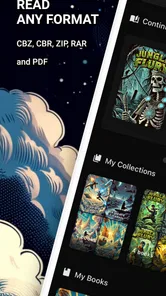
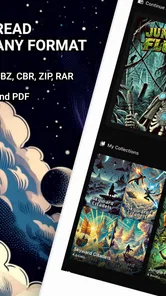
ComiQuest is a free comics app from Mad Mustache Company, and its main appeal is straightforward: it reads comics you already have, rather than asking you to find them inside a built-in shop. It handles ZIP, RAR, CBZ, CBR, and PDF files, which is useful if your collection has been gathered from different sources over time. Before expecting a comic to appear, make sure the file is actually saved somewhere your device can access; a file that is still only in an email or cloud account may need to be downloaded first.
One practical habit I recommend is keeping a clean folder for comics and giving files recognizable names before opening them. That makes it easier to pick the right issue when several archives look alike, and it also helps if you switch between a PDF and a comic archive. If a file refuses to open, check that it finished downloading and try opening another known-good file. That simple comparison can help distinguish a damaged or incomplete archive from a wider app problem.
Where opening a comic can get confusing
The formats ComiQuest accepts cover many common personal collections, but the file extension alone does not promise that every comic will open perfectly. An archive can be incomplete, corrupted, or simply not the file you thought it was. I’d test with one issue that you know works before moving a large batch into your reading routine. If that opens and another does not, you have a useful clue: focus first on the problem file rather than changing several app or device settings at once.
There is also a small but important distinction between having a comic available online and having it ready to read. If it is sitting in a cloud service, message, or email, make sure it has actually been downloaded to an accessible location. For a trip or a commute, I would open the issue once while connected and check a few pages. That quick rehearsal is more useful than discovering at the station that the file never finished arriving.
Reading comfortably and keeping your place
When I try a file reader, I don’t start by importing my whole collection. I open one comic, read a few pages, and see whether the controls feel natural on my device. That is especially sensible here because ComiQuest is designed around files you bring to it: the most important first question is whether your own archive opens and suits the way you like to read.
Features That Make You Go Wow
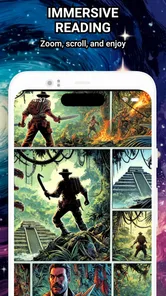
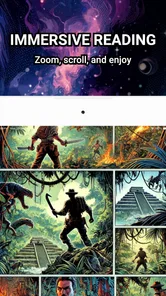
The app comes packed with a bunch of cool features that make reading comics a breeze. For instance, the panel-by-panel guided view is a game-changer. It allows you to zoom in on each panel, making sure you don’t miss any of the intricate details or speech bubbles. It’s almost as if you’re flipping through a physical comic book.
More From Our News Desk

 Gmail
GmailGmail in a Busy Inbox: Who Benefits Most?
From first account to crowded workday, Gmail earns its place through dependable search and flexible sorting—but its best fit depends on how much inbox maintenance you can tolerate.

 Prime Video
Switching to Prime Video: What Changes in Your Viewing Routine
Prime Video can make a compelling second home for streaming, but switching means learning a different catalog, rental layer, and route from browsing to playback.

 Universal TV Remote Control
Universal TV Remote Control Works Best as a Reliable Backup
A phone remote earns its place through quick setup and reliable habits. Here is how to get more from Universal TV Remote Control—and where its limits show.

 Weather - By Xiaomi
Weather by Xiaomi Review: Clear at a Glance, Less Clear Up Close
Xiaomi’s weather app makes everyday forecasts quick to scan, but its calm surface can leave useful details and recovery paths harder to find than they should be.

 X
XX Under Pressure: Can It Recover When Posting Goes Wrong?
A resilience-focused review of X, examining setup, mistaken posts, interruptions, weak connections, and the gaps that matter when recovery needs to be dependable.

 Clash of Clans
Clash of Clans Is Won Between the Battles
Its raids are quick; its community is a long-term project of coordination, teaching, rivalry, and shared responsibility—with all the friction that entails.
Latest News



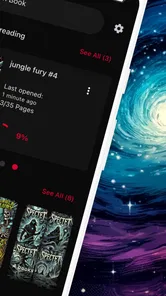
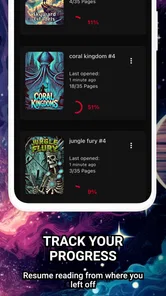
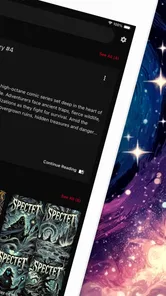
Another awesome feature is the customizable reading experience. Whether you prefer a dark mode for late-night reading or adjusting the brightness to suit your comfort, ComiQuest has got your back. Plus, it remembers where you left off, so you can jump right back into the action without a second thought.
Make reading fit your routine
For a realistic everyday use, imagine downloading an issue before leaving home, then opening it on a commute where the signal is unreliable. Offline access is helpful in that situation, but I’d still check that the file opens before heading out rather than discovering a problem on the train. If you read in short breaks, the remembered position is handy; if you share a device or jump between several books, take a moment to confirm which issue you are resuming so you do not mistake one file for another.
The guided panel view is most useful when artwork or lettering is too small on your screen. I would use it selectively: it can make dense pages easier to follow, but some readers may prefer the original page composition and move around manually. On a larger screen, full-page viewing may feel more natural, while a phone benefits more from close reading. That is a trade-off in how you enjoy a comic, not a reason to expect every page to behave the same way.
Small setup checks that save time
Before deciding whether the reader is at fault, I’d check three basics: the comic finished downloading, the file is in a location the device can reach, and its name makes it easy to identify. These are especially helpful when you have both a PDF and an archive for the same issue. Opening the wrong copy can look like a format problem when it is really just a selection mistake.
If you are bringing over a large collection, try a few representative files first rather than testing only one format. For example, you might check a PDF and an archive you know to be complete, then decide whether the app fits your library. This is a cautious workflow, not a claim that every file type will behave identically. It helps you spot a troublesome file early and avoids spending time reorganizing everything around an issue you could have caught with a small test.
Finding Your Next Favorite Read
Now, let’s talk about the comic discovery aspect. The app has a nifty feature where you can explore new comics based on your reading history. It’s like having your personal comic book curator! You’ll get recommendations tailored just for you, making it easier to find your next favorite series or artist.
Oh, and did I mention the offline reading capability? You can download your comics and read them anywhere, anytime. Whether you’re commuting, traveling, or just chilling in a no-WiFi zone, your comics are just a tap away.
Recovery when a reading session goes wrong
If a comic stops opening, I would avoid repeatedly tapping the same file and changing unrelated settings. First, check that the download completed; then try a different file that you know is good. If the second one opens, return to the original and consider whether its archive is incomplete or damaged. If neither opens, close and reopen the app, then try again. This sequence gives you a clearer diagnosis than treating every hiccup as an app-wide failure.
For a session interrupted halfway through, the remembered position should make returning easier. Still, when you have several issues in progress, confirm the file title before continuing. A useful habit is to keep issue names distinct instead of relying on a row of vague filenames. That little bit of housekeeping matters more in a personal-file reader than it does in a service that labels each book in a managed catalog.
When another kind of comics app is better
ComiQuest suits readers who already have digital files and want one place to open a mixed collection. It is less compelling if you want a service that supplies a large licensed catalog, handles purchases and subscriptions, or organizes everything around a publisher’s online library. A typical storefront-based comics app is better for discovering and acquiring books there; a basic file reader is the better fit when you value control over your own files. ComiQuest sits closer to that second use case, while its discovery feature may add a route to recommendations.
That difference also shapes who should skip it. If you want to browse a ready-made shelf of books and start reading without managing local files, a catalog-based service will likely feel more convenient. If you already keep comics as archives or PDFs, however, a dedicated file reader can be a more direct route than importing your reading life into a separate store. I would choose based on where your collection lives, not on which app sounds more feature-rich in the abstract.
If a comic does not show up or reading seems interrupted, I would first check the file location, download status, and whether another file opens. If the issue is limited to one archive, the archive itself may be the obstacle; if several files fail, restarting the app and reopening a file is a sensible next check. For offline reading, confirm access while you still have a connection. These checks are simple, but they avoid blaming the reader for a missing or incomplete file.
What to expect from a personal-file reader
A file-based approach gives you flexibility, but it also leaves more of the organization to you. Clear filenames and a consistent folder structure can make a mixed library easier to browse, while a collection scattered across downloads, attachments, and cloud locations creates extra steps. I’d keep the issues I plan to read together and test a file before relying on it away from home. Those habits are not special app functions; they are practical ways to make this style of reading less frustrating.
It is also worth thinking about how you read. Someone who likes to inspect artwork closely may appreciate guided panel viewing on a phone, while someone who values seeing a whole page at once may prefer a larger display or a reader whose page controls feel better to them. Neither preference makes one approach universally correct. I would try a few pages in both the guided and ordinary page view before deciding whether the reading experience matches your taste.
Wrapping It Up
So, what’s the verdict? Well, if you’re a comic aficionado, ComiQuest - Comic Reader is a must-have app. Its seamless interface, versatile features, and personalized recommendations make it a top-notch choice for comic lovers. It’s like having a comic book store right in your pocket.
Whether you’re a die-hard fan or a casual reader, this app caters to all your comic reading needs. So why not give it a try and immerse yourself in the vibrant world of comics? Happy reading!
I would treat that enthusiasm with a little caution: the app has a 3.0 average from around 238 ratings, so it is not an obvious safe pick for every reader. It has reached over 50,000 installs, but popularity alone does not guarantee a smooth experience with every file or device. It is free to install, rated for Everyone, and its current version is 1.28.0; in-app purchases range from $1.99 to $69.99 per item. I’d check any purchase details carefully before spending, especially if all you need is a reader for files you already own.
My practical verdict is that ComiQuest is worth considering if your comics are already in ZIP, RAR, CBZ, CBR, or PDF form and you want to read them on a phone, including away from Wi-Fi. I would skip it if your priority is a polished subscription library or a dependable source of new books rather than file reading. The app’s listed minimum OS is 7.0, so check compatibility before installing. For a personal archive, the best test is modest: open a file you know is complete, try a few pages, and see whether the reading controls suit you before moving a larger collection over.
Comic Reader CBR, CBZ & PDF Frequently Asked Questions
Which comic file formats can ComiQuest - Comic Reader open?
ComiQuest - Comic Reader is made for reading comic files you already have, with support for ZIP, RAR, CBZ, CBR, and PDF. That range covers common comic archive formats as well as PDFs, so you can bring compatible files into the app instead of looking for comics inside a built-in catalog. The app is listed in the Comics category and is developed by Mad Mustache Company.
Will ComiQuest - Comic Reader work on my device?
ComiQuest - Comic Reader is an app for Android, and its minimum operating-system requirement is Android 7.0. Checking your device’s Android version before downloading is a sensible first step, particularly if you use an older phone or tablet. The app is free to download, but it also offers in-app purchases, so keep that in mind when deciding whether it suits your needs.
What is ComiQuest - Comic Reader?
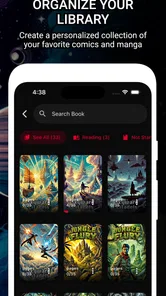
ComiQuest - Comic Reader is a versatile app designed for comic enthusiasts who want to enjoy their favorite comics on the go. The app supports a wide range of formats, including CBR, CBZ, and PDF, ensuring a seamless reading experience. With its user-friendly interface, it allows users to easily organize and access their comic collections anytime, anywhere.
Is ComiQuest - Comic Reader free to use?
ComiQuest - Comic Reader offers both free and premium versions. The free version provides basic functionalities that allow users to read and organize comics. However, the premium version unlocks additional features such as cloud syncing, ad-free experience, and enhanced organizational tools, which can significantly enhance the user experience. In-app purchases range from $1.99 to $69.99 per item, so review the purchase options before paying.
What features does ComiQuest - Comic Reader offer?
ComiQuest - Comic Reader comes with a variety of features designed to improve your comic reading experience. It includes customizable reading modes, bookmarking, and a night mode for comfortable reading in low-light conditions. Additionally, it offers a robust search function and the ability to import comics from various cloud services, making it a comprehensive tool for comic lovers.
Pros
- User-friendly interface for easy navigation.
- Supports various comic formats
- enhancing versatility.
- Offline reading mode for convenience.
- Cloud syncing to save progress across devices.
- Customizable settings for personalized reading experience.
Cons
- Limited free version features.
- Occasional crashes reported by some users.
- Ads can be intrusive in free version.
- Requires internet for cloud syncing.
- High battery consumption reported.











