

ComicID: Comic Book Scanner
- 22.00
- 3.7
- Installs
- 10.00K
- Price
- Free

Screenshots
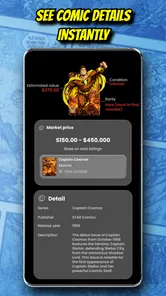
Analysis by Reviewed
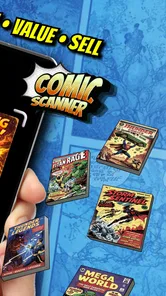
Comic collecting can be enjoyable right up until you have to identify a long box, check what you already own, or prepare a few issues for sale. ComicID: Comic Book Scanner is aimed at that awkward middle ground between a casual reader and a serious cataloguer: it uses AI to help identify comics and supports the process of selling a collection. I found the idea useful because it turns the phone camera into the first step of a repeatable sorting routine rather than making me type every title from scratch.
It is a free comics app from The App Dude, with optional in-app purchases ranging from $4.99 to $18.99 per item. The app is rated for Everyone, runs on Android 7.0 or later, and its current version is 1.4. Its store presence is still fairly modest, with over 10 thousand installs, an average rating of 3.7 from around 140 ratings, and roughly 22 written reviews. Those numbers suggest an app with a practical audience but not one I would treat as a fully mature replacement for a professional collection database.
How I use ComicID from a messy stack to a usable collection
Before I begin, I make the job smaller: I pick a manageable batch, keep each comic within reach, and decide whether I’m sorting to identify, keep, or sell. That stops a scanner session from turning into a hunt through an entire box every time one cover is unclear. From there, the next step is setting up a consistent way to check each match before it gets separated from its comic.
The baseline scanning routine
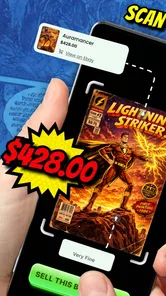
My best results came from treating the camera as an identification aid, not as a magic wand. I placed one comic flat, removed anything covering the front, and gave the app a clear view of the cover. That small bit of preparation matters. A bent issue, glare across the title, or a pile of overlapping covers makes the first step less dependable and creates more work afterward.
For a small group, I would scan one issue, examine the proposed match, and then move it into a separate “checked” pile. That habit sounds basic, but it prevents a common collecting mistake: assuming that a visually similar cover is automatically the exact issue in hand. Comics often have variant covers, reprints, anniversary editions, and different issue numbers that look close enough at a quick glance.
I would keep the physical comic beside the phone while checking the result. Compare the series name, issue number, cover details, and any visible edition information before treating the identification as final. If the app recognizes a comic quickly, that saves typing. If it produces an uncertain or unsuitable match, manual checking is still part of the workflow rather than a failure of the whole idea.
This is where the app feels most useful for an ordinary collector. I do not need to build a perfect archive before seeing value from it. Even identifying a batch of comics well enough to separate duplicates, unknown issues, and likely sale candidates can make a weekend sorting project much less intimidating.
More From Our News Desk

 Gmail
GmailGmail in a Busy Inbox: Who Benefits Most?
From first account to crowded workday, Gmail earns its place through dependable search and flexible sorting—but its best fit depends on how much inbox maintenance you can tolerate.

 Prime Video
Switching to Prime Video: What Changes in Your Viewing Routine
Prime Video can make a compelling second home for streaming, but switching means learning a different catalog, rental layer, and route from browsing to playback.

 Universal TV Remote Control
Universal TV Remote Control Works Best as a Reliable Backup
A phone remote earns its place through quick setup and reliable habits. Here is how to get more from Universal TV Remote Control—and where its limits show.

 Weather - By Xiaomi
Weather by Xiaomi Review: Clear at a Glance, Less Clear Up Close
Xiaomi’s weather app makes everyday forecasts quick to scan, but its calm surface can leave useful details and recovery paths harder to find than they should be.

 X
XX Under Pressure: Can It Recover When Posting Goes Wrong?
A resilience-focused review of X, examining setup, mistaken posts, interruptions, weak connections, and the gaps that matter when recovery needs to be dependable.

 Clash of Clans
Clash of Clans Is Won Between the Battles
Its raids are quick; its community is a long-term project of coordination, teaching, rivalry, and shared responsibility—with all the friction that entails.
Latest News



What to do after identification
An identified comic is only useful if I make a decision about it. I found it helpful to divide the collection into three practical groups: keep, investigate, and sell. The first group contains issues I already understand and want to retain. The second contains anything with a questionable match, unusual edition, or condition that needs closer attention. The last contains duplicates or comics I bought without a long-term plan.
That approach keeps the scanner from becoming a distraction. Instead of scanning everything repeatedly, I use it to answer a specific question: “What is this, and what should I do with it next?” For someone preparing a sale, that is more valuable than simply producing a long list of titles.
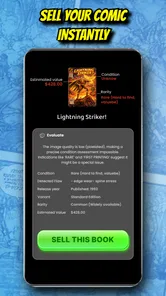
The selling angle also requires sensible expectations. Identification can help organize a listing, but it does not automatically determine a fair asking price. Condition, completeness, edition, demand, and the quality of the photographs still matter. I would use the app to establish the comic’s identity, then independently inspect the issue before writing a description or promising anything to a buyer.
A realistic everyday use case
Imagine finding a short box in a closet after moving house. The comics are mixed together, some are familiar, and others have covers you only vaguely remember. I would scan the obvious issues first, place recognized duplicates in one group, and reserve anything ambiguous for a second pass in better light. Once the box is sorted, I could use the identified information to decide which books belong in my personal collection and which are worth photographing for sale.
The important benefit is not that every comic becomes instantly valuable. The benefit is that an unstructured box becomes a series of manageable decisions. For a casual collector, that reduction in friction is probably the strongest reason to try it.
Settings and habits worth checking
I would begin by checking the app’s available options before scanning a large collection. In particular, look for any controls related to camera behavior, account or purchase handling, and the way identified items are saved or reviewed. I would not change settings simply because they exist; the useful choices are the ones that reduce interruptions during a batch.
A good practical habit is to scan in consistent lighting. Bright window glare can wash out lettering, while dim room light can make a cover look less distinct. A plain surface also helps me keep the camera focused on the comic rather than on a busy background. These are not glamorous tricks, but they are more reliable than repeatedly forcing a poor image through the recognition process.
I also recommend checking the result before moving the comic away. If I scan ten issues into a pile and only inspect the matches later, one mistaken identification can become difficult to trace. Confirming each result immediately creates a simple audit trail: physical comic, screen result, then sorted pile.
Because purchases are available inside a free app, I would also review the purchase screen carefully before committing to anything. The free starting point makes experimentation easy, but collectors should decide whether an optional purchase solves a real bottleneck in their own workflow. If I only have a small personal stack, paying for extra access may not be worthwhile. If I am processing a large inherited collection, the calculation could be different.
Faster patterns for larger batches
Once the basic routine feels comfortable, the biggest speed improvement comes from preparation rather than frantic tapping. I would first remove obvious duplicates and group comics by series or publisher when that is already clear. Scanning a somewhat organized batch makes it easier to notice a wrong issue number and reduces the mental switching caused by jumping between unrelated books.
Another useful pattern is the two-pass method. In the first pass, I scan quickly and separate confident matches from uncertain ones. In the second, I revisit only the uncertain group with cleaner positioning and closer inspection. This is faster than trying to achieve perfect recognition on every issue during the first attempt, especially when a long box contains many visually similar covers.
For selling, I would create a separate physical or digital work area for comics that have passed identification. The scan should not be the final step. I would then inspect corners, spine wear, pages, inserts, and visible damage before preparing any listing. This protects against a subtle but important mistake: confusing accurate identification with accurate grading.
I would also keep a small note beside me for questions that the camera cannot settle by itself. For example, I might write down “check edition,” “confirm issue number,” or “photograph back cover.” This prevents me from interrupting the whole batch whenever one comic needs extra research. The app works best as the front end of a process, while human judgment handles the exceptions.
Where the AI approach helps, and where it stops
The obvious strength is speed. A camera-assisted identification flow is more approachable than opening a spreadsheet and manually entering every title, particularly when I am dealing with comics I did not personally buy. It can also make a collection feel less opaque: once a few unknown covers are recognized, I have a clearer idea of what the box contains and which questions deserve attention.
The limitation is that comic covers are not always unique enough for a quick visual match to settle every detail. Similar artwork, reprints, variants, and editions can create plausible-looking results. I would be especially cautious with comics that I believe may be valuable, unusual, or difficult to replace. In those cases, the app is a starting point for research, not the sole authority.
That distinction matters when selling. A buyer may care about a specific printing, a complete issue, or a condition detail that is invisible from the front cover. ComicID can help me name and organize the item, but it cannot remove the need for careful photographs and an honest description. Anyone expecting one scan to produce a complete valuation will probably be disappointed.
There is also a trade-off between convenience and control. A dedicated spreadsheet or collection database can be slower at the beginning, but it may offer more freedom for custom fields, personal notes, grading records, purchase history, and long-term organization. A general marketplace search may be better when my immediate goal is comparing current listings rather than cataloguing a box. I see ComicID as the quicker first layer, not necessarily the best final home for every collector’s records.
Who should use it, and who should skip it
I would recommend trying it if you have a mixed comic collection, inherited boxes, repeated purchases, or a group of issues you want to prepare for sale. It is particularly suitable for people who find manual cataloguing too tedious but still want more structure than a photo folder. The free entry point also makes it reasonable to test the workflow before deciding whether optional purchases are useful.
I would be more cautious if you already maintain a detailed database and enjoy entering every field yourself. In that situation, the app may duplicate work rather than replace it. It is also not the right sole tool for a collector whose main concern is professional valuation, insurance documentation, or exact edition verification. Those jobs need more evidence than a cover scan.
New collectors should remember that identification is not the same as rarity. A recognizable character, an old-looking cover, or a high issue number does not automatically make a comic valuable. I would use the app to learn what I own, then investigate condition and edition separately before making financial decisions.
What the current release means in practice
The current version is 1.4, and I would approach it as a focused tool rather than a finished all-purpose collecting suite. The 3.7 average indicates a mixed experience among users, which fits the nature of an AI identification app: success depends heavily on the comic, the image, and how carefully the result is checked. The app has enough interest to be worth testing, but I would keep a backup method for anything important.
Its Everyone content rating makes it approachable for families and younger readers who want to identify comics together. A parent could use it as part of a sorting activity, while an older collector might use it to introduce a child to series names, issue numbers, and the difference between keeping a book and preparing it for sale. The simple camera-first concept is easier to explain than a complex cataloguing system.
Still, I would avoid scanning in a rush. The app’s value increases when I build a repeatable routine around it: clean cover, steady image, immediate confirmation, physical sorting, and a separate research step for exceptions. The best results come from combining automation with deliberate checking. That is the main lesson I took from using it.
My verdict for collectors
ComicID: Comic Book Scanner is a sensible free starting point for identifying and organizing comics, especially when the alternative is leaving unknown issues in a box. I like its practical focus and the way it can turn a daunting collection into a sequence of smaller tasks. It is most convincing when used to accelerate the first pass, separate duplicates, and prepare information before a sale.
I would not treat it as a complete collection-management system or a substitute for edition research, condition assessment, and careful pricing. Experienced users will get more from it by creating habits around the scan: work in batches, isolate uncertain matches, verify before sorting, and never confuse recognition with grading. Those steps make the app more dependable without pretending that AI can solve every comics question.
For a casual owner, a family sorting an inherited box, or a seller who needs a quicker way to identify a pile, it is worth a trial. For a meticulous collector with a highly customized archive, a spreadsheet or specialist database may remain the better long-term option. My overall view is positive but measured: this is a useful front door into comic cataloguing, provided I stay involved after the camera has done its part.
ComicID: Comic Book Scanner Frequently Asked Questions
Is ComicID suitable for someone new to comic collecting?
ComicID is aimed at readers and collectors who want to identify comics and build a digital record of their collection. Its camera-based approach may make getting started feel more straightforward than typing in each book’s details. You can try it for occasional identification or use it as part of a collecting routine, while checking each match before relying on it.
What is ComicID: Comic Book Scanner used for?
ComicID: Comic Book Scanner is designed to help comic readers identify and organize physical comic books using a smartphone camera. After scanning a cover, the app can provide matching information such as the title, issue, series, and related details when available. It is especially useful for collectors who want to create a quick digital inventory without entering every comic manually.
How accurately does ComicID recognize comic books?
Recognition quality can vary depending on the comic’s cover, lighting, camera focus, and the information available in the app’s database. Well-known issues with clear, unobstructed covers are generally easier to identify, while older, international, variant, damaged, or independently published comics may require a manual search. It is best to review the detected result before saving it to your collection.
Can I use ComicID to manage my entire comic collection?
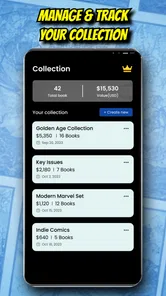
The app can be useful for building and browsing a digital comic collection, but its exact cataloging features may depend on the current version and platform. Users should check whether it supports fields they care about, such as issue numbers, publication dates, variants, condition, purchase information, or personal notes. For large collections, confirm that your data can be edited, exported, or backed up.
Does ComicID: Comic Book Scanner require an internet connection?
An internet connection may be needed for image recognition, database searches, account features, or synchronizing collection information. Camera access is required to scan covers, and the app may request additional permissions depending on how it stores images or collection data. Before scanning a large collection offline, check which features remain available without connectivity and whether scans are saved locally.
Pros
- Quickly identifies comic books using a phone camera.
- Useful for organizing personal comic collections.
- Saves catalog details digitally for easy reference.
- Helps track issues you already own while shopping.
- Simple scanning workflow suitable for casual collectors.
Cons
- Recognition may struggle with older
- damaged
- or unusual covers.
- Catalog information can vary in accuracy or completeness.
- Requires a stable internet connection for some lookups.
- Manual corrections may be needed after scanning.
- Advanced collection features may require in-app purchases.











