

Comic Book Price Value Scanner
- 45.00
- 4.5
- Installs
- 10.00K
- Price
- Free
Screenshots
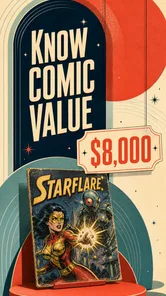

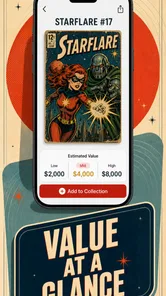
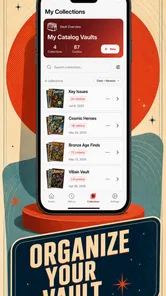

Analysis by Reviewed
I like the idea behind Comic Book Price Value Scanner because it addresses a familiar collector problem: remembering what a comic is called, keeping track of what is already on the shelf, and getting a quick sense of its value. In use, the best way to think about it is as a practical companion for cataloguing and checking books, not as a substitute for careful grading or a definitive price guide. That distinction matters. A scan can make a first pass much easier, but a comic’s condition, edition, and market context still call for a human eye.
Comic Book Price Value Scanner is a free comics app from petraapps, rated for Everyone and available in version 1.0.5. It has a 4.5 average from 451 ratings, with 10K+ installs. It also offers in-app purchases priced from $5.49 to $69.99 per item, so I would check what each purchase includes before paying. The app’s core appeal is straightforward: use a cover scan to identify a comic, follow real-time values, and organize a collection in one place.
Build a reliable routine around each scan
For a casual reader, scanning a cover when a new issue comes home is an easy place to start. For a collector, the more useful habit is to treat every scan as the beginning of a small record-checking routine. I would scan the cover, review the identification, and compare the result with the physical book before relying on it. A title can have similar covers, multiple printings, or edition details that are not obvious from a quick glance, so a confident-looking match should still be checked.
That extra pause is especially worthwhile when cataloguing older comics or books with variant covers. Rather than adding a whole box in one rushed session, I’d work through a manageable stack and separate uncertain matches for a second look. This keeps a collection list useful instead of filling it with near-misses that become harder to correct later. A scan is most valuable when it saves lookup time without encouraging me to skip identification altogether.
The collection-management side also changes how I would use the app. Instead of scanning only when I want a price, I’d add books as they enter my collection and keep the list current after trading or selling. That turns the app into a working inventory rather than a one-off novelty. If I’m heading to a shop, convention, or a friend’s place to compare books, having a maintained record is more useful than trying to reconstruct the contents of a shelf from memory.
A realistic example: after picking up a handful of comics at a local sale, I’d scan them at home, check each title and edition against the cover and indicia, then add the confirmed books to my collection. I’d note which ones need a closer condition assessment before using any value as a guide. The benefit is not that a phone can grade a book perfectly; it is that identification and organization become less tedious, leaving me more time for the parts that require judgment.
What to check before trusting a value
Price information is a starting point, not a promise of what a particular copy will sell for. Two copies of the same comic can differ meaningfully because of condition, restoration, completeness, and buyer interest. I would use the app’s real-time value feature to spot a rough range or flag a book worth researching, then make a separate decision based on the copy in front of me. For a valuable issue, I would compare more than one source and look at sales for genuinely similar editions and conditions.
More From Our News Desk

 Gmail
GmailGmail in a Busy Inbox: Who Benefits Most?
From first account to crowded workday, Gmail earns its place through dependable search and flexible sorting—but its best fit depends on how much inbox maintenance you can tolerate.

 Prime Video
Switching to Prime Video: What Changes in Your Viewing Routine
Prime Video can make a compelling second home for streaming, but switching means learning a different catalog, rental layer, and route from browsing to playback.

 Universal TV Remote Control
Universal TV Remote Control Works Best as a Reliable Backup
A phone remote earns its place through quick setup and reliable habits. Here is how to get more from Universal TV Remote Control—and where its limits show.

 Weather - By Xiaomi
Weather by Xiaomi Review: Clear at a Glance, Less Clear Up Close
Xiaomi’s weather app makes everyday forecasts quick to scan, but its calm surface can leave useful details and recovery paths harder to find than they should be.

 X
XX Under Pressure: Can It Recover When Posting Goes Wrong?
A resilience-focused review of X, examining setup, mistaken posts, interruptions, weak connections, and the gaps that matter when recovery needs to be dependable.

 Clash of Clans
Clash of Clans Is Won Between the Battles
Its raids are quick; its community is a long-term project of coordination, teaching, rivalry, and shared responsibility—with all the friction that entails.
Latest News



This approach also helps prevent a common collecting mistake: treating a displayed figure as the cash value of a book sitting on a shelf. Asking prices, completed sales, and what a local buyer will offer are not interchangeable. If the app surfaces a number that seems surprising, I’d verify the exact issue and printing first, then check whether the copy’s condition supports that expectation. The scanner can speed up the first step, but it cannot remove those distinctions.
Settings and collection habits that pay off
I would begin by checking the app’s available settings and collection controls before scanning a large backlog. In particular, it is sensible to understand how the app handles identification corrections and what information it retains for each entry, if those controls are available in the version being used. The practical aim is to establish a consistent method: use the same naming and condition notes for similar books, and avoid adding uncertain matches as though they were confirmed.
A useful workflow is to divide a collection into small batches by box or shelf, rather than scanning at random. That makes it easier to catch duplicates and to resume later without losing track. I’d also keep particularly important books in a separate review pile until I’ve confirmed the issue details. This is not an app feature claim; it is a simple way to avoid letting the speed of scanning outrun the accuracy of the catalogue.
Before relying on a value history for a buying or selling decision, I’d check the date and context of the displayed information whenever the app presents them. Market movement can matter, but so can the exact edition and condition behind a comparison. If the screen gives only a broad estimate, I’d use it as a prompt for further research rather than as a final offer price. For ordinary collection tracking, that level of caution is usually enough; for an expensive book, I’d do more homework.
Faster patterns for repeated use
The biggest speed gain comes from preparing the comics, not from trying to scan as quickly as possible. I’d put books in a stable stack, make sure covers are easy to access, and scan in a consistent order. Then I’d confirm each result immediately instead of postponing all corrections until the end. A short verification step per book is less frustrating than discovering later that several similar covers were entered incorrectly.
For a large collection, I would also keep a simple boundary between “identified” and “needs checking.” If a scan is ambiguous, move on and return to it with the book in hand rather than repeatedly trying to force a match. This helps maintain momentum while protecting the quality of the catalogue. If the app supports convenient collection organization, use that structure consistently; if it does not match the way you sort physically, a separate box-by-box workflow can still keep the process orderly.
Another helpful pattern is to scan at the moment a comic changes hands. When buying, the app can help identify a book before it gets mixed into a stack of similar issues; when selling or trading, a current inventory makes it easier to check what you own. I would still inspect the book and agree on condition separately. The app is strongest as a memory and lookup aid, not as an automatic negotiator.
Where scanning and valuation have limits
Cover recognition is naturally less dependable when the cover is damaged, obscured, unusually reflective, or visually close to another edition. In those cases, a manual check is not a failure of the workflow; it is the sensible next step. Likewise, a scan cannot tell the whole story of a comic’s condition. A crease, clipped coupon, loose page, or restoration can change how a collector values a copy, and those details need direct inspection.
There is also a trade-off between convenience and precision. If you only own a few comics and already know their titles, a spreadsheet or a notes app may be enough for a basic inventory. If you are making serious buying decisions, specialist price research and a careful grading process are better companions than any quick scan alone. Comic Book Price Value Scanner makes more sense when identifying and tracking many books is a recurring task, especially if the collection is large enough that memory and manual searching become a burden.
The app is free to start, but the in-app purchase range means that people who want additional capabilities should inspect the purchase options carefully rather than assume every useful feature is included at no cost. I would first see whether the core scanning and collection workflow suits my habits, then decide whether any paid option addresses a specific need. That is a better test than paying in advance on the strength of a broad promise.
Compatibility is another practical consideration: the listed minimum operating-system requirement is version 7.0. The app was released on December 4, 2025, and the current version is 1.0.5. Those details are useful when deciding whether an older device can run it, but they don’t change the central point: the quality of your results depends partly on how carefully you confirm scans and maintain your collection.
Who will get the most from it
I’d recommend trying it if you regularly buy, sell, or sort comics and want one place to identify covers, follow values, and keep an inventory. It should be particularly useful for collectors who have accumulated boxes over time and want a less laborious way to begin cataloguing them. The most satisfying use is probably not scanning a single prized issue once; it is building a repeatable habit that makes the whole collection easier to understand.
I would be more cautious if your main need is precise appraisal. A scan and a displayed value cannot replace checking the edition, condition, and relevant market evidence. Likewise, if you dislike maintaining digital records, the collection tools may feel like extra work rather than a benefit. In those cases, a manual catalogue or specialist reference may fit better, while the scanner can still be useful for occasional identification.
Where it fits among comic-collecting tools
The usual alternatives each solve a different part of the problem. A spreadsheet gives me control over fields and sorting, but I have to identify and enter each book myself. A notes app is even simpler for a short list, though it can become awkward once I want to search a large inventory. A specialist price reference may be the better choice when the main question is what a particular edition in a particular condition has actually sold for. This app sits between those approaches: scanning can reduce the effort of getting a collection started, while the value feature offers a convenient first check.
That middle ground is useful, but it comes with a practical trade-off. A dedicated manual catalogue can be tailored to the way I sort, including details I personally care about, while a scanner-led workflow depends on confirming that the app’s match is the book I own. I would not replace a carefully maintained grading or sales record with a scan result. I would use the app to narrow down what needs attention, then move to a more detailed reference when the decision has real financial weight.
Small decisions that make a catalogue more useful
One detail that is easy to overlook is how much consistency matters once a collection grows. I’d choose one approach for recording condition notes and stick to it, even if the notes are brief. If I use different descriptions for similar books, later comparisons become less helpful. I’d also keep a short list of uncertain identifications outside the confirmed inventory, so an unresolved scan does not quietly become part of the collection record as fact.
For a household with more than one collector, I would agree on who updates the inventory after a comic is bought, traded, or moved to another box. That small routine can prevent duplicate entries and outdated records without needing a complicated system. If I’m using the app alone, the same principle applies: make the update while the book is already in hand rather than postponing it until I have forgotten which issue I was sorting.
Before taking the app along on a buying trip, I’d try the workflow at home with books whose titles and editions I can verify easily. That gives me a feel for how much checking I need to do, and it helps me avoid depending on a quick scan in a noisy shop or while handling several books at once. For a purchase I care about, I would still inspect the indicia and condition and make the final call from the physical copy, not the convenience of a result on screen.
My verdict after thinking through the routine
Comic Book Price Value Scanner is a sensible fit for collectors who want to make identification and inventory upkeep less of a chore. I like its role as a quick first pass, especially when I’m dealing with a box of books rather than one comic I already know by heart. It can help me decide what to verify, what to record, and which items deserve deeper research, but it does not remove the work of checking an edition or judging condition.
If you are starting a collection catalogue, I’d begin with a small batch and see whether scanning fits the way you handle your books before committing to a bigger project or a purchase. If you mainly need precise pricing, have only a few comics, or prefer a fully custom inventory, another tool may suit you better. For regular collectors who value a quicker route from cover to organized record, this is worth considering, provided you keep your own checks in the loop.
My overall view is that Comic Book Price Value Scanner is most convincing as a practical first-pass tool. It can reduce the friction of identifying and organizing comics, and its value tracking gives a collector a reason to return after the initial cataloguing session. I would not treat its scan or valuation as the final word, especially for high-value books. Used with a quick verification habit and realistic expectations, though, it offers a sensible way to turn a scattered collection into something easier to search, review, and manage.
Comic Book Price Value Scanner Frequently Asked Questions
What is Comic Book Price Value Scanner, and what does it do?
Comic Book Price Value Scanner is designed to help comic collectors identify an issue and look up information that may help estimate its market value. Depending on the app’s available features and catalog, you may be able to scan or search for a comic and review details such as its title, issue number, and price references. Treat any displayed figure as a guide rather than a guaranteed sale price.
How accurate are the comic book values shown in the app?
An app’s estimate is only as reliable as the data it uses and the information entered or recognized during a scan. Comic prices can change with demand, recent sales, printing, edition, and condition, so a listed value may not match what a buyer will pay. Check that the identified issue and variant are correct, and compare the estimate with recent sales and other reputable sources.
Can I use the scanner to identify any comic book?
Recognition may depend on the comic’s cover being clear and the issue being represented in the app’s database. Older, obscure, international, promotional, or variant editions may be harder to identify, and glare, cropping, or wear can affect scanning. If a scan returns no result or an uncertain match, try searching by title, publisher, and issue number, then verify the edition before relying on its price information.
Does the app account for a comic’s condition, edition, or graded status?
These details can have a major effect on a comic’s value. A price reference may not automatically reflect differences between a worn copy and a professionally graded one, or between a standard issue and a rare variant. Review the app’s listing carefully and check whether it lets you specify condition or grading. For buying, selling, or insurance decisions, use an appropriate condition assessment and confirm details independently.
Is Comic Book Price Value Scanner free, and does it require an internet connection?
Availability, pricing, and connection requirements can vary by platform and app version. Check the Google Play or Apple App Store listing for the current price, in-app purchases, subscription terms, and feature descriptions before downloading. Scanning may use your device camera, while searching catalogs or retrieving current price information may require internet access. Also review the app’s permissions and privacy information if you plan to scan or save a collection.
Pros
- Quickly identifies comics by scanning their covers.
- Useful for checking a comic’s estimated value while browsing.
- Can help organize a collection around recognized issues.
- Convenient for collectors who want pricing details on the go.
- A scanner is faster than searching for each comic manually.
Cons
- Recognition may be less reliable for worn or obscured covers.
- Estimated prices may not match actual sale prices.
- Rare or newer issues may be missing from the database.
- Good lighting and a steady camera help improve scan results.
- Values can become outdated as comic prices change.











