

Cloned Voices
- 18.00
- 3.4
- Installs
- 1.00M
- Price
- Free

Screenshots
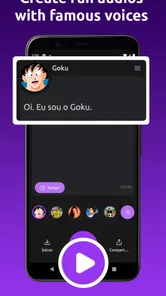
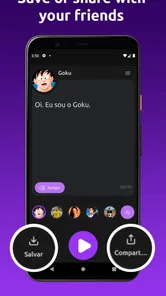
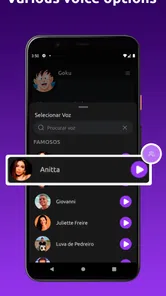
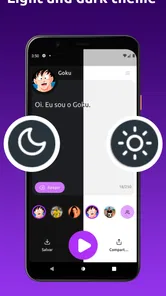
Analysis by Reviewed
When I first tried a voice-changing app, I wanted to know one thing: could I make a short clip that would actually amuse a friend, without spending ages figuring out the controls? Cloned Voices is built around that kind of quick creative experiment. It’s a free comics app from InnerCodeDevs, rated for Everyone, and its focus is playful audio made with familiar Brazilian voices. I’d approach it as a novelty for short messages and jokes, not as a professional recording studio or a way to make anyone believe a celebrity really spoke.
What to expect from the idea
The appeal is the contrast between an ordinary line and a recognizable voice style. That can make a greeting, a silly reaction, or a bit of dialogue feel more entertaining than simply sending a text. The app has reached over a million installs, while its average rating is 3.4 from around sixteen thousand ratings; that mix suggests plenty of curiosity, but also a reason to keep expectations grounded. A voice effect may be amusing without sounding convincing in every sentence.
It’s also worth keeping the “Brazilian voices” angle in mind. If you’re looking for a broad catalogue of international impressions, this may not match what you have in mind. I’d first check whether the available choices suit the joke or message I want to make, rather than assuming every famous voice is represented. The best result depends as much on choosing a voice that fits the line as it does on the novelty of the effect.
Before you make your first clip
For a first-time user, the most reassuring approach is to decide on the message before opening the app. Keep it to one thought, such as a quick greeting or a reaction to something your friends already know about. That makes the first attempt easier to assess: you can focus on whether the selected voice makes the line funnier, rather than wrestling with a script that needs several changes.
It also helps to choose the audience early. A private joke for a friend who knows your sense of humor has a different risk from a clip posted where strangers may hear it without context. I’d avoid using a recognizable voice for anything that sounds like a real announcement, request, or personal confession. The safest and most satisfying clips are clearly playful, brief, and shared with people who understand why the voice is part of the joke.
Getting Started with Cloned Voices
Downloading and setting up Cloned Voices is a breeze. Available on both Android and iOS, the app has a user-friendly interface that makes it easy for anyone to navigate. Once installed, you’re greeted with a straightforward menu that guides you through the process of selecting and using different voice options. I was impressed by how quickly I could jump in and start having fun with the various features.
Make the first clip a small experiment
For a first try, I’d keep the script brief: one greeting or a single punchline, rather than a long message. Short lines are easier to judge, and they make it simpler to tell whether the chosen voice suits the delivery. Try a familiar phrase first, then change only one thing at a time—such as the wording or the voice—so you can hear what actually improved the result. This is a more useful test than recording a long monologue and discovering that the effect doesn’t fit halfway through.
More From Our News Desk

 Gmail
GmailGmail in a Busy Inbox: Who Benefits Most?
From first account to crowded workday, Gmail earns its place through dependable search and flexible sorting—but its best fit depends on how much inbox maintenance you can tolerate.

 Prime Video
Switching to Prime Video: What Changes in Your Viewing Routine
Prime Video can make a compelling second home for streaming, but switching means learning a different catalog, rental layer, and route from browsing to playback.

 Universal TV Remote Control
Universal TV Remote Control Works Best as a Reliable Backup
A phone remote earns its place through quick setup and reliable habits. Here is how to get more from Universal TV Remote Control—and where its limits show.

 Weather - By Xiaomi
Weather by Xiaomi Review: Clear at a Glance, Less Clear Up Close
Xiaomi’s weather app makes everyday forecasts quick to scan, but its calm surface can leave useful details and recovery paths harder to find than they should be.

 X
XX Under Pressure: Can It Recover When Posting Goes Wrong?
A resilience-focused review of X, examining setup, mistaken posts, interruptions, weak connections, and the gaps that matter when recovery needs to be dependable.

 Clash of Clans
Clash of Clans Is Won Between the Battles
Its raids are quick; its community is a long-term project of coordination, teaching, rivalry, and shared responsibility—with all the friction that entails.
Latest News



A practical first success could be a cheerful birthday greeting for a friend who understands the joke. I’d listen to the finished clip before sharing it, especially if the wording could be mistaken for a real statement. Sending it with a playful note makes the intent clear and keeps the joke friendly. If the first take feels awkward, trimming the idea down to a cleaner, more natural sentence is often a better move than trying to force a complicated script.
A World of Voices at Your Fingertips
What sets this app apart is the vast array of voice choices it offers. From iconic movie characters to political figures, the selection is quite impressive. I spent hours playing around with different voices, and I have to say, the accuracy is spot on. The app uses advanced AI to ensure that the voice cloning is as realistic as possible. It's almost eerie how well it captures the nuances and tone of the original voices.
I’d treat that realism as a reason to use a little judgment, not as a promise that every result will pass as genuine. A short comic line is a safer and more enjoyable use than a serious announcement or a message that could affect someone’s reputation. If you’re making something for a group chat, consider whether everyone will immediately understand it as a joke. That simple check helps keep a lighthearted tool from creating needless confusion.
Fun Features Galore
Apart from just voice changes, the app also allows you to record your own clips and add background noises or effects for a more immersive experience. Imagine sending a birthday message to a friend in the voice of their favorite actor! The possibilities are endless, and the app encourages creativity and fun.
For a more polished result, I’d start with a clear recording in a quiet room, then add effects only if they support the scene. Background sound can give a clip personality, but too much can bury the words; the voice is the point, so clarity should win. A useful workflow is to make one clean version first, listen back, and then try a second version with a single extra effect. Keeping both gives you a quick comparison instead of guessing whether the added sound helped.
Another cool feature is the ability to share your creations easily on social media platforms. I tried this out and got some hilarious reactions from my friends. It's a great way to keep the fun going beyond the app itself.
Sharing is convenient when a clip is meant for a laugh, but it also changes the audience. A joke that works in a private chat may lose its context when reposted elsewhere. I’d add a caption that makes the playful intent obvious and avoid presenting generated speech as a real recording. If you want to save a joke for a small group, sharing it directly with those people may be a better fit than posting it publicly.
Where it fits—and where it doesn’t
Compared with a conventional audio recorder, this app is for transforming a message into a playful voice effect rather than capturing natural speech alone. Compared with a general audio editor, the attraction is the recognizable voice concept, not fine-grained production work. That makes it a better pick for a quick gag than for podcast narration, business audio, or a carefully mixed project. If precise editing and dependable studio-style output matter more than novelty, a dedicated recording or editing tool is the more sensible choice.
I can see it working well for a family birthday group, a casual friend chat, or a quick creative prompt when people are already in on the joke. It is less suited to someone who wants realistic impersonation for serious communication, needs extensive control over sound, or expects a particular voice to be available without checking. The app is free, but I’d still judge it by whether the actual choices and results fit your purpose, not by the low barrier to trying it.
A useful everyday routine
One realistic way I’d use it is to make a small audio surprise while planning a birthday message. I’d write a line that sounds like something I would naturally say, record it in a quiet moment, and listen once before deciding whether an added effect helps. If it works, I’d send the clip privately with a short caption that signals the joke. If the voice makes the words hard to understand, I’d simplify the line or choose a different option instead of layering on more sound.
This process also answers a common first-use question: what should I do if the first result isn’t funny? I wouldn’t keep changing every setting at once. I’d first shorten the sentence, then test whether a different voice makes the same words land better. That keeps the experiment manageable and makes it easier to decide whether the limitation is the writing, the voice choice, or simply that this particular idea works better as a text.
Privacy, trust, and sensible use
In today's digital age, privacy is a big concern for many users, and rightly so. Cloned Voices takes this seriously by ensuring that all data is securely stored and never shared without your consent. This reassurance makes it easier to enjoy the app without worrying about your personal information being compromised.
Because voice clips can sound personal, I’d avoid recording sensitive details or using someone else’s identity in a way that could mislead people. Before making a clip for a public post, think about who might hear it without the original context. That is a practical habit with any voice tool, particularly one built around recognizable voices. A funny greeting is low-stakes; a fabricated instruction or claim is not.
What to check when a result feels off
If a clip sounds less amusing than expected, the first thing I’d check is whether the sentence suits the voice style. A line that depends on subtle emotion or a complicated setup may not work as well as a simple, direct reaction. I’d also listen for whether background effects compete with the spoken words. The point is not to make every clip elaborate; it is to make the words easy to follow and the intention easy to read.
Another sensible check is whether the person receiving it will know it is a playful effect. A familiar voice can make a short message feel vivid, but that same quality can cause confusion if the clip is forwarded without explanation. When in doubt, keep the message harmless and include context in the accompanying text. This small step makes sharing more considerate without taking the fun out of the experiment.
Who should give it a try?
If you enjoy sending friends silly audio messages and like experimenting with familiar Brazilian voices, it’s easy to see the appeal. The app is currently at version 3.0.1 and supports Android 5.0 and later, which makes it an option for many older Android devices as well as newer ones. I’d recommend trying one short, harmless clip first, then deciding whether the available voices and effects are enough for the kind of jokes you actually share.
If you don’t enjoy recording yourself, want a neutral text-to-speech voice, or need reliable control over a finished audio track, this probably isn’t the right tool. Its central pleasure is the playful transformation, and that works best when you already have a specific, low-stakes idea in mind. I wouldn’t install it expecting a complete audio workstation or a substitute for a human performer.
Choosing it over another audio app
The choice is less about which tool is universally better and more about what you want to make. A standard recorder is the straightforward option for preserving your own voice; a fuller editor makes more sense when timing, mixing, or detailed adjustments matter. This app is the more tempting option when the recognizable voice transformation is the joke itself. If your goal is simply to send a clear spoken note, adding a character-style effect may be an unnecessary detour.
It also makes sense to think about the people you share with. Someone who enjoys playful voice messages and recognizes the Brazilian references may get more out of it than someone who prefers plain audio or does not know the voices. I’d try it with a low-stakes message first rather than building an elaborate project around a voice choice you have not tested. That way, the app can earn a place in your routine through one good result instead of an expectation that it must suit every kind of audio.
In conclusion, Cloned Voices is a fantastic app for anyone looking to add a bit of humor and creativity to their everyday interactions. With its easy-to-use interface, wide range of voice options, and commitment to user privacy, it's definitely worth checking out. Whether you're looking to entertain yourself or surprise your friends, this app has something for everyone. Give it a try, and who knows, you might just discover a new favorite pastime!
Cloned Voices Frequently Asked Questions
What language and voice style is Cloned Voices designed for?
Cloned Voices is presented as a tool for creating fun audio with famous Brazilian voices. That makes its theme especially relevant if you enjoy Brazilian voices and want a playful audio experience. The app is in the comics category, so it is best approached as entertainment rather than as a general-purpose voice or professional audio studio.
What should I consider before sharing audio made with Cloned Voices?
Think about the audience and context before sharing any generated audio. A familiar or recognizable voice can make a joke entertaining, but it may also lead listeners to misunderstand who is speaking. Keep your use respectful, avoid presenting generated speech as a real statement from someone, and consider whether the people involved would be comfortable with the audio being shared.
Is Cloned Voices free to download, and is it suitable for everyone?
Cloned Voices is a free app in the comics category, and its content rating is Everyone. That makes it accessible to a broad audience, although parents may still want to consider how children use voice-generation features and whether the audio they create is appropriate to share. The app is developed by InnerCodeDevs.
What Android version is required, and who makes Cloned Voices?
Cloned Voices is developed by InnerCodeDevs and requires Android 5.0 or later. Before downloading, check that your device runs a compatible version of Android; otherwise, the app may not install or work as intended. It is an app in the comics category, centered on making playful audio with famous Brazilian voices.
What is Cloned Voices and how does it work?
Cloned Voices is an app designed to replicate voices using advanced AI technology. By inputting a sample of a person's voice, the app can generate speech that sounds remarkably similar to the original speaker. This is achieved through machine learning algorithms that analyze vocal patterns and tones, allowing users to create customized voice messages or content.
Pros
- Realistic voice cloning capabilities.
- Supports multiple languages.
- User-friendly interface.
- Fast processing speed.
- Customizable voice parameters.
Cons
- Limited free version features.
- May require high-end device specifications.
- Privacy concerns with voice data.
- Occasional processing errors.
- In-app purchases can be costly.











