Challenger Comics Viewer
- 698.00
- 3.9
- Installs
- 1.00M
- Price
- Free
Screenshots

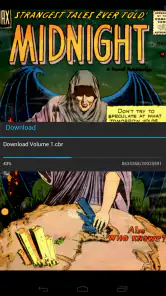
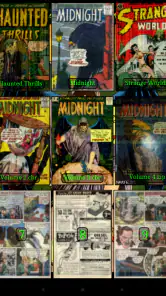
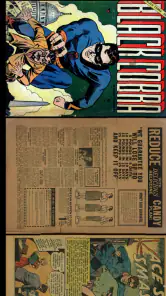
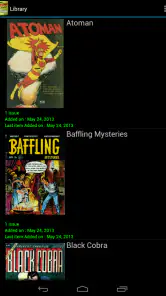
Analysis by Reviewed
On a shared tablet, a comic reader has to work for more than one person: one reader may want a quick manga chapter, while someone else prefers a long PDF issue. I like that Challenger Comics Viewer is built around opening personal comic files rather than asking me to browse a single in-app catalogue. That makes it useful in a household where people already have their own collections, but it also means the quality of the experience depends partly on how those files are organized and opened.
Sharing a device without mixing reading habits
For a practical routine, I’d keep each person’s comics in clearly named folders and agree on where new downloads should go. The viewer handles many common comic and image formats, so a shared device can serve different kinds of reading without everyone converting files first. Folder names such as a reader’s name or a series title can make handoffs less confusing than relying on memory, especially when several people are reading from the same library.
A small naming habit can save time later: keep a series together, make volume or chapter order obvious, and avoid giving unrelated files nearly identical names. That matters most when a reader is choosing quickly from a list rather than browsing an illustrated catalogue. I’d also keep an unfinished issue in its series folder instead of leaving it among recent downloads, so the next person can find it without guessing which file is current.
I would not treat that arrangement as separate accounts or private profiles. It is simply a household workflow: readers take turns, use recognizable folders, and leave the file collection tidy for the next person. If your priority is keeping each person’s reading history, library, or preferences fully separate, a reader designed around individual accounts may suit you better. Here, I’d check the available settings on the device before making it the family’s only comic app.
Choosing files and setting expectations
The key question before installing is what you already read. If your collection is mostly local CBR, CBZ, PDF, or image files, a dedicated viewer can be more direct than a comics storefront that emphasizes buying or discovering titles. Challenger Comics Viewer is a free Android comics app from The Challenger; it has a 3.9 average from around 22,000 ratings and over a million installs. It is marked for Everyone, and its long-running presence makes it familiar to many readers, though a rating is only a rough guide to whether its controls fit your habits.
It was released on December 12, 2011, and runs on Android 5.0 or later. That makes it an option to consider on an older compatible Android device that has been repurposed for reading, but the operating system requirement alone does not tell me how every file will behave on a particular device. I’d test a small selection first: one image-based comic, one archive, and a PDF if those are the formats I expect to use most. That trial helps catch awkward page sizing before I copy a large collection over.
There is a useful trade-off in that file-first approach: you bring your own material and keep the app focused on reading, but you also need to manage where files come from and how they are sorted. For a commuter, I’d copy a few issues onto the device before leaving rather than assume every file will be available when needed. For a parent sharing a tablet, I’d also preview a comic before handing it to a younger reader; an Everyone label for an app does not make every comic inside it suitable for every age.
More From Our News Desk

Clash of Clans Is Won Between the Battles

Android Auto Makes the Case for Quieter Car Software

MobiOffice: Transforming Mobile Productivity with Seamless Integration

EA SPORTS FC™ Mobile Soccer: Redefining Mobile Sports Gaming

How Microsoft OneDrive Became a Mobile Productivity Giant

How Google Translate Breaks Language Barriers Effortlessly
A Visual Treat for Comic Enthusiasts
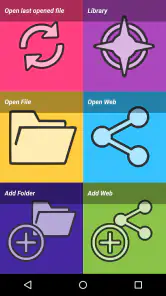
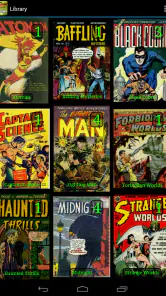
Right off the bat, the first thing that caught my eye was how visually appealing Challenger Comics Viewer is. The app offers a clean, intuitive interface that makes navigating through my vast collection of comics a breeze. Whether you're a fan of manga or western comics, this app supports a wide range of formats including CBR, CBZ, PDF, and more. It's like having a virtual library right at your fingertips!
The format range is useful because a household collection rarely arrives in one neat shape. Alongside comic archives and PDFs, the viewer can handle ePUB, CBT, CB7, JPG, PNG, BMP, and GIF files. I wouldn’t assume every format presents pages in exactly the same way, though. A scanned page, a digital comic, and a regular image file can have different proportions and reading rhythms; checking the first few pages lets me decide whether the file itself or the viewing setup is causing a problem.
Immersive Reading Experience
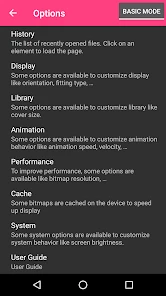
If you're anything like me, you know that the reading experience is everything. This app delivers with its customizable reading settings. You can choose between single page and double page views, adjust the zoom level, and even change the background color to suit your mood. The transition between pages is smooth, almost as if you're flipping through a physical comic book. It's these little details that make reading so immersive.
For smaller screens, I’d start with a single page and adjust zoom only when lettering feels hard to read; excessive zoom can turn page navigation into a repeated pan-and-reset routine. Double-page viewing makes more sense on a larger display, especially when artwork is designed as a spread. That simple choice can make the same file feel either comfortable or fiddly, so I’d test a few pages before settling on a default.
There is also a useful distinction between improving readability and trying to force every page into the same setup. A manga page with small text may call for a closer view, while a splash page is better appreciated without constant magnification. I’d change the layout for the material rather than treat one setting as universally best. If two people use the tablet differently, it is worth checking whether the current view still suits the next reader instead of assuming their preferred zoom and background match yours.
Features That Make a Difference
One of the features I absolutely love is the automatic bookmarking. It remembers where you left off, so you can pick up right where you paused. There's also a night mode, which is a lifesaver for my late-night reading sessions. Additionally, the app supports cloud storage services, allowing me to access my comics from multiple devices without a hitch. It's all about convenience here!
In a shared-device situation, I’d still make a habit of closing a volume at a clear stopping point and checking the bookmark when the next reader opens it. A remembered page is handy, but it is not the same thing as separate progress for every person. Cloud storage can help when I switch devices, while local folders are simpler when I want a small reading set ready for a trip; either way, keeping the source files organized makes the handoff easier.
For a day out, I’d use a short pre-trip routine: choose the issues, confirm they open, and leave them in a folder that is easy to recognize. That is more dependable than planning to sort out a cloud library while waiting for a train or sitting somewhere with limited connectivity. Cloud access is convenient for moving between devices, but it is not a replacement for knowing where the files are or checking that the intended volume is available on the device I’m carrying.
Practical fit for a household
This is strongest for readers who already have comics in supported files and want a flexible viewer rather than a store-led experience. It is less compelling if you mainly want recommendations, a built-in catalogue, or a polished shared library that separates family members automatically. Compared with general document readers, its comic-focused viewing options are the draw; compared with comic services, the freedom to open personal files is the point. The compromise is that organizing, selecting, and checking content remains your responsibility.
The comparison is less about one app being universally better and more about what I want the software to do. A general PDF reader may be enough if I only read occasional PDF issues, while a comic-focused viewer makes more sense when my shelves include image files and several archive formats. A subscription or storefront app can be more convenient when I want discovery and a ready-made catalogue. This viewer’s appeal is control over personal files, not replacing those services’ browsing or purchasing routines.
Now, I know what you're thinking – what about the ads? Well, the app does have a free version with ads, but they're not intrusive at all. However, if you're looking for an ad-free experience, the premium version is totally worth it. It's reasonably priced and enhances the overall experience.
For someone who is sensitive to interruptions, I’d pay attention to how the free experience feels during an actual reading session rather than decide based on a quick launch. The app is free to try, which makes that a sensible first step. I would not treat an upgrade as necessary just to test whether the formats and controls suit me; first I’d open the files I use most, read a full chapter, and see whether the overall routine feels comfortable.
Age, trust, and choosing what gets opened
The Everyone content rating applies to the app, not to the comics a person chooses to open in it. That distinction matters more on a shared tablet than on a personal device. I’d keep the family’s intended reading material in a clearly chosen location and review new files before making them easy for younger readers to browse. A file viewer gives the household flexibility, but it also puts more of the selection work on the people managing the collection.
That responsibility is a genuine reason some families should choose a different setup. If you need automatic age boundaries, individual child profiles, or a catalogue curated for younger readers, a service built around those needs is a better match. Challenger Comics Viewer is more appealing when an adult already has appropriate files and wants to read them. I’d also avoid treating a shared tablet’s folder names as a privacy measure; clear organization helps coordination, but it does not create separate accounts.
Who will get the most from it
I’d recommend it to readers who have a mixed collection, prefer keeping files they already own or have collected, and want choices such as single-page or double-page viewing. It can also suit a household that shares one Android tablet casually, provided everyone is comfortable taking turns and the person maintaining the files keeps the library understandable. Its broad format support can reduce the need to convert a collection before trying it.
I’d skip it if my main goal were finding new comics inside the app, managing separate family reading histories, or handing a young child a device without checking the material first. It is also a less obvious choice if almost everything I read is a single kind of document and a simpler reader already handles that comfortably. The strongest reason to choose this app is the combination of personal files and comic-oriented display options; if neither matters to me, its extra flexibility may not be worth changing my routine.
Final Thoughts
In conclusion, Challenger Comics Viewer has become my go-to app for reading comics on the go. Its user-friendly interface, extensive format support, and thoughtful features cater perfectly to both casual readers and hardcore comic enthusiasts alike. If you're passionate about comics and want a reliable app that enhances your reading experience, give this one a try. Trust me, you won't be disappointed!
My household verdict is positive with a caveat: I’d recommend it when several people share a device but are comfortable taking turns and keeping their files in order. I would skip it as the main family solution if separate profiles, content filtering, or automatic coordination are essential. For everyone else, its strength is straightforward reading across varied file types, and its best results come from choosing the right page layout and keeping a small, clearly sorted collection ready to open.
Challenger Comics Viewer Frequently Asked Questions
What file types can I open with Challenger Comics Viewer?
Challenger Comics Viewer is designed to read a broad selection of comic and image formats. It supports PDF, ePUB, CBR, CBZ, CBT, CB7, JPG, PNG, BMP, and GIF, making it useful if your collection includes both comic archives and individual image files. Before downloading, check that your comics are saved in one of these formats.
Is Challenger Comics Viewer suitable for reading comics saved on my device?
The app is a comics viewer intended for opening digital comics in its supported formats, including PDF, ePUB, CBR, and CBZ. That makes it a practical option for readers who already have compatible files and want to view them on an Android device. Its focus is on reading your files rather than serving as a comics shop or subscription service.
Can I use Challenger Comics Viewer if I am new to digital comics?
Yes. Challenger Comics Viewer is a comics app for opening files in formats such as PDF, ePUB, CBR, and CBZ, so it can be considered by readers who are just starting to build a digital collection. It is listed for everyone, and the range of supported formats may help if you receive comics from different sources. Your device must run Android 5.0 or later.
Is Challenger Comics Viewer free to download, and what devices can run it?
Challenger Comics Viewer is a free comics app for Android, and it requires Android 5.0 or later. It is listed for everyone, making it a straightforward option to consider if you want a viewer for digital comics without paying to download the app. Check that your device meets the minimum Android requirement before installing.
What platforms is Challenger Comics Viewer available on?
Challenger Comics Viewer is available on both Android and iOS platforms, allowing users to easily access their comics on smartphones and tablets. The app provides seamless integration across devices so that you can enjoy your comic collection whether you are at home or on the go.
Pros
- Supports multiple comic formats.
- Smooth zoom and pan features.
- Customizable reading settings.
- Offline reading available.
- User-friendly interface.
Cons
- No cloud sync feature.
- Occasional crashes reported.
- Limited library management.
- Ads in free version.
- No in-app purchases.
- Category
- Comics
- Version
- Varies with device