

Cartoon Comic Strip Maker
- 124.00
- 3.2
- Installs
- 1.00M
- Price
- Free

Screenshots
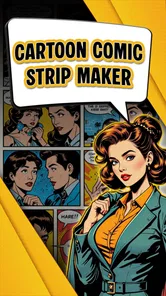

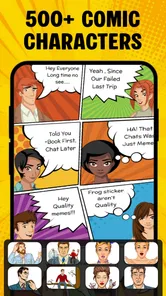
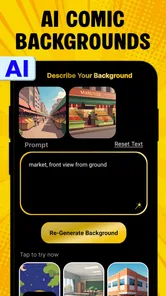
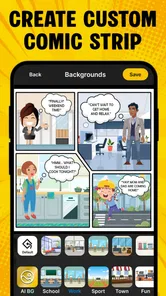
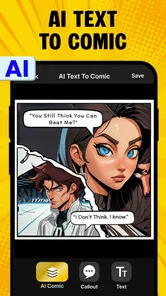

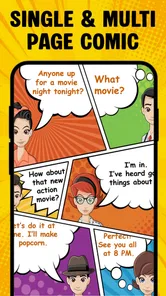
Analysis by Reviewed
I like the idea of turning a quick joke or small story into a comic without first learning to draw. Cartoon Comic Strip Maker is a comics app from Csmartworld, aimed at helping you put cartoon-style strips and books together. It is free to install, with optional in-app purchases priced at $6.99 per item, so I’d try making something with the free access before deciding whether a paid item is worth it for your needs.
What you can learn from a first test
Before committing to a bigger project, I’d make one short strip with a clear beginning, middle, and end. That quickly shows whether the available layouts, characters, backgrounds, and drawing options fit your idea. It also lets you see how much arranging and editing you enjoy doing on a small screen. A tiny test is more useful than browsing tools without a specific story in mind.
I’d also choose a familiar everyday moment rather than a complicated plot. For example, a lunch-break comic about forgetting a mug can work as three simple beats: the mistake, the discovery, and the reaction. Writing those beats first helps you decide how many panels the joke needs. If the idea is difficult to summarize in a sentence, it may need more planning before you start selecting visuals.
Making a comic without starting from a blank page
The first thing you'll notice about the Cartoon Comic Strip Maker is how user-friendly it is. From the moment you open the app, you're greeted with a clean interface that's both inviting and easy to navigate. Seriously, even my grandma could figure this one out!
Once you're in, the app offers a plethora of tools that let you create your comic strips from scratch. You can choose from a wide range of pre-designed characters and backgrounds, or if you're feeling particularly adventurous, you can even draw your own. The drawing tools are quite intuitive, allowing you to add your personal touch without any hassle.
Templates help with pacing
One of the standout features of this app is its extensive library of templates. Whether you're looking to create a single-panel comic or an epic multi-page saga, there's a template for that. Plus, the app lets you add speech bubbles, text, and even sound effects, giving your comics that professional look and feel.
For a short gag, I’d start with a single panel and write the punchline before adjusting the character and background. For a longer page, it helps to decide the sequence of events first, then choose a layout that gives each beat room. That small bit of planning can save you from trying to squeeze too much text into a panel. Speech bubbles and sound effects are most useful when they clarify timing or mood; adding them everywhere can make a simple strip feel crowded.
More From Our News Desk

 Gmail
GmailGmail in a Busy Inbox: Who Benefits Most?
From first account to crowded workday, Gmail earns its place through dependable search and flexible sorting—but its best fit depends on how much inbox maintenance you can tolerate.

 Prime Video
Switching to Prime Video: What Changes in Your Viewing Routine
Prime Video can make a compelling second home for streaming, but switching means learning a different catalog, rental layer, and route from browsing to playback.

 Universal TV Remote Control
Universal TV Remote Control Works Best as a Reliable Backup
A phone remote earns its place through quick setup and reliable habits. Here is how to get more from Universal TV Remote Control—and where its limits show.

 Weather - By Xiaomi
Weather by Xiaomi Review: Clear at a Glance, Less Clear Up Close
Xiaomi’s weather app makes everyday forecasts quick to scan, but its calm surface can leave useful details and recovery paths harder to find than they should be.

 X
XX Under Pressure: Can It Recover When Posting Goes Wrong?
A resilience-focused review of X, examining setup, mistaken posts, interruptions, weak connections, and the gaps that matter when recovery needs to be dependable.

 Clash of Clans
Clash of Clans Is Won Between the Battles
Its raids are quick; its community is a long-term project of coordination, teaching, rivalry, and shared responsibility—with all the friction that entails.
Latest News



Sharing is useful, but check the finished image
And let's not forget the sharing options! Once you've crafted your masterpiece, sharing it with the world is as easy as pie. The app integrates seamlessly with social media platforms, so you can showcase your work with just a few taps.
Before sharing, I’d read the comic once at the size it will appear on a phone screen. Text that seems clear while editing can become harder to follow when the whole strip is viewed at once, especially if several speech bubbles compete for attention. This is a practical final check for a joke, a classroom activity, or a small story you plan to send to friends.
Community can provide a reason to keep creating
But what really sets this app apart is its community feature. You can connect with other comic enthusiasts, share your work, and get feedback. It's like having a bunch of comic-loving friends right in your pocket! The community is vibrant and supportive, making it a great place to find inspiration and improve your skills.
Moreover, the app regularly hosts challenges and contests, giving you the chance to showcase your skills and win some cool prizes. It's a fun way to keep your creative juices flowing and stay motivated.
How it fits into a creative routine
A realistic use for this kind of maker is a quick after-school or lunch-break project: turn a small mishap into three panels, add dialogue, then share the result with family or classmates. It also suits someone who wants to plan a story visually before attempting more detailed illustration. The templates lower the effort of arranging a page, while the option to draw your own gives more control when the supplied cartoon look does not match the scene in your head.
Compared with drawing each panel in a general art app, a comic maker puts layouts, characters, and dialogue elements at the center of the process. That is convenient if your priority is getting a readable strip assembled quickly. A full illustration or design app is likely a better fit if you need precise brush control, elaborate character work, or page-by-page artistic polish. This app’s appeal is the shortcut from idea to comic, not a replacement for a dedicated drawing workspace.
Free to try, with limits to weigh
The app is free, and optional purchases cost $6.99 per item. I’d begin with a small test comic before buying anything: it gives you a chance to see whether the available layouts and creative tools suit the kind of work you want to make. The price of an item alone does not tell you whether it will add useful value to your particular workflow, so consider a purchase only when you know what you need from it.
There are trade-offs. A library of ready-made elements can make a first strip feel approachable, but it can also make different comics look alike if you rely on the same combinations. Making your own drawings or changing the way you use the panels can help give a story a more personal feel. If your main goal is to publish highly polished pages or control every visual detail, I would choose a more specialized tool instead.
Small choices that make a strip easier to read
One useful habit is to draft the dialogue before adding decorative elements. A panel has limited space, and a short line usually leaves the characters and the action room to breathe. If a sentence needs to be cut, I’d preserve the words that carry the joke or reveal the character’s reaction, rather than shrinking the text’s role by adding more bubbles.
I’d also keep the visual job of each panel distinct. A character’s expression can carry a beat that would otherwise need another line of dialogue, while a background can establish where the scene is happening without repeated explanation. This is especially helpful when using familiar cartoon assets: a deliberate change in pose, setting, or timing can make a sequence feel more like your own instead of a row of unrelated decorations.
For a longer comic, I would work in passes. First settle the order of events, then place the dialogue, and only after that refine the visual choices. This makes it easier to spot a missing transition or an overloaded panel before spending time polishing details. The trade-off is that a template can make page assembly feel quick, but it does not automatically solve storytelling; the reader still needs to understand what changed from one panel to the next.
Who is likely to enjoy it
I’d recommend giving it a try if you enjoy writing short jokes, making simple visual stories, or creating something playful to share without building every image from scratch. Parents and teachers may also find the format handy for inviting children to tell a story in panels, with adult guidance appropriate to the activity. The app is rated for Everyone, and its creative focus makes it approachable for casual use, though the best fit still depends on a person’s patience and interest in arranging a comic.
It may be less satisfying for someone who wants a structured drawing course, professional publishing controls, or a large canvas for detailed illustration. It is also worth remembering that “easy to start” does not mean every finished strip will read well automatically: panel order, text length, and visual clarity still take thought. A quick read-through before sharing is a simple way to catch confusing dialogue or a punchline that arrives too soon.
Where it sits among comic-making options
The choice between this and a general drawing app comes down to what slows you down. If arranging panels and adding speech bubbles are the tedious parts, a comic-focused workflow is more appealing than building those pieces manually. If the drawing itself is the main pleasure, or you want exact control over line work and composition, a drawing app will probably feel less restrictive. I would not choose this expecting it to replace a full illustration setup.
It is also different from writing a script in a notes app and leaving the visuals for later. Here, you can think in panels while shaping the story, which can expose pacing problems early: a reaction may need its own beat, or a punchline may work better after a pause. That visual planning is valuable even for a comic you never publish. The compromise is that choosing ready-made elements can guide the look of the story as much as the story guides the art.
For a child or a group activity, I’d treat the app as a prompt for storytelling rather than a test of drawing skill. One person can suggest the situation, another can choose what a character says, and the finished panels can be read aloud together. The approach keeps the task manageable, though an adult may need to help with the sequence and text so the finished comic makes sense to someone who did not watch it being made.
A sensible way to decide
The app has been available since January 17, 2019, and its current version is 8.3. It has an average rating of 3.2 from around 9,600 ratings, alongside 123 written reviews, and has passed one million installs. I take that mixed rating as a reason to approach it with realistic expectations rather than assume it will suit every creator. It works on Android 7.0 and later, so checking your device’s system version is a useful first step.
The practical question is whether the free experience gives you enough room to make the kind of comic you have in mind. I’d try a complete, modest strip before considering an optional purchase, then ask whether a paid item would solve a specific problem or simply add more choices. Since purchases are priced per item, the value depends on what that item contributes to your own project; I would not spend just because a larger selection sounds appealing.
If you are deciding whether to share a comic publicly, make a private test first and inspect how the finished panels look together. That gives you a chance to judge readability and the overall style before putting time into a longer piece. For an occasional gag or a simple story, a quick workflow may be exactly what you need. For a regular publishing project, compare it with tools built around more detailed illustration and page control before settling on a workflow.
So, there you have it, folks! The Cartoon Comic Strip Maker is not just an app; it's a gateway to a world of creativity and fun. Whether you're a seasoned artist or just looking to try something new, this app is definitely worth checking out. Trust me, once you start, you won't want to stop!
Cartoon Comic Strip Maker Frequently Asked Questions
What devices and operating systems can run Cartoon Comic Strip Maker?
Cartoon Comic Strip Maker is an app in the Comics category, developed by Csmartworld. Its minimum operating-system requirement is version 7.0, so check your device’s software before downloading. The app is free to install, and its current version is 8.3. It is designed for creating personalized cartoon comic strips and comic books.
How popular is Cartoon Comic Strip Maker?
Cartoon Comic Strip Maker has more than one million installs and an average rating of 3.2 from around 9,600 ratings, alongside 123 written reviews. Those figures offer a sense of its reach and user feedback, but they cannot predict whether its creative tools will suit your own style. If you enjoy making comics, you can try it and decide whether the workflow feels right for you.
What is Cartoon Comic Strip Maker and how does it work?
Cartoon Comic Strip Maker is a creative application designed for both Android and iOS devices, allowing users to create personalized comic strips with ease. By offering a variety of templates, characters, and text bubbles, users can craft their stories and share them with friends or on social media platforms. The intuitive drag-and-drop interface makes it accessible for all ages.
What features does Cartoon Comic Strip Maker offer?
Cartoon Comic Strip Maker boasts a wide array of features including customizable characters, different backgrounds, text bubbles, and special effects. Users can also import their own images to integrate into comic strips. Additionally, the app provides editing tools for refining details and offers an easy sharing function to upload creations directly to social media.
Is Cartoon Comic Strip Maker free to use?
Cartoon Comic Strip Maker is free to download and offers a free version with basic features, allowing users to create and share simple comic strips. However, for access to premium features such as additional characters, backgrounds, and an ad-free experience, users can opt for in-app purchases. In-app purchases are listed at $6.99 per item, so check the purchase details before confirming anything.
Pros
- User-friendly interface for beginners
- Wide variety of templates available
- Supports high-resolution exports
- Regular updates with new features
- Includes a vast library of assets
Cons
- Limited free version features
- Occasional app crashes
- Ads in the free version
- No collaboration tools
- Requires internet for some features











