Carmin
- 668.00
- 4.4
- Installs
- 1.00M
- Price
- Free

Screenshots
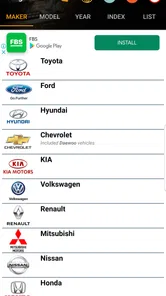
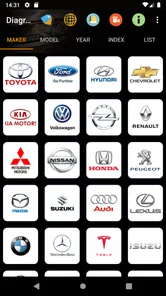

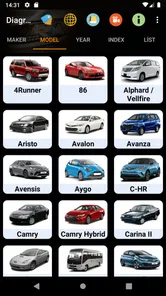
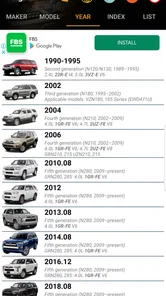
Analysis by Reviewed
Carmin is best understood as a reference tool for automotive electrical wiring, not as a navigation companion. That distinction matters: if I were looking for turn-by-turn directions, traffic updates, offline maps, or a diary of my journeys, I would choose a different kind of app. If I needed help making sense of a vehicle’s electrical connections, however, a collection of wiring diagrams can be much more useful than a general-purpose car app. My view is that Carmin is worth considering when the job involves tracing a circuit, but it should be treated as a guide rather than a substitute for careful diagnosis.
A focused tool for electrical questions
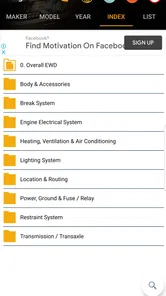
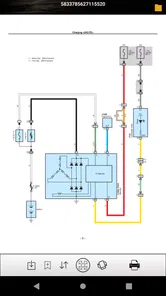
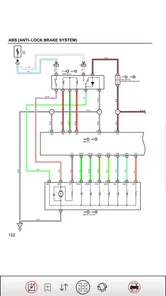
Carmin sits in the auto-and-vehicle category and is developed by Min Junior. Its appeal is its narrow subject: automotive wiring diagrams. Rather than trying to manage every aspect of car ownership, it is aimed at people who need a visual reference while thinking through an electrical problem. That focus can save time when you already have a specific question, such as where a circuit runs or how a connection relates to other parts of a system.
That kind of reference is useful because electrical faults are often less obvious than mechanical ones. A light that stops working, an accessory that behaves inconsistently, or a circuit that needs checking can send a home mechanic into a tangle of guesses. A diagram gives you a way to organize those questions before you reach for tools. I would use it to orient myself and plan what to inspect, not to assume that a picture alone identifies the cause of a fault.
How I would use it at the car
Picture a practical situation: a driver notices an electrical component has stopped working and wants to understand the circuit before asking a mechanic or attempting a basic check. I would first identify the vehicle and the system I need to investigate, then consult the relevant diagram and compare its layout with the car in front of me. The key is to move slowly: confirm that the reference applies to the exact vehicle, follow the circuit logically, and avoid treating a similar-looking diagram as proof that the wiring is identical.
A useful habit is to make a short list of what you already know before opening a diagram: what stopped working, whether the issue is constant or intermittent, and what changed just before it began. That keeps the search focused. It also helps prevent a common mistake with wiring references—following every branch on the page when only one part of the circuit is relevant. If I were working in a cramped space, I would study the diagram first, note the path I need to check, and then return to the car rather than repeatedly switching attention between the screen and the wiring.
Diagrams are most helpful when paired with basic caution. Disconnecting or testing electrical components can carry risks, and a diagram does not tell you whether a particular repair is safe for your skill level. If a job involves uncertainty, damaged wiring, or equipment you do not understand, I would stop and get qualified help. Carmin can make a problem easier to think through; it cannot inspect the vehicle, verify a repair, or replace sound safety practices.
What Makes Carmin Stand Out?
First things first, the user interface. I’m not one to get overly excited about how an app looks, but Carmin is a visual treat. The design is sleek and modern, making it incredibly easy to use—even for those who aren’t tech-savvy. It’s like the app developers took a peek into our minds and crafted something that just makes sense.
More From Our News Desk

Weather by Xiaomi Review: Clear at a Glance, Less Clear Up Close

X Under Pressure: Can It Recover When Posting Goes Wrong?

Clash of Clans Is Won Between the Battles

Android Auto Makes the Case for Quieter Car Software

MobiOffice: Transforming Mobile Productivity with Seamless Integration

EA SPORTS FC™ Mobile Soccer: Redefining Mobile Sports Gaming
Features That Make Life Easier
One of the standout features of Carmin is its real-time navigation. I took it for a spin during rush hour and was amazed at how accurate the traffic predictions were. It rerouted me around a gnarly traffic jam, saving me precious time. What’s even cooler is the offline map feature. I mean, who hasn’t been in a spot where data is sketchy at best? With Carmin, those worries are a thing of the past.
Oh, and if you’re someone who loves stats, you’re in for a treat. Carmin offers detailed analytics of your trips. It’s like having a personal travel diary that keeps you informed about your travel habits over time. I found myself diving into the stats just to see how much time I actually spend on the road. Spoiler: it’s a lot.
User Experience
Now, let’s talk about the overall user experience. Setting up Carmin was as straightforward as it gets. The app guides you through the process with clear instructions, and in no time, you’re good to go. I appreciate an app that respects my time and doesn’t make me jump through hoops just to get started.
While using the app, I noticed how intuitive the controls are. Everything is where you expect it to be, and there’s no unnecessary clutter. The app runs smoothly, with no annoying lags or crashes—a testament to the developers’ attention to detail.
Making sense of diagrams
For a wiring reference, the most important question is not whether a diagram looks clear in isolation, but whether it matches the vehicle and circuit you are working on. I would treat identifying the correct model and system as the first step, then check that the labels and connections make sense alongside the actual components. If anything conflicts with what you see, pause instead of forcing the diagram to fit. Vehicles can differ by configuration, and electrical work is not a good place to rely on a guess.
A second practical tip is to use the diagram to frame a test, not to dictate a repair. For example, if a circuit appears to pass through several connections, the diagram can help you think about where a fault might interrupt the path. That is different from concluding that one particular part is defective. A wiring map can narrow the possibilities, but testing and careful observation still matter. This distinction is especially useful for beginners, who may otherwise read a diagram as a direct list of parts to replace.
Compared with searching the web for an isolated image, a dedicated app has the potential advantage of keeping reference material in one place and making it easier to return to a diagram while working. A broad car-maintenance app, meanwhile, may be a better fit if your main needs are service reminders, fuel tracking, or general ownership records. And if you need live directions, a navigation app is the sensible choice. Carmin’s value is not that it replaces those tools; it is that automotive wiring is a specialized problem and benefits from a specialized reference.
Where the limits matter
The main trade-off is that diagrams can look authoritative even when they are not the right match for the vehicle in front of you. Before relying on one, I would check the vehicle details carefully and avoid carrying over assumptions from another model or year. The app should support a diagnosis, not settle it on its own. If the information is hard to interpret or does not appear to fit, turning to a repair manual or a qualified technician is a better move than improvising.
It is also worth being realistic about the kind of user experience this category offers. Wiring diagrams are reference material, so they demand more attention than an app that simply records a trip or gives a route. Someone hoping for a guided, step-by-step repair process may find a diagram less reassuring than expected. I would not recommend choosing Carmin solely because you want a general car companion; it makes the most sense when you have a concrete electrical question and are comfortable checking details carefully.
For a beginner, the best approach is to start with a small, low-risk question and learn how to read the diagram before attempting any work. For someone experienced, the benefit is quicker access to a visual reference that can help organize troubleshooting. Either way, I would keep the phone away from moving parts and avoid handling electrical connections while distracted by the screen. Planning the check first is safer and usually more efficient than trying to interpret a diagram in the middle of a task.
Who should install it
Carmin is most likely to suit a DIY owner, an automotive student, or a technician who wants wiring references available on a phone. It may also help a curious driver understand what a mechanic is discussing, provided they remember that a diagram is only one part of the explanation. Someone who rarely deals with electrical systems may still find it useful for occasional reference, but should not expect it to teach every diagnostic skill from scratch.
The app is free to download, with optional in-app purchases priced from $4.99 to $48.99 per item. It is rated for Everyone and has an average rating of 4.4 from around 23,000 ratings, with over 1 million installs. Those figures suggest that it has found an audience, but popularity does not tell me whether a particular diagram suits a particular vehicle. I would judge it by whether it helps with the exact reference task I have in mind.
On Android, it runs on version 5.0 or later, and its current version is 4.3.0. It was released on April 21, 2019. That gives readers a few concrete compatibility details to check before installing, but the more important decision is still practical: do you want a wiring reference, or are you looking for navigation, maintenance reminders, or a full repair tutorial? Choosing based on that distinction prevents disappointment.
Final Thoughts
All in all, Carmin is a must-have app for anyone who spends a considerable amount of time on the road. Its intuitive design, reliable navigation, and insightful analytics make it a powerhouse tool for modern-day travelers. Whether you’re commuting to work or exploring new places, Carmin is like that trusty co-pilot you never knew you needed. Give it a try, and you might just find yourself wondering how you ever got by without it!
For the specific job of consulting automotive wiring diagrams, my recommendation is more measured: Carmin is worth a look if you want that kind of reference close at hand, especially when you already know what system you need to investigate. I would not rely on it as the only authority for a repair, and I would skip it if my priority were route planning or general vehicle tracking. Used with careful vehicle matching and sensible safety judgment, it can be a practical starting point for electrical troubleshooting.
Carmin Frequently Asked Questions
Is Carmin available for free, and what should I know before installing it?
Carmin is free to download and is intended for people looking for automotive electrical wiring diagrams. It is rated for Everyone, so its content is suitable for a broad audience. Before installing, check that your Android device runs version 5.0 or later. The app also offers in-app purchases, so downloading it for free does not mean every purchase option is free.
Who develops Carmin, and what kind of app is it?
Carmin is an Auto & Vehicles app developed by Min Junior. Its focus is automotive electrical wiring diagrams, so it is aimed at people who want a mobile reference for vehicle wiring information. The app is free to download, though it also offers in-app purchases. It is rated for Everyone, making its content suitable for a broad audience.
What is Carmin and how does it work?
Carmin is a versatile app designed to enhance your daily productivity by integrating a range of tools into one platform. It offers features such as task management, calendar synchronization, and note-taking. Users can customize their dashboard to fit their personal or professional needs, making it easier to keep track of tasks, appointments, and ideas in one place.
Is Carmin free to use or does it require a subscription?
Carmin offers both free and premium subscription plans. The free version provides access to basic features such as task management and note-taking. However, for advanced features like cloud sync, collaboration tools, and enhanced customization, users need to subscribe to a premium plan, which offers monthly or annual payment options.
On which platforms is Carmin available?
Carmin is available on both Android and iOS platforms, ensuring broad accessibility for users across different devices. The app is optimized for smartphones and tablets, providing a seamless user experience regardless of the device used. This cross-platform availability ensures that users can manage their tasks on-the-go, whether they use an Android or an iOS device.
Pros
- User-friendly interface with intuitive navigation.
- Offers a wide variety of customization options.
- Seamless integration with other apps.
- Fast and responsive performance.
- Regular updates with new features.
Cons
- Limited offline functionality.
- Some features require in-app purchases.
- Occasional bugs and glitches.
- High battery consumption during use.
- Limited customer support options.











