CarMax: Used Cars for Sale
- 8.91K
- 4.5
- Installs
- 5.00M
- Price
- Free

Screenshots
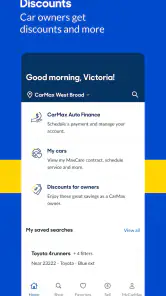

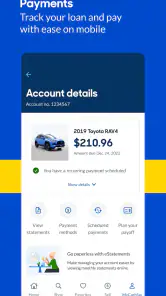
Analysis by Reviewed
I find CarMax: Used Cars for Sale most useful as a place to start narrowing down a big decision, not as a substitute for seeing a vehicle in person. It’s a free Auto & Vehicles app from CarMax Enterprise Services, LLC, with access to a large used-car inventory. That makes it handy for checking what might fit your needs before spending time visiting a location or contacting a seller.
What the free access is worth
There’s no app purchase price to weigh up: browsing the app is free. For me, that makes it an easy tool to try while comparing options, especially if I’m still deciding between a car, SUV, or truck. The value is in making research more convenient; it doesn’t mean the vehicle itself is free, and the app shouldn’t be mistaken for a guarantee that a car is the right choice.
CarMax has been in the app stores since 2012, and the current Android version is 4.41.2, with Android 10 as the minimum requirement. It has a 4.5 average from around 35,000 ratings, with roughly 8,900 written reviews and over 5 million installs. Those figures suggest it’s an established shopping app, though they can’t tell me whether a particular listing will suit my budget or expectations. Its Everyone age rating also makes the app broadly accessible.
Using the listings to make a smarter shortlist
The app’s strongest role is helping me turn vague browsing into a practical shortlist. Rather than opening listings at random, I’d first decide which details are non-negotiable—such as vehicle type, price range, or a particular feature—then use the search filters to reduce the field. I’d keep a little flexibility around preferences that aren’t essential: a strict filter can hide reasonable alternatives, while a broad search can make it harder to compare like with like.
A useful everyday scenario is looking for a dependable vehicle during a lunch break. I can check what is available, save the more relevant possibilities for closer review, and come back later to compare them when I have time. If I’m shopping with someone else, the vehicle comparison tool gives us a shared basis for discussion: we can focus on the differences that matter to us instead of trying to remember details from several listings.
Where it helps—and where I’d slow down
Photos and a 360-degree view can reveal details that a single exterior image would miss, so I’d use them to spot questions worth asking before arranging a visit. A history report can also add useful context to a listing. Still, neither replaces an in-person inspection or a careful check that the vehicle’s condition matches what I need. I treat the digital presentation as a screening step, not proof that a car is mechanically sound.
The financing tools are another reason the app can be useful early in the process. The original experience describes pre-qualification that doesn’t affect a credit score, along with a payment calculator; I’d use those to think through affordability rather than treating an estimate as a final loan offer. Before committing, I’d check the actual terms and make sure the full vehicle cost fits my budget. Anyone who only wants general market research, or who prefers negotiating directly with private sellers, may get more from broader classified listings and independent research instead.
More From Our News Desk

Weather by Xiaomi Review: Clear at a Glance, Less Clear Up Close

X Under Pressure: Can It Recover When Posting Goes Wrong?

Clash of Clans Is Won Between the Battles

Android Auto Makes the Case for Quieter Car Software

MobiOffice: Transforming Mobile Productivity with Seamless Integration

EA SPORTS FC™ Mobile Soccer: Redefining Mobile Sports Gaming
Exploring the Features
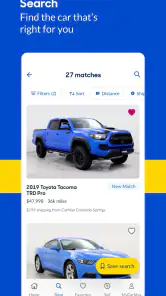
Upon launching the app, the first thing you notice is the user-friendly interface. It’s clean, intuitive, and doesn’t overwhelm you with options. Navigating through the app is a breeze, and you don't need to be a tech whiz to get the hang of it. You can easily search for cars by make, model, price range, and even specific features. The CarMax: Used Cars for Sale app really does make car shopping as easy as pie.
One of the standout features for me is the 360-degree view of the cars. It’s almost like you’re right there in the showroom. You can inspect every nook and cranny of the vehicle, which is crucial when buying a used car. Plus, each listing comes with a detailed history report, so you know exactly what you’re getting into. No surprises here!
Why You’ll Love It
Now, I’ve got to say, the vehicle comparison tool is a game-changer. You can put several cars side by side and weigh out the pros and cons based on your personal criteria. It’s like having your own personal car consultant in your pocket. The app also gives you access to customer reviews, which are super helpful in making an informed decision. It’s always good to know what other buyers think before you take the plunge.
Another feature worth mentioning is the financing options right at your fingertips. You can pre-qualify for financing without affecting your credit score, which is a huge plus! The app also offers a calculator to estimate your monthly payments, so you can budget accordingly.
Comparing it with other ways to shop
When I compare this with general classified apps, the biggest difference is the purpose of the search. Broad marketplaces can help me scan a wider mix of private and dealer listings, which is useful when I want to understand the market or negotiate directly. CarMax is more focused: I can browse its own used-vehicle inventory and use the related viewing and financing tools in one place. That makes it a better first stop for someone considering a CarMax purchase, but not a complete picture of every vehicle for sale nearby.
I’d use the two approaches at different stages rather than expecting one to replace the other. First, I’d use the app to narrow down body styles and features, then check comparable listings elsewhere if price context or a broader selection matters to me. A lower advertised price on another marketplace is not automatically a better deal; condition, history, and the work needed to complete a private sale all matter. The reverse is true too: a polished listing and convenient app workflow do not, on their own, prove a particular car is the best value.
A more careful way to compare cars
One practical tip is to compare vehicles that serve the same purpose, not just ones that look similar in search results. For example, if I need a vehicle for commuting and occasional weekend trips, I’d decide how much space I actually use before choosing between a compact car and an SUV. Then I’d compare a small shortlist against those needs instead of treating every appealing listing as a contender. This keeps the decision tied to daily use rather than presentation.
I’d also make a short question list while browsing. If a photo leaves a detail unclear, or the history report raises something I want explained, I’d write it down before contacting anyone or arranging a visit. That small habit makes the 360-degree imagery and listing information more useful: they become prompts for a real inspection, not a substitute for one. The app helps me notice what to investigate; it cannot make that judgment for me.
For a couple or family making the decision together, comparison is especially useful when each person has different priorities. One person may care most about cargo space, another about the monthly budget, and someone else about a particular feature. I’d agree on the must-haves first, then compare only the vehicles that meet them. This avoids a common shopping trap: debating a long list of cars without settling what the household actually needs.
Questions worth settling before a visit
A natural question is whether browsing costs anything. The app itself is free to use, so I can begin searching without paying for access. That should be kept separate from the vehicle’s purchase cost and any financing arrangement. I’d use the payment calculator for rough planning, then review the actual figures and terms before making a commitment rather than assuming its estimate is a final quote.
Another question is whether viewing a listing is enough to decide. My answer is no. Photos, a 360-degree view, and a history report can make screening more informed, but I’d still want to see the vehicle and confirm that its condition and details suit me. If I’m unable to inspect it myself, I’d arrange an appropriate independent check rather than relying only on what appears on a phone screen.
People also often wonder whether this is the right app for a broad search. It is useful if CarMax inventory is part of the decision, but shoppers who want to include private sellers and a wider range of dealers should use broader classified listings too. Likewise, anyone who already knows the exact model and wants the lowest possible price through direct negotiation may prefer to focus on those alternatives. The best choice depends on whether convenience and a focused inventory or maximum market breadth matters more.
Who gets the most out of it
I’d recommend it to someone early in a used-car search who wants to explore cars, SUVs, and trucks without starting with scattered browser tabs. It suits shoppers who benefit from visual browsing, want to keep a shortlist, or would like a payment estimate as one part of budgeting. It can also help a first-time buyer prepare more focused questions before visiting a vehicle, as long as they remember that online research is only one step.
It is less compelling for someone who only wants a general snapshot of every nearby used-car option, or who enjoys contacting private sellers and negotiating directly. It also isn’t the right tool for anyone expecting an app to certify a vehicle’s mechanical condition. In those situations I’d pair it with other marketplace searches, independent research, and a hands-on inspection. That is not a knock on the app; it reflects the limits of shopping for a physical vehicle through a screen.
Final Thoughts
All in all, the CarMax app takes the stress out of buying a used car. It’s comprehensive yet simple to use, making it perfect for both tech-savvy individuals and those who might not be as familiar with using apps. Whether you're looking to buy your first car or just browsing for an upgrade, this app is definitely worth checking out. With the convenience it offers, car shopping has never been this easy or enjoyable.
So, if you’re in the market for a used car, don’t just take my word for it—download the CarMax: Used Cars for Sale app and see for yourself. Happy car hunting!
CarMax: Used Cars for Sale Frequently Asked Questions
Who publishes CarMax: Used Cars for Sale, and what is the app for?
CarMax: Used Cars for Sale is published by CarMax Enterprise Services, LLC. It is an Auto & Vehicles app for people exploring used cars, SUVs, and trucks. Its central purpose is to help shoppers find, search, and browse vehicle listings, making it useful whether you are beginning a search or comparing options you already have in mind.
How large is the selection I can browse in the CarMax app?
The app’s store summary describes a selection of over 40,000 used cars, SUVs, and trucks. That makes it possible to browse a broad range of vehicle listings in one place and narrow your search according to what interests you. Since inventory can change, check the selected vehicle’s current details before making plans around it.
Can I browse CarMax inventory without creating an account?
Yes. The app is designed to let shoppers find, search, and browse used cars, SUVs, and trucks, so you can explore vehicles before deciding whether to save favorites or take another step. Browsing first is a practical way to get familiar with the available selection and compare options at your own pace.
What features does the CarMax app offer?
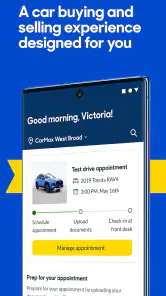
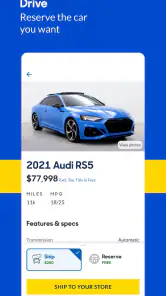
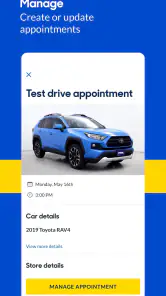
The CarMax app provides a comprehensive platform for browsing a vast inventory of used cars. Users can view detailed vehicle specifications, photos, and history reports. The app also offers a finance calculator, the ability to save favorite vehicles, and a feature to schedule test drives. Additionally, the app includes a tool for locating nearby CarMax stores.
Is the CarMax app free to use?
Yes, the CarMax app is free to download and use. You can browse, compare, and save your favorite vehicles without paying for the app, making it an accessible tool for anyone shopping for a used car. It is rated for Everyone, so its stated age classification is suitable for a broad audience.
Pros
- Wide selection of used cars available.
- User-friendly interface and easy navigation.
- Detailed vehicle history reports included.
- Competitive pricing and financing options.
- Convenient home delivery service.
Cons
- Limited availability in some regions.
- Occasional app performance issues.
- Some cars may have hidden damages.
- Limited negotiation on listed prices.
- Customer service may vary by location.
- Category
- Auto & Vehicles
- Version
- 4.41.2