Carly — OBD2 car scanner
- 1.34K
- 3.5
- Installs
- 1.00M
- Price
- Free

Screenshots

Analysis by Reviewed
I reach for a car scanner when a warning light appears and I want to understand the situation before deciding what to do next. Carly — OBD2 car scanner is built around that kind of practical question: connect a phone to a car through an OBD2 adapter, check what the vehicle reports, and use the information to plan a sensible next step. I see it as a way to become a more informed owner, not as a replacement for a mechanic or a guarantee that every fault can be diagnosed at home.
Before you plug in
The first thing to keep in mind is that the app depends on a suitable adapter and on what your particular car makes available through its systems. That means the useful starting point is not just installing the app, but checking whether your car and adapter are a good match before relying on a particular function. Carly is free to install, but some in-app purchases range from $2.74 to $118.99 per item, so I’d look at what is available for my vehicle before budgeting for a feature.
There’s also a difference between reading a warning and fixing its cause. A diagnostic result can give you a better conversation with a repair shop, but it doesn’t automatically prove which part has failed. I’d treat the app as a decision aid: useful for gathering context, especially when a dashboard alert appears, while leaving safety-critical repairs and uncertain diagnoses to a qualified professional.
Getting Under the Hood
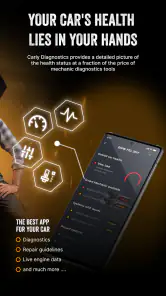
Alright, let’s dive right into what Carly — OBD2 car scanner can do for you. First off, this app connects to your car via an OBD2 adapter. Don’t worry if you’re not super tech-savvy; the app guides you through the setup process with ease. Once you’re connected, it starts pulling data from your car’s computer systems, revealing insights that were previously only accessible to professionals. Pretty cool, huh?
Features That Stand Out
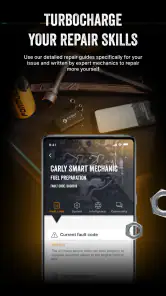
One of the standout features has to be the ability to perform diagnostic checks. You can identify issues ranging from minor glitches to potentially serious problems. The app provides a detailed report, so you’re not just left with a cryptic error code. Imagine heading to the mechanic already knowing what’s wrong with your car. Talk about a confidence booster!
In everyday use, I’d save the report or note its wording before clearing or changing anything. That gives you something concrete to share with a mechanic and makes it easier to compare what the car reports before and after a repair. If the same alert returns, that history is more useful than trying to remember a dashboard message from weeks ago. I also wouldn’t use a reassuring scan result as a reason to ignore symptoms such as unusual noises, loss of power, or a warning that affects safe driving.
Customizing with care
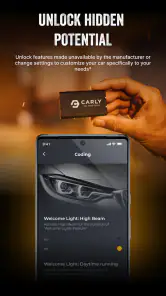
Another awesome feature is the coding function. If you’re the type of person who likes to customize car settings, this is where Carly shines. You can tweak settings like the welcome lights, auto-lock, and even disable that annoying seatbelt warning beep. It’s like giving your car a personalized makeover without the hefty price tag.
More From Our News Desk

Weather by Xiaomi Review: Clear at a Glance, Less Clear Up Close

X Under Pressure: Can It Recover When Posting Goes Wrong?

Clash of Clans Is Won Between the Battles

Android Auto Makes the Case for Quieter Car Software

MobiOffice: Transforming Mobile Productivity with Seamless Integration

EA SPORTS FC™ Mobile Soccer: Redefining Mobile Sports Gaming
I’d approach coding as a deliberate, one-change-at-a-time process rather than a quick round of experiments. Make a note of the original setting, change only what you understand, and check the result while parked. A small convenience tweak can affect how the car behaves, and personal preferences differ: an automatic lock may suit one driver but frustrate someone who regularly loads passengers or cargo. If you share the vehicle, agree on changes first so a customization doesn’t become an unexpected annoyance for the next person behind the wheel.
Maintenance Made Easy
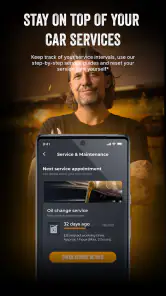
For those of us who might forget to check our oil or tire pressures regularly, Carly has got your back. The app keeps track of your car’s maintenance schedule, sending you timely reminders so you can keep everything running smoothly. It’s like having a virtual assistant dedicated to just your car’s needs.
I’d use reminders as prompts to inspect or arrange service, not as a substitute for checking the owner’s manual or the car itself. A reminder can help keep routine jobs from slipping through the cracks, but it cannot tell you that a tire has lost pressure today or that a new sound needs attention. For a household with more than one vehicle, it also helps to be clear about which car you’re checking before making decisions from a scan or maintenance note.
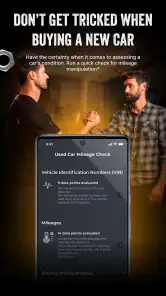
Plus, Carly offers a used car check feature. If you’re in the market for a second-hand vehicle, this tool is invaluable. It can tell you if the car’s mileage has been tampered with or if there are any hidden issues you should be aware of before making a purchase. It’s like having a little detective right in your pocket.
Putting a scan to work
Picture a familiar moment: you’re preparing to drive to work and a warning light appears. Once safely parked, you connect the adapter, follow the app’s prompts, and run a check. The useful outcome isn’t necessarily a home repair; it may simply be knowing whether to call a garage, explaining the warning more clearly, or asking a seller a focused question about a used car. I’d avoid scanning while driving and wouldn’t let an app result overrule a warning that calls for immediate attention.
That workflow is where Carly differs from a basic code reader. A simple reader can be a better choice if all you want is a low-friction way to retrieve a fault code. Carly brings diagnostics together with customization, maintenance support, and used-car checks, which is more appealing if you want one car-focused app for several ownership tasks. The trade-off is that an adapter is part of the setup, and the range of useful functions can depend on the vehicle, so it may be more than a casual driver needs.
Making the handoff to a mechanic
The scan is most helpful when I treat it as the beginning of a conversation, not the final diagnosis. Before calling a garage, I’d write down when the warning appeared, what the car was doing, and whether the symptoms changed afterward. Then I’d share the wording of the report and ask the mechanic to verify the cause. That small handoff keeps a code from turning into a premature parts order and gives the technician context they cannot get from the code alone.
There is a practical distinction between an alert that appears once and one that returns after a repair or under the same driving conditions. If the warning disappears, I’d still keep the note rather than assuming the issue is settled. If it comes back, the sequence of events can help a professional reproduce the problem. Carly can help organize that information, but it cannot perform the physical inspection or confirm that a repair has solved the underlying fault.
A used-car visit without false certainty
For a used-car viewing, I’d ask the seller’s permission before connecting an adapter and make the scan one part of a broader inspection. It can give me a more focused set of questions, but I wouldn’t treat a clean result as proof that a vehicle has been well maintained or has no hidden damage. I’d still compare the car’s condition with its paperwork, take a test drive, and arrange an independent inspection when the purchase matters enough to justify it.
The mileage check is particularly easy to overread. A result that raises a concern should prompt follow-up, not an accusation; a result that does not raise one should not become a guarantee. The useful payoff is having another clue to discuss with the seller or inspector. That is a better role for an app-based check than asking it to make a high-stakes purchase decision on its own.
Who will get the most from it
I think the strongest fit is a hands-on owner who wants to understand warning messages, keep a record of maintenance, or make supported comfort changes without treating every scan as a repair verdict. It can also help someone assessing a used vehicle by adding another source of information to an inspection and a conversation with the seller. I would not rely on it as the sole check before buying a car: a scan cannot replace a road test, paperwork review, or independent mechanical inspection.
Drivers who prefer a mechanic to handle all diagnostics, rarely use vehicle settings, and don’t want to manage an adapter may be happier with a workshop visit or a straightforward code reader. Carly’s broader toolkit is valuable only if you’ll actually use those extra functions. Its Android version 49.69 requires Android 8.0 or later, and the app is rated for Everyone; those details help establish basic compatibility, while the exact usefulness still comes down to the car and the tasks you have in mind.
Choosing the right level of tool
Compared with a garage diagnostic, Carly gives me a more convenient way to gather information before an appointment, but it cannot replace a technician’s equipment, experience, or physical checks. Compared with a basic OBD2 reader, it asks for more setup and offers a broader set of ownership tasks. That breadth is worthwhile when I expect to use diagnostics, supported coding, maintenance prompts, or a used-car check; if I only want to read an occasional code, a simpler reader may be the less complicated choice.
It also isn’t an ideal purchase for someone who expects every menu item to work on every car. Vehicle support is a real part of the decision, so I’d check compatibility for the specific car and the specific function before paying for an adapter or an in-app option. That is especially important if coding is the main attraction: the availability and usefulness of a setting depend on the vehicle, and the price of an in-app purchase can vary considerably.
Final Thoughts
All in all, Carly — OBD2 car scanner is a game-changer for anyone who wants to take control of their car’s health. It’s super user-friendly, packed with features, and gives you the peace of mind knowing what’s going on with your vehicle. Whether you’re a car enthusiast or just someone who wants to avoid unexpected repair bills, this app is definitely worth checking out. So, what are you waiting for? Give it a try and let me know what you think!
Developed by Carly Solutions GmbH & Co KG, it has been available since October 21, 2012. It has a 3.5 average from around 31,000 ratings, about 1,300 written reviews, and over 1 million installs. Those figures suggest a well-established tool with a mixed reception rather than an automatic recommendation for every driver. I’d start with the free install, confirm the adapter and vehicle fit, then decide whether the functions I’ll use justify any purchase. For someone who wants context before handing a car over to a garage, that’s a practical place to begin.
What I’d check before spending
Because the app is free to install but has paid items, I’d separate the decision into two parts: first establish whether it can connect usefully to my car, then decide whether the functions I actually need justify a purchase. I wouldn’t buy based on the promise of a feature in the abstract. I’d identify one practical job—such as reading a warning or checking whether a particular setting is supported—and use that as the test for whether the extra cost makes sense.
The same approach helps avoid buying an adapter for a one-off curiosity. If I only want an answer to a current warning, a repair shop may be the more direct route. If I expect to refer to the app over the life of the car, keep track of maintenance, or make a supported adjustment, the broader toolkit has a clearer purpose. The right value judgment depends less on how many functions appear in the app and more on how often I will genuinely use them.
Keeping expectations grounded
One question I’d ask before installing is whether I need live certainty or simply better context. Carly is more useful for the second. It can help turn a vague dashboard symbol into information I can discuss, but a diagnostic code is a clue generated by the vehicle, not a complete explanation of the mechanical problem. If the car behaves strangely, the symptoms and the scan should be considered together, and a qualified mechanic should handle any repair I’m not equipped to do safely.
I’d also keep the adapter and phone workflow for when the car is stationary. A warning can be stressful, but trying to diagnose it while driving adds distraction and does not improve the quality of the decision. Park somewhere safe, check the car’s own manual if the warning calls for immediate action, and use the app only when it is appropriate to do so. That order matters more than getting a scan quickly.
My recommendation in practice
I’d recommend Carly to an owner who enjoys being involved in routine car decisions and is comfortable treating digital readings as guidance rather than authority. It is a particularly sensible fit when the same owner has several reasons to open it, such as checking a warning, keeping maintenance in view, and exploring supported settings. I’d skip it if I wanted a guaranteed fix, a universal tool for every vehicle, or a substitute for a professional inspection.
The clearest way to judge it is to start with a specific car and a specific question. Check the fit, use the app to gather information, preserve the result, and decide whether the next step is a garage, a routine check, or no action beyond monitoring. That measured workflow is where Carly makes the most sense: not as a magic answer in your pocket, but as a practical bridge between noticing something about your car and choosing what to do next.
Carly — OBD2 car scanner Frequently Asked Questions
Can Carly help me decide whether a car needs a mechanic?
Carly is designed to help you detect vehicle errors and review diagnostic information, which can give you more context before discussing a problem with a mechanic. It should be treated as a way to understand what your car reports, not as a replacement for a professional inspection or repair. If a warning light appears or the car behaves unusually, use the information as a starting point and seek appropriate help.
What should I know about Carly’s developer and track record?
Carly is an Auto & Vehicles app developed by Carly Solutions GmbH & Co KG. It has been available since October 21, 2012, and has passed one million installs, so it is an established option rather than a newly launched app. Its listing shows a 3.5 average from around 31,000 ratings, while written reviews can offer more specific perspectives on how it suits different users.
What should I check before downloading Carly?
Carly is listed as a free Auto & Vehicles app from Carly Solutions GmbH & Co KG, with an Everyone age rating. Before downloading, check that your phone runs Android 8.0 or later and consider whether the app’s vehicle functions are relevant to your car. Carly’s short description presents it as an OBD2 car scanner for detecting errors, customizing features, and helping save money on car care.
Does Carly cost anything to use?
The app is free to download, but it offers in-app purchases ranging from $2.74 to $118.99 per item. That means the download itself does not tell you the full potential cost of using Carly’s features. Check the purchase details shown in the app before committing, and consider what you need from the scanner so you can decide whether any paid options make sense for you.
What is Carly, and how does it work with my car?
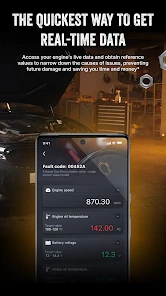
Carly is an advanced OBD2 car scanner app that connects to your vehicle's OBD2 port using a compatible adapter. It allows you to diagnose issues, perform coding, and customize settings directly from your smartphone. By providing real-time data and insights, Carly helps you maintain and optimize your car's performance, potentially saving on costly repairs.
Pros
- Easy-to-use interface for quick diagnostics.
- Provides real-time data for better analysis.
- Compatible with most car brands.
- Offers detailed fault reports for users.
- Regular updates enhance functionality.
Cons
- Requires a subscription for full features.
- May have connectivity issues occasionally.
- Limited free version capabilities.
- Some features might be complex for beginners.
- Hardware adapter sold separately.
- Category
- Auto & Vehicles
- Version
- 49.69