AutoZen-Car Dashboard&Launcher
- 252.00
- 4.1
- Installs
- 1.00M
- Price
- Free

Screenshots

Analysis by Reviewed
Sharing a car often means sharing a phone screen, too: one person is driving, another is choosing music, and directions need to stay easy to follow. I see AutoZen - Car Dashboard & Launcher as most useful when the driver wants a simpler, car-focused place to reach everyday driving tools, rather than a general phone home screen full of unrelated apps. Its appeal is practical, but it works best when each person sets up the phone thoughtfully before the trip.
One dashboard, different driving habits
On a household errand, I might set a route before leaving, then let a passenger choose audio while I concentrate on traffic. A large, uncluttered driving interface can make that handoff less fiddly than hunting through a standard launcher. For a shared vehicle, though, the dashboard reflects the phone being used, not a separate profile for every driver. I would agree on a familiar layout and avoid changing widgets or settings while the car is moving.
That distinction matters if several people take turns driving. AutoZen can bring navigation, music and calls into a driving-oriented experience, but it should not be treated as a household account system or a way to keep one person’s preferences separate from another’s. If each driver needs a fully individual setup, using their own phone or switching to the car’s built-in system may be more convenient.
Set things up before the keys are in hand
I would do the first round of configuration while parked: choose the dashboard items that are genuinely useful, check which map and audio apps I want to use, and make sure the phone behaves as expected for calls. This is also the right time to decide whether quick settings such as night mode or Do Not Disturb belong within easy reach. The point is to reduce fiddling later, not to make the dashboard a project that needs constant adjustment.
For a shared phone, I would keep the home screen choices conservative. A driver who mostly needs directions and calls may prefer fewer visible controls; someone else might value quick access to music. The trade-off is that more customization can make the interface feel personal, but it can also make a borrowed phone less predictable. A stable, simple arrangement is often the better household choice.
Coordination without extra distraction
AutoZen is most helpful when everyone coordinates before departure. The passenger can help pick a destination or queue audio while the vehicle is parked, leaving the driver with fewer reasons to touch the screen on the road. If a route or playlist needs changing mid-trip, I would let a passenger handle it where possible or pull over safely. A dashboard designed for driving does not make every interaction safe in every situation.
Its role is different from relying on a single navigation app alone. A map app may be all a driver needs for directions, while AutoZen is intended to bring several driving tasks together in one view. That wider role can save a few app switches, but it also means the experience depends on the map, music and calling apps a person already uses. If you want a dedicated navigation tool with no dashboard layer, the simpler alternative may suit you better.
More From Our News Desk

Weather by Xiaomi Review: Clear at a Glance, Less Clear Up Close

X Under Pressure: Can It Recover When Posting Goes Wrong?

Clash of Clans Is Won Between the Battles

Android Auto Makes the Case for Quieter Car Software

MobiOffice: Transforming Mobile Productivity with Seamless Integration

EA SPORTS FC™ Mobile Soccer: Redefining Mobile Sports Gaming
Age, trust and practical limits
The app is rated for Everyone, which makes it broadly suitable as software, but that rating is not driving instruction or a reason to let a young or inexperienced driver manage a screen on the road. I would set expectations around hands-free use and safe stopping, and keep a responsible adult involved when a new driver is learning. The interface can organize phone functions; it cannot replace attention, judgement or the vehicle’s own safety features.
There are also everyday dependencies to consider. A dashboard launcher is only as useful as the phone, its chosen apps and the vehicle setup around it. Before a longer drive, I would check the route and audio while stationary and avoid assuming that every preferred service will behave identically on every device. If the car already has a dependable built-in display that meets your needs, adding another interface may bring little benefit.
For anyone comparing options, the key question is whether a combined driving screen solves a real annoyance. If you regularly switch between maps, music and calls, a launcher can make those tasks feel more organized. If you only need occasional directions, opening your usual map app may be quicker and simpler. I would also consider whether a shared household phone is genuinely convenient: keeping one setup consistent is easy, while different tastes can turn customization into a small point of friction.
AutoZen is a free Auto & Vehicles app from ZenThek, with optional in-app purchases ranging from under a dollar to just under thirty-five dollars per item. It has a 4.4 average from around 5,300 ratings and has passed one million installs, so it is clearly used by a broad audience. It was released in June 2020, and version 6.5.2599 supports Android 7.0 and later. I would treat the paid options as optional rather than assume they are necessary for a useful basic setup.
My household verdict is that this is worth trying if one Android phone regularly serves as the car’s navigation and media screen and the driver wants those tools gathered in a more approachable layout. It is less compelling for people who prefer their car’s built-in interface, need separate personal profiles, or rarely use anything beyond a map. Set it up while parked, keep the shared arrangement predictable, and use a passenger for mid-trip changes; under those conditions, it can make a familiar drive feel better organized without pretending to make driving effortless.
Driving Made Simple and Safe
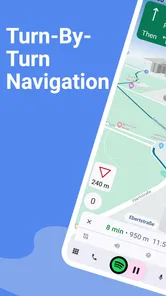
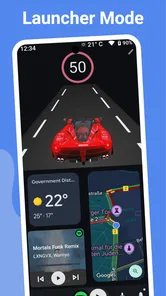
First off, let's talk about the interface. Right from the get-go, AutoZen impresses with its sleek and intuitive design. The layout is clean and minimalistic, which is perfect when you're on the road. The last thing any driver needs is to be distracted by a cluttered screen. With large icons and easy-to-read text, the app ensures that you can keep your eyes where they belong—on the road.
Navigation and Features
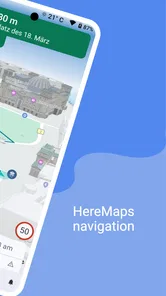
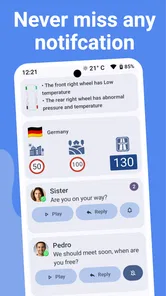
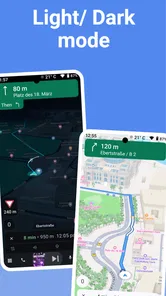
The app's navigation system is top-notch. It integrates seamlessly with your favorite map apps, offering real-time traffic updates, route suggestions, and even speed limit alerts. I found the voice-guided directions to be particularly helpful, as it meant I could keep my hands firmly on the wheel. Plus, the app cleverly adjusts its brightness based on the time of day, which is a small but thoughtful touch.
But AutoZen isn't just about getting you from point A to point B. It also enhances your driving experience with music and podcast integration. Whether you're a Spotify user or prefer Apple Music, the app makes it easy to control your tunes without taking your attention off driving. And let's not forget the Google Assistant integration, which allows you to make calls, send messages, or even check the weather—all hands-free.
Customizable and User-Friendly
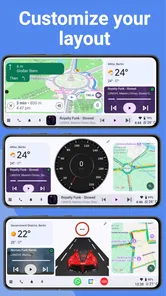
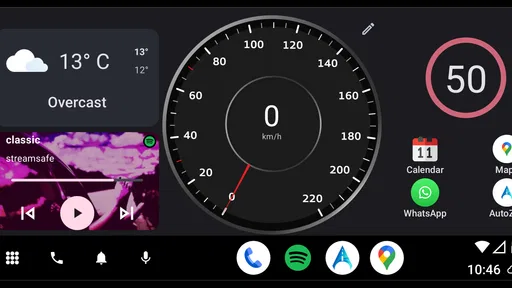
Customization is another area where AutoZen shines. You can tailor the dashboard to suit your personal preferences, from choosing the widgets that appear on your home screen to adjusting the color scheme. It's like having a personal assistant that knows exactly what you need while driving and adjusts accordingly.
One of the features I really appreciate is the customizable quick settings menu. Need to switch to night mode quickly? Or perhaps you want to toggle the Do Not Disturb mode? It's all just a tap away, ensuring that you remain focused on driving.
Making the setup work for a household
For a family sharing one vehicle, I would decide first whether AutoZen will run on one dedicated phone or on whichever driver’s phone is in the car. A dedicated device can keep the dashboard arrangement familiar, while personal phones give each driver access to their own usual apps and preferences. Neither approach is automatically better: the useful choice is the one that avoids last-minute swapping, unlocking, and reconfiguring before a trip.
If the phone is passed between adults, I would agree on a small set of defaults: which map app opens for directions, what audio app is easiest to reach, and whether quick settings should remain visible. That simple conversation can prevent a passenger from rearranging the screen just as the driver is leaving. It also makes the setup easier to restore if someone changes a widget or color by accident.
A realistic trip, and where the friction shows
Picture a weekday school pickup followed by a grocery stop. Before pulling away, I would enter the destination, check the audio, and leave the phone mounted where the driver can glance at it without reaching. If plans change, a passenger can help select the next stop while parked. This is where combining familiar driving tools can feel worthwhile: the driver does not need to return to a general home screen simply to move between the tasks used on that outing.
The trade-off is that a launcher is an organizing layer, not a replacement for every app it brings together. If a chosen map or music app needs attention, that underlying app remains part of the experience. I would test the exact combination I plan to use on a short, familiar drive before relying on it for a long journey. That is a practical way to spot awkward handoffs in advance, without discovering them at a busy junction.
Compared with a built-in vehicle display, AutoZen’s appeal is having a familiar phone-based arrangement that can travel with the driver. The car’s own system may be the better choice when it is already easy to read and control, particularly if the household wants one consistent interface without mounting a phone. Compared with opening a map app directly, AutoZen makes more sense for people who regularly want directions alongside audio and calls; for an occasional trip, the extra dashboard layer may simply be unnecessary.
Who will appreciate it, and who can skip it
I would recommend giving it a try if you drive often, use an Android phone as part of your in-car routine, and find yourself bouncing between maps, music and calls. It is also a reasonable fit for a household that can agree on one straightforward layout and let a passenger handle changes when needed. Its value is less about adding a new driving task and more about arranging familiar ones in a place designed for the car.
I would skip it if your vehicle’s own screen already handles your routine comfortably, if you need multiple driver profiles on one shared phone, or if you want a navigation-only tool with no additional dashboard to configure. It is also a poor reason to interact with a phone more often while driving. A clean layout may reduce visual clutter, but it does not make reading, tapping or troubleshooting safe in moving traffic.
Age context and household trust
In a household with younger drivers, I would treat the Everyone rating as an indication about the app’s general content, not as a judgement about whether a driver is ready to manage a dashboard. The important household rule is still that setup and route changes happen before the car moves, or are handled by a passenger or after stopping safely. Parents can explain that distinction without assuming the app supplies family supervision or driver monitoring.
There is a trust question with shared devices, too. A phone may contain someone else’s navigation history, contacts or music choices, so I would avoid handing it over casually if those details are personal. Each household can decide whether a dedicated car phone, an individual driver’s device, or the built-in system is the least awkward arrangement. AutoZen can make a phone more car-focused, but it does not turn shared hardware into separate personal spaces.
Questions I would settle before relying on it
Would it suit a short commute? Yes, if switching between directions and audio is a regular annoyance; if the route is familiar and you only need occasional guidance, a normal map app may be faster. Is it useful on a long drive? It can be, provided the phone and chosen apps are set up and checked while parked before departure. For a household with several drivers, the key decision is whether one common layout is acceptable or whether separate phones and the vehicle display will cause less friction.
Would I pay for an optional purchase immediately? No. The app is free to start, and I would first see whether the basic arrangement covers the actual driving routine. Optional purchases range from $0.99 to $34.99 per item, so it is sensible to review what is being offered and decide whether it addresses a need rather than assuming every driver must buy something. That keeps the trial low-pressure and makes the value easier to judge.
Final Thoughts
In a world where distractions are everywhere, AutoZen - Car Dashboard & Launcher offers a refreshing change. It's designed with the modern driver in mind, prioritizing safety without compromising on functionality. Whether you're a daily commuter or someone who enjoys the occasional road trip, this app has something to offer.
To sum it up, AutoZen is more than just a dashboard app; it's a complete driving companion that makes your journeys smoother and safer. With its combination of intuitive design, robust features, and seamless integration with other apps, it truly stands out in the crowded market of driving apps. So, next time you hit the road, why not give AutoZen a try? You might just find it becomes as essential as your seatbelt.
AutoZen-Car Dashboard&Launcher Frequently Asked Questions
What Android version does AutoZen require?
AutoZen requires Android 7.0 or later, so check your phone’s software version before downloading. The app is in the Auto & Vehicles category and is designed to provide a driving-focused interface on a compatible smartphone. If your device meets the Android requirement, you can consider whether its dashboard, navigation, music and calling features suit the way you use your phone in the car.
What is AutoZen-Car Dashboard & Launcher?
AutoZen-Car Dashboard & Launcher is a mobile application designed for drivers to enhance their driving experience by providing a streamlined and accessible interface. It offers features such as navigation, music control, and hands-free calling, making it easier and safer to use your phone while driving.
Is AutoZen compatible with all vehicles and smartphones?
AutoZen is compatible with most Android smartphones but requires Android version 7.0 or higher. While it works independently of the car's system, users should ensure their vehicle's Bluetooth is functional for optimal integration. Always check the app's requirements to confirm compatibility with your specific device.
Can I use AutoZen offline for navigation?
AutoZen primarily relies on internet connectivity for navigation features. However, it can cache some map data for offline use, though this may be limited. For the best experience, it is recommended to use the app with a stable internet connection to ensure access to real-time traffic updates and accurate directions.
Does AutoZen support voice commands?
Yes, AutoZen supports voice commands, allowing drivers to operate the app hands-free. This feature enhances safety by enabling users to make calls, send messages, or start navigation without taking their hands off the wheel. Users should ensure their device's microphone is functional for optimal voice command performance.
Pros
- User-friendly interface enhances driving experience
- Customizable dashboard for personal preferences
- Efficient voice command integration
- Supports multiple navigation apps
- Battery-saving features for long drives
Cons
- Limited free features in the basic version
- Occasional GPS signal drops
- Voice commands can be slow to respond
- Requires constant internet connection
- Some features locked behind paywall











