Arbiter
- 440.00
- 4.1
- Installs
- 100.00K
- Price
- Free

Screenshots
Analysis by Reviewed
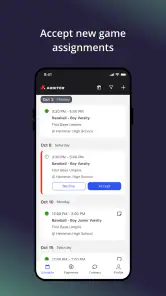
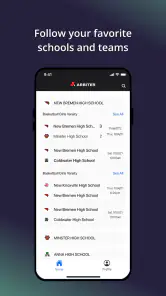
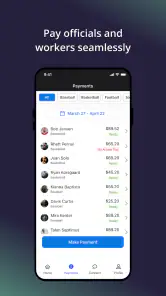
Arbiter is a sports app aimed at people who help organize and run games, rather than fans who simply want scores or news. I approached it as a practical tool for the moments around a match: getting the right people connected, checking assignments, and keeping game-day responsibilities from becoming a chain of messages and last-minute confusion. That focus makes it quite different from the typical sports app on a phone.
Developed by ArbiterSports, the app is free and available for Everyone. It has reached over 100 thousand installs, with a 4.1 average from around 760 ratings. Those numbers suggest a useful, established service, although they also hint that the experience depends heavily on how well an organization already uses the wider Arbiter system.
What Arbiter is really for
The first thing I would clarify to a new user is that this is not primarily a training app, a live-score app, or a general sports calendar. Its value is in the administration behind organized play. If you are an official, coordinator, or another participant whose schedule depends on assigned games, Arbiter is designed to put that work in one place on a mobile device.
That distinction matters because expectations can otherwise be wrong from the first launch. Someone looking for match commentary, player statistics, fitness plans, or a community feed will probably find the app too narrow. Someone who regularly needs to keep track of sporting assignments may find the narrow focus reassuring: fewer distractions, and a clearer reason to open it.
In everyday use, I would treat it as a companion to an existing sports-operations workflow. The app cannot make an assignment meaningful if the organization has entered the wrong details, and it cannot solve every communication problem between officials and administrators. What it can do is reduce the need to remember scattered information and repeatedly search through conversations.
Where the first-use friction usually appears
The most likely stumbling block is not a complicated sports rule or an obscure setting. It is identity and access. A user needs to be connected to the correct organization and account context before the mobile experience can show useful work. If the wrong account is used, or if an invitation and an existing login do not line up, the app may appear empty or incomplete even though the underlying assignment exists.
I recommend checking the basics before assuming something is broken. Confirm the email or account identity used by the organization, make sure you are signing into the intended Arbiter environment, and look for the exact assignment or event information you were expecting. It is easy to blame the phone when the real issue is that the administrator has not attached the user to the right schedule.
More From Our News Desk

Clash of Clans Is Won Between the Battles

Android Auto Makes the Case for Quieter Car Software

MobiOffice: Transforming Mobile Productivity with Seamless Integration

EA SPORTS FC™ Mobile Soccer: Redefining Mobile Sports Gaming

How Microsoft OneDrive Became a Mobile Productivity Giant

How Google Translate Breaks Language Barriers Effortlessly
Another source of confusion is timing. A schedule can change after it was first created, and a mobile view may not match what a coordinator has just edited until the app refreshes its information. Before contacting support, I would close and reopen the relevant screen, check the connection, and compare the visible details with the official communication from the organizer. This simple comparison often separates a display delay from a genuine scheduling mistake.
The key setup lesson is to verify the account and assignment before troubleshooting the device. That habit saves more time than repeatedly reinstalling an app that may be working correctly with incomplete or outdated account information.
Checks that make game-day use smoother
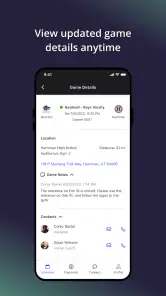
Once access is working, I would spend a few minutes reviewing the app before the first important event. Check the schedule, inspect the details of the next assignment, and make sure you understand where the information appears. Doing this at home is much better than trying to learn the interface while traveling to a venue or standing beside a field.
It is also worth confirming that the phone itself is ready. A stable connection is useful when information needs to load or refresh, and a phone with very little free space or an outdated operating system can create unrelated problems. The current version is 1.15.0 and the app supports Android 7.0 or later, so Android users should verify compatibility before spending time on more complicated fixes.
I would not rely on the app as the only memory aid for an important appointment. A sensible routine is to review the assignment in Arbiter, note the location and start time in the way you normally remember commitments, and then return to the app for the latest details. This is not a criticism of the app; it is a practical safeguard for any scheduling tool, especially when changes can happen close to game time.
For coordinators, the useful setup question is not simply “Can people install it?” but “Do all participants know which account and workflow to use?” A group can lose the benefit of a shared system if one person checks a personal calendar, another relies on text messages, and a third expects the mobile app to display information that has not been entered or assigned correctly.
Recovering when the workflow goes wrong
When a schedule looks wrong, I would work from the least disruptive check to the most disruptive one. First, refresh the view and confirm the connection. Next, leave the screen and return to it, then sign out and back in if the information still looks stale. Only after those steps would I consider reinstalling, because reinstalling can add another login hurdle without correcting an assignment that was entered incorrectly on the administrative side.
If the app opens but a particular event is missing, record what you can see: the account being used, the expected event, and whether other assignments appear normally. This helps an administrator identify whether the problem affects one event or the whole account. A missing single assignment points toward scheduling or account association; a completely empty experience points more strongly toward access, setup, or synchronization.
When several people report the same issue at roughly the same time, I would avoid having everyone repeatedly change phone settings. A shared problem is more likely to involve the organization’s schedule, account configuration, or service availability than an individual handset. In that situation, one clear report from the coordinator is more useful than many disconnected reports from participants.
There is also a human side to recovery. If an assignment changes close to start time, do not assume that seeing an old detail in the app settles the matter. Compare it with the latest direct instruction from the responsible organizer, especially for the venue, time, or role. The app should support communication, not replace sensible confirmation when the consequences of a mistake are significant.
Useful habits for officials and coordinators
For an official handling several events, I found the main benefit in reducing mental switching. Instead of keeping one conversation for one game, a separate note for another, and a calendar reminder somewhere else, the app gives the assignment workflow a recognizable home. The practical gain is not flashy; it is the ability to check responsibilities in a repeatable way.
A good routine is to review upcoming work in a quiet moment, then perform a shorter check before leaving. During the first review, look for conflicts and missing details. During the second, confirm the immediate assignment and any recent change. This two-stage approach is more reliable than opening the app for the first time five minutes before an event.
For a scheduler, the trade-off is that mobile convenience does not remove the need for careful data entry. Clear assignments and consistent account records still matter. If the organization’s internal process is disorganized, the app may make the confusion easier to see without magically resolving it. That is still useful, but expectations should be realistic.
One less obvious advantage is that a dedicated sports-administration app can keep operational information separate from personal social feeds. That separation helps when your phone contains plenty of unrelated notifications. The downside is equally clear: if your group does not use Arbiter consistently, you may still need other channels, and the app will not become the single source of truth by itself.
When the phone is not the real cause
It is tempting to treat every missing update as an app failure, but sports scheduling involves several moving parts. The event may have been changed by an administrator, the user may have been assigned under another account, or the information may simply not have been published in the expected way. A clean reinstall cannot correct any of those situations.
I would also separate a display problem from a policy or organizational decision. If an assignment is disputed, the app can show what is recorded, but it cannot decide which instruction should take priority. The right response is to contact the responsible coordinator and keep the conversation focused on the event details rather than repeatedly manipulating the app.
Device conditions can still matter. Poor connectivity, an older phone, limited storage, or a system that has not been updated can interfere with ordinary mobile use. The sensible approach is to test the app under a stable connection, restart the device, and make sure the operating system meets the Android requirement. These are general checks, but they are especially valuable when the app works for others and fails only on one phone.
iPhone users should apply the same reasoning even though the technical checks differ. Confirm the account, connection, and assignment first; then use the platform’s normal update and restart steps. The important point is not to assume that an iOS or Android label explains a scheduling discrepancy that originated elsewhere.
How it compares with familiar alternatives
The usual alternative is a mixture of email, group chat, text messages, and a personal calendar. That approach is flexible and familiar, and it may be enough for a small informal group. It also creates predictable weaknesses: details get buried, changes are easy to miss, and each person may keep a different version of the schedule.
Arbiter is stronger when the organization wants assignments to live inside a sports-specific workflow. It gives officials and coordinators a more focused place to check their responsibilities than a general calendar or messaging thread. The trade-off is that a general calendar is often better for combining sports commitments with work, family events, and travel. I would use the dedicated app for assignment context and a personal calendar for broader time management.
Compared with a score or news application, Arbiter serves a completely different need. Those apps are built around following competition; this one is about helping the people who make organized competition happen. Choosing between them is not really a quality contest. It depends on whether you are watching the game or responsible for being there in an official or administrative role.
The app is also not the best choice for someone who wants a broad team-management platform with extensive communication, statistics, or media tools. Its focused purpose is a strength for assignment tracking, but it becomes a limitation if you expect one application to manage every part of a club or league.
Who should use it, and who should skip it
I would recommend Arbiter to officials who receive sports assignments through ArbiterSports, coordinators who need a mobile view of organized schedules, and participants who are tired of searching through messages for the latest event details. It is especially sensible for people who move between venues and need a quick, repeatable way to check what they are responsible for.
I would skip it if you only want live scores, sports news, exercise guidance, or a fan-oriented experience. I would also hesitate if your organization does not actually use the Arbiter workflow. Installing a scheduling app without a connected account or active administrative process is unlikely to provide much value.
Families and casual players should consider whether the app matches their role. If you are merely attending a game, a team message or calendar may be simpler. If you are assigned to officiate or coordinate the event, the focused structure becomes much more relevant.
Version, cost, and the day-to-day trade-off
The app is free, which makes trying it straightforward for an organization or individual who already has a reason to use it. Its content rating is Everyone, so it is suitable from an age-rating perspective for a broad audience. The more important decision is not the download cost but whether your sports organization has a dependable process around it.
Version 1.15.0 shows that the app has an active version identity rather than being an abandoned experiment, while its release date of July 19, 2021 places it in a mature period of availability. I would still keep it updated through the normal app-store process, because scheduling tools benefit from compatibility fixes and improvements even when the visible workflow remains familiar.
The central trade-off is focus versus completeness. Arbiter can be useful precisely because it does not try to be a full sports media center. At the same time, users may need a calendar, direct communication, or another organizational tool alongside it. I see that as a realistic part of using the app, not a reason to reject it.
My practical verdict
After looking at the app as a working tool rather than a sports entertainment product, I see a clear audience for it. Arbiter is most valuable when you already belong to an organized officiating or scheduling process and want a mobile way to keep track of assigned work. Its free access, focused purpose, and broad age rating make it easy to try, but the quality of the experience depends on accurate account setup and reliable information from the organization behind the schedule.
My advice is to install it before you urgently need it, confirm the correct account, review a real assignment, and establish a backup habit for important times and locations. If something disappears, check the account and the organizer’s record before blaming the phone. That workflow prevents the most common kind of wasted troubleshooting.
My recommendation is positive but specific: use Arbiter if your role is connected to ArbiterSports assignments, and do not choose it simply because you want a general sports app. For the right user, it can turn a scattered game-day routine into a much clearer one. For everyone else, a calendar, team communication tool, or sports-information app will probably be the more natural fit.
Arbiter Frequently Asked Questions
What is Arbiter and what is it used for?
Arbiter is an app designed to help users manage and review decisions, disputes, or rule-based outcomes in a structured way. Depending on the version and platform, it may provide tools for submitting cases, comparing arguments, recording evidence, or reaching a fair resolution. Before downloading, check the app description carefully because features and intended use can vary between Arbiter products.
Is Arbiter free to download and use?
Arbiter may be available as a free download, but some functions can require in-app purchases, a subscription, or access provided by an organization. The basic installation price does not always include every feature. I recommend checking the store listing for current pricing, trial conditions, premium tools, and renewal details before creating an account or submitting any personal information.
Does Arbiter require an account or personal information?
Many of Arbiter’s features may require users to register so that cases, decisions, preferences, or activity can be saved securely. The app could request information such as an email address, name, or organization details. Before signing up, review its privacy policy and permissions, especially if you plan to upload documents, messages, photographs, or other sensitive material.
Is Arbiter suitable for resolving important legal or personal disputes?
Arbiter can be useful for organizing disagreements and supporting a fair decision-making process, but it should not automatically be treated as a replacement for a qualified lawyer, court, mediator, or professional authority. The app’s result may depend on the information entered by users. For serious legal, financial, employment, or safety-related matters, obtain independent professional advice.
Does Arbiter work on both Android and iPhone?
Availability depends on the specific Arbiter application, developer, and region. Some versions may be offered for Android, iPhone, or through a web-based service rather than on every mobile platform. Check the official Google Play or Apple App Store listing before downloading to confirm device compatibility, operating-system requirements, supported languages, recent updates, and whether the same account works across platforms.
Pros
- Clean interface makes navigating cases and decisions straightforward.
- Useful tracking tools help users monitor ongoing arbitration matters.
- Supports organized documentation for easier reference and follow-up.
- Can improve communication between parties in a structured setting.
- Suitable for users seeking a focused alternative to informal dispute handling.
Cons
- Some features may require an account or additional setup before use.
- The app may feel specialized for users unfamiliar with arbitration processes.
- Limited activity or users in your area could reduce its usefulness.
- Notifications may become distracting when following multiple matters.
- Performance and availability may vary depending on device and connection.
- Category
- Sports
- Version
- 1.15.0





